
0 ITEMS

Google Sheets Amortization Formula: Leveraging Tools for Business Growth

Using Google Sheets for amortization simplifies loan repayment planning and enhances financial transparency.
- It allows businesses to create detailed schedules showing each payment’s principal and interest components.
- The amortization formula helps predict long-term debt management and cash flow needs.
- Custom formulas like PPMT and IPMT automate calculations critical for budgeting and analysis.
- Integrating amortization schedules with other business tools boosts accuracy and operational efficiency.
- Simplifying complex financial planning, these schedules support smarter investment and growth decisions.
Continue reading to understand how to leverage Google Sheets for effective amortization management.
Understanding Amortization In Business
Understanding the concept of amortization in the business world is essential for any company aiming to maintain a clear financial perspective. It’s a critical component that helps businesses manage their financial assets and liabilities over time, ensuring smooth fiscal operation and long-term growth. Through a practical application in tools like Google Sheets, amortization becomes not just a theoretical term but a tangible asset in strategic business planning.
What Is Amortization?
Amortization is a financial term used to describe the process of spreading out a loan into a series of fixed payments over time. These payments cover both the principal amount and the interest on the debt, allowing businesses to reduce and eventually eliminate a liability on their balance sheet. Although it’s commonly associated with loans, amortization can also apply to intangible assets, evenly distributing the cost of an asset over its useful life.
Importance Of Amortization In Business
The significance of amortization in business cannot be overstated. It offers numerous advantages:
- Budget Management: Amortization schedules make it easier for businesses to anticipate expenditure and manage budgets effectively, ensuring that loan repayments are planned and accounted for in the financial forecasts.
- Financial Analysis: Using an amortization formula in tools like Google Sheets helps businesses analyze and anticipate the long-term financial impact of their debts and assets.
- Tax Benefits: Amortization can lead to potential tax benefits, as the depreciation of certain assets and loan interest can often be written off.
- Cash Flow Management: Structured repayment plans assist in maintaining a healthy cash flow by breaking large expenses into manageable payments.
Effectively leveraging the principles of amortization empowers a business to mitigate the risks associated with large purchases or loans and to make strategic decisions that can foster growth and stability.
Google Sheets Amortization Formula Explained
Amortization schedules are pivotal for businesses in managing loans and planning financial strategies. Google Sheets, a versatile and accessible tool, offers an intuitive way to create these schedules using built-in formulas. Understanding the Google Sheets amortization formula can transform how a business approaches its growth and debt management. This post will guide through the basic functionalities of Google Sheets and demonstrate how to leverage them for effective Amortization.
Basic Functions And Features Of Google Sheets
Google Sheets boasts a plethora of functions that are essential for creating complex financial documents including amortization schedules. Some key features include:
- Custom Formulas: Perform numerical operations with built-in formulas like
PMNT,IPMT, andPPMT. - Spreadsheet Functionality: Organize data efficiently with tables, cell formatting, and conditional formatting.
- Collaboration: Share sheets with stakeholders, allowing for real-time contributions and edits.
- Accessibility: Accessible from any device with internet connectivity, ensuring your financial information is always at your fingertips.
| Function | Description |
|---|---|
PPMT |
Calculates the principal part of a loan payment for a given period. |
IPMT |
Calculates the interest part of a loan payment for a given period. |
PV |
Calculates the present value of a loan, an important component for starting an amortization schedule. |
How To Use Google Sheets For Amortization
Using these robust features, creating an amortization schedule in Google Sheets becomes a straightforward process. Follow these steps:
- Set up the Spreadsheet: Create headers for each column such as Period, Payment, Interest, Principal, and Remaining Balance.
- Input Loan Details: Insert the total loan amount, interest rate, and loan term into designated cells.
- Apply Amortization Formulas: Use the
PPMTandIPMTto calculate principal and interest for each period. Fill down these formulas to cover the entire loan term. - Calculate Remaining Balance: Subtract the principal from the starting balance and drag the formula down the column.
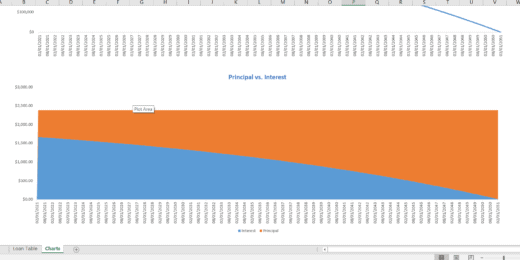
- Analyze the Data: Use the built-in Charts feature to visualize the amortization process, if desired.
For instance, to calculate the monthly principal payment, you would use:
=PPMT(interest_rate/12, current_period, total_periods, -loan_amount)This formula uses cell references to represent interest_rate, current_period, total_periods, and loan_amount, which can be replaced with your specific loan details.
Advantages Of Leveraging Google Sheets For Business Growth
The advantages of leveraging Google Sheets for business growth are multifold. This powerful tool offers an array of functions that can drive efficiency and scalability in managing finance-related tasks, such as tracking amortization schedules. From its inherent cost-effectiveness to its advanced features for customization and collaboration, Google Sheets stands out as a vital ally in nurturing a thriving business environment.
Cost-effectiveness And Accessibility
Utilizing Google Sheets can lead to notable reductions in company expenses. This is due to the absence of hefty licensing fees commonly associated with other financial software. Here’s why Google Sheets is a game-changer for budget-conscious businesses:
- No costly installations: Google Sheets operates entirely online, eliminating the need for expensive hardware or software setup.
- Free access: Unlike many specialized software options, Google Sheets is part of the free suite of apps available with a Google account.
- Scalability: From startups to large enterprises, Google Sheets can grow with your business without the need for additional investment.
Accessibility also plays a significant role in its adoption. Team members can access spreadsheets from any device with internet connectivity, fostering real-time updates and decisions.
Customization And Collaboration
What truly sets Google Sheets apart is the ability to tailor financial models like amortization schedules to specific business needs. Customization options include:
| Feature | Benefit |
|---|---|
| Formulae and functions | Create complex financial calculations, tailored to your business. |
| Conditional formatting | Highlight key data points, making them easier to analyze. |
| Data validation | Ensure accuracy in data entry. |
In terms of collaboration, Google Sheets is second to none. It enables:
- Simultaneous editing: Multiple users can work on the same sheet without overwriting each other’s inputs.
- Change tracking: Keep a full history of revisions to maintain accountability.
- Real-time communication: Built-in chat and commenting facilitate instant communication among team members.
By harnessing these features, businesses can ensure that every member of the team is on the same page, driving coordinated and strategic efforts towards growth.
Optimizing Business Growth With Google Sheets Amortization
‘Optimizing Business Growth with Google Sheets Amortization’ revolves around leveraging the power of data analysis and financial planning to propel a business towards its growth objectives. With Google Sheets at your disposal, understanding and managing your organization’s financial trajectory through amortization schedules becomes a breeze. This integral tool enables businesses to visualize and plan for long-term financial commitments in a strategic and informed manner.
Tracking And Analyzing Financial Data
In the expansive sea of business data, staying afloat requires robust tracking and analysis methods. Google Sheets provides a lifeline in this respect. By outlining and updating financial information, such as loan repayment schedules, interest rates, and balance dues, businesses can keep a vigilant eye on their financial health. The utilization of the amortization formula in Google Sheets allows for dynamic data tracking, granting the power to:
- Monitor cash flow: Keep up-to-date records of financial obligations and payment timelines.
- Calculate interest: Determine the precise amount of interest paid over the life of a loan.
- Forecast financial scenarios: Predict the impact of additional payments or refinancing options.
Smart businesses harness these insights to optimize their financial strategies and maintain a positive growth trajectory.
Making Informed Business Decisions
Harnessing the power of amortization schedules in Google Sheets fuels strategic decision-making at every level of the business hierarchy. Decision-makers are empowered to:
- Assess the financial impact of proposed investments or purchases.
- Strategize loan repayments to minimize interest and maximize cash flow.
- Align business strategies with financial forecasts, adapting to changing market conditions.
This informed approach not only elevates a business’s fiscal responsibility but also accelerates its path to financial stability and growth.
Integration With Other Business Tools
The landscape of business management has dramatically evolved, and the integration with other business tools has become essential for staying competitive. A powerful instrument like Google Sheets, especially when wielding an amortization formula, transcends mere data tabulation. It becomes an invaluable asset for businesses aiming to streamline their financial operations and boost their growth trajectories.
Automating Processes With Google Sheets
One of the many strengths of Google Sheets lies in its capacity to connect with various business applications and services. Automation is a game-changer for businesses, allowing them to perform repetitive tasks with excellent precision and minimal manual input. The use of Google Sheets for automating financial computations through the amortization formula extends its functionality beyond just accounting.
- Time-saving workflows can be established by integrating Google Sheets with CRM systems, ensuring customer data seamlessly flows into models and forecasts.
- Scheduling payment reminders or generating invoices can be automated through integration with email platforms, directly leveraging the data from the amortization schedules.
- Data entry errors diminish by syncing Google Sheets with point-of-sale systems, which feed sales figures directly into the amortization models.
Businesses relish the newfound agility as Google Sheets communicates with other cloud-based tools, assuaging the risk of data silos and empowering stakeholders with up-to-date financial insights. Writing custom scripts through Google Apps Script or using available add-ons can significantly propel such automation capabilities.
Enhancing Data Accuracy And Efficiency
The precision of financial models like amortization schedules is non-negotiable in maximizing business performance. Google Sheets elevates this accuracy and operational efficiency through seamless integrations. The amortization formula within Google Sheets can be tailored to feed off data from various other business tools to provide real-time financial insights.
| Tool | Benefit to Amortization Schedules |
|---|---|
| Accounting Software | Automatically updates the amortization schedule as loans are disbursed and payments are processed. |
| Banking APIs | Direct feeds from banking transactions ensure that payment schedules reflect accurate, up-to-the-minute information. |
| ERP Systems | Facilitate enterprise-wide financial planning with integrations that align amortization data with broader financial goals. |
Integrating with analytical tools also enhances decision-making. Organizations can leverage predictive analytics to understand potential scenarios and their effects on amortization. This proactive approach ensures that companies stay ahead of their financial planning, mitigating risks while capitalizing on opportunities for growth.
Frequently Asked Questions Of Google Sheets Amortization Formula: Leveraging Tools For Business Growth
What Is An Amortization Formula In Google Sheets?
An amortization formula in Google Sheets calculates periodic loan payments. It spreads out a loan amount over a number of payments. This formula accounts for interest and principal over the loan’s life, providing a clear payment schedule.
How Can Amortization Schedules Promote Business Growth?
Amortization schedules aid in financial planning and budgeting. By visualizing loan payments over time, businesses can manage cash flows efficiently. This foresight supports better investment decisions, leading to sustained business growth and financial stability.
Can Google Sheets Calculate Interest In Amortization?
Yes, Google Sheets can calculate interest within an amortization schedule. Using built-in financial functions like PMT, IPMT, and PPMT, users can determine the interest paid per period, as well as the principal amount, contributing to a detailed amortization plan.
What’s The Simplest Way To Create An Amortization Table?
Creating an amortization table in Google Sheets is straightforward. Use the PMT function to get monthly payments. Then detail each payment’s interest and principal parts using IPMT and PPMT, and reduce the loan balance accordingly to form the schedule.
Conclusion
Embracing the power of Google Sheets for amortization calculations can significantly enhance business efficiency. Mastering this formula unlocks precise financial forecasting, a cornerstone of thriving enterprises. Start employing this influential tool now; it’s a strategic step toward sustainable business growth and smarter financial management.
































































































































You might also like:
- 10 Ideas to Increase Average Revenue Per User
- 10 Main Elements of a Business Plan
- 5 Ways COVID-19 Impacts Financial Plans For Retirement & What To Do About It
- Financial Modeling for Startups and Small Businesses
- How to Calculate Net Present Value?
- How to Build a Capitalization Table
- How to Make Smart Decisions with 6 Key Financial Metrics?
- Mastering the Art of IRR Calculation: A Comprehensive Guide for Investors
- Achieve Financial Success By Knowing Your Business Plan Model
- Why Should You Use Excel for Financial Modeling?
- Business Plan Models – Using Business Models as Examples
- Financial Projections Templates – The Easy Way
- Average Order Value (AOV)
- Debt Amortization
- Amortization
- Cash Flow Analysis
- Financial Modeling
- Debt Schedule
- Loan Life Coverage Ratio (LLCR)
- SaaS Business Financial Model
- Simple Budget Planner Template


