
0 ITEMS

Debt Amortization
Debt amortization might sound like financial jargon, but it's a straightforward process that plays a crucial role in managing loans effectively. Whether you're paying off a mortgage, car loan, or business debt, amortization helps you understand how each payment reduces your balance over time. By dividing payments into principal and interest portions, this method provides a clear roadmap to becoming debt-free—allowing you to plan, budget, and strategize your financial future confidently. In this blog, we'll break down how amortization works and why it matters for anyone dealing with long-term loans.
Debt Amortization Table Excel templates take the guesswork out of loan management by giving you a powerful, ready-to-use tool that precisely tracks every payment. These templates automatically calculate how much each payment goes toward interest versus principal, helping you stay on top of your repayment schedule and see the full picture of your loan over time. Whether you're a small business owner, investor, or financial planner, using an Excel-based amortization table simplifies budgeting, improves cash flow planning, and empowers you to make more informed decisions about refinancing or early repayment strategies.


A practical Excel-based acquisition underwriting model designed for European SME…
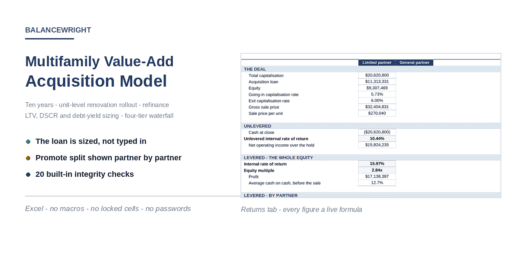

Underwrite an apartment value-add deal end to end. The loan…


Bankable Financial Model for Utility-Scale Solar PV Project Finance This…


⚡ Model the grid-connection decision before delay, network upgrades, deposits,…


Excel model to analyze real estate investment deals — NOI,…

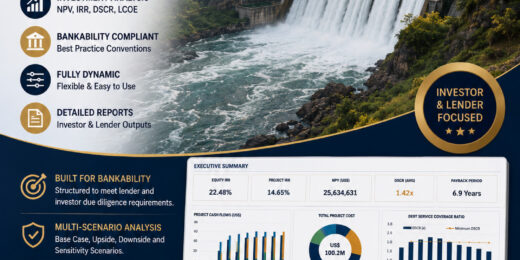
Small Hydropower Bankable Financial Model — Summary This is a…

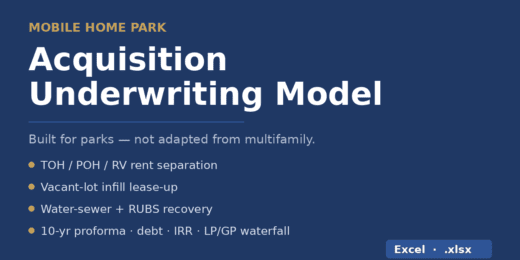

Underwrite a mobile home park deal in minutes: a model…


Plan and forecast your film production business with a ready…
A 30-module editable Excel model for multinational Pillar Two analysis,…


Underwrite multifamily deals the way institutional buyers do — without…

Premium Private School & University Financial Model designed for integrated…

Premium 30-year Oil & Gas Upstream and Downstream Financial Model…

🔥 Premium Tokenomics & Web3 Token Launch Financial Model A…

Premium Green Hydrogen Production Levelized Cost of Hydrogen model for…

🚀 Premium eVTOL / Urban Air Mobility Financial Model A…

A premium Nuclear Fusion Project Finance Model designed for evaluating…

🚘 Premium Autonomous Vehicle / Robotaxi Fleet Operations Financial Model…

A specialized Excel valuation model for longevity and anti-aging biotechnology…

An integrated 10-year real estate portfolio model for underwriting and…

An institutional-style, fully editable model for probability-adjusted pharmaceutical valuation, commercial…

A decision-ready U.S. clean-energy tax-credit model for evaluating post-OBBBA §48E…

Build, compare and stress-test five major Sukuk structures in one…


A professional Excel and Google Sheets financial model built for…
A professional Excel and Google Sheets financial model built for…

A professional Excel and Google Sheets financial model built for…

A professional Excel and Google Sheets financial model built for…

A professional Excel and Google Sheets financial model built for…

A professional Excel and Google Sheets financial model built for…

Professional oil and gas modeling bundle with two fully editable…

A professional Excel financial model for residential building development projects…

The Data Center Development Financial Model by PDMM is a…

🏦 Leveraged Buyout Financial Model Bundle — Lite + Pro…

🚀 A professional Private Equity Buy-and-Build Roll-Up M&A Financial Model…

This Excel model is built for a hybrid P2P +…

A complete, editable Veterinary Clinic Financial Model Pro built for…

Plan, forecast and value a full-service events company with this…


A bankable, institutional-grade LBO & acquisition model in Excel —…


Fin-Wiser’s Solar Off-Grid Hybrid & BESS Financial Model helps users…

Poultry Farm Financial Model – 10-Year Forecast, Valuation, Feasibility &…

🚀 AI GPU-as-a-Service / AI Compute Data Center Financial Model…

A premium Excel financial model bundle created by PDMM for…

Plan, finance, and optimize an EV fleet depot charging project…

A professional PFAS Water Treatment & Remediation Financial Model created…

Direct Air Capture Financial Model – Carbon Removal Credits, MRV, Offtake, Storage & Project Finance
A professional Direct Air Capture financial model built for durable…


The Mortgage Payment Scenario Calculator is a comprehensive Excel model…


Institutional-grade multi-tranche debt schedule in Excel: Revolver, Term Loan A/B,…

A professional Excel financial model for planning, forecasting, valuing, and…

A professional Excel financial model for commercial airline planning, aircraft…

A professional Solar + Battery Energy Storage System (BESS) financial…

A professional 5-year integrated financial statements Excel model designed for…

The Manufacturing Startup Feasibility Financial Model by PDMM is a…

A premium salary-based microfinance lending financial model package built for…

This professional Excel template helps users evaluate a microfinance, digital…

A professional biotech and pharma startup financial model package built…

A ready-to-use Equipment Rental Marketplace Financial Model Template delivering dynamic…

A professional Excel financial model suite for nuclear power plant…

A professional Excel financial model suite for airport projects and…

A professional 8-12 MTPA Liquefied Natural Gas (LNG) Financial and…
How to Build a Debt Amortization Table?

In the fast-paced world of startups and growing businesses, managing debt is not just about knowing how much you owe—it's about understanding when, how, and how much you'll need to repay over time. That's where a debt amortization table becomes indispensable. Whether you're securing a loan to fund expansion or managing existing obligations, this table offers a clear roadmap of your financial commitment—breaking down each payment into principal and interest components across the life of the loan. For founders, CFOs, and financial planners, mastering this simple yet powerful tool means gaining control over cash flow forecasting, ensuring timely repayments, and maintaining credibility with lenders and investors. In this guide, we'll walk you through the steps to build your own debt amortization table and show you how it can become a cornerstone of smart financial planning.
This guide explains:
✔ What debt amortization means and why it matters
✔ Benefits of using amortization tables
✔ Different loan repayment structures explained
✔ Step-by-step guide to building a debt amortization table
✔ How to use Excel formulas for accuracy
✔ Real model examples for practical insight
✔ Pro tips for smarter, cleaner tables
✔ How financial modeling simplifies debt management
Understanding the Debt Amortization Meaning and Importance
Understanding the debt amortization meaning and its importance is crucial for any business looking to manage its finances effectively. At its core, debt amortization refers to paying off a debt over time through regular payments, typically including both principal and interest. This structured repayment plan allows businesses to predict and regulate their cash flow more accurately, ensuring they can meet financial obligations while also planning for future growth. This process is integral to financial planning as it minimizes liability and provides a clear roadmap for managing cash flow and financial commitments.

Beyond the debt amortization meaning, a debt amortization table serves several functions. A debt amortization table shows how you pay off a loan over time. It breaks each payment into interest and principal, so you see how your balance drops with every installment. This table helps you track progress, budget and spot when interest rates are highest. Among its importance are:
- Tracks Loan Repayment: A debt amortization table breaks down each loan payment into principal and interest components. This allows borrowers and financial analysts to clearly monitor how much of the loan balance is being paid off over time, providing transparency in the repayment journey.
- Supports Loan Comparison: When evaluating multiple financing options, amortization schedules help compare different loans by visualizing total interest paid, payoff speed, and monthly obligations. This makes it easier to choose the most cost-effective borrowing strategy.
- Improves Forecasting: For businesses, incorporating an amortization table into financial models helps predict future cash flows and balance sheet impacts. Showing the scheduled reduced liabilities enables more accurate forecasting of financing costs, interest expenses, and working capital
- Facilitates Expense Planning: Since the table specifies how much interest is paid each period, it’s useful for budgeting and tax planning. Businesses can better manage their tax deductions and avoid surprises by knowing when interest expenses peak and decline.

How to Amortize Debt
There are different ways on how to amortize debt:
One way how to amortize debt is through a balloon payment. It means the borrower makes regular payments that only cover part of the loan principal over time—plus interest. Then, at the end of the loan term, one large final payment (the "balloon") pays off the remaining balance. It may either be through fixed service or fixed amortization.
- Fixed Service, or fixed total payment amortization, involves equal payments throughout the loan term. The lender sets the payment upfront based on the loan amount, interest rate, and repayment period. Each payment covers both interest and principal—starting with higher interest and gradually increasing principal. This predictable structure simplifies budgeting, though you pay more interest early on.
- A fixed amortization plan repays a loan in equal installments, combining interest and principal. Over time, interest decreases while principal increases. It offers predictable payments and faster debt reduction, but early payments are higher and may strain cash flow.
A bullet repayment structure applies when no principal is repaid during the life of the loan, and instead, the entire principal is repaid in one lump sum at the end of the loan term. This method is common in bonds or short-term deals with high upfront capital needs. A bullet payment frees up cash early on since you pay nothing during the loan term. This helps businesses invest or grow without worrying about installments. But the downside is the big risk at maturity—you must repay the full amount in one go. If you're unprepared, it can strain your finances fast.
Each method shapes cash flow and debt balance differently. Our Mini Storage Financial Model shows these options in action to help you pick the right fit for your project.
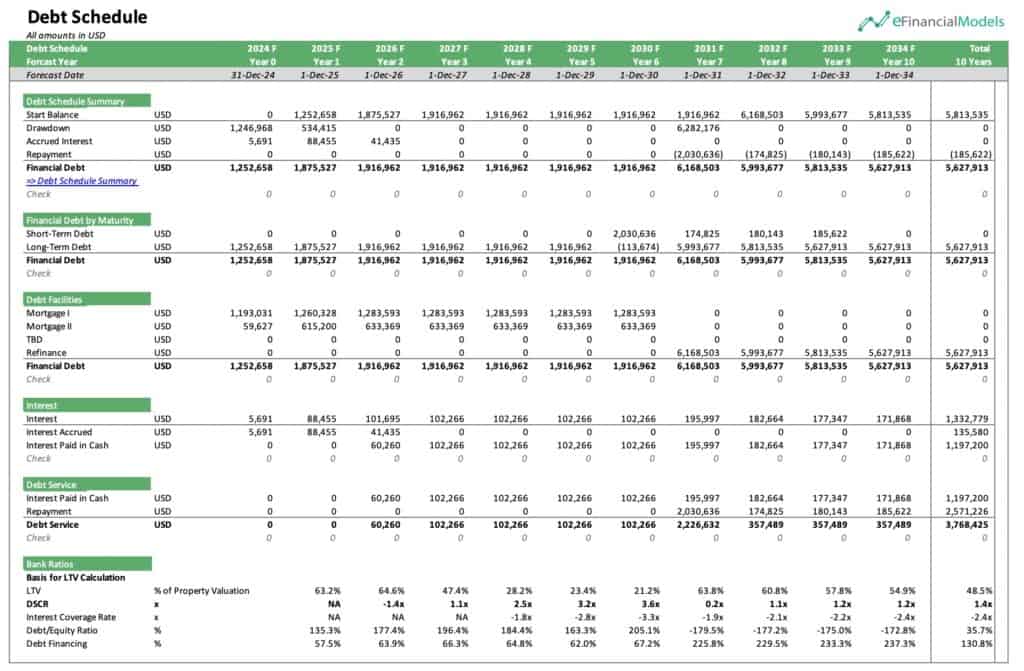
The above debt schedule example from our Mini Storage Financial Model shows a mix of fixed service, fixed amortization, and a bullet payment. In the early years (2025–2030), debt service remains steady—typical of a fixed service setup where equal payments cover both interest and principal. Starting in 2031, the model switches to fixed amortization, where principal repayments begin, leading to reduced debt faster. Finally, in 2034, a large bullet payment clears the remaining balance, signaling a lump-sum payoff. This structure offers predictable cash outflows upfront, followed by a gradual debt reduction, and ends with a major payout to settle the loan.
Steps to Build a Debt Amortization Table
Building a debt amortization table is a key step in tracking the repayment of a loan over time. It breaks down each loan payment into principal and interest portions and shows the remaining balance after each payment.
Step 1: Gather Loan Details
The first step in building a debt amortization table is to gather all the loan details. Start with the loan amount, also known as the principal. Know the interest rate—usually annual—and how long the loan will last, whether in years or months. Be clear on how often payments are due—monthly, quarterly, or another schedule. Finally, note the loan’s start date. These basics form the foundation of your amortization schedule so you can apply the debt amortization formula smoothly.
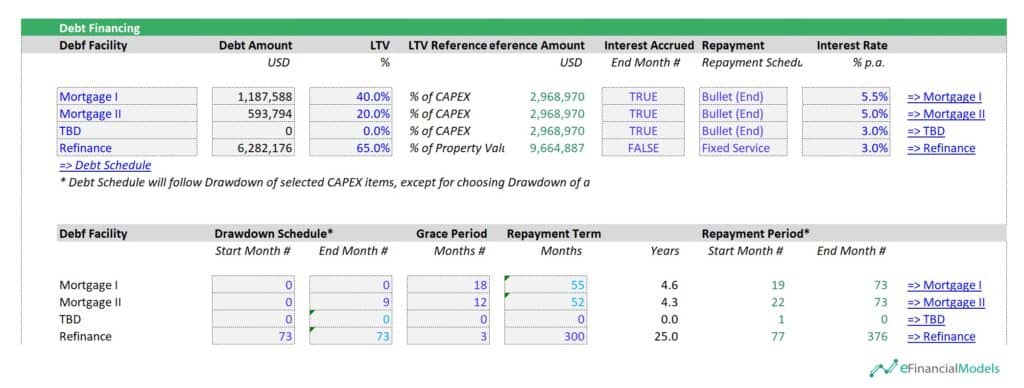
The debt financing assumptions above cover four loans: Mortgage I, II, TBD, and Refinance. The first three use bullet repayments with accrued interest. The Refinance loan uses fixed service, starts in Month 77, and runs for 25 years with equal payments. Mortgages I and II fund 60% of CAPEX and include grace periods. Refinance covers 65% of property value. Interest rates range from 3.0% to 5.5%.
Step 2: Construct the Table Headers
Constructing the table headers is the second step in building a debt amortization table. These headers organize your data and make the table easy to follow. Start with "Payment Number" to track each installment. Add "Payment Date" to show when each payment is due. Include "Scheduled Payment" for the total amount paid each period. Split this into "Principal Payment" and "Interest Payment" to show how the payment is divided. Use "Beginning Balance" to show how much debt remains before the payment. Finish with "Ending Balance" to reflect the remaining debt after the payment. These headers set the foundation for accurate tracking.
Step 3: Apply the Debt Amortization Formula
The third step is to apply the debt amortization formula based on the chosen method—fixed payment, fixed principal, or bullet repayment. In Excel, the debt amortization formula varies by method.
The PMT function in Excel applies the debt amortization formula for fixed payment loans.
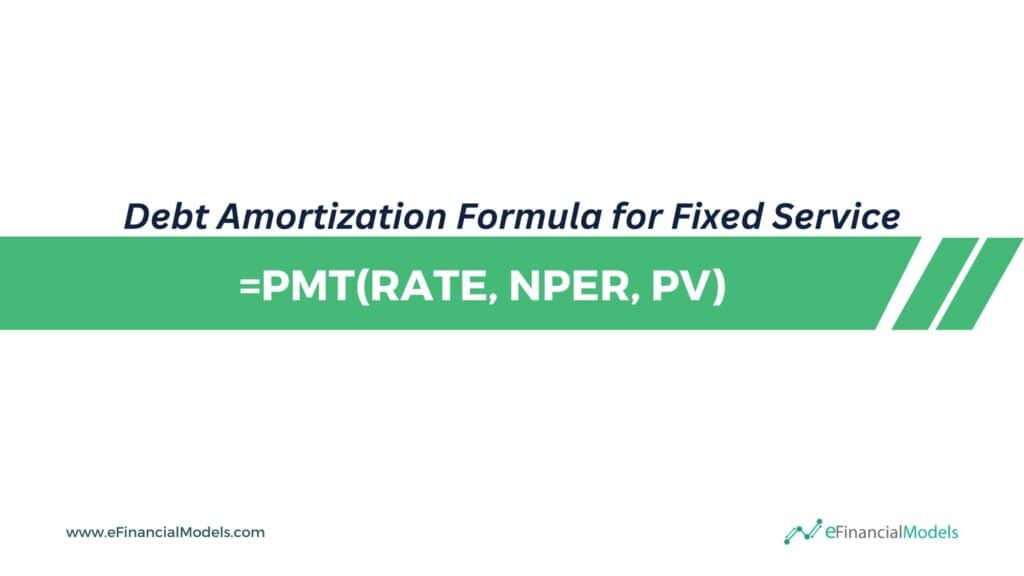
Where:
- RATE is the interest rate per period
- NPER is the number of repayment periods
- PV is the present value or loan amount
The PMT function in Excel calculates the fixed payment needed to fully repay a loan based on constant interest and equal payments. Enter this formula in the payment column to get the amount that will remain the same each month. This step ensures consistent payments that gradually reduce the loan balance to zero.
The debt amortization formula for fixed amortization loans is:
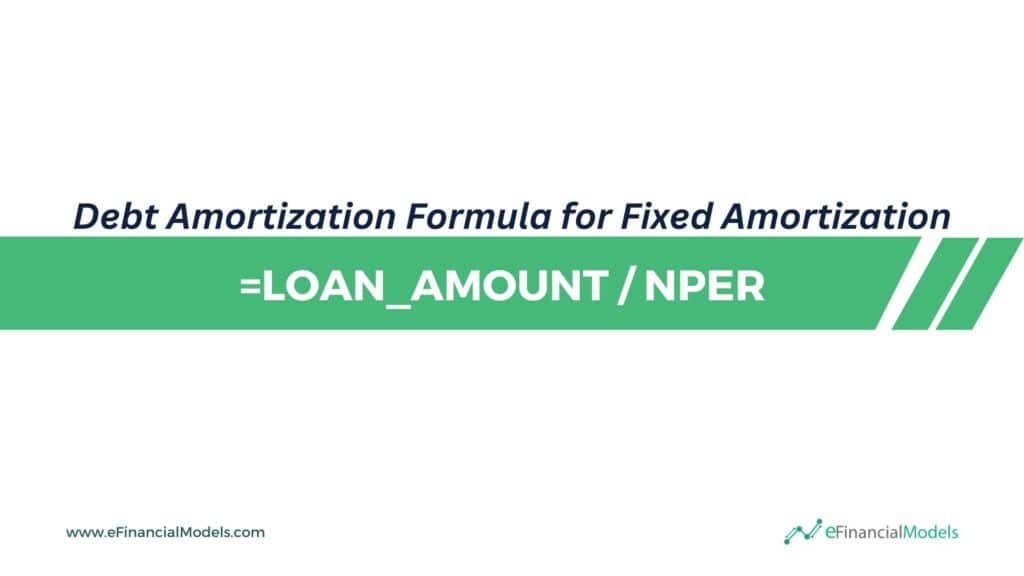
Where:
- The LOAN_AMOUNT is the total borrowed
- NPER is the number of repayment periods
To determine the interest for each period, multiply the remaining loan balance at the beginning of the period by the periodic interest rate using =beginning_balance * rate. The total payment for each period is the sum of the constant principal repayment and the calculated interest.
The debt amortization formula for a bullet loan is:

Where:
- PERIOD represents the current period number;
- NPER is the number of repayment periods
- The LOAN_AMOUNT is the total borrowed
Interest for each period is computed using the formula =loan_amount * rate, where loan_amount is the original principal and rate is the periodic interest rate. This amount remains the same each period since the principal does not decrease.
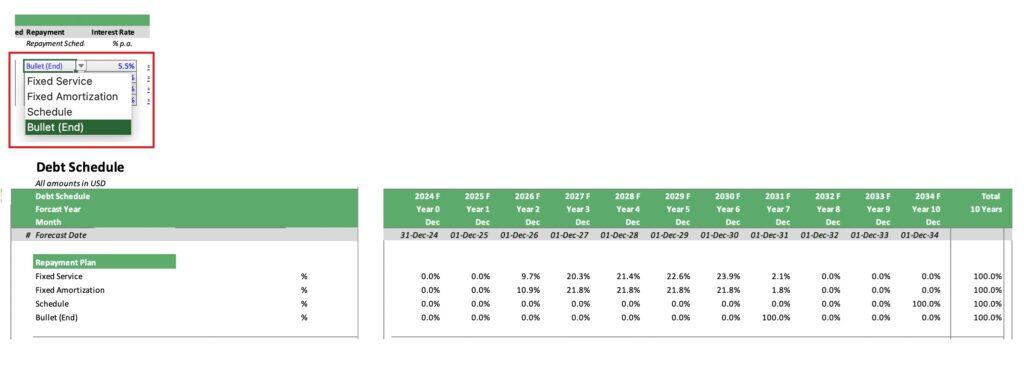
Most of our financial model templates make debt amortization easy to calculate by offering flexible repayment options. The image above shows users can choose from methods like Fixed Service, Fixed Amortization, or Bullet (End). These built-in dropdown menus and schedules automate the calculations across forecast years, saving time and reducing errors. You can see how percentages adjust instantly depending on the chosen method, making it simple to analyze various repayment scenarios.
Step 4: Build the Amortization Rows
The fourth step in building a debt amortization table is to amortize each row. Instead of calculating from top to bottom, our financial model works left to right—month by month or year by year. To amortize rows from left to right, start by placing the beginning loan balance in the row's first cell. Then, move across the row to calculate interest for the period based on that balance. Next, subtract the interest from the total payment to get the principal portion. Deduct the principal from the starting balance to get the new balance, and place that in the next cell. Repeat this process across the row for each period. This horizontal method makes it easy to see how the loan decreases over time.
Step 5: Check Your Final Balance
The last step in building a debt amortization table is to check your final balance. After making the final payment, the Ending Balance should be zero—or nearly zero if rounding errors exist. This confirms that the loan has been fully paid off. If the balance is off, go back and review your payment calculations. A correct table should show a steady decline in balance, ending at zero. This final check ensures your schedule is accurate and complete.
Pro Tips: Use absolute references like $B$1 in your formulas so they work when copied across rows. Format your numbers clearly—use currency for payments and percentages for interest rates. Add conditional formatting to make key points stand out, such as when half the loan is paid off or when the final payment hits. These small steps make your table easier to read and track.
Build More Accurate Debt Amortization Tables Through Financial Modeling
To build a debt amortization table, collect all your loan details. Then, set up clear table headers to track each period’s activity. Use a reliable formula to calculate interest and principal payments. Fill in each row to show how the debt reduces over time. Lastly, double-check that your final loan balance reaches zero. This step-by-step flow keeps your projections accurate and easy to follow.

Use financial modeling to sharpen your debt amortization tables. It helps you easily test different loan terms, payment schedules, and interest rates. You can spot errors early and adjust quickly. This means better planning, clearer projections, and smarter decisions. With the right model, your debt tracking becomes faster, smoother, and more reliable.
Start building smarter debt models today with the right financial tools at your fingertips!