
0 ITEMS

Real Estate Agency Financial Model Excel Template
The Real Estate Brokerage Financial Model Financial Model Template helps users build a structured forecast for a brokerage business based on the way the industry actually operates. Instead of relying on a generic spreadsheet, the model focuses on commission-driven revenue, seller-side transactions, buyer-side transactions, rental transactions, agent productivity, commission splits, marketing spend, operating expenses, startup costs, and cash flow. It gives entrepreneurs and planners a practical way to translate assumptions into a five-year financial outlook that can support business planning, funding discussions, budgeting, and internal decision-making. This template is designed for real estate brokerage founders, agency owners, entrepreneurs, consultants, financial analysts, and anyone preparing a real estate business plan or investor document. Users can adjust revenue assumptions, transaction volume, average commission values, payroll, staffing plans, office costs, software expenses, marketing budgets, and other cost drivers to reflect their own local market and growth strategy. The model helps estimate how much capital may be needed before launch, what level of sales activity is required to support operations, and how profitability may develop as the brokerage scales. The Real Estate Brokerage Financial Model connects core inputs with outputs such as revenue forecasts, profit and loss projections, cash flow forecasts, balance sheet summaries, KPI dashboards, investor metrics, and break-even analysis. It is useful for testing whether a brokerage can generate enough commission income to cover fixed overhead, agent compensation, lead generation, technology, licensing, insurance, and administrative costs. Users can also review low, base, and high scenarios to understand how changes in market conditions, transaction volume, or pricing assumptions may affect liquidity and profit. Because the template is editable and ready to use in Excel or Google Sheets, it saves time compared with building a model from scratch while still allowing full customization. It can help users present clearer financial plans to lenders, investors, partners, advisors, or internal stakeholders. Whether launching a new brokerage, expanding an existing agency, evaluating a new market, or preparing a funding request, this financial model template provides a practical framework for forecasting cash flow, assessing profitability, identifying break-even timing, and making more informed decisions.
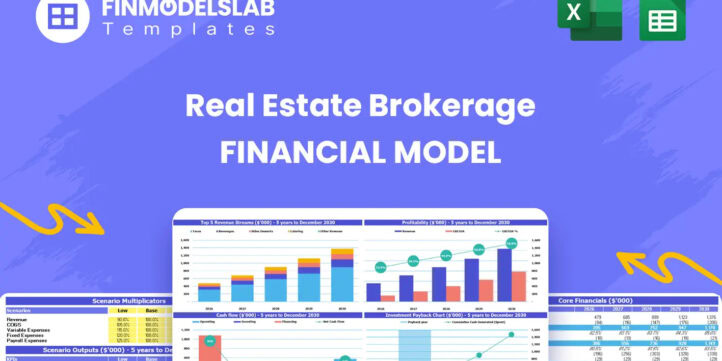


Financial Model Overview
The Real Estate Brokerage Financial Model Financial Model Template gives founders, agency owners, consultants, and analysts a structured way to forecast the financial performance of a real estate brokerage. A brokerage does not operate like a generic service business, because revenue depends on transaction volume, commission values, agent headcount, commission splits, rental fees, marketing productivity, and the timing of closings. This template is built around those drivers, helping users estimate how seller-side transactions, buyer-side transactions, and rental transactions convert into revenue, profit, cash flow, and investor-ready financial outputs. It is useful for launching a new brokerage, expanding an existing agency, preparing a business plan, applying for funding, or reviewing whether a growth strategy is financially realistic. The model is fully editable, compatible with Excel and Google Sheets, and designed to help users replace disconnected estimates with an organized five-year financial planning framework.
All-in-One Dashboard
The all-in-one dashboard brings the most important inputs and outputs of the Real Estate Brokerage Financial Model into one centralized view. It helps users quickly review the assumptions that drive the forecast, such as transaction volumes, average commission values, agent-related assumptions, operating costs, marketing expenses, and launch requirements, while also showing the outputs those assumptions create. This section is useful because a brokerage owner or planner can monitor projected revenue, profitability, cash flow, margins, and other key financial outcomes without having to search through every worksheet. For funding preparation, the dashboard makes it easier to communicate the overall business case to investors, lenders, partners, or internal stakeholders. For operational planning, it gives management a practical control panel for checking whether growth targets, hiring plans, and spending decisions remain aligned with the company’s financial capacity. By combining core assumptions and results, the dashboard helps users move faster from data entry to decision-making.
Low, Base, and High Scenario Analysis
The low, base, and high scenario analysis section helps users evaluate how the brokerage may perform under different market and operating conditions. Real estate brokerage performance can change quickly depending on housing market activity, closing volume, listing availability, buyer demand, average property values, lead generation effectiveness, and the ability to recruit productive agents. This component allows users to compare a conservative case, a central planning case, and an upside case so they can see how revenue, profit margins, cash flow, and funding needs may shift when assumptions change. A low scenario can help identify risks during slower transaction periods, while a high scenario can show the staffing, marketing, and working capital required to support stronger growth. This is especially useful for founders and advisors preparing business plans because it demonstrates that the plan has been stress-tested rather than built around one optimistic forecast. It also supports practical decision-making by showing how much flexibility the business has if sales are delayed, costs rise, or growth exceeds expectations.
Professional Charts
The professional charts section turns the financial forecast into visual outputs that are easier to understand and present. Instead of reviewing only rows of numbers, users can view charts that summarize revenue trends, expense categories, profitability development, cash balance movement, and other important financial metrics over time. This is valuable for a real estate brokerage because stakeholders often want to see whether transaction-driven revenue is growing consistently, whether marketing and payroll are scaling at a sustainable pace, and whether the business is building enough cash to support operations. These charts can be used in investor presentations, lender discussions, board updates, internal planning meetings, or business plan appendices. They help users explain the forecast more clearly by showing the relationship between brokerage activity and financial outcomes. For non-financial users, the visual format also makes it easier to identify trends, pressure points, and opportunities for improvement. By presenting financial information in a polished and accessible way, this component improves both analysis and communication.
ROE Components and DuPont Analysis
The ROE components and DuPont analysis section helps users evaluate return on equity by breaking it into the underlying drivers that influence shareholder or owner returns. For a real estate brokerage, return performance is affected not only by profit, but also by margins, asset efficiency, capital structure, and the way invested funds are used to generate earnings. This component helps users understand whether projected returns are coming from strong operating profitability, efficient use of resources, leverage, or a combination of these factors. Inputs may connect to net income, equity investment, assets, liabilities, and profitability assumptions, while outputs help summarize return on equity and its key contributing elements. This is useful for investors and founders because a high-level return metric alone does not explain why the business is performing well or where risk may exist. DuPont-style analysis gives more depth to the financial story and can support decisions about reinvestment, borrowing, owner distributions, expansion, and capital allocation. It also strengthens the model for investor review by showing that return expectations are supported by detailed financial logic.
Revenue Inputs
The revenue inputs section is one of the most important parts of the Real Estate Brokerage Financial Model because it defines how the brokerage generates income. Users can adjust assumptions for seller-side transactions, buyer-side transactions, and rental transactions, along with transaction counts, average commission amounts, fee levels, growth rates, or other relevant revenue drivers. This allows the model to reflect the user’s actual business plan rather than a one-size-fits-all forecast. For example, a brokerage focused on residential sales may use different assumptions than one with a strong rental placement business or a premium listing strategy. Revenue inputs can also be adapted to local market conditions, average home values, agent productivity, lead conversion expectations, and planned sales team growth. The outputs from this section feed directly into revenue forecasts, profitability calculations, cash flow projections, and investor metrics. By making revenue assumptions transparent and editable, this component helps users test whether their expected deal flow and commission structure can support the company’s operating costs and growth objectives.
Bank-Ready Reports
The bank-ready reports section organizes the forecast into clean financial outputs that can be shared with lenders, investors, advisors, and other stakeholders. A brokerage seeking funding may need to present projected profit and loss statements, cash flow forecasts, balance sheet summaries, key assumptions, and performance metrics in a format that is easy to review. This component helps convert operating assumptions into lender-friendly and investor-ready reports, reducing the time needed to prepare financial documents from scratch. It is useful for loan applications, funding pitches, partner discussions, acquisition planning, or internal financial reviews. The reports can help demonstrate how the brokerage expects to generate commission revenue, manage payroll and operating expenses, cover startup costs, maintain liquidity, and reach sustainable profitability. Because the reports are linked to editable assumptions, users can update inputs and refresh the outputs as the business plan changes. This makes the model practical for both initial planning and ongoing revisions, while giving stakeholders a clearer view of the financial structure behind the brokerage plan.
Revenue Breakdown
The revenue breakdown section gives users a detailed view of how total income is distributed across the brokerage’s main revenue streams. For a real estate brokerage, a single revenue line is often not enough, because seller representation, buyer representation, and rental transactions may have different volumes, commission amounts, closing timelines, margins, and growth patterns. This component separates those streams so users can understand which activities contribute most to total revenue and how changes in one area affect the overall forecast. Inputs may include the number of seller-side deals, buyer-side deals, rental transactions, average commission per sale, rental fees, growth assumptions, and market-specific pricing. Outputs help show revenue by category, revenue mix, and trends over the projection period. This is useful for strategic planning because it highlights where the brokerage may be most dependent on certain transaction types and where diversification could improve stability. It also supports sales planning, marketing allocation, agent recruiting, and service expansion by showing which revenue streams are expected to drive growth and profitability.
KPI Dashboard
The KPI dashboard helps users monitor the performance indicators that matter most for a real estate brokerage. Beyond standard financial statements, brokerage owners need to understand operational metrics such as revenue growth, transaction volume, average commission, profitability ratios, cash position, marketing efficiency, agent productivity, and margin development. This component summarizes key performance metrics so users can compare the forecast against goals, benchmarks, and internal expectations. It is useful for founders who want to track whether the business is scaling efficiently and for investors who want a quick view of the company’s financial health. The dashboard can also support monthly or quarterly management reviews by highlighting areas that need attention, such as rising expenses, weak transaction volume, or pressure on cash flow. When used with editable assumptions, the KPI dashboard becomes a planning tool rather than a static summary. Users can adjust pricing, deal volume, staffing, or marketing spend and immediately see how the changes affect the metrics that guide decision-making, funding discussions, and long-term strategy.
Startup Cost and CAPEX Planning
The startup cost and CAPEX planning section helps users estimate the upfront investment required to launch or expand a real estate brokerage. Typical inputs may include office furniture, equipment, website development, branding, computers, software, licensing, legal setup, insurance, deposits, initial marketing, signage, training, and other pre-opening expenses. This component is especially important because a brokerage may need to spend money before transaction revenue begins, and underestimating startup costs can create early cash pressure. The section helps users organize one-time expenses separately from recurring operating costs, making it easier to calculate total funding needs and determine how much capital should be available before opening. Outputs from this section can feed into cash flow projections, balance sheet planning, funding requirements, and investor summaries. For business planning, it helps founders make realistic launch decisions and compare different setup strategies, such as starting with a smaller office, using shared space, investing more heavily in technology, or increasing the initial marketing budget. It also supports lender and investor discussions by showing exactly where startup capital is expected to be used.
Break-Even and Funding Requirements Analysis
The break-even and funding requirements analysis section helps users understand when the brokerage may become profitable and how much capital may be needed to reach that point safely. A real estate brokerage can have strong long-term potential but still face timing risks if commissions are delayed, transaction volume ramps up slowly, or fixed expenses begin before revenue is consistent. This component may use assumptions for revenue, gross margin, payroll, rent, marketing, technology, professional services, startup costs, and cash reserves to estimate the level of sales activity required to cover expenses. It can help identify the break-even point, the minimum revenue needed to support operations, and the amount of funding required before the business becomes self-sustaining. This is useful for founders preparing launch budgets, consultants advising clients, and investors evaluating risk. It also supports decision-making by showing whether the business should reduce overhead, raise additional capital, adjust commission assumptions, delay hiring, or increase lead generation before launch. By connecting profitability timing with capital needs, this section helps users plan more responsibly and avoid cash shortfalls during the most vulnerable stage of the brokerage’s growth.
File types:
Excel – Single-User: .xlsx
Excel – Multi-User: .xlsx
Similar ProductsOther customers were also interested in...


 HenrySheykin
Serviced Apartments Financial Model Excel Template
The Serviced Apartments Financial Model is a ready-to-use financial model template built for the ope... Read more

 eFinancialModels
Real Estate Financial Model Templates Package
This is a collection of ready-made Excel financial model templates for real estate businesses and it... Read more

 Giorgos
Real Estate Development Financial Models Bundle
A collection of seven Real Estate Development Financial Models offered at a discounted price you can... Read more

Real Estate Acquisition Financial Models Bundle
A collection of six Real Estate Development Financial Models offered at a discounted price you can�... Read more
Condominium Development REFM Financial Model Excel...
The Condo Development Financial Model helps developers, investors, analysts, consultants, and busine... Read more
Vacation Rentals Hotel Financial Model Excel Templ...
The Vacation Rental Financial Model helps users turn a short-term rental concept, property managemen... Read more
Condo Hotel Financial Model Excel Template
The Condo Hotel Financial Model helps users turn a condo hotel concept, launch plan, or investment o... Read more

Rental Property Spreadsheet Template
This Rental Property Financial Model Financial Model Template helps investors, founders, property ow... Read more

 Andreas
Airbnb Financial Model
Air BnB Financial Model Template presents the business case of the purchase of up to 5 properties wi... Read more

Real Estate Portfolio Financial Model
The Real Estate Portfolio Financial Model Template forecasts the financial performance when building... Read more
You must log in to submit a review.