
0 ITEMS

Grocery Store Financial Model Excel Template
The Grocery Store Financial Model helps entrepreneurs, founders, consultants, analysts, and retail business owners build a structured financial forecast for launching or expanding a grocery store. Instead of starting with a blank spreadsheet, users get a ready-to-use financial model template designed around the economics of food retail, including customer traffic, sales conversion, product categories, gross margins, operating expenses, payroll, startup costs, cash flow, and profitability. It is built to support business planning, funding preparation, internal budgeting, and practical decision-making. This template is useful for anyone preparing a grocery store business plan, evaluating a supermarket concept, planning a neighborhood food market, or presenting a funding case to lenders or investors. The model helps users document revenue assumptions, estimate initial investment needs, calculate ongoing costs, and understand how store performance may change over time. By connecting daily visitors, product mix, pricing, cost of goods sold, staffing, rent, and other operating assumptions, it gives users a clearer view of how the business could perform under realistic conditions. The Grocery Store Financial Model also helps users assess financial sustainability over a multi-year period. It supports revenue forecasting, expense planning, payroll budgeting, cash flow forecasting, profitability review, and break-even analysis, so users can identify when the business may become profitable and how much funding may be needed before it reaches that point. Built-in outputs and dashboards make it easier to review financial results, communicate assumptions, and explain the business case to stakeholders. Because the template is editable, users can adjust assumptions for their own location, store size, pricing strategy, product categories, supplier terms, staffing plan, and growth expectations. It works as a practical planning tool for both early-stage entrepreneurs and established operators considering expansion. Whether used for investor presentations, lender discussions, internal strategy, or personal decision-making, this financial model template helps turn grocery store planning into a more organized, transparent, and financially informed process.
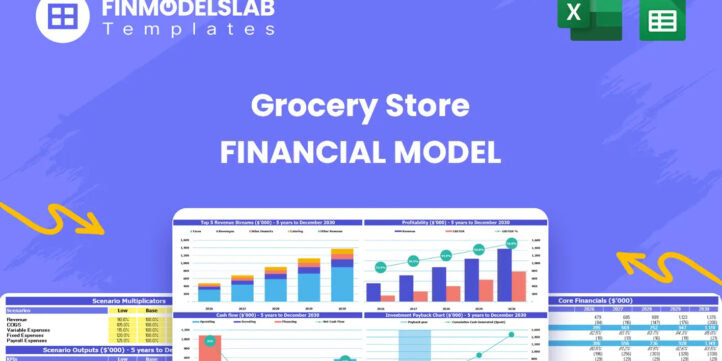


Financial Model Overview
The Grocery Store Financial Model is a ready-to-use financial model template built to help users plan, test, and present the financial performance of a grocery store or food retail business. Grocery stores require careful planning because revenue depends on daily customer traffic, conversion rates, product mix, inventory turnover, margins, staffing, rent, equipment, and working capital. This template brings those assumptions into one structured model so entrepreneurs, business owners, consultants, analysts, and founders can forecast performance without building a spreadsheet from scratch. It is designed for business planning, funding preparation, budgeting, expansion analysis, and internal decision-making. Users can edit the assumptions to reflect their own store concept, location, pricing, supplier terms, operating expenses, and growth expectations, then review the impact on revenue, profit, cash flow, returns, and funding needs over a multi-year forecast period.
All-in-One Dashboard
The all-in-one dashboard gives users a central view of the core inputs and core outputs of the Grocery Store Financial Model. This component is designed to make the model easier to manage by bringing important assumptions and financial results into one organized area. Users can review or update key drivers such as customer traffic, conversion rates, average sales levels, product mix, cost of goods sold, rent, payroll, startup investment, and growth assumptions, while also viewing outputs such as revenue, gross profit, EBITDA, cash balance, payback period, and break-even timing. For a grocery store, this is especially useful because small changes in visitor counts, margins, or staffing can have a major impact on profitability and cash flow. The dashboard helps users quickly understand how the business is performing, whether the forecast is financially viable, and which assumptions require closer attention. It is also useful for presentations because it allows stakeholders to see the overall financial story without needing to inspect every worksheet in detail. By combining inputs and outputs in one place, the dashboard supports faster planning, better budgeting, and more confident decision-making.
Low, Base, and High Scenario Analysis
The low, base, and high scenario analysis component allows users to evaluate how the grocery store could perform under different operating conditions. Instead of relying on a single forecast, the model supports multiple planning cases that can reflect conservative, expected, and optimistic outcomes. Users can adjust assumptions such as daily visitors, conversion rates, basket size, product margins, supplier costs, payroll levels, lease costs, and operating expense growth to see how revenue, profit, cash flow, and capital requirements change. This is important for grocery store planning because food retail can be affected by customer behavior, competition, local demographics, supplier pricing, labor availability, and seasonal demand. A low case can help identify downside risks and potential cash shortfalls, while a base case can support realistic planning targets and a high case can show upside potential if the store gains traction faster than expected. This component is useful for investors, lenders, and internal teams because it demonstrates that the business plan has been stress-tested. It helps users prepare contingency plans, set realistic milestones, and make decisions with a better understanding of risk and opportunity.
Professional Charts
The professional charts component translates the financial forecast into clear visual reports that are easier to understand and present. Rather than forcing users to interpret long rows of spreadsheet data, the model can display key trends such as revenue growth, gross margin, EBITDA progression, net income, cash balance, operating expenses, and return metrics in chart format. For a grocery store, these visuals can help explain how customer growth turns into sales, how margins improve over time, how expenses scale with operations, and when the business begins moving toward profitability. This component is especially useful for business plans, investor decks, lender meetings, board updates, and internal strategy reviews because stakeholders often need a concise view of the forecast. Users can rely on the charts to communicate the financial direction of the business, highlight important milestones, and support decisions about funding, expansion, staffing, inventory, or marketing. The visual format also makes it easier to compare scenarios and identify changes in performance over the forecast period. With presentation-ready charts, the Grocery Store Financial Model helps users turn detailed financial assumptions into a more accessible and persuasive financial narrative.
ROE Components and DuPont Analysis
The ROE components section uses a DuPont-style analysis to help users understand what is driving return on equity in the grocery store forecast. Return on equity can be influenced by profitability, asset efficiency, and leverage, and this component helps separate those drivers so users can see whether returns are coming from stronger margins, better use of assets, or financing structure. Inputs may include net income, revenue, total assets, equity, liabilities, profit margins, and asset turnover assumptions. For a grocery store, this analysis is useful because the business may require meaningful investment in fixtures, refrigeration, inventory, point-of-sale equipment, and working capital before it produces stable profits. The section helps users evaluate whether the business is using invested capital efficiently and whether projected returns are strong enough to support the risk of the venture. It can also help operators identify improvement opportunities, such as increasing margin through better product mix, improving turnover through inventory management, or controlling asset growth as the store scales. For investors and stakeholders, this component adds depth to the forecast by going beyond basic profit numbers and showing how shareholder returns are created over time.
Revenue Inputs
The revenue inputs component is where users build the grocery store forecast from the bottom up using practical operating assumptions. Instead of estimating sales as one generic number, the model can use drivers such as daily store visitors, weekly traffic patterns, customer conversion rates, average basket value, product category mix, pricing, and sales growth. For a grocery store, this approach is valuable because revenue depends on how many people visit the store, how many make purchases, what they buy, and how product categories contribute to total sales. Users can model categories such as fresh produce, grocery staples, artisanal products, and household essentials, each with its own pricing, sales share, and margin assumptions. The inputs are editable, allowing users to customize the forecast for a neighborhood grocer, specialty market, supermarket, convenience-focused grocery store, or expansion location. This section helps users test whether revenue assumptions are realistic, identify the store traffic needed to support expenses, and understand the impact of pricing or product mix changes on overall financial performance. It is a foundational component of the Grocery Store Financial Model because reliable revenue planning drives the rest of the forecast, including inventory needs, staffing, cash flow, and profitability.
Bank-Ready Reports
The bank-ready reports component organizes the financial outputs in a format that can support lender discussions, financing applications, and stakeholder review. Grocery stores often need outside funding for lease deposits, store buildout, equipment, refrigeration, point-of-sale systems, initial inventory, working capital, and early operating losses. This section helps present the financial forecast in a clear and lender-friendly way, including outputs such as profit and loss projections, cash flow forecasts, balance sheet summaries, debt assumptions, repayment capacity, minimum cash position, and funding requirements. Users can use these reports to explain how much capital is needed, how the funds will be used, and how the store expects to generate enough cash to support operations and repay financing. For banks and lenders, clarity and consistency matter, so the model is structured to provide professional financial outputs rather than disconnected assumptions. This component is useful for entrepreneurs preparing loan applications, consultants developing funding packages, and owners evaluating whether a planned store can support debt. By making the financial case easier to follow, the reports help users communicate credibility, financial discipline, and preparedness.
Revenue Breakdown
The revenue breakdown component gives users a detailed view of how total grocery store sales are generated across different revenue streams and product categories. Rather than treating revenue as one lump sum, the model can separate sales by category, such as fresh produce, grocery staples, artisanal products, household essentials, or other store-specific departments. Users can assign different sales mix percentages, prices, growth rates, cost structures, and gross margins to each category. This is important because grocery store profitability can vary significantly by product type. Fresh items may attract customers but require careful inventory management, staple goods may drive repeat traffic, specialty items may improve margins, and household essentials may increase basket size. The revenue breakdown helps users see which categories contribute most to sales and profit, where margin improvements may be possible, and how changes in product strategy could affect the business. It is useful for inventory planning, supplier negotiation, pricing decisions, and marketing focus. This section also supports more credible financial planning because it allows users to explain the revenue model in detail to investors, lenders, or internal stakeholders. A clear revenue breakdown makes the overall forecast more transparent and helps operators make better merchandising and growth decisions.
KPI Dashboard and Performance Benchmarks
The KPI dashboard and performance benchmarks component helps users monitor the grocery store’s key financial and operating metrics in a structured way. Key performance indicators may include revenue growth, gross margin, EBITDA margin, net profit margin, customer conversion rate, average basket value, repeat customer rate, cash balance, inventory-related metrics, payroll as a percentage of sales, and return measures. The benchmark framework helps users compare projected performance against realistic targets or industry expectations, making it easier to identify whether assumptions are too aggressive, too conservative, or aligned with a credible food retail plan. For grocery stores, KPI tracking is essential because operational performance can change quickly if supplier costs rise, traffic slows, inventory is mismanaged, or labor costs increase. This component gives users a fast way to evaluate the health of the business and identify areas that need attention. It can support monthly reviews, investor updates, management meetings, and strategic planning. By connecting financial results with practical operating indicators, the KPI dashboard helps users move beyond basic accounting outputs and focus on the metrics that actually drive performance, sustainability, and long-term profitability.
Startup Costs and Capital Expenditure Planning
The startup costs and capital expenditure planning component helps users estimate the initial investment required to open or expand a grocery store. This section can include refrigeration and display units, shelving, store fixtures, point-of-sale hardware, security systems, signage, leasehold improvements, licenses, permits, initial marketing, deposits, professional fees, pre-opening payroll, and opening inventory. Grocery stores often require significant upfront capital before the first sale is made, so this component is important for understanding the true funding need before launch. Users can edit each cost line to match their store size, location, concept, equipment choices, supplier requirements, and buildout plan. The outputs help calculate total launch costs, capital expenditure requirements, pre-opening expenses, and the amount of cash needed to begin operations with enough financial cushion. This is useful for loan applications, investor conversations, personal budgeting, and go or no-go decisions. It also helps prevent one of the most common planning mistakes in retail: underestimating the cost of getting the store operational. By clearly organizing startup costs, the Grocery Store Financial Model gives users a practical view of the capital required to move from concept to opening day.
Break-Even and Cash Flow Forecasting
The break-even and cash flow forecasting component helps users understand when the grocery store may become financially sustainable and how much cash may be required before that point. Break-even analysis can calculate the level of sales needed to cover fixed and variable costs, while the cash flow forecast tracks monthly inflows and outflows to identify potential shortfalls. Inputs may include revenue growth, gross margin, rent, payroll, utilities, insurance, marketing, supplier payments, inventory purchases, taxes, debt service, and capital expenditures. For a grocery store, this component is especially valuable because the business may need time to build a loyal customer base while still paying rent, staff, vendors, and other operating costs. Profitability on an income statement does not always mean the business has enough cash, so the cash flow view helps users plan liquidity more carefully. The model can help identify minimum cash requirements, timing of funding needs, and the impact of operational changes on cash position. It supports decisions such as securing a line of credit, adjusting inventory purchasing, changing staffing levels, negotiating supplier terms, or timing expansion. By combining break-even analysis with cash flow forecasting, this component helps users plan for survival, stability, and long-term profitability.
File types:
Excel – Single-User: .xlsx
Excel – Multi-User: .xlsx
Similar ProductsOther customers were also interested in...

 HenrySheykin
Candy Store Financial Model Excel Template
The Candy Store Financial Model helps entrepreneurs and planners turn a retail confectionery concept... Read more
Bakery Financial Model Excel Template
The Bakery Financial Model helps entrepreneurs, bakery owners, consultants, analysts, and business p... Read more
Clothing Store Financial Model Excel Template
The Clothing Store Financial Model helps turn a retail apparel concept into a structured financial f... Read more
 Giorgos
Mini Grocery Store Financial Model – Dynamic...
Financial Model providing a dynamic up to 10-year financial forecast for a startup or existing Mini ... Read more
 CFO Templates
Retail Business Financial Model
The Retail Financial Plan is an all-inclusive financial planning template for the retail industry. W... Read more
Gift Shop Financial Model Excel Template
The Gift Shop Financial Model helps users build a structured financial forecast for a retail gift st... Read more
Flower Shop Financial Model Excel Template
The Flower Shop Financial Model helps entrepreneurs, florists, business owners, consultants, and ana... Read more
Pizzeria Financial Model Excel Template
The Pizza Restaurant Financial Model Template helps entrepreneurs, restaurant owners, consultants, a... Read more
Liquor Store Financial Model Excel Template
The Liquor Store Financial Model helps entrepreneurs, store owners, consultants, analysts, and busin... Read more
Food Truck Financial Model Excel Template
The Food Truck Financial Model helps entrepreneurs, founders, business owners, consultants, and anal... Read more
Reviews
 Mini supermarket financial model
Its nice to work just missing one thing. If we apply actual data in this model how can we compare with budget value.
Rest All performance is wonderful
Thank you for your feedback.
2947 of 5913 people found this review helpful.
You must log in to submit a review.