
0 ITEMS

Net Present Value Calculator in Excel
Our Net Present Value Calculator in Excel helps you quickly assess the profitability of your investments by simplifying complex financial calculations. With easy-to-use formulas and a straightforward layout, this tool makes it easier to determine the present value of future cash flows. Whether evaluating new projects or comparing investment options, our calculator provides accurate results to support better decision-making. This powerful Excel tool saves time, eliminates guesswork, and makes informed financial choices.

| All Industries, Financial Model, General Excel Financial Models |
| Calculator, Excel, Financial Planning, Free Financial Model Templates, NPV (Net Present Value) |
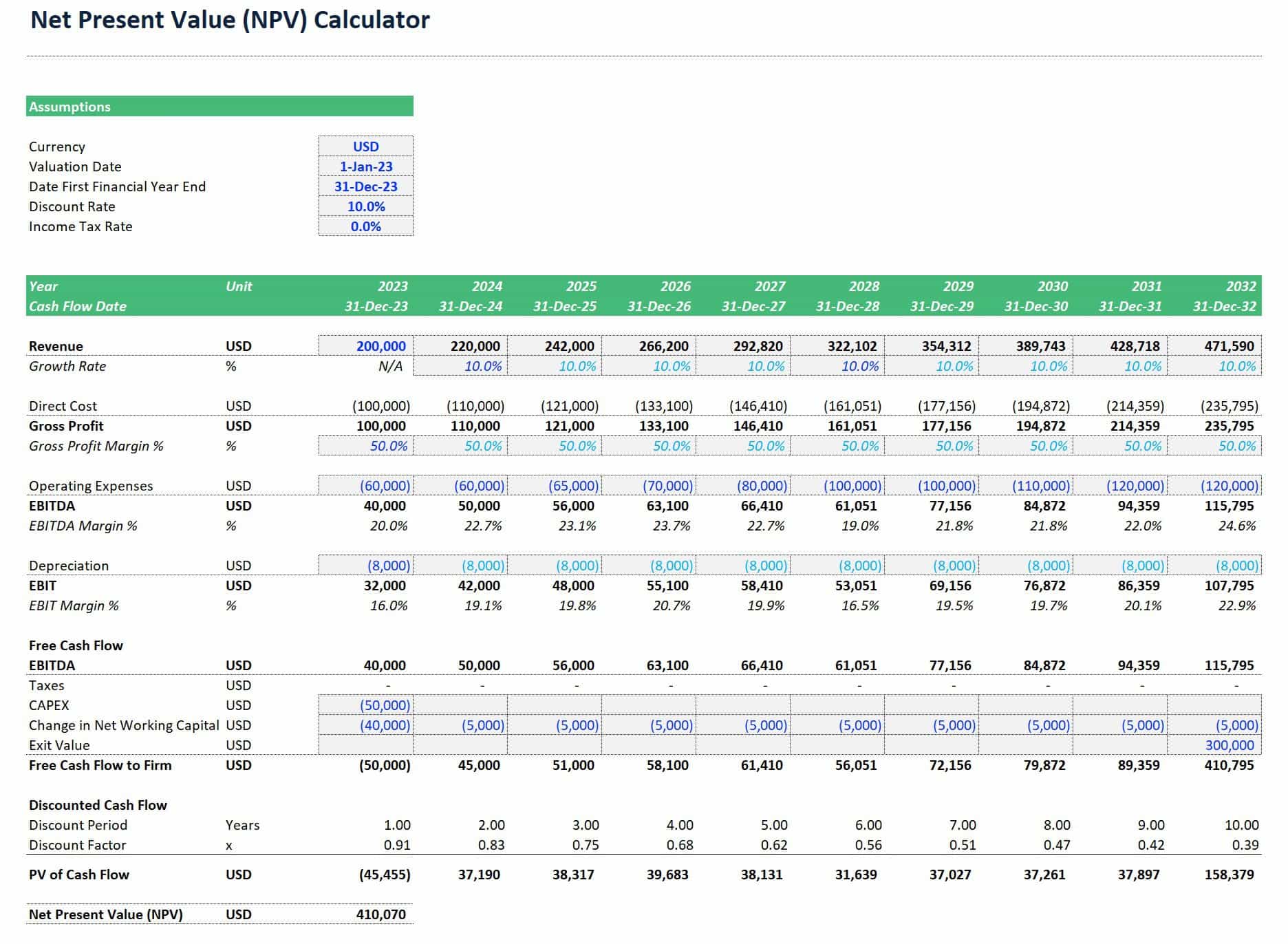
Introducing our FREE Net Present Value Calculator in Excel—a simple-to-use spreadsheet template designed to easily calculate the net present value (NPV) of future forecasted Free Cash Flows. Download this free NPV calculator in Excel to quickly and effectively determine the present value of future cash flows. Whether making investment decisions or planning financial strategies, this free and easy-to-use Excel calculator helps you make informed choices effortlessly.
The Formula for NPV Calculation
Net Present Value (NPV) can be derived when discounting future net cash inflows minus outflows to its present value. It typically involves building a financial free cash flow forecast over a specified period. The formula for NPV calculation takes into account the time value of money by using a discount rate to convert each year of free cash flow forecast to their present values as of today and then summing up all present values of that cash flow stream. It belongs to the income approach of state-of-the-art modern valuation techniques. The formula for NPV calculation can also help better assess the expected value creation for shareholders and complement other financial metrics, such as the Internal Rate of Return (IRR), when analyzing new investment opportunities. It can be mathematically expressed as:

Where:
- Rt = the free cash flow forecast over a specified period
- i = the discount rate
- t = the specified period at which the cash flow occurs
Free Cash Flow Forecast
The formula for NPV calculation starts by forecasting the free cash flows for each period. It represents the cash the business generates after covering operating expenses and capital expenditures. Excel’s NPV function helps sum these discounted cash flows, giving you a snapshot of the investment’s worth in today’s terms. It allows you to assess whether the investment adds value, with a positive NPV indicating it’s likely a worthwhile opportunity.
In Excel, calculating the NPV of a financial free cash flow forecast over a specified period often involves using the Earnings Before Interest, Taxes, Depreciation, and Amortization (EBITDA) instead of Earnings Before Income and Taxes (EBIT). EBITDA includes depreciation, which helps reflect the operating performance more comprehensively without the impact of non-cash expenses like depreciation. By including depreciation in EBITDA, you focus on cash-based profitability.
NPV Calculator Discount Rate
The NPV calculator discount rate is a key factor in determining the present value of future cash flows from an investment. By applying the discount rate, you adjust future cash flows to reflect their value today, accounting for risks and the time value of money. A higher discount rate makes future cash flows less valuable, which reduces the Net Present Value (NPV), indicating a riskier or less desirable investment. Conversely, a lower discount rate increases the NPV, suggesting a more promising opportunity.
Choosing the right NPV calculator discount rate is crucial, as it significantly impacts an investment’s attractiveness. Furthermore, the NPV calculator discount rate measures the riskiness of the expected free cash flows by considering how much return needs to be generated to satisfy capital providers for the risk. It can be estimated by calculating the expected Weighted Average Cost of Capital (see this article on How to calculate the Weighted Average Cost of Capital (WACC).
Specified Forecast Period
The specified forecast period in the formula for NPV calculation refers to the number of years or timeframes over which you project and discount future cash flows. This period is essential because it sets the timeframe for assessing the investment’s potential profitability.
The forecast period is typically chosen based on how long you expect the investment to generate meaningful cash flows or when cash flow projections are most reliable. During this time, you calculate each year’s free cash flow and discount it to its present value. A well-defined forecast period helps provide an accurate view of an investment’s value today, ensuring that the NPV calculation reflects realistic financial expectations.

NPV Calculator in Excel – Accurate NPV Analysis Tool
An NPV Calculator in Excel is a simple editable spreadsheet that calculates net present value using Excel’s Excel’s NPV function. Using such a calculator makes it much easier to calculate NPV, as all the required formulas are already in place. You no longer have to worry about formulas for calculating net present value. Instead, you can input the components of the formula for NPV calculation.
The required assumptions to populate the NPV calculator in Excel are the free cash flow forecast or revenue, discount rate, and forecast period. Revenue is the amount the business expects to earn and spend during the forecast period, which can be several days, weeks, months, or years. Furthermore, you can calculate the weighted average cost of capital (WACC) in-depth to get an accurate discount rate.
How to Calculate NPV Step by Step?
The formula for NPV calculation involves summation and complex calculations. However, the Net Present Value Calculator in Excel makes it easier. Using an NPV calculator in Excel helps you quickly assess whether an investment will likely generate positive returns, saving time and improving accuracy. Here’s a step-by-step guide to using a Net Present Value Calculator in Excel:

Tick the version you want to download and click the “Purchase” button. This will lead you to the checkout page, where you can download our Net Present Value Calculator in Excel for free.
You will see two sheets in this Net Present Value Calculator Excel template:
- Sheet 1 is an Example Sheet
- Sheet 2 is the Template Sheet
The cells are color-coded.
- Cells in Blue represent assumptions.
- Cells in Light Blue are assumptions linked to a blue assumption. But they can be overwritten as needed.
- Cells in Black are calculations or output.
For the terms and abbreviations:
- PV = Present Value
- NPV = Net Present Value
- USD = United States Dollar
- EBITDA = Earnings Before Interest, Depreciation, Amortization, and Taxes
- EBIT = Earnings Before Interest and Taxes
- CAPEX = Capital Expenditures
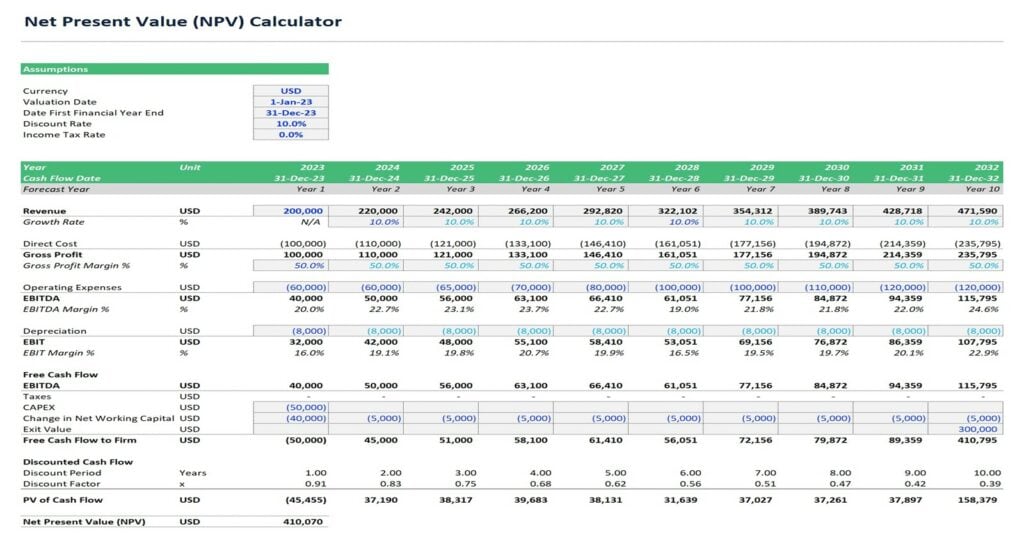
- Step 2: Enter the following assumptions.
For this NPV Calculator in Excel, the net present value example needs the following assumptions:
- Forecast period – the “Start Date or Valuation Date” to the “First Financial Year End.”
- Discount Rate
- Income Tax Rate
- Revenue
- Growth Rate
- Direct Cost
- Gross Profit
- Gross Profit Margin %
- Depreciation Rate
- CAPEX
- Change in Net Working Capital
- Exit Value

Under the Example Sheet above, we have experimented using the following assumptions or input:
- Start Date or Valuation Date = 01 January 2023
- Date First Financial Year End = 31 December 2023.
- Discount Rate = 10%
- Income Tax Rate = 0%
The assumptions will result in the following year and ten-year cash flow date.

Furthermore, we have input the remaining assumptions or input on the corresponding cells as follows:
- Revenue = $200,000
- Growth Rate from Year 2 onwards = 10% (Note: We use a fixed assumption of 10% annually. But can we can vary per year)
- Gross Profit Margin % = 50% (Note: We use a fixed assumption of 50% annually. But can we can vary per year)
- Depreciation Rate = -$8,000 (Note: We use a fixed assumption of -$8,000 annually. But can we can vary per year)
- CAPEX = -$50,000
- Change in Net Working Capital for Year 1 = -$40,000
- Change in Net Working Capital for Year 2 to Year 10 = -$5,000 every year
- Exit Value = $300,000
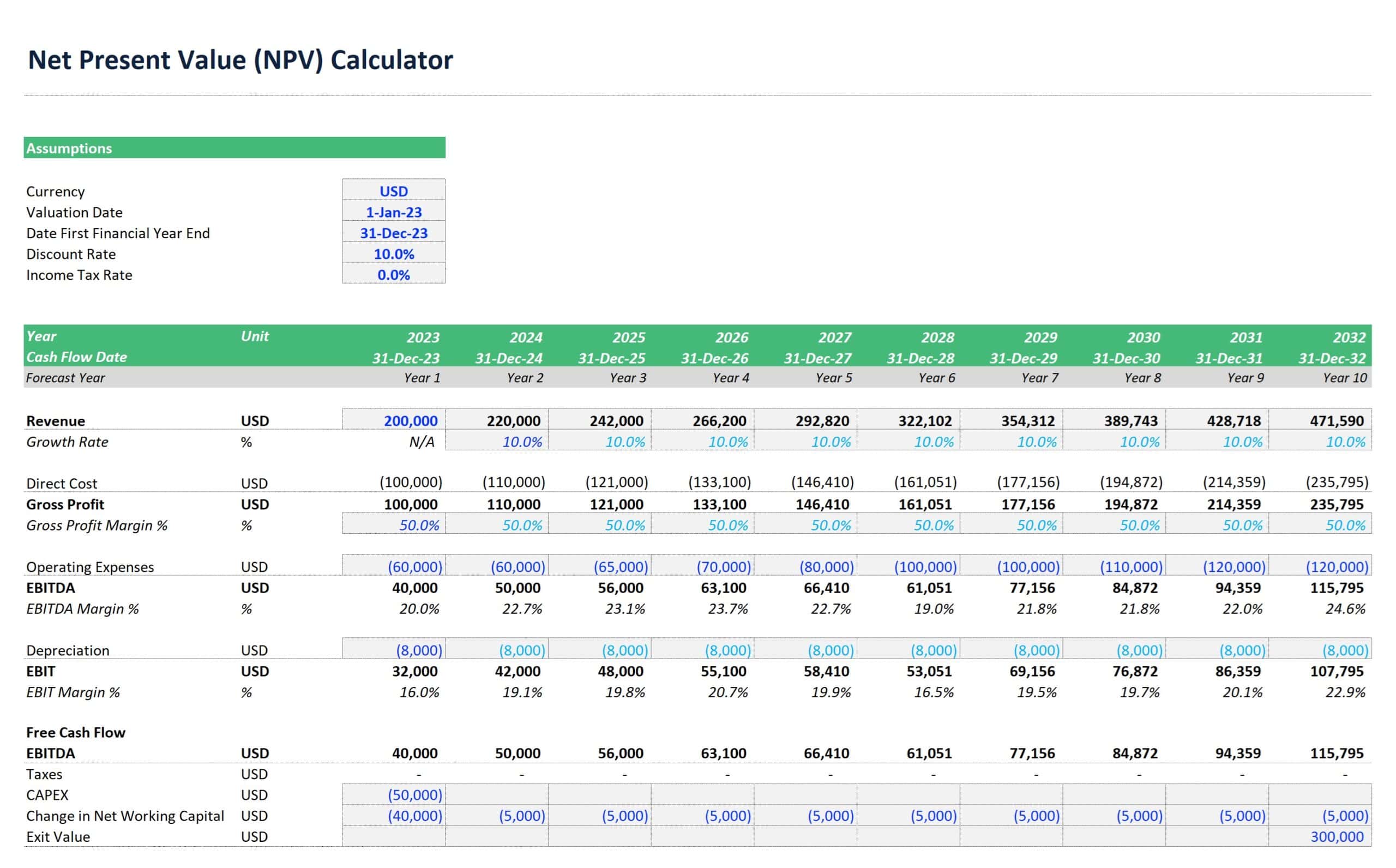
The NPV Calculator auto-calculates related factors such as:
- Direct Cost per year
- Gross Profit per year
- Annual EBITDA
- Annual EBITDA Margin %
- Free Cash Flow to Firm
- Discounted Cash Flow, including the Discounted Period and Discount Factor
- Annual Present Value of Cash Flow
- Net Present Value in USD
- Step 3: Read the Results of the NPV Calculator in Excel

You can now look for the net present value at the bottom of the cell to analyze the profitability or viability of the asset, company, or project. The net present value example above results in an NPV of $410,070.
How to Interpret the Results of an NPV Calculator for Financial Decision-Making?
Interpreting the results of an NPV calculator in Excel is straightforward. Theoretically, a positive NPV indicates that the cash flow, project, or investment will make money. In contrast, a negative NPV shows that the investment will not add value and may result in losses. Let us further practice interpreting an NPV calculator’s results for financial decision-making.
- Sample 1
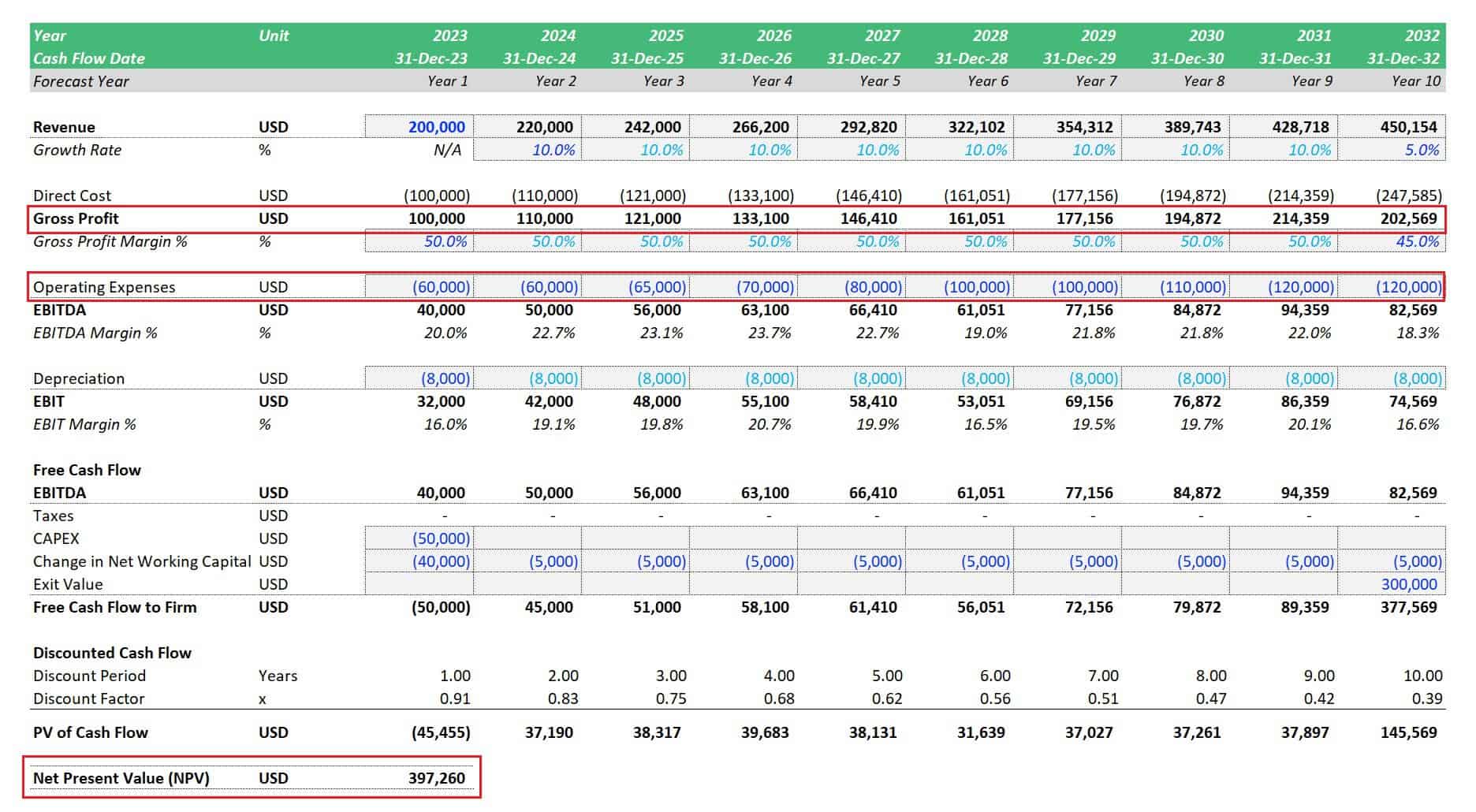
Sample 1 shows a positive NPV of $397,260. The table shows that the cash inflows or gross profit are greater than the cash outflows or operating expenses (OPEX). As such, the investor makes a profit since revenues are greater than the costs.
- Sample 2
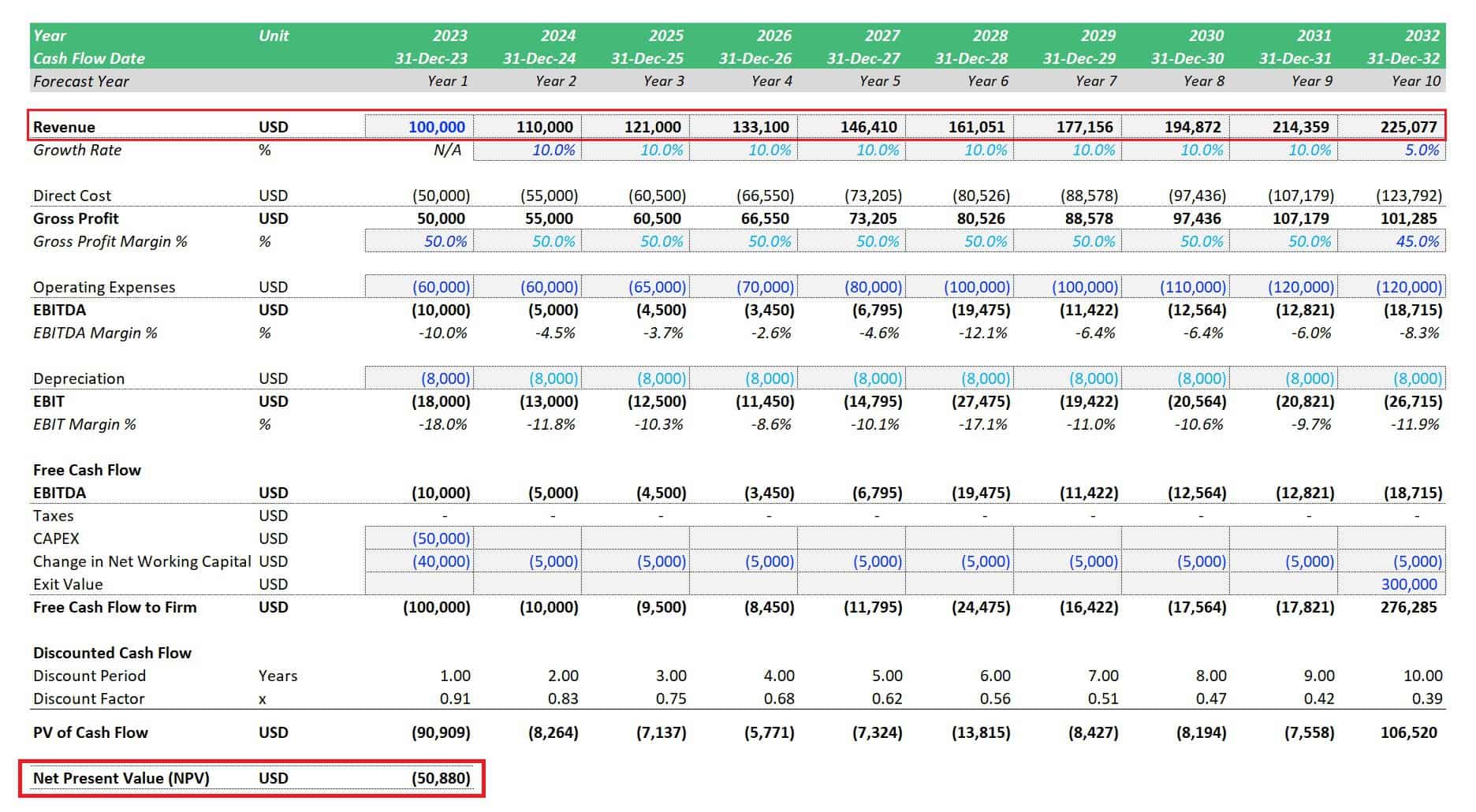
Sample 2 shows a negative NPV of ($50,880). The table shows that the cash inflows or gross profit are lesser than the cash outflows or operating expenses (OPEX). As such, the investor incurs losses since revenues are insufficient to cover the costs.
- Sample 3

Sample 3 shows that you can also use the NPV Calculator if you have already made an investment and would like to know the value of your future cash flows, similar to a DCF valuation model. You only need to remove the CAPEX and net working capital (NWC) during Year 1 to simulate such a valuation scenario. As you can see, the NPV is now at $479,078.
What if the NPV is Zero?
A zero NPV means no gain or loss in an investment. If the investment value doesn’t change, looking for other opportunities that will result in growth may be best. Similarly, choose the option that yields the highest positive NPV value to rank multiple investment choices.
Why Use this NPV Calculator?
Calculate net present value or discounted future value using our Net Present Value Calculator in Excel which is fully editable and simple to use.[CH1] [CH2]
- Easy-to-Use: How is net present value calculated? The spreadsheet function for calculating net present value is based on the initial investment, future cash flows, and a discount rate. You can easily and quickly enter or vary these parameters on the cells specified in blue.
- Editable: Editable values are specified in blue, so you can run different net present value examples and solutions to increase the accuracy of your NPV valuation. Alternatively, you can set a custom valuation date or start the first discount period timeframes for less than a year.
- Simple: This NPV calculator follows a simple and standard profit and loss structure. Select line items to enter applicable inputs, and this net present value calculator with solution will lead to either a positive or negative NPV.
Download the NPV Calculator Now and Make Smarter Investment Decisions!
Today’s money is more than it’s worth tomorrow. Inflation and potential investments make it so. So, every time you put your money at risk, you need a solid financial analysis.
One of the most professional valuation methods to determine the value of an asset, company, or future cash flow stream, in general, is to calculate NPV. eFinancialModels.com offer two versions of a fully editable NPV Calculator in MS Excel. The first version covers a 10-year NPV forecast. The second and current model lets you quickly calculate the net present value of up to 30 years of future free cash flow stream.
Versions:
- Net-Present-Value-Calculator_V4.5 – 10-year forecast
- Net-Present-Value-Calculator_V4.5 – 30-year forecast
File Format:
.xlsx (MS Excel)
Other Resources:
- Weighted Average Cost of Capital (WACC) Calculator Template
- WACC Calculator | Discount Rate Estimation
- IRR Calculator: 15 Years
- IRR and NPV Calculator
- Discounted Cash Flow (DCF) Analysis Template
- 1-Pager Discounted Cash Flow Excel Model
Similar ProductsOther customers were also interested in...








 eFinancialModels
Waterfall Profit Distribution Model (up to 4 Tiers...
We are introducing our 4-Tier Waterfall Profit Distribution Model. The waterfall profit distribution... Read more
Budget Template in Excel – Analysis in 4 Ste...
The Purpose of the 4 Step Budget Analysis Spreadsheet Template is to offer a user-friendly solution ... Read more
 Anuj
Anuj
Private Equity Fund Model (Investor Cashflows)
The Private Equity Fund Cashflows Model helps LPs and GPs analyze fund cash flows, returns, and dist... Read more
 Giorgos
Advanced Financial Model with DCF and Valuation
Dynamic 10-Year Financial Model, suitable for any type of business, supporting strategic planning, i... Read more
 Pierre-AlexandreHeur...
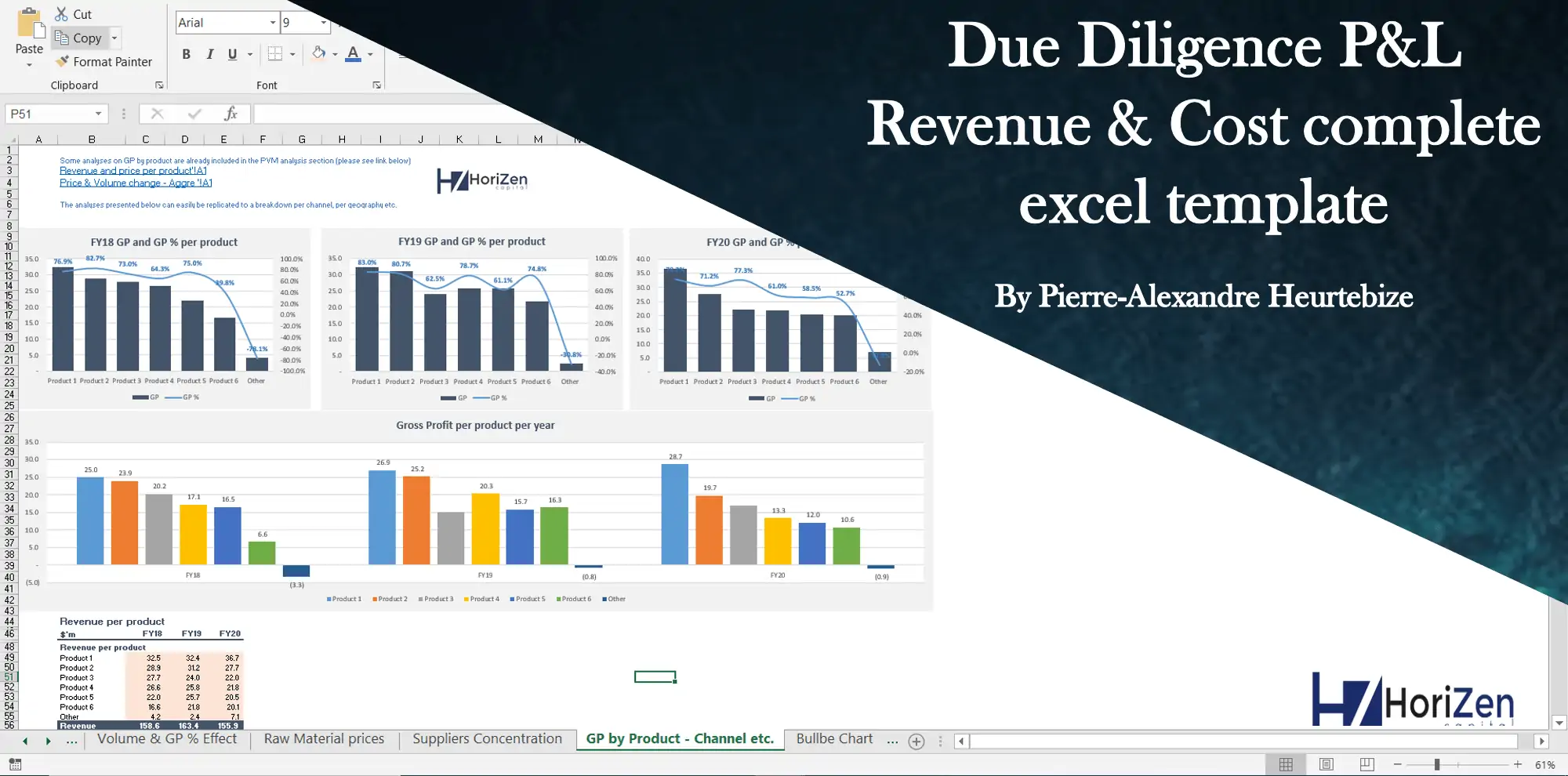
Due Diligence P&L – Exhaustive Revenue a...
Model for in depth understanding of high level profit and loss and revenue analysis. Big-4 like chec... Read more
Startup Company Financial Model – 5 Year Fin...
Highly-sophisticated and user-friendly financial model for Startup Companies providing a 5-Year adva... Read more
 D'Errico Financial S...
Mergers & Acquisitions (M&A) Model
The Mergers & Acquisition (M&A) Model provides a projection for a company looking to potentially... Read more
 Pushkar
3 Statement Financial Modeling with DCF & Rel...
Financial Modeling Tutorial guides user via step by step approach on how to build financial models w... Read more
Private Equity Acquisition Model
The Private Equity Acquisition Model provides a business valuation of a target company for investmen... Read more
Reviews
 Thank you, these models are informative.
Thank you, these models are informative for getting the right business decision, keep it up.
Thank you for your feedback.
263 of 558 people found this review helpful.
 NPV Template
Very useful tool, easy to understand, super easy to use. I highly recommend.
295 of 562 people found this review helpful.
Help other customers find the most helpful reviews
Did you find this review helpful?
 Very good model
 Net Present Value Calculator_v04
Bom Excel, facil de entender e usar. Bons resultados e facil de usar Recomendo!
English Translation: Good Excel, easy to understand and use. Good results and easy to use I recommend!
364 of 682 people found this review helpful.
Help other customers find the most helpful reviews
Did you find this review helpful?
 Net Present Value Calculator_v04
Sangat berguna sekali saya gunakan dalam pembelajaran. Semoga ini bermanfaat. Terima kasih.
English Translation: It is very useful for me to use in learning. Hope this is useful. Thank you.
371 of 674 people found this review helpful.
Help other customers find the most helpful reviews
Did you find this review helpful?
You must log in to submit a review.