
0 ITEMS

How to Calculate the WACC in Excel?
Understanding and calculating the Weighted Average Cost of Capital (WACC) helps evaluate a company’s funding costs and investment potential.
- WACC combines the costs of debt and equity, weighted by their proportions in the company’s capital structure.
- A lower WACC indicates cheaper capital, which can boost project profitability and enterprise value.
- Calculating WACC in Excel involves inputting key financial data such as cost of debt, cost of equity, and capital weights.
- Properly estimating WACC assists in making informed decisions on investment, project valuation, and corporate finance strategies.
- Using Excel tools for WACC calculation simplifies the process, reduces errors, and allows scenario testing for better analysis.
This article provides clear steps and practical examples to help you master WACC calculation in Excel.
What is the Weighted Average Cost of Capital(WACC)?
The Weighted Average Cost of Capital (WACC) is the average rate a company expects to pay to finance its assets. It combines the cost of equity and the cost of debt, weighted by their respective shares in the company’s capital structure. WACC shows the return that investors demand and helps assess whether a project is worth the investment. The Weighted Average Cost of Capital (WACC) is a popular method for estimating a company’s discount rate. It reflects what both shareholders and lenders need to earn. Finance professionals often calculate the weighted cost of capital to assess project value through Net Present Value (NPV) analysis.
Should WACC Be High or Low?
A low WACC is generally preferable because it allows a business to raise capital at a lower cost. This helps increase the value of future cash flows, making investments more profitable. A high WACC indicates a higher risk or more expensive financing, which can hinder growth. Companies aim to lower their WACC by striking a balance between debt and equity. Knowing how to calculate the WACC in Excel enables investors and owners to make more informed funding decisions and enhance business value.
A good WACC is low enough to indicate that the company can fund projects at a low cost but high enough to reflect real market risks. It depends on the industry, but lower WACC usually means safer investments and better value. Companies with stable earnings and strong credit often have lower WACC. To find the right balance, it’s key to calculate the weighted cost of capital accurately and use it to judge business performance and plans.
How Do You Calculate the Weighted Cost of Capital?
To make smart investment choices, you need to know your cost of funding. A key step is to calculate the weighted average cost of capital or WACC. This shows the average rate your business pays for using both debt and equity. It helps you determine if a project generates more value than it costs to fund.
Here’s the WACC Formula:

Where:
- Equity Share % (E) shows how much of the company’s capital comes from shareholders.
- The Cost of Equity (COE) is the return that investors expect for owning company stock.
- Debt Share % (D) tells you how much of the company’s capital is funded by loans.
- The Cost of Debt (COD) is the interest rate a company pays on its borrowed funds.
- The Tax Rate (T) lowers the cost of debt since interest payments reduce taxable income. We subtract the tax rate in WACC because interest on debt is tax-deductible, which lowers the real cost of borrowing.
The E/V (Equity-to-total capitalization ratio) shows the portion of total funding that comes from equity. The D/V (Debt-to-total capitalization ratio) shows the portion of total funding that comes from debt. These ratios are important because they indicate the relative weight each funding source carries, which directly influences the final WACC.
Using Excel to Find Your Weighted Cost of Capital
Excel makes it easy to run the numbers and determine if your project is financially viable. By using simple formulas and clear inputs, you can quickly figure out your average funding cost. Knowing how to calculate the WACC in Excel helps you make better investment calls, compare options, and stay confident in your financial strategy. Let’s walk through the steps to get it right.
1. Input Basic Values
Open Excel and enter the following values in separate cells: Cost of Equity, Cost of Debt, Equity amount, Debt amount, and the Tax Rate. Label each cell clearly so you can reference them easily in formulas later.
2. Calculate Total Capital
Add the Equity and Debt amounts together. Use the formula =Equity + Debt to find the Total Capital. This value represents the full amount of funding the company uses.
3. Calculate Equity Weight
Divide Equity by Total Capital using the formula =Equity / Total Capital. This provides the Equity Weight, which indicates the portion of funding that comes from equity.
4. Calculate Debt Weight
Divide Debt by Total Capital using the formula =Debt / Total Capital. This gives you the Debt Weight, representing the proportion of funding that comes from borrowed money.
5. Calculate After-Tax Cost of Debt
Multiply the Cost of Debt by (1 – Tax Rate) using the formula =Cost of Debt * (1 – Tax Rate). This illustrates the true cost of debt after accounting for tax savings.
6. Calculate WACC
Multiply the Equity Weight by the Cost of Equity. Then multiply the Debt Weight by the After-Tax Cost of Debt. Add the two results together using this formula: =(Equity Weight * Cost of Equity) + (Debt Weight * After-Tax Cost of Debt). This final value is your WACC.
Save Time with a WACC Calculator
An Excel WACC Calculator makes it easy to calculate the weighted cost of capital by breaking the process into clear, step-by-step inputs. You enter values like equity, debt, interest rate, tax rate, and expected return. The calculator does the math for you, applies the correct weights, and combines the results. It avoids manual errors and saves time. With built-in formulas, it provides fast and accurate results for informed financial decisions.
Our WACC Calculator | Discount Rate Estimation Excel Template helps calculate the weighted cost of capital by combining the cost of equity and the after-tax cost of debt based on their respective weights in the capital structure. It utilizes inputs such as equity value, debt amount, interest rate, tax rate, and return on equity. Each component is weighted by its proportion of total capital and then summed up to get the WACC. This provides a clear and simple way to estimate the company’s average financing cost, which is useful for informed investment decisions and valuation.
WACC Calculation Example
Here’s a simple WACC calculation example to illustrate how it works.

The above WACC calculation example shows how a company with 70% equity and 30% debt can estimate its financing cost. The cost of equity is 12.57%, calculated based on a 2% risk-free rate, a 6% market risk premium, a beta of 1.43, and a 2% size premium. The cost of debt is 5%, but after applying a 25% tax rate, it drops to 3.75%. By weighting these costs according to capital structure, the final WACC is 9.93%. This helps the business assess its hurdle rate for investments.
This WACC calculation example uses clear inputs to illustrate how a company estimates its average cost of financing. Key assumptions include:
- Equity Weight shows the share of equity in the company’s total funding. It comes from the company’s capital structure or balance sheet.
- The risk-free interest rate reflects the return on a safe investment, such as a government bond.
- Beta (Unlevered) measures how the business aligns with the market, excluding the impact of debt.It is is found in industry reports or financial databases.
- The Market Risk Premium in the USA is the additional return that investors expect from U.S. stocks over risk-free assets. It is is sourced from market research or finance textbooks.
- Country Spread adjusts for added risk when operating in countries with less stable markets.
- Other Premiums account for extra risks, such as small company size or specific business factors. These are published by rating agencies or country risk services.
- The debt risk premium is the additional cost lenders charge for assuming credit risk. It is estimated by comparing corporate bond rates to risk-free rates.
- The tax rate reduces the effective cost of debt because interest payments lower taxable income. It can be taken from the company’s local corporate tax laws or financial reports.
These inputs work together in this WACC calculation example to show a company’s blended financing cost. The calculator then applies the capital structure weights to get the final WACC. It’s a simple way to understand how each factor shapes the result.
Here’s another WACC calculation example where we target to use debt financing corresponding to 50.0% of the company’s total capitalization.
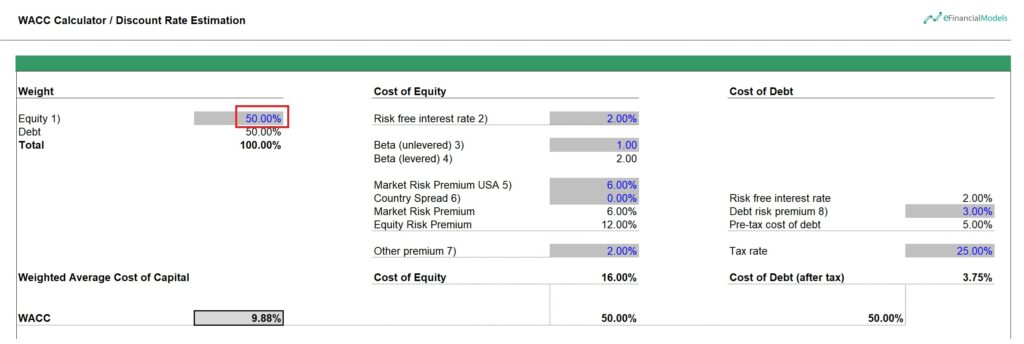
In this WACC calculation example, the company is targeting a capital structure with 50.0% debt financing and 50.0% equity. The cost of equity is calculated at 16.00%, incorporating a risk-free rate of 2.00%, a levered beta of 2.00, and an equity risk premium of 12.00%, plus an additional 2.00% premium. On the debt side, the pre-tax cost is 5.00%, and after applying a 25.00% tax rate, the effective cost of debt is 3.75%. By weighting both the equity and debt components equally, the resulting Weighted Average Cost of Capital (WACC) is 9.88%, which represents the blended cost of financing the company’s operations using its chosen mix of debt and equity.
Unlock Better WACC Insights with Excel Tools
To wrap up, knowing how to calculate the WACC in Excel helps you quickly assess a company’s average financing cost. Start by entering the Cost of Equity, Cost of Debt, Equity, Debt, and Tax Rate. Then, compute the Total Capital, find the Equity and Debt Weights, and adjust the Cost of Debt for tax purposes. Multiply each cost by its respective weight and add the results. With just a few simple steps, you’ll get a clear picture of your weighted average cost of capital.

Unlock better WACC insights by using Excel’s built-in tools and formulas. They make it easy to organize inputs, reduce errors, and update numbers fast. With clear cell references and simple math, you can calculate the weighted cost of capital more accurately. Excel also allows you to test different scenarios to see how changes in debt, equity, or taxes impact your results.




















































You might also like:
- How to Calculate Net Present Value (NPV)?
- How to Value a Business Using a Discounted Cash Flow Model
- Understanding the Levelized Cost of Energy Formula
- Key Financial Ratios
- Understanding Debt Sizing & Project Finance Ratios
- Cash Flow Analysis
- Business Valuation
- Financial Projections
- Real Estate
- Financial Services
- How to Build a Capitalization Table
- Understanding the Debt Service Coverage Ratio: An Essential Metric for Financial Analysis
- Financial Ratios Analysis and Its Importance
- Financial Planning for Small Business Owners – Taking an SBA Loan
- Financial Ratios Cheat Sheet
- Forecasting
- Insurance
- Top 5 Risks of Wind Energy Parks
- Scenario Analysis
