
0 ITEMS

Who Can Benefit From A Budget Spreadsheet In Excel?

A budget spreadsheet in Excel is a crucial tool for managing personal finances and business operations effectively.
- It helps track income streams and expenses systematically in one place.
- Formulas automate calculations like totals, percentages, and financial ratios, reducing errors.
- Customizable features allow visualization through charts and targeted highlighting of key data.
- SMEs, large corporations, and high CapEx industries rely on these spreadsheets for strategic planning and operational efficiency.
- Tech startups benefit from agile financial analysis to support growth and funding efforts.
Using a budget spreadsheet enhances financial clarity, improves resource allocation, and supports long-term planning.
What is a Budget Spreadsheet?
A budget spreadsheet is an essential financial management tool that enables individuals and organizations to plan, monitor, and control their financial activities. Typically created in software applications like Microsoft Excel, a budget spreadsheet systematically organizes all financial data in one place. Users can input detailed entries related to various income sources and expenditures, from fixed costs like rent and salaries to variable expenses such as marketing and travel. By providing fields for projected and actual figures, the spreadsheet allows for continuous tracking of financial performance against budgeted forecasts, highlighting variances that need attention or adjustment.
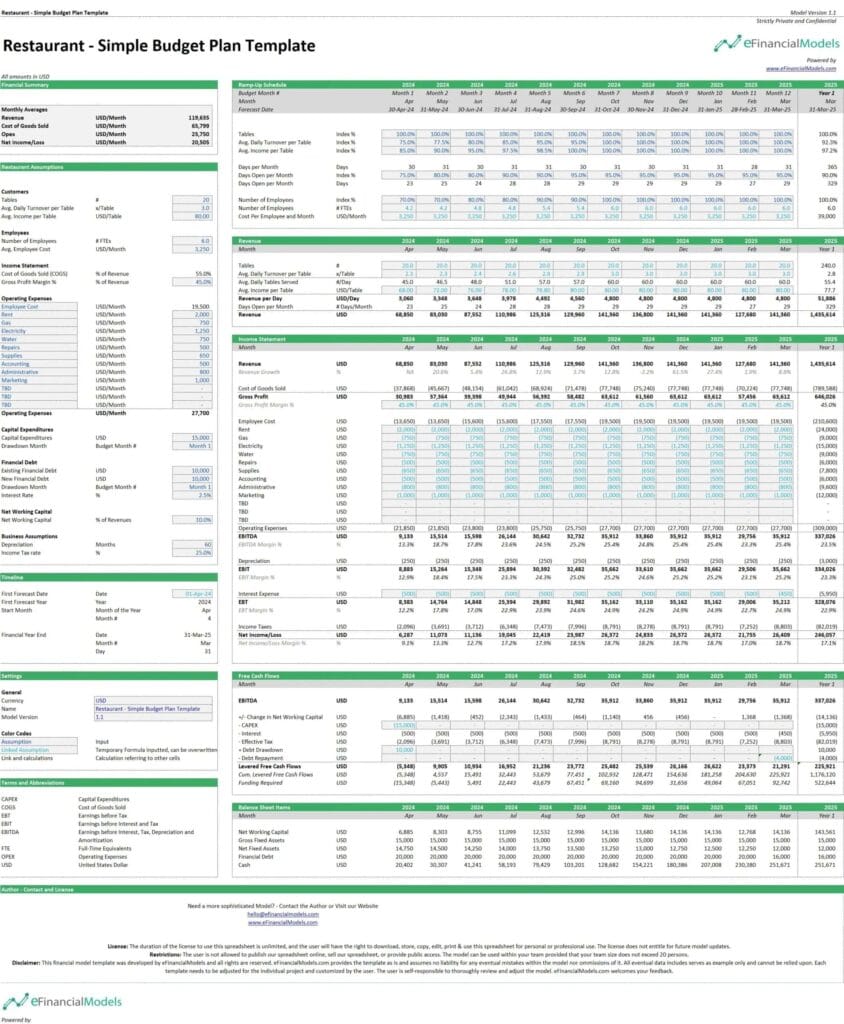
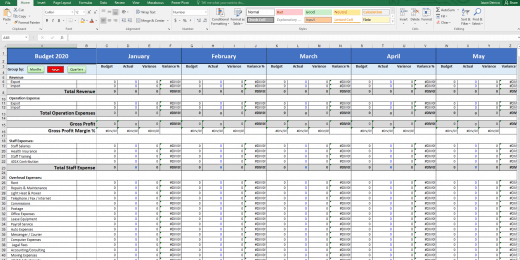
Look at this screenshot of a restaurant budget spreadsheet designed to streamline financial management in the hospitality sector. This tool allows for meticulous tracking of daily sales, inventory costs, labor expenses, and more, offering restaurant owners and managers a detailed overview of financial activities. By facilitating comparisons between projected and actual expenses, the spreadsheet aids in making informed decisions to enhance operational efficiency and profitability.
The functionality of budget spreadsheets extends beyond mere tracking; they are instrumental in strategic financial planning and decision-making. With the ability to incorporate formulas, budget spreadsheets automate calculations like sum totals, percentages, and financial ratios, making complex data analysis simpler and more accurate. This can help in identifying cost-saving opportunities, optimizing resource allocation, and forecasting future financial scenarios under different assumptions. Moreover, budget spreadsheets can be customized to suit specific financial needs and goals, whether for a small startup or a large multinational corporation, providing a flexible and scalable tool that evolves with the user’s financial landscape. This adaptability makes them an invaluable resource for achieving financial clarity and ensuring long-term financial sustainability.
Now, let’s find out who benefits from a budget spreadsheet.

Small and Medium Enterprises (SMEs)
Small and medium enterprises (SMEs) encompass diverse businesses, from budding startups to established entities across numerous industries. Maintaining a clear understanding of cash flow management, profit margins, and operational efficiency ratios is vital for sustained growth for these businesses. By utilizing a budget spreadsheet in Excel, SMEs can streamline their financial oversight and management processes. This tool transforms intricate financial data into actionable insights, allowing business owners to allocate resources strategically and plan for future growth.
Consider a case study involving an SME in the manufacturing sector. By implementing a well-structured budget spreadsheet, the company could identify areas of excessive expenditure and optimize its production processes. This improved their cost efficiency and enabled them to expand their market share through targeted investments. The result was a more robust financial framework that supported sustained growth and competitiveness within their industry.
Large Corporations and Multinationals
Large corporations and multinational companies face unique challenges due to their widespread operations and the complexity of their financial structures. The ability to monitor revenue growth, analyze market share, and calculate return on investment (ROI) is essential for these entities. A budget spreadsheet in Excel facilitates detailed and scalable financial planning across various departments and global regions. This tool allows businesses to adjust their financial strategies quickly in response to fluctuating market conditions, thereby enhancing reporting capabilities and ensuring stakeholder satisfaction.
For instance, a well-known multinational corporation utilized an Excel budgeting solution to streamline its financial processes across multiple countries. A robust budget spreadsheet enabled the organization to manage its resources more effectively, increasing operational efficiency and profitability. This case illustrates how large companies can leverage budget spreadsheets to enhance their financial management practices and drive strategic initiatives.
Industries with High Capital Expenditures (CapEx)
Industries characterized by high capital expenditures, such as construction, energy, and large-scale manufacturing, face significant financial pressures that require precise tracking and management of extensive investments. These companies must focus on capital budgeting efficiency, asset performance metrics, and cost control measures. A budget spreadsheet in Excel is an essential tool in this context, supporting decision-making related to asset purchases, maintenance, and upgrades. It provides a clear snapshot of financial status, particularly concerning how CapEx impacts cash flow.
To illustrate, a major construction firm implemented a customized Excel budget spreadsheet to optimize budget allocation and project scheduling. The clarity and organization offered by the spreadsheet allowed the company to adhere to budgets more effectively while managing multiple projects simultaneously. This approach contributed to smoother operations, minimized delays, and enhanced profitability.
Tech Startups and Innovators
Managing limited resources while maximizing output is often a top priority for tech startups and innovators. These companies must closely monitor performance indicators such as burn rate, user acquisition costs, and time to market for new products. A budget spreadsheet in Excel provides essential support for these startups, allowing them to present robust financial data during funding rounds and investor presentations. It also enables agile responses to market demands and technological changes, fostering a culture of adaptability and innovation.
One successful tech startup demonstrated the power of discipline by managing its growth trajectory through a budget spreadsheet. By analyzing their budgets closely, they could identify growth opportunities while maintaining financial stability. This proactive approach allowed them to secure further funding and ultimately establish a strong foothold in the competitive technology landscape.
In conclusion, budget spreadsheets in Excel are essential tools that benefit various business sectors, including SMEs, large corporations, industries with high capital expenditures, and innovative tech startups. By leveraging these spreadsheets, organizations can enhance their financial management practices, allowing them to make informed decisions that drive success in their respective fields. To explore further how a well-structured budget spreadsheet can transform your financial future, consider eFinancialModels’ comprehensive range of financial modeling templates and services, specially designed to optimize budget management and ensure sustainable growth.
Importance of Budgeting for Different Audiences
In summary, a budget spreadsheet in Excel is a transformative tool for multiple audiences, each with unique financial challenges and goals. Individual consumers, small business owners, non-profits, and educational institutions can leverage budgeting to clarify their finances. Budget spreadsheets allow these entities to make informed decisions, optimize resources, and foster financial responsibility, paving the way for a brighter financial future.
Benefits of Using a Budget Spreadsheet in Excel

Now that we have explored who can benefit from using a budget spreadsheet in Excel, let’s delve into the specific advantages of this financial management tool:
1. Organization and Structure
Excel provides a structured framework for organizing finances, with customizable columns, rows, and tabs. You can categorize your income and expenses, create separate sheets for different accounts or projects, and easily access and update your financial data. This organization and structure make it easier to track your spending, identify patterns, and make informed financial decisions.
2. Accuracy and Efficiency
Excel’s built-in formulas and functions enable you to perform complex calculations automatically, reducing the risk of manual errors and saving time and effort. You can set up formulas to calculate totals, averages, percentages, and more, allowing you to analyze your financial data accurately and efficiently. This accuracy and efficiency ensure you have reliable and up-to-date information at your fingertips.
3. Flexibility and Customization
Excel offers many tools and features that allow you to customize your budget spreadsheet to suit your needs. You can create charts and graphs to visualize your financial data, set up conditional formatting to highlight important information and create dropdown menus or data validation rules for easy data entry. Excel’s flexibility and customization options empower you to tailor your budget spreadsheet to your unique financial situation.
Conclusion
In conclusion, adopting a budget spreadsheet in Excel is more than a mere financial exercise; it’s a transformative strategy that equips various individuals and organizations with the analytical tools to navigate their financial landscapes successfully. Whether you are a student, a family, a small business owner, or an entrepreneur, the insights derived from a well-maintained budget spreadsheet can lead to profound improvements in financial decision-making and long-term financial health. Excel’s flexibility allows for tailored financial tracking and analysis, making it an indispensable tool for those seeking to enhance their financial understanding and control. By consistently applying budget management principles through Excel, users can achieve immediate financial stability and set the groundwork for sustained economic prosperity. Ultimately, a budget spreadsheet is more than just numbers and charts. It is a roadmap to financial empowerment and a testament to the importance of structured financial planning in achieving personal and professional financial goals.
Frequently Asked Questions (FAQ)
What is a budget spreadsheet?
A budget spreadsheet is a tool often created in Excel that helps individuals and businesses track their income and expenses, enabling them to manage their finances effectively.
Who can benefit from using a budget spreadsheet?
Individuals, small business owners, freelancers, non-profits, and educational institutions can all benefit from using a budget spreadsheet to achieve greater financial clarity and oversight.
Are there specific KPIs to track in a budget spreadsheet?
Yes, Key Performance Indicators (KPIs) such as cash flow forecasts, break-even analysis, and the cost of customer acquisition are crucial for effectively managing finances.







































You might also like:
- 10 Tips to Develop a First Class Business Valuation Report
- 10-Step Financial Planning Checklist for Smart Executives
- 5 Practical Tips to Help Raise Funds For Startups
- How to Secure Seed Financing?
- Creating a Budget Plan – Using the Best Excel Budget Template
- 5 Smart Ways To Manage Personal Finances In A Pandemic
- B2C Versus B2B – The Meaning for Startups
- Budgeting
- Monthly Budget Template (with Financial Statements)
- Financial Planning for Small Business Owners – Taking an SBA Loan
- Understanding What is Yield to Maturity and Why It Matters
- Understanding the Levelized Cost of Energy Formula
- How to Create a Price Comparison Template?
- Why Financial Forecasting Models Are Vital for Your Business
- Restructuring Your Startup: Essential Steps
- How to Build a Capitalization Table
- Financial Modeling for Startups and Small Businesses
- Small Business Budget Template
- Creating a Business Plan for your Food Truck Business
- Top 10 Tips for Business Budgeting
