
0 ITEMS

Greenfield Manufacturing Plant Financial Model (Bill of Materials, Project Finance, DSCR, LLCR and DCF Valuation)
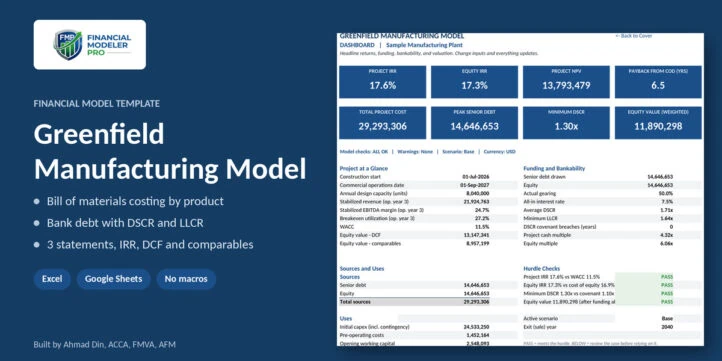
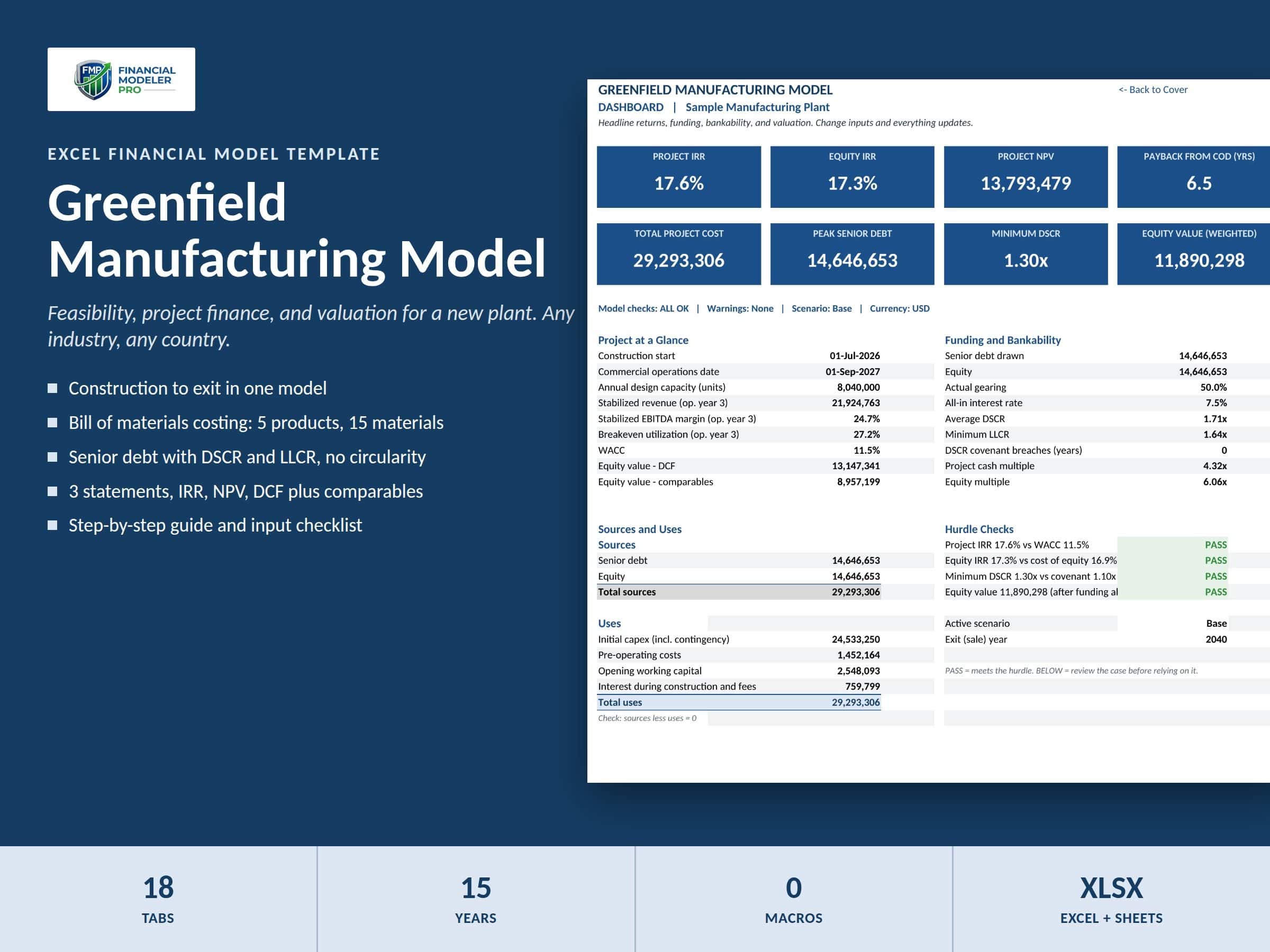
A full feasibility and valuation model for a new manufacturing plant in any industry, country, and currency. It costs each product from its bill of materials, plans capacity and production, sizes senior debt with DSCR and LLCR tests, and produces 3-statement financials, project and equity IRR, and a DCF plus comparables valuation. Interest during construction is solved without circular references. Works in Excel and Google Sheets, with no macros.
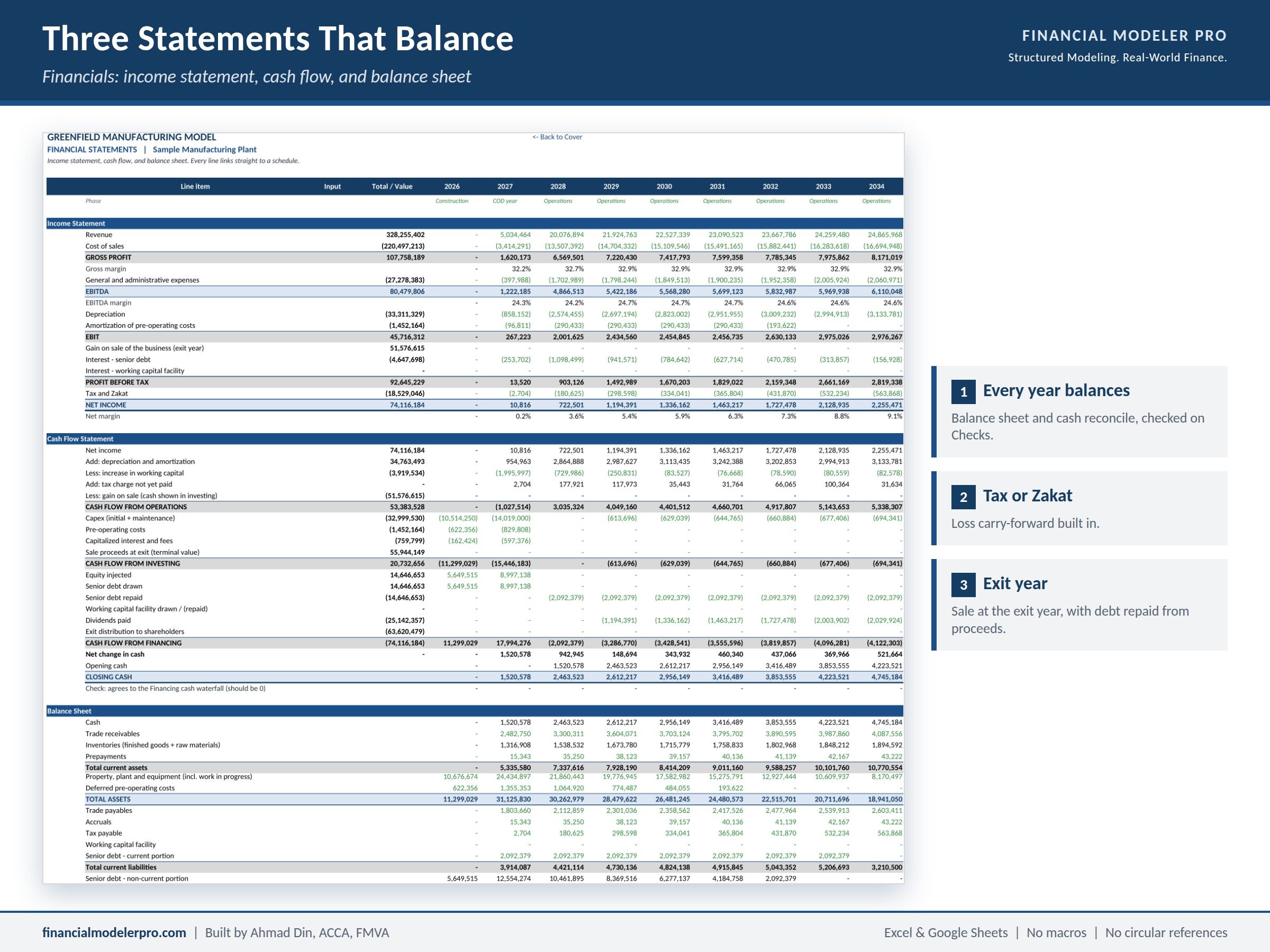
What is this model used for?
This template tells you whether a new factory is worth building. It follows the plant from the first month of construction, through commissioning and ramp-up, to a sale at the end of the holding period, and answers three questions: does the project earn enough, will a bank lend to it, and what is the business worth?
Use it for a feasibility study, a business plan, a bank loan submission, or an investor presentation. It suits any plant that turns raw materials into products: food, plastics, packaging, chemicals, building materials, textiles, and similar. The sample case is in USD and every figure can be replaced with your own.
What is included?
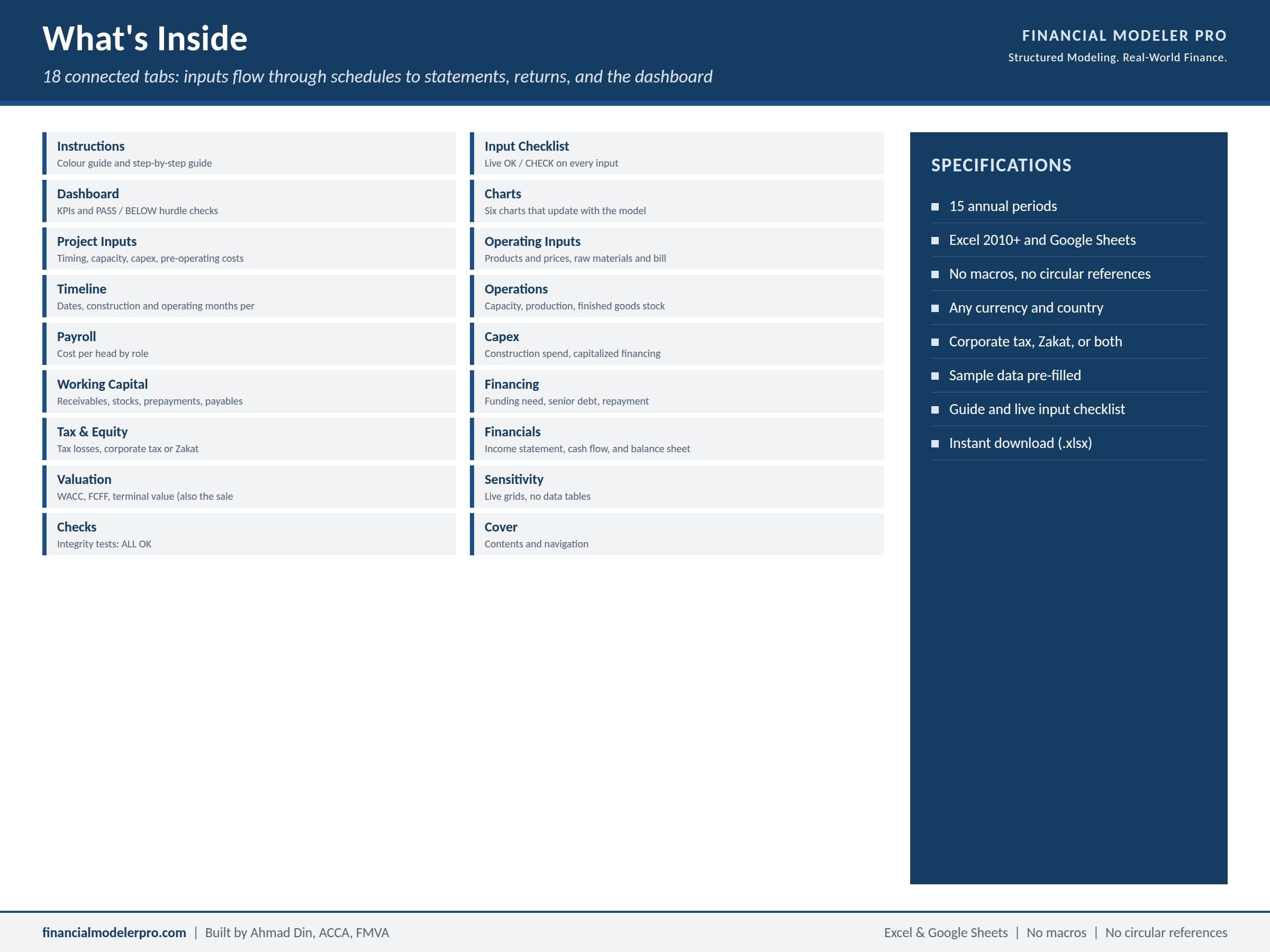
One Excel workbook with 18 linked tabs:
- Cover, Instructions, and an Input Checklist that shows OK or CHECK for each input group
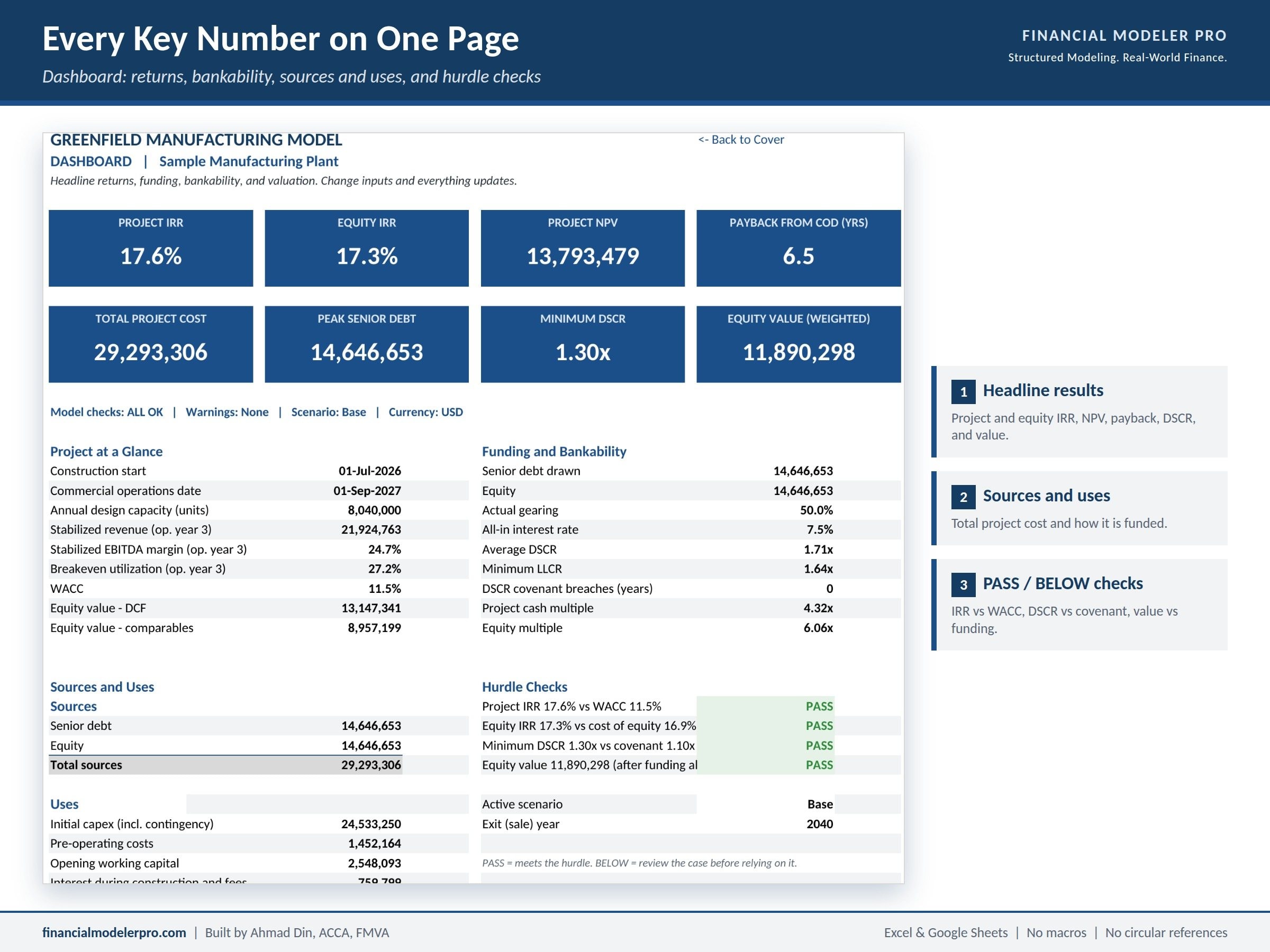
- Dashboard with eight headline KPIs, project at a glance, sources and uses, and hurdle checks (PASS or BELOW)
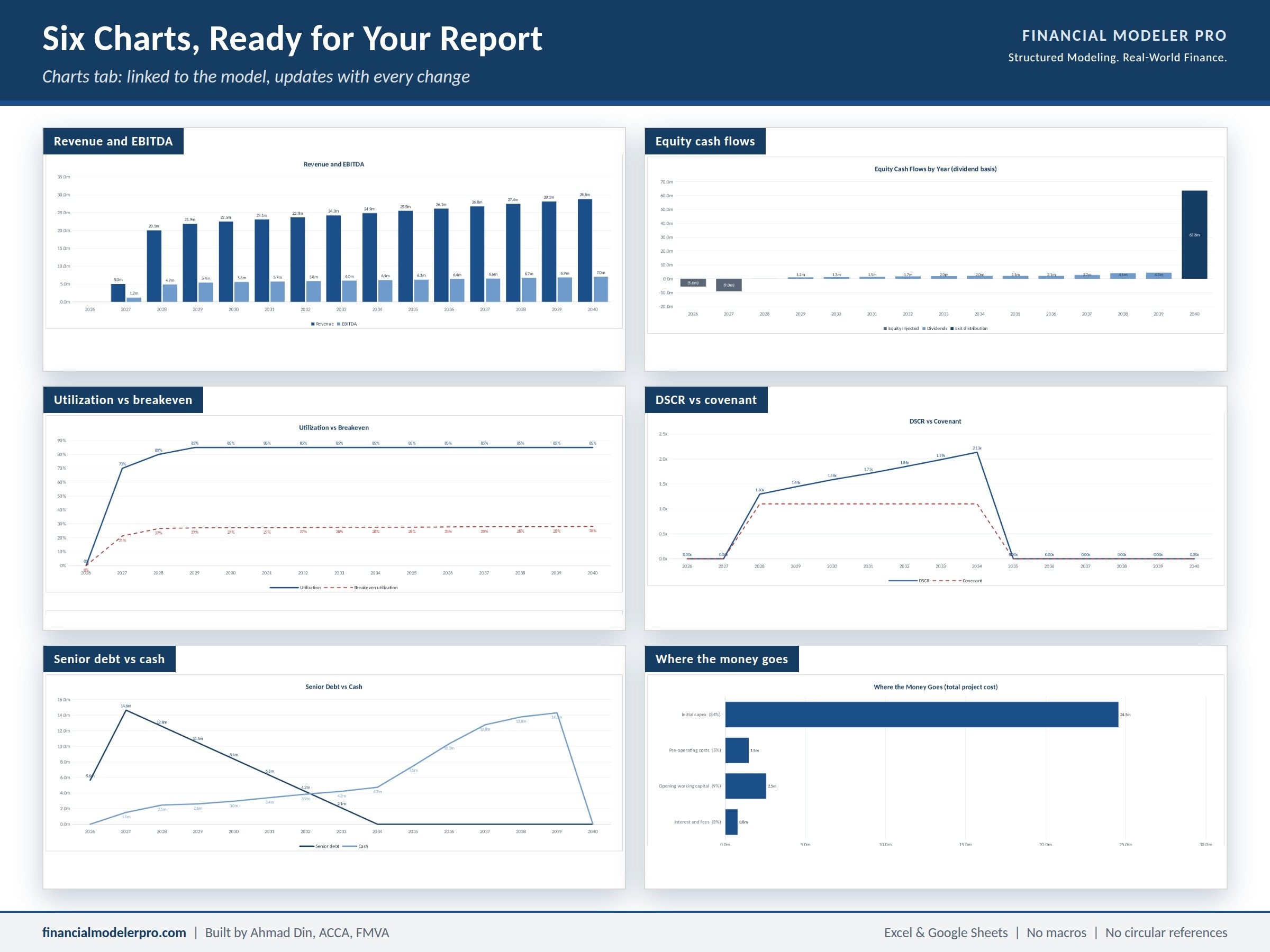
- Charts tab with six charts linked to the model
- Project Inputs: timing, capacity, capex, pre-operating costs, funding, tax, dividends, valuation, peers, and scenarios
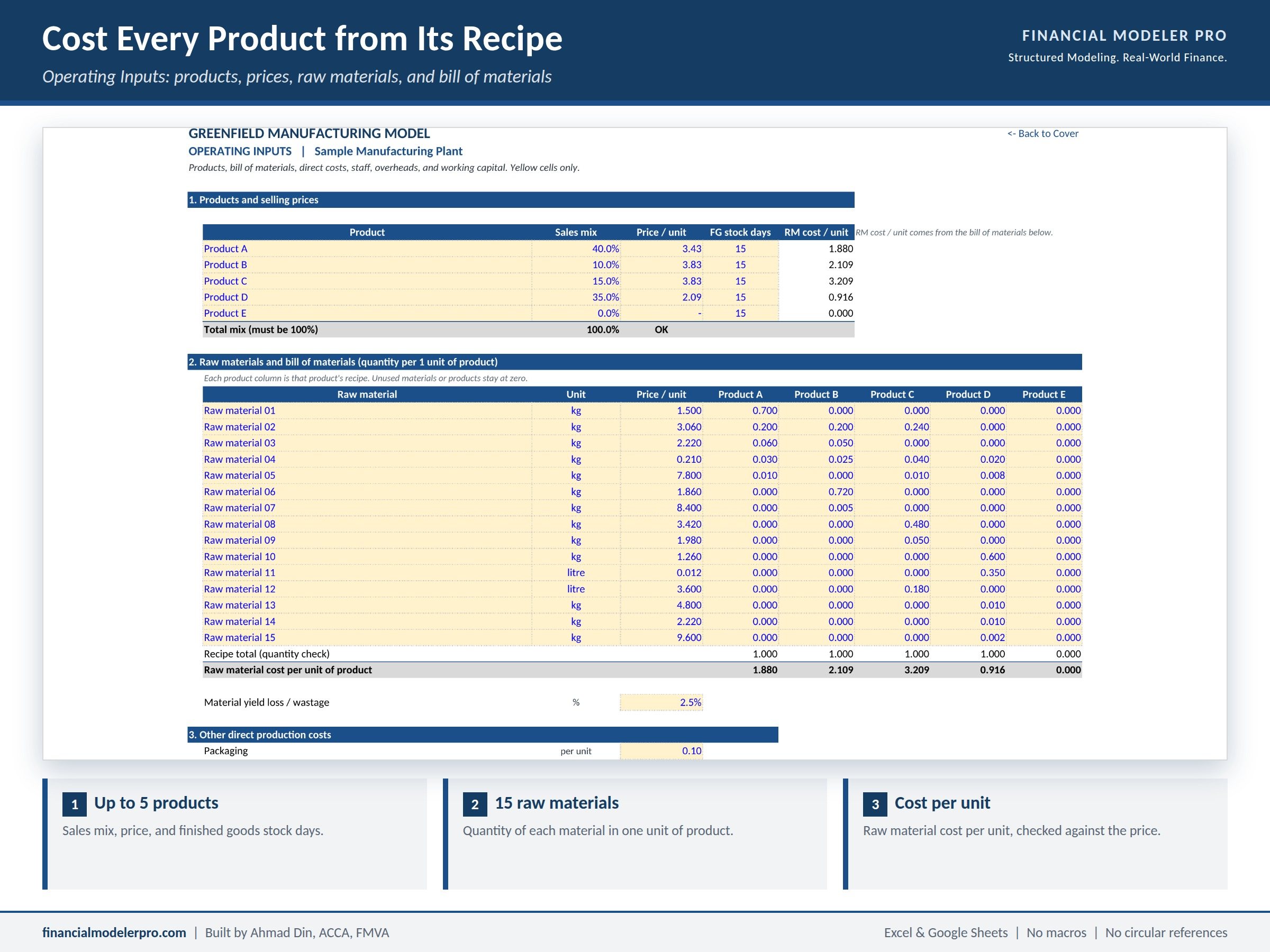
- Operating Inputs: products and prices, raw materials and bill of materials, direct costs, staff list, G&A, and working capital days
- Timeline, Operations, Payroll, Capex, Working Capital, Financing, and Tax & Equity schedules
- Financials: income statement, cash flow statement, and balance sheet
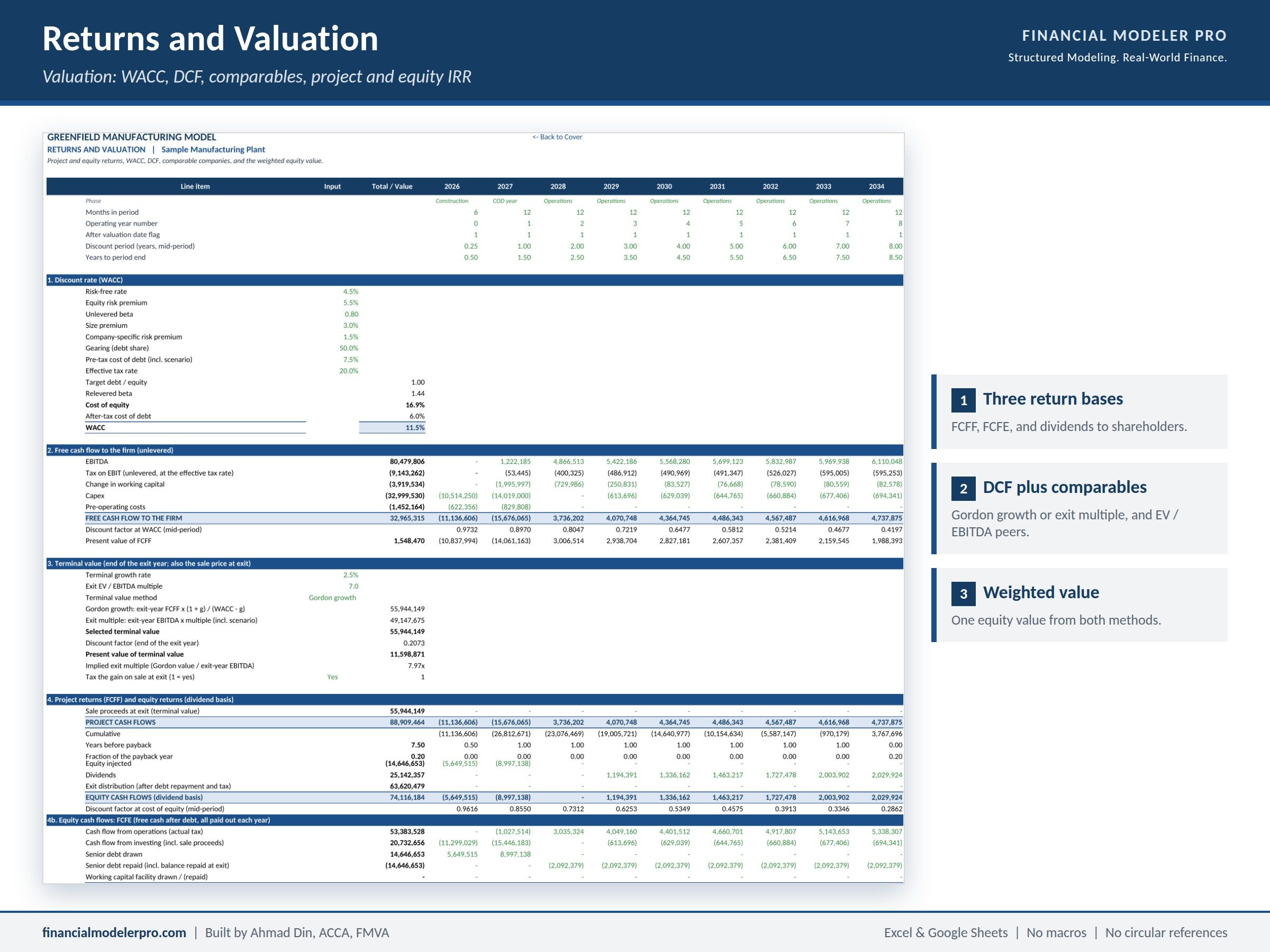
- Valuation, Sensitivity, and Checks
Main features
- Bill of materials costing: up to 5 products and 15 raw materials, with the quantity of each material in one unit of each product
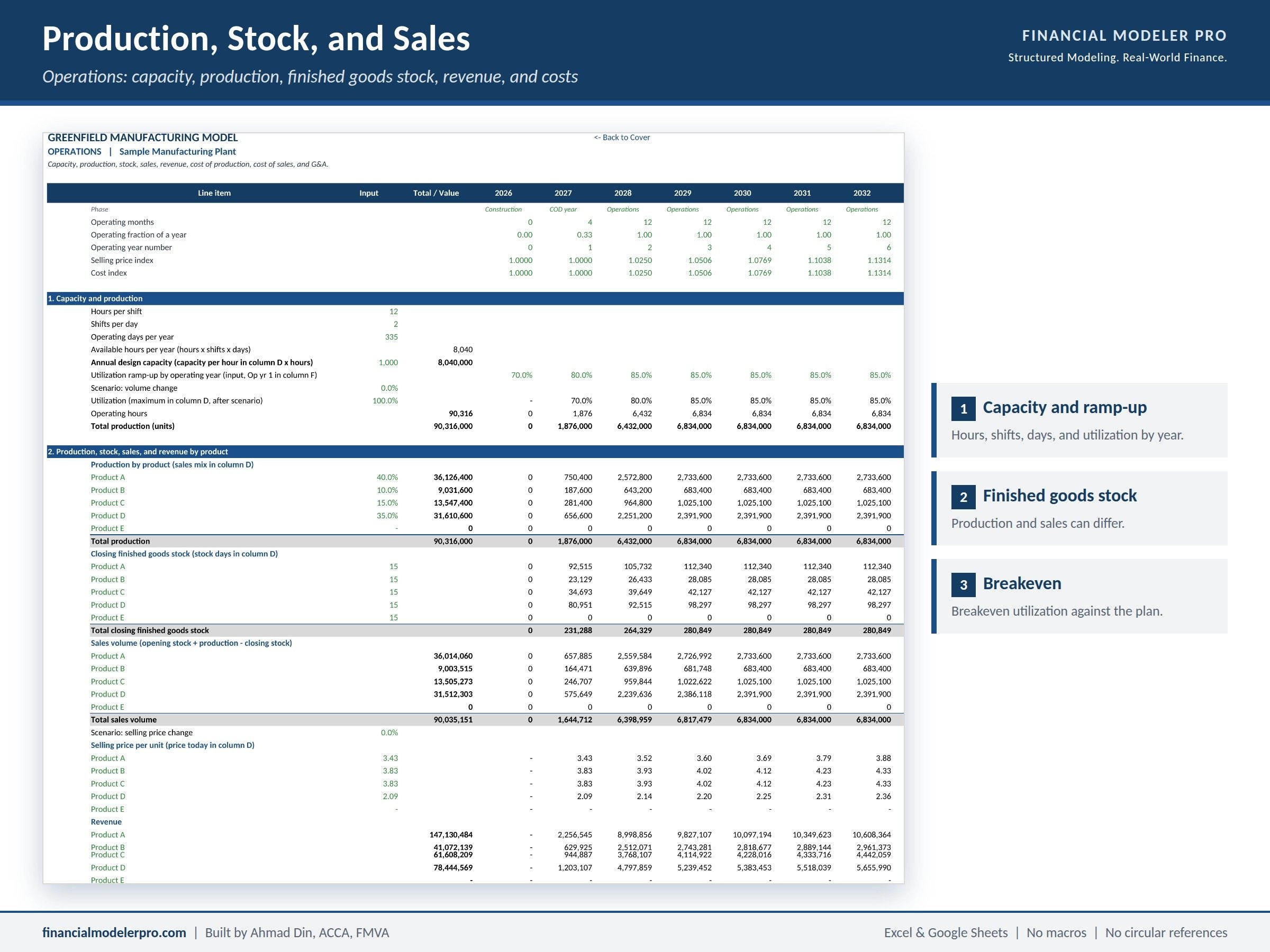
- Capacity built from output per hour, hours per shift, shifts per day, and operating days, with a utilization ramp-up by year
- Production, finished goods stock, and sales by product, with unit cost and breakeven utilization
- Staff list of up to 20 roles, split between direct labour and administration, with construction-phase payroll capitalized into project cost
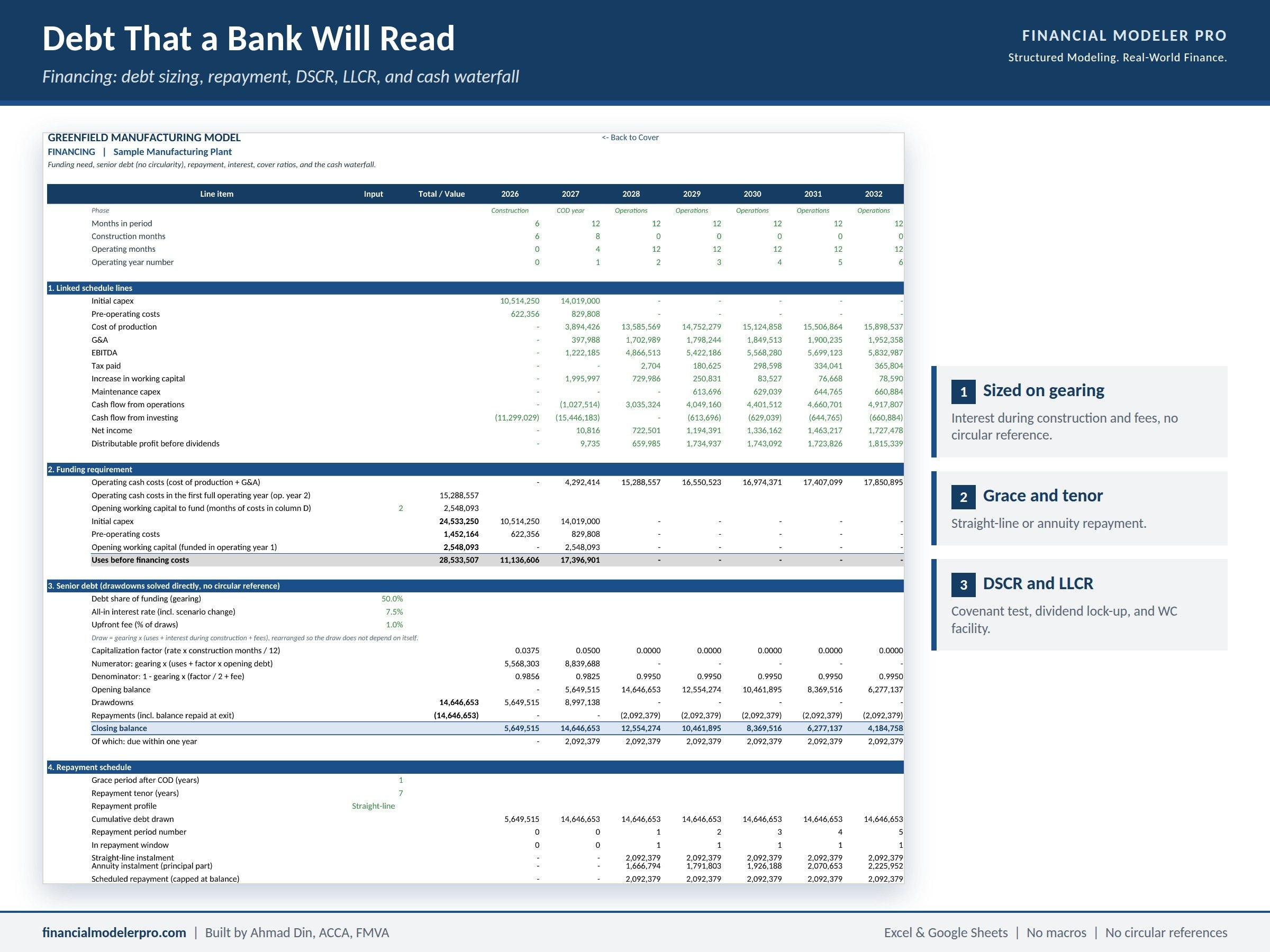
- Senior debt sized on gearing, with grace period, tenor, a choice of repayment profile, and interest during construction
- No circular references: financing costs during construction are solved in closed form, so the model never needs iterative calculation
- Lender tests: DSCR, LLCR, a minimum DSCR covenant, a dividend lock-up, minimum cash, and a working capital facility
- Valuation by DCF on free cash flow to the firm, cross-checked against EV / EBITDA of listed peers, and blended into one equity value
- Three return bases: project cash flow (FCFF), equity cash flow (FCFE), and dividends actually received by shareholders
- Base, Downside, and Upside scenarios on price, volume, raw materials, other costs, capex, interest rate, and exit multiple, switched from one cell
- Live sensitivity grids with no data tables, so they also work in Google Sheets
- Corporate tax with loss carry-forward, or Zakat for Saudi Arabia and the GCC, plus a statutory reserve
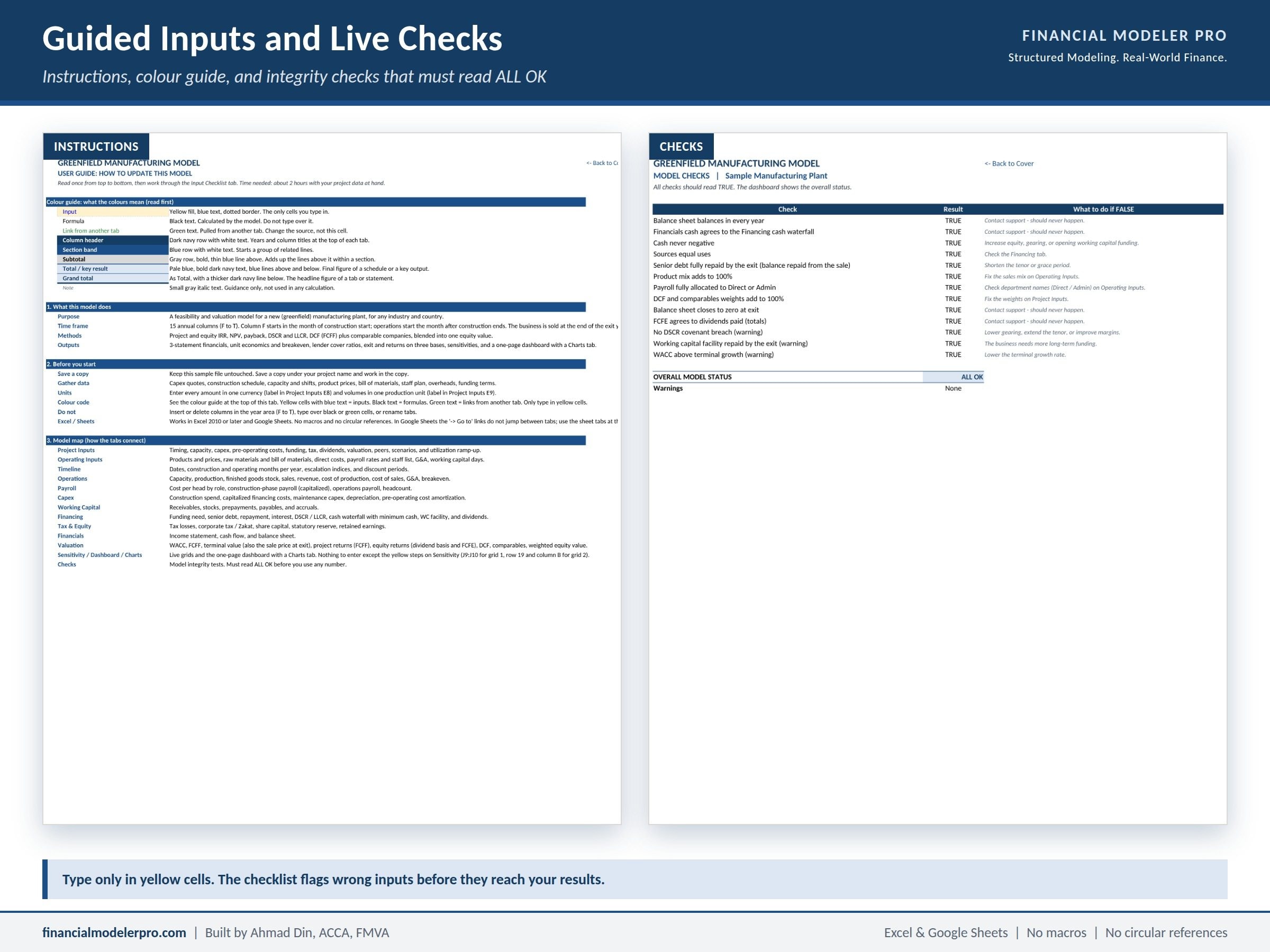
- Integrity checks that must read ALL OK before you rely on any number
How to work with the template
- Save a copy under your project name and open the Instructions tab. It starts with a colour guide and a map of how the tabs connect.
- Enter your figures in the yellow cells only, on Project Inputs and Operating Inputs. There are 16 numbered steps, and the Input Checklist shows what is still missing.
- Open the Checks tab and confirm it reads ALL OK.
- Read the Dashboard and Valuation tabs, then test the case on the Sensitivity tab and with the scenario switch.
A first full run takes about two hours with your project data to hand. All formulas are visible and no cell is locked, so you can trace or extend any line.
Why you need this model
Most factory templates start from a revenue guess. This one starts from the recipe: what goes into each unit, what it costs, how much the plant can make, and how many people it takes to run. That is how a lender’s technical adviser will look at your project, and it is why the margins in this model can be defended line by line. The financing side is built the same way, with the cover ratios and lock-up tests a bank expects to see.
Technical notes
- 15 annual periods, starting in the month construction begins
- Excel 2010 or later and Google Sheets
- No macros, no circular references, no external links, no merged cells
- One plant per file; operating years are annual
- Sample data is illustrative; replace it with your own
Licences
- Free PDF Preview: shows the layout and outputs before you buy
- Excel Model, Business Licence: for use inside your own company
- Excel Model, Consulting Licence: for use on client engagements
About the author
Built by Ahmad Din, ACCA, FMVA, AFM, a corporate finance and transaction advisory practitioner with 12+ years of experience across Saudi Arabia, the GCC, and Pakistan, and the founder of Financial Modeler Pro. Custom versions of this model are available on request through eFinancialModels.
Similar ProductsOther customers were also interested in...



 eFinancialModels
Electric Vehicle (EV) Charging Station Financial M...
With this comprehensive 5- or 10-year monthly tool, investors can assess the viability of setting up... Read more

Financial Model for Mobile App | Mobile App Busine...
The Mobile App Financial Plan Template in Excel allows you to develop financial projections when lau... Read more

 HenrySheykin
Food Truck Financial Model Excel Template
The Food Truck Financial Model helps entrepreneurs, founders, business owners, consultants, and anal... Read more

Green Hydrogen Production from Wind Energy Financi...
The Green Hydrogen from Wind Financial Model aims to comprehensively forecast a horizon of 40 years ... Read more

Simple Mutual Non-Disclosure Agreement Template
Protect your business secrets with ease using our Simple Mutual Non-Disclosure Agreement Template. S... Read more

Solar Energy Financial Model
The Solar Energy Financial Model Spreadsheet Template in Excel assists you in preparing a sophistica... Read more

 Peter Graf
The Customer-Centric Financial Model for Restauran...
Starting a restaurant without a financial plan is like driving a car blindfolded. You wouldn´t do i... Read more
You must log in to submit a review.