
0 ITEMS

13-Week Cash Flow & Liquidity Forecast Excel – Treasury Pro, Credit Facility, Stress Testing & Actual vs Forecast
Treasury Pro is a structured 13-week direct-method cash flow and liquidity planning model with weekly receipts, payments, cleared bank actuals, revolving credit management, Base/Upside/Downside scenarios, stress tests, manual forecast baselines, actual-versus-plan comparisons and a directional 52-week outlook. Includes 19 Excel worksheets, eight native dashboard charts and a separate 27-page English PDF guide.
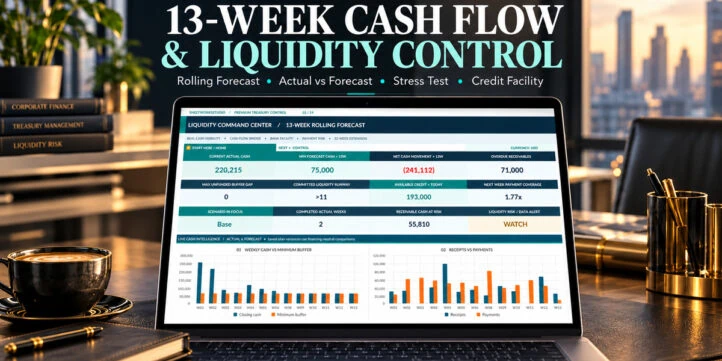


13-WEEK CASH FLOW & LIQUIDITY CONTROL – TREASURY PRO v2.4
Know when cash is coming in, which payments are approaching and how much liquidity remains available – with one connected Excel treasury control system.
Treasury Pro by SheetworksStudio combines a 13-week direct-method cash forecast, transaction schedules, cleared bank actuals, revolving credit facility planning, scenario analysis and saved-plan comparisons in one professional, fully editable Excel workbook.
Developed for CFOs, treasury teams, controllers, finance managers, business owners and financial consultants, the model supports a repeatable weekly cash management process.
Bring operational cash forecasting together with lending headroom, collection risk, liquidity warnings and transparent management reporting.
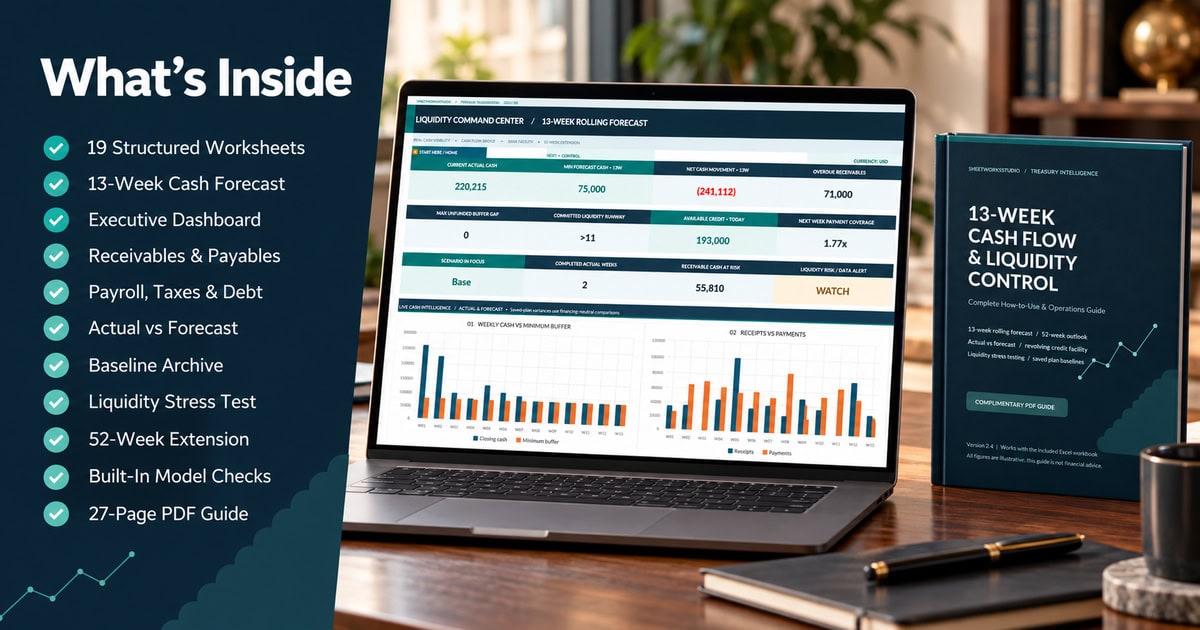
The digital package contains 19 structured Excel worksheets, eight native data-linked dashboard charts and a comprehensive 27-page English PDF operations guide.
📊 1. EXECUTIVE DASHBOARD & 13-WEEK CASH FORECAST
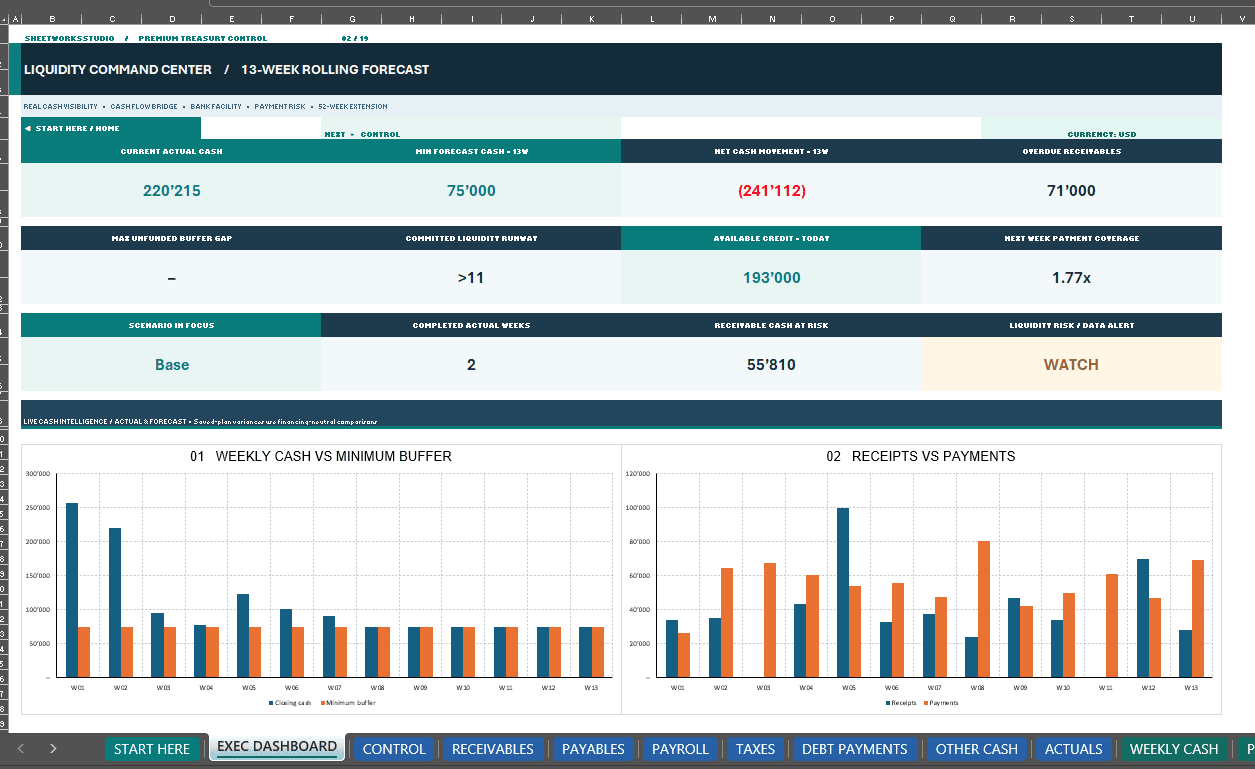
Review the key indicators behind short-term business liquidity through a professionally formatted Executive Dashboard.
Dashboard and Forecast Capabilities:
- Actual Unrestricted Cash
- Minimum Forecast Cash Across 13 Weeks
- Weekly Customer Collections and Other Receipts
- Supplier Payments, Payroll, Taxes and Debt Service
- Operating Costs and Capital Expenditures
- Net Operating Cash Movement
- Weekly Closing Cash Balances
- Minimum Operating Cash Buffer
- Funding Gaps and Liquidity Warnings
- Committed Liquidity Runway
- Next-Week Payment Coverage
- Overdue Receivables
- Estimated Receivable Cash at Risk
- Available Revolving Credit
- Eight Native Financial Charts
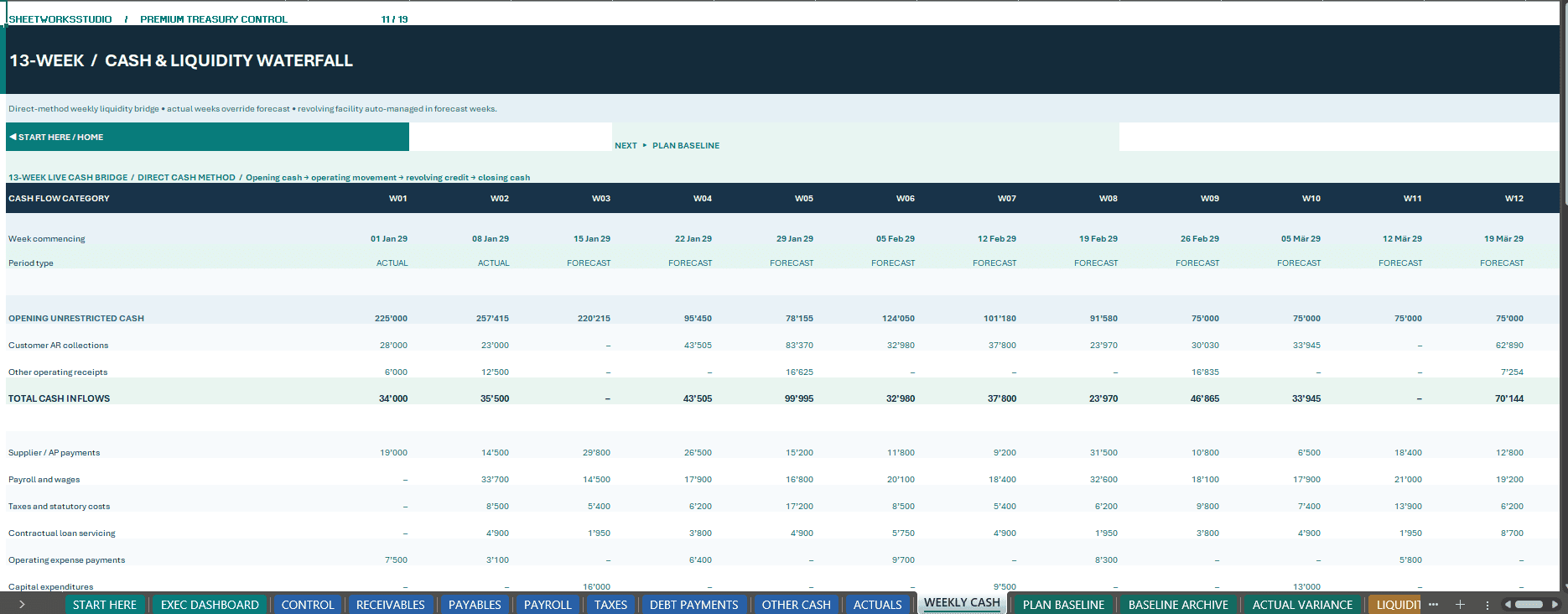
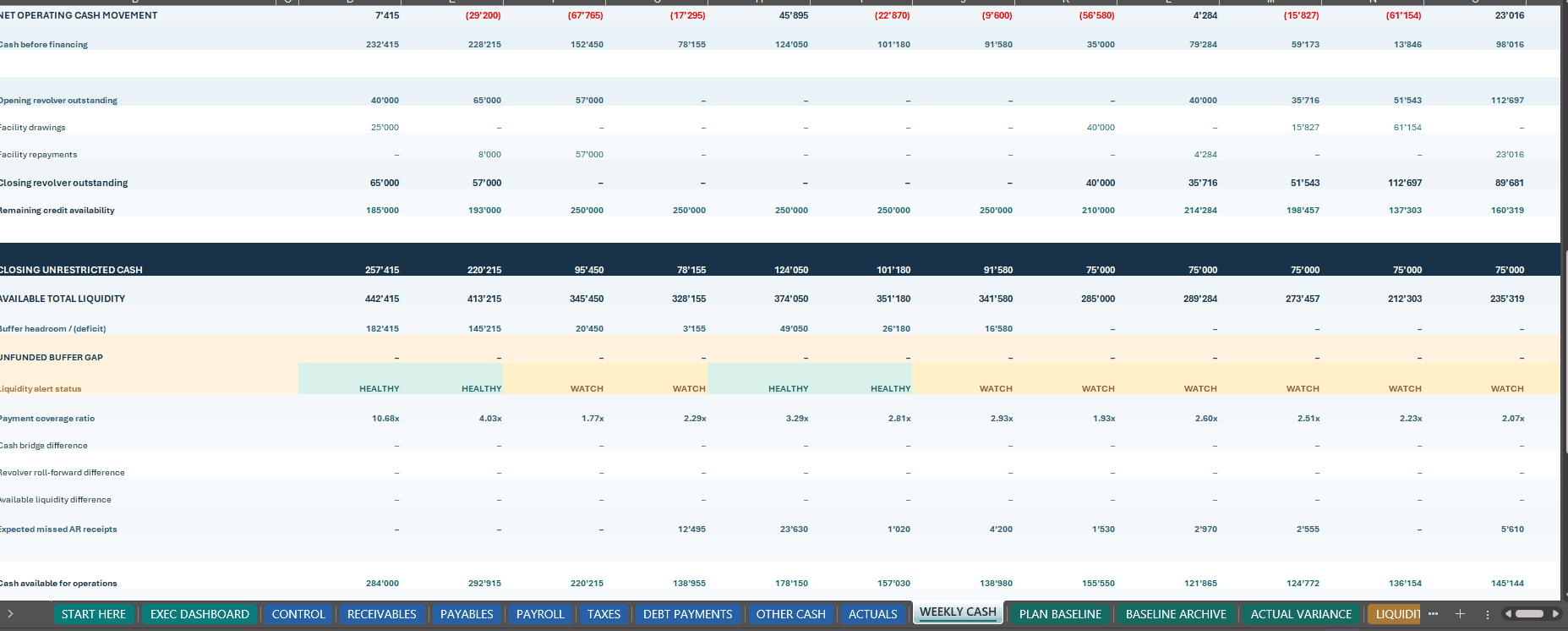
The 13-week forecast follows the direct cash flow method, combining transaction-level receipts and payments into a consistent weekly liquidity bridge.
Completed weeks use actual cleared bank transactions, while future weeks reflect scheduled receipts, outstanding obligations and the selected financial scenario.
This connected approach helps finance teams identify when cash is expected, when major payments are due and whether additional funding may be required.
💳 2. RECEIVABLES, PAYMENTS & REVOLVING CREDIT FACILITY
Manage essential operational cash movements through dedicated financial registers.
Accounts Receivable Planning
- Customer Invoice Records
- Invoice and Due Dates
- Expected Collection Dates
- Outstanding Receivable Balances
- Editable Collection Probabilities
- Expected Cash Receipts
- Overdue Receivable Identification
- Collection Risk Indicators
Payment & Expense Scheduling
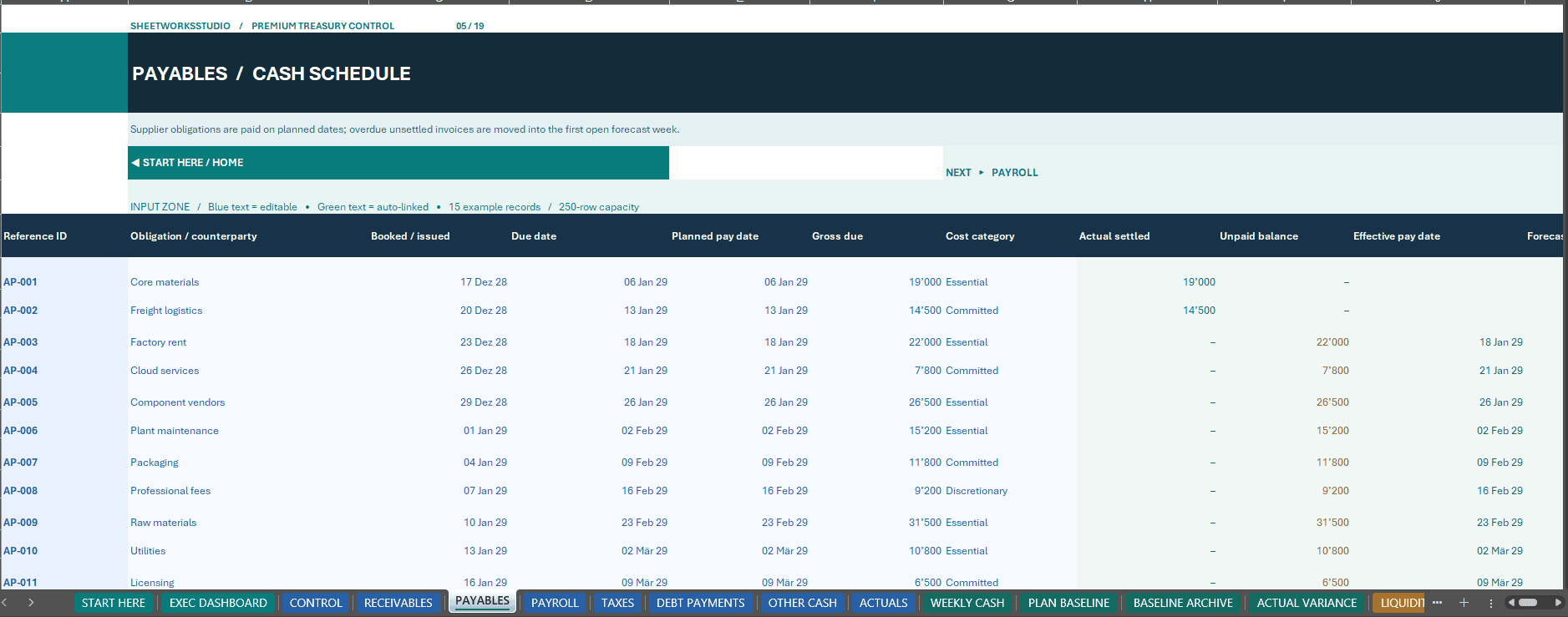
- Accounts Payable
- Supplier Obligations
- Payroll and Employee Payments
- Taxes and Statutory Costs
- Contractual Debt Payments
- Operating Expenses
- Capital Expenditure
- Other Cash Receipts and Payments
A dedicated ACTUALS worksheet records cleared bank transactions and links them to the relevant transaction reference IDs.
Revolving Credit Facility Modeling
- Committed Facility Limit
- Opening Credit Facility Balance
- Weekly Facility Drawdowns
- Revolving Credit Repayments
- Outstanding Loan Balances
- Available Facility Headroom
- Revolving Credit Interest
- Financing-Related Cash Movements
Facility borrowing is tracked separately from operating cash generation, providing a clearer distinction between operational liquidity and external financing.
🔄 3. BASE, UPSIDE & DOWNSIDE SCENARIOS
Evaluate how alternative operating conditions affect cash collection, payments and short-term liquidity.
Three Selectable Scenarios:
- Base
- Upside
- Downside
Editable Scenario Drivers Include:
- Receivable Collection Probabilities
- Collection Timing Adjustments
- Other Cash Receipt Multipliers
- Supplier Payment Timing
- Operating Expense Changes
- Payroll Cost Assumptions
- Tax Payment Adjustments
- Debt Service Assumptions
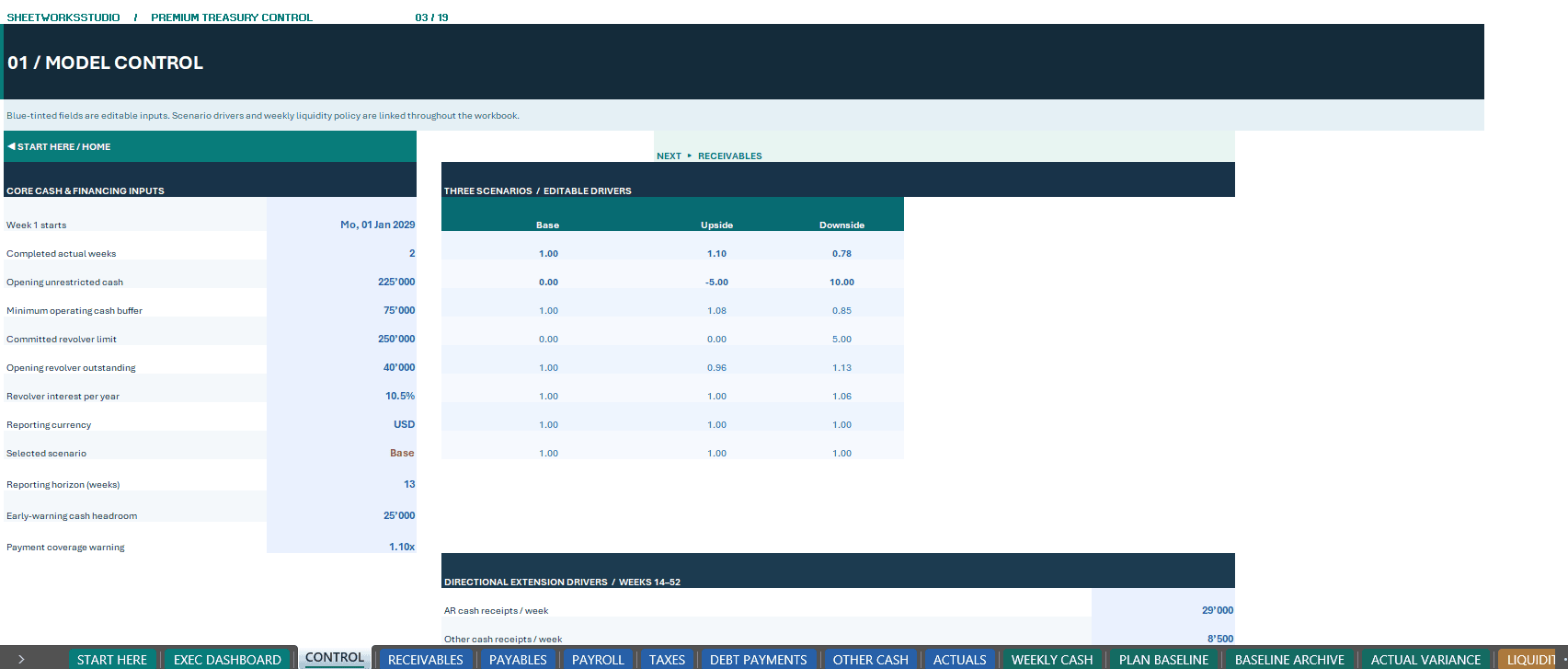
The central CONTROL worksheet allows users to select the active scenario and modify the associated drivers.
Scenario assumptions connect to the relevant transaction schedules and weekly financial calculations.
This supports comparison of potential liquidity outcomes without maintaining separate, disconnected cash-flow spreadsheets.
🔎 4. DEDICATED LIQUIDITY STRESS TESTING
Go beyond standard scenario planning with the separate LIQUIDITY STRESS worksheet.
Analyze potential short-term cash pressure using independently configurable stress assumptions.
Stress Testing Features:
- Future Customer Collection Haircuts
- Delayed Receivable Collections
- Increased Operating Cash Payments
- Stressed Weekly Cash Receipts
- Stressed Cash Outflows
- Revised Credit Facility Usage
- Remaining Credit Availability
- Minimum Cash Buffer Shortfalls
- Weekly Liquidity Pressure
- Stressed Closing Cash Balances
Actual completed weeks remain historical, while the stress assumptions primarily affect the remaining forecast periods.
The stress module helps treasury teams examine how slower customer payments and higher costs could influence liquidity requirements.
Important: Incremental interest generated by stressed facility usage is not fully repriced through an iterative debt-interest calculation. Stress results are intended for directional liquidity analysis.
↔ 5. SAVED BASELINES & ACTUAL-VS-FORECAST ANALYSIS
Improve weekly financial control by comparing actual cash movements against an archived original forecast.
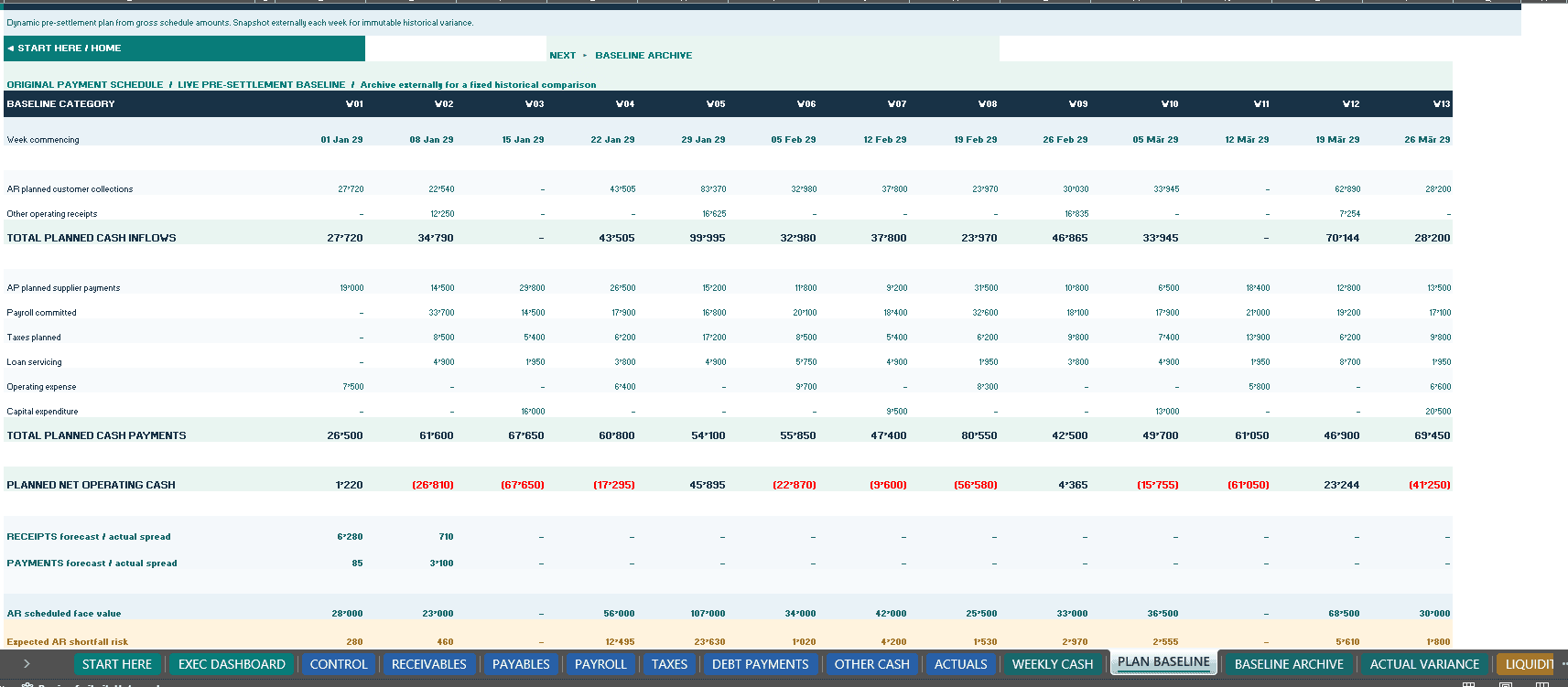
PLAN BASELINE
The live baseline worksheet presents the original planned cash receipts and payments before historical results are finalized.
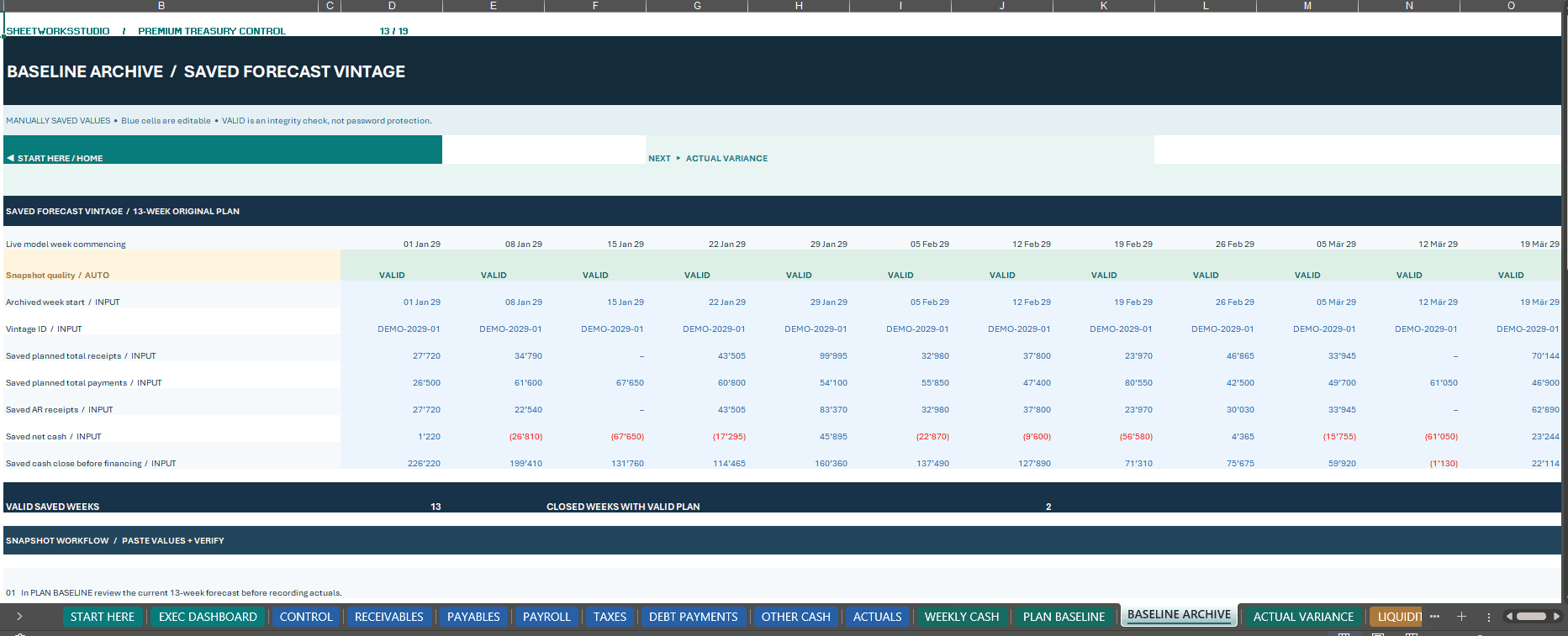
BASELINE ARCHIVE
Preserve fixed forecast snapshots using manual Paste Special → Values.
The archive includes controls for:
- Missing Forecast Snapshots
- Incomplete Saved Plans
- Mismatched Forecast Dates
- Snapshot Vintage Identification
- Saved Weekly Cash Receipts
- Saved Weekly Payments
- Original Net Cash Movement
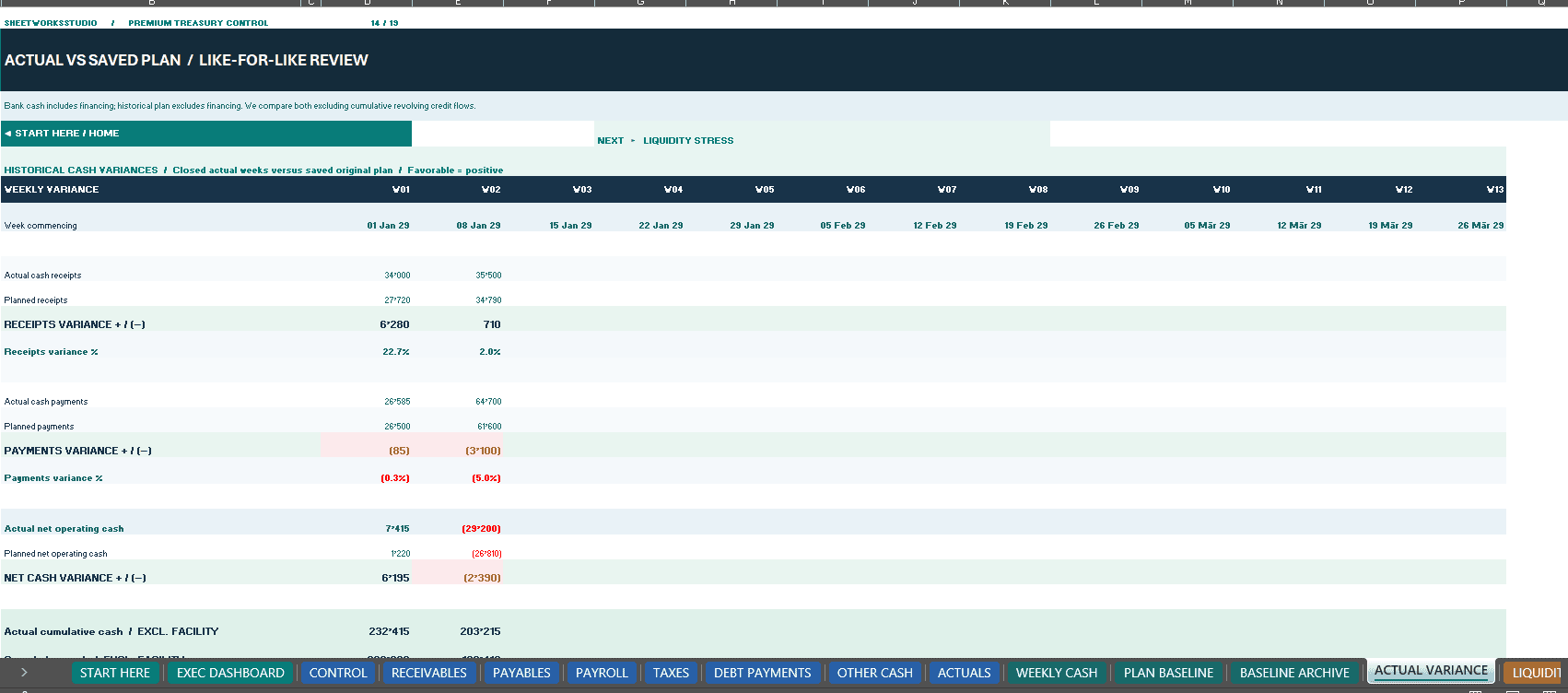
ACTUAL VARIANCE
Review completed actual weeks against valid saved forecast snapshots.
Included Variance Analysis:
- Actual Cash Receipts
- Actual Cash Payments
- Actual Net Operating Cash
- Saved Planned Operating Cash
- Weekly Net Cash Variances
- Cumulative Cash Variances
- Receivable Collection Variances
- Bank Cash Reconciliation
The variance analysis uses a financing-neutral comparison, helping users distinguish operating cash differences from revolving credit drawings and repayments.
Snapshots are maintained manually. The workbook does not automatically create historical forecast archives or import bank transactions.
◷ 6. DIRECTIONAL 52-WEEK LIQUIDITY OUTLOOK
Extend treasury planning beyond the detailed 13-week forecast.
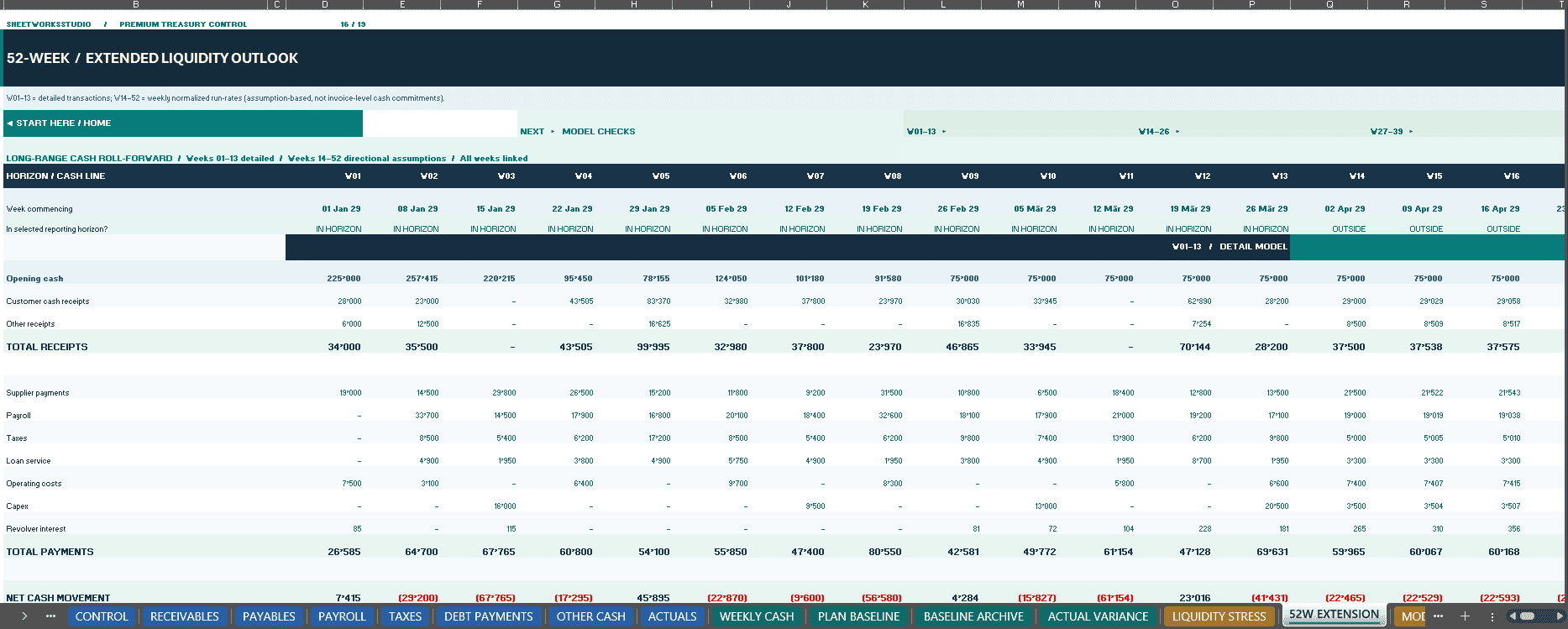
The integrated 52W EXTENSION provides a longer-range financial perspective.
Forecast Structure:
- Weeks 1–13: Linked Detailed Cash Forecast
- Weeks 14–52: Editable Run-Rate Assumptions
Available Financial Outputs:
- Projected Cash Receipts
- Scheduled and Assumption-Based Payments
- Net Cash Movement
- Revolving Credit Usage
- Available Facility Headroom
- Weekly Closing Cash
- Liquidity Buffer Shortfalls
- Potential Funding Requirements
The extended outlook helps users examine medium-term liquidity trends and potential financing pressure.
This module is a directional forecast based on simplified run-rate assumptions, not a separate transaction-by-transaction 52-week cash planning engine.
✅ 7. MODEL INTEGRITY & FINANCIAL CONTROLS
The dedicated MODEL CHECKS worksheet provides an integrated review of financial reconciliations and transaction data quality.
Control Areas Include:
- Weekly Cash Flow Bridges
- Credit Facility Roll-Forward
- Weekly Opening and Closing Cash Continuity
- 52-Week Cash Flow Reconciliation
- Revolving Credit Commitment Limits
- Bank Transaction Validation
- Duplicate Bank Identifiers
- Invalid Schedule References
- Excessive Invoice Collections
- Payment Over-Settlements
- Forecast Scenario Validity
- Baseline Archive Validity
- Actual-Vs-Plan Cash Reconciliation
Additional financial warnings highlight relevant liquidity risks, including cash shortfalls, unpaid supplier obligations and overdue receivables.
A technical PASS confirms the relevant programmed reconciliation checks. It does not establish sufficient liquidity, acceptable credit risk or guaranteed financing availability.
The workbook also provides internal worksheet navigation, differentiated manual input areas, automated calculations and data-validation dropdowns.
📦 8. WHAT’S INCLUDED
FILE 1 — TREASURY PRO v2.4 EXCEL WORKBOOK (.XLSX)
One editable Excel financial model containing:
- 19 Structured Worksheets
- Detailed 13-Week Cash Flow Forecast
- Eight Native Executive Dashboard Charts
- Receivables and Payables Registers
- Payroll and Tax Schedules
- Contractual Debt Payments
- Other Cash Receipts and Expenses
- Cleared Bank Actuals
- Revolving Credit Facility Calculations
- Base, Upside and Downside Scenarios
- Dedicated Liquidity Stress Testing
- Live Plan Baseline
- Manual Baseline Archive
- Actual-Vs-Forecast Variance Analysis
- Directional 52-Week Cash Outlook
- Financial Model Controls
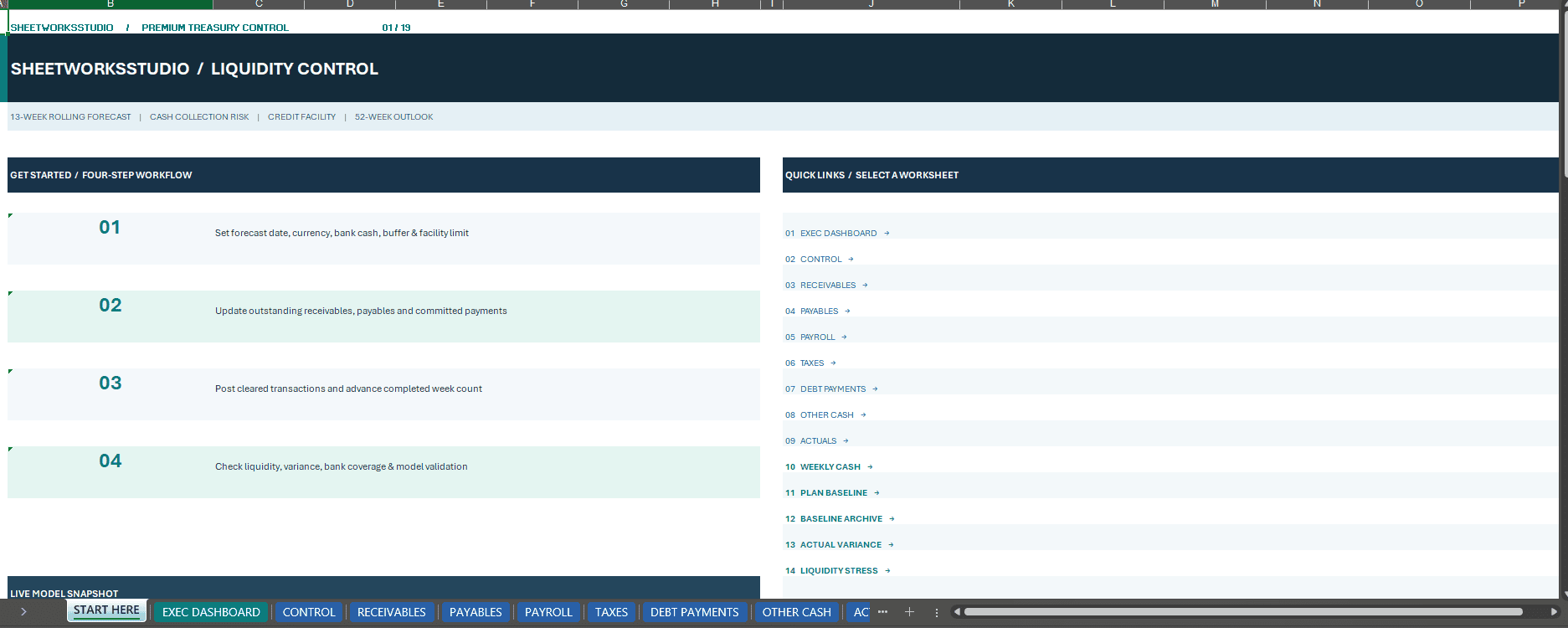
- Embedded Workbook User Guide
FILE 2 — COMPLETE HOW-TO-USE & OPERATIONS GUIDE (.PDF)
A comprehensive 27-page English operations manual covering:
- Initial Workbook Setup
- Worksheet Navigation
- Cash Forecasting Methodology
- Customer Collections and Payment Scheduling
- Revolving Credit Facility Planning
- Cleared Bank Transaction Recording
- Baseline Archive Procedures
- Actual-Vs-Forecast Comparisons
- Scenario Selection
- Liquidity Stress Testing
- Weekly Treasury Review Procedures
- Dashboard KPI Definitions
- Model Checks and Troubleshooting
- Practical Examples
- Important Financial Modeling Limitations
Both purchased files are supplied together in one downloadable ZIP package.
The complete 27-page PDF operations guide may also be offered separately as a complimentary download. The free guide does not include the paid Excel model.
9. WHO IS THIS MODEL FOR?
Designed for:
- Chief Financial Officers
- Corporate Treasury Teams
- Financial Controllers
- Finance Managers
- Business Owners
- FP&A Professionals
- Cash Flow Consultants
- Turnaround and Restructuring Professionals
- Financial Advisers
- Small and Medium-Sized Business Finance Teams
Treasury Pro is particularly suitable for professionals who require a repeatable, structured process for weekly operating cash forecasting, financing oversight and liquidity risk analysis.
🧭 10. PRACTICAL WEEKLY WORKFLOW
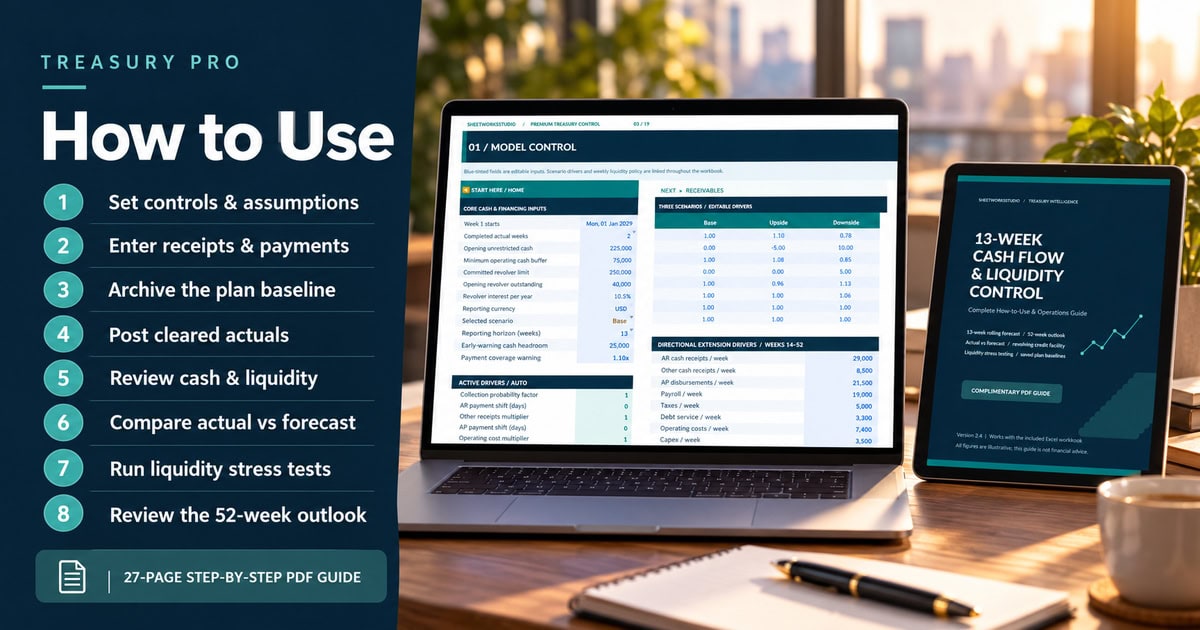
STEP 1 — CONFIGURE THE MODEL
Open CONTROL and enter the forecast start date, opening bank cash, credit facility assumptions, minimum cash buffer and selected scenario.
STEP 2 — UPDATE TRANSACTION SCHEDULES
Replace fictional receivables, payables, payroll, taxes, debt obligations and other cash records with your own financial information.
STEP 3 — REVIEW THE INITIAL FORECAST
Check the 13-week cash forecast, available financing, payment coverage and model integrity controls.
STEP 4 — SAVE THE ORIGINAL PLAN
Archive the baseline using Paste Special → Values before recording actuals or making subsequent forecast revisions.
STEP 5 — RECORD CLEARED TRANSACTIONS
Enter cleared bank transactions in ACTUALS and update the completed actual weeks.
STEP 6 — REVIEW FINANCIAL PERFORMANCE
Analyze the Executive Dashboard, actual-versus-plan variances, revolving credit balances and liquidity warnings.
STEP 7 — TEST DOWNSIDE ASSUMPTIONS
Use LIQUIDITY STRESS to examine potential funding pressure and review the directional 52-week outlook.
11. TECHNICAL SPECIFICATIONS
- Product: 13-Week Cash Flow & Liquidity Control
- Edition: Treasury Pro v2.4
- Detailed Forecast: 13 Weekly Periods
- Extended Outlook: 52 Weekly Periods
- Worksheets: 19
- Native Dashboard Charts: 8
- Scenarios: Base, Upside, Downside
- Stress Testing: Dedicated 13-Week Module
- Baseline Archive: Manual Snapshot System
- Documentation: 27-Page English PDF Guide
- Illustrative Sample Data: Fictional 2029 Transactions
- File Formats: XLSX + PDF
- Recommended Software: Microsoft Excel Desktop
- Macros / VBA: Not Required
- Automated External Data Connections: Not Required
- Delivery: Digital ZIP Download
Software Compatibility: Microsoft Excel Desktop is recommended. Google Sheets import and functional compatibility have not been independently verified. Equivalent calculations, charts, dropdowns, navigation and formatting are therefore not guaranteed.
12. IMPORTANT MODEL LIMITATIONS & DISCLAIMER
Treasury Pro is a weekly cash-flow and liquidity management template. It is not a complete accounting ledger, audited financial reporting system or automated bank reconciliation application.
The workbook does not provide accrual-based financial statements, comprehensive daily cash testing, foreign-exchange conversion, automated bank feeds, complete lending covenant calculations or borrowing-base certification.
Longer-range liquidity projections depend on simplified assumptions. The stress module does not fully iteratively reprice incremental revolving credit interest.
All supplied transactions, example cash balances, credit facility amounts and financial forecasts are fictional and provided exclusively to demonstrate the workbook’s functionality.
The model is an independent, unofficial SheetworksStudio template and is not affiliated with any bank or lending institution.
It does not constitute accounting, financial, legal, tax, lending or investment advice.
Users should replace all illustrative assumptions with independently verified financial information and review relevant financing agreements and cash requirements before making business decisions.
FORECAST CASH. PROTECT LIQUIDITY. MANAGE CREDIT. TRACK ACTUALS.
One Connected Excel System for Professional Weekly Cash Management and Treasury Planning.
SheetworksStudio | Professional Financial Modeling Templates
Similar ProductsOther customers were also interested in...



 eFinancialModels
Electric Vehicle (EV) Charging Station Financial M...
With this comprehensive 5- or 10-year monthly tool, investors can assess the viability of setting up... Read more

Financial Model for Mobile App | Mobile App Busine...
The Mobile App Financial Plan Template in Excel allows you to develop financial projections when lau... Read more

 HenrySheykin
Food Truck Financial Model Excel Template
The Food Truck Financial Model helps entrepreneurs, founders, business owners, consultants, and anal... Read more

Green Hydrogen Production from Wind Energy Financi...
The Green Hydrogen from Wind Financial Model aims to comprehensively forecast a horizon of 40 years ... Read more

Simple Mutual Non-Disclosure Agreement Template
Protect your business secrets with ease using our Simple Mutual Non-Disclosure Agreement Template. S... Read more

Solar Energy Financial Model
The Solar Energy Financial Model Spreadsheet Template in Excel assists you in preparing a sophistica... Read more

 Peter Graf
The Customer-Centric Financial Model for Restauran...
Starting a restaurant without a financial plan is like driving a car blindfolded. You wouldn´t do i... Read more
You must log in to submit a review.