
0 ITEMS

Self-Storage Development & Acquisition Model Pro
The Self-Storage Development & Acquisition Model Pro is an institutional-grade Excel template that underwrites a self-storage facility either way you approach it — as a ground-up development or as the acquisition of an existing, operating property — from a single toggle. Flip one input and every tab reconfigures: uses of funds, the debt structure, the timeline, and the return waterfall all switch between a 12-month construction build and a day-one operating acquisition, without breaking a balance check.
Overview
The Self-Storage Development & Acquisition Model Pro is an institutional-grade Excel template that underwrites a self-storage facility either way you approach it — as a ground-up development or as the acquisition of an existing, operating property — from a single toggle. Flip one input and every tab reconfigures: uses of funds, the debt structure, the timeline, and the return waterfall all switch between a 12-month construction build and a day-one operating acquisition, without breaking a balance check.
The model runs 10-year annual projections (plus a month-by-month construction budget in Development mode) across 15 fully linked worksheets, with roughly 8,900 auto-calculating formulas, zero macros, and zero circular references. It delivers three complete, integrated financial statements with a visible balance check on every year, a granular six-type unit mix with an ECRI revenue engine, an itemized four-stream ancillary income stack, a full US cost-segregation tax module (MACRS with parameterizable bonus depreciation, NOL carryforward, and exit-gain tax with deferred-tax unwind), a construction-loan-to-permanent-takeout-to-refinancing debt schedule with DSCR covenant tracking, a GP/LP equity waterfall, a DCF, live sensitivity tables, and a 12-KPI executive dashboard — all driven from one Assumptions tab.
Why This Model
Most self-storage templates pick a side. Acquisition-underwriting models price an existing facility off an in-place cap rate but have no ground-up development path; development models build a construction budget and lease-up but cannot underwrite buying the facility next door. A real storage investor does both, and compares them. This model was built to hold both strategies in one workbook and to sit them on top of a genuinely integrated three-statement engine:
- Development / Acquisition toggle — one input switches the entire model between ground-up development (S-curve construction budget, capitalized IDC, construction loan → permanent takeout) and acquisition of an existing facility (price = in-place NOI ÷ going-in cap, optional value-add capex, permanent loan day one). None of the leading templates we benchmarked combines ground-up development and acquisition in one workbook.
- Six-type unit mix with a climate-controlled premium — units, net rentable square feet, and street rate for each of six unit types (5×5 through 10×30), plus a climate-controlled share and rate premium, rolling up to total NRSF, gross potential rent, and a blended street rate.
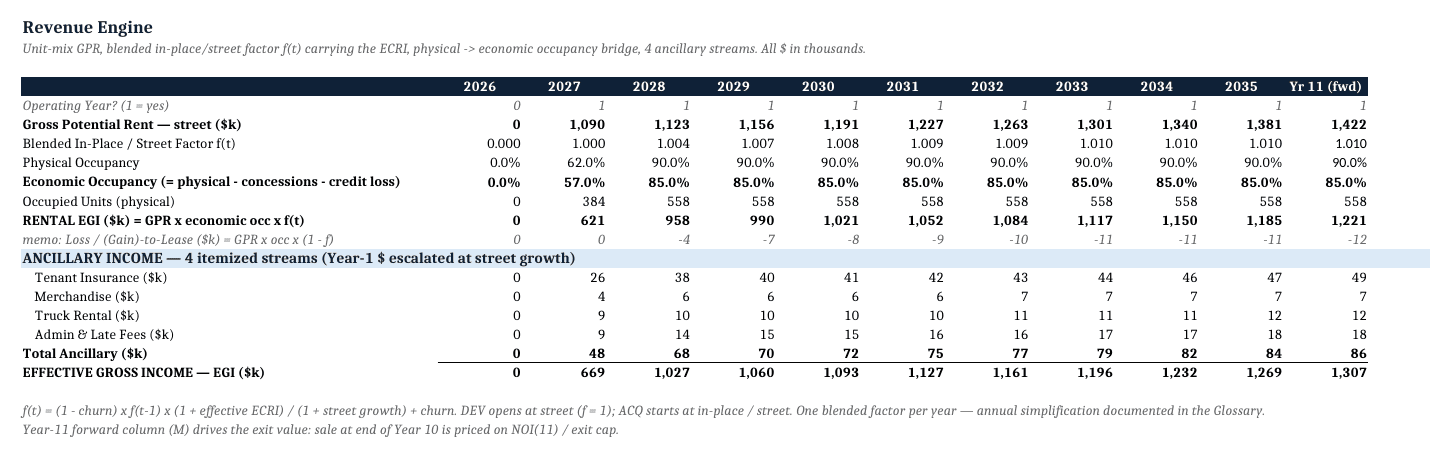
- ECRI revenue engine — street-rate growth, existing-customer rate increases net of induced vacates, and an explicit blended in-place/street factor, with a physical-to-economic occupancy bridge (concession and credit-loss gaps). ECRI underwriting exists in dedicated acquisition models; here it is integrated across the full 10-year horizon and three statements.
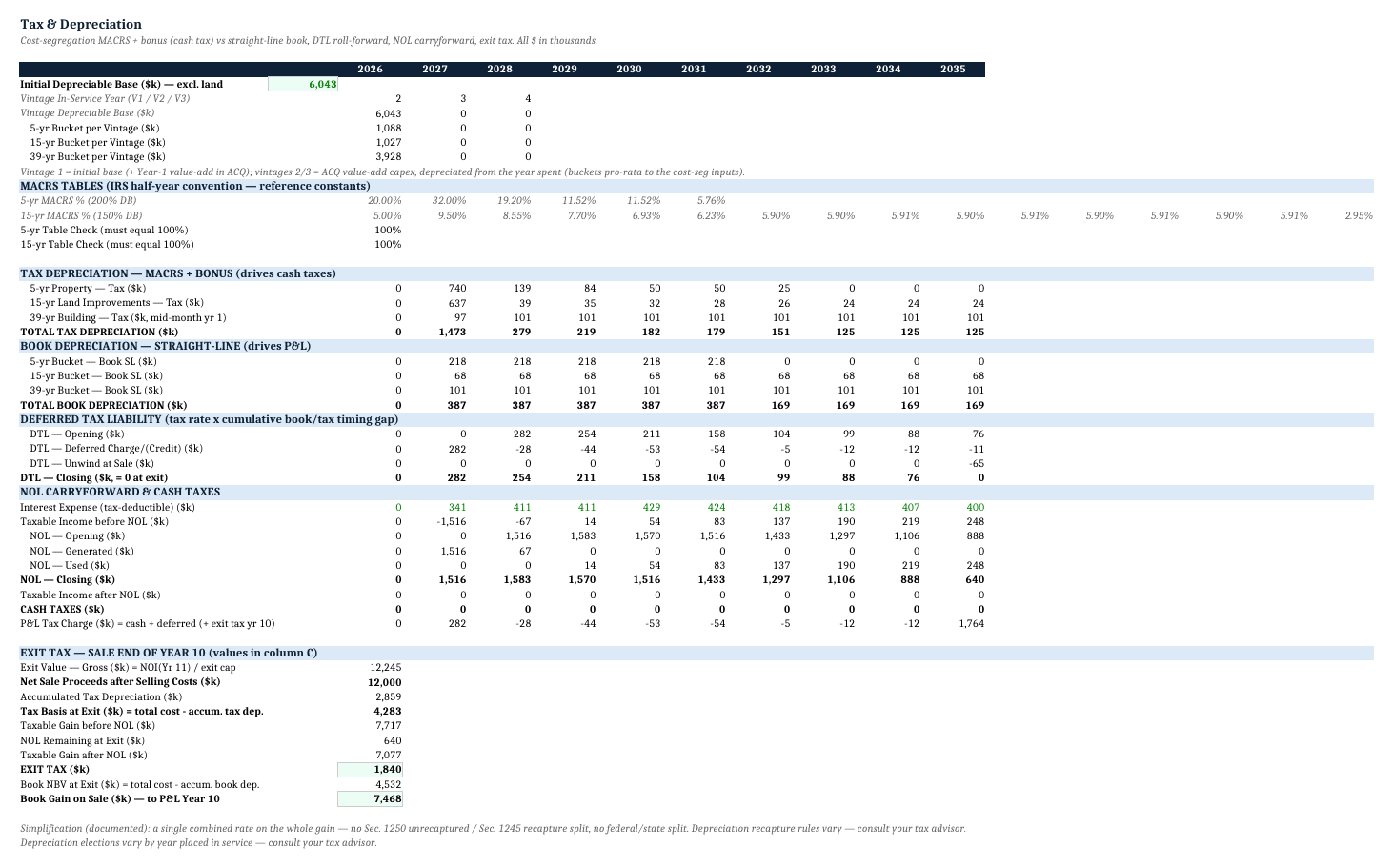
- US cost-segregation tax module — three MACRS buckets (5-year personal property, 15-year land improvements, 39-year straight-line building), a parameterizable bonus depreciation rate (0–100%), NOL carryforward, and tax on the disposition gain computed on the post-MACRS tax basis with the deferred tax liability unwound at exit. None of the benchmarked listings mentions cost-segregation MACRS or bonus depreciation.
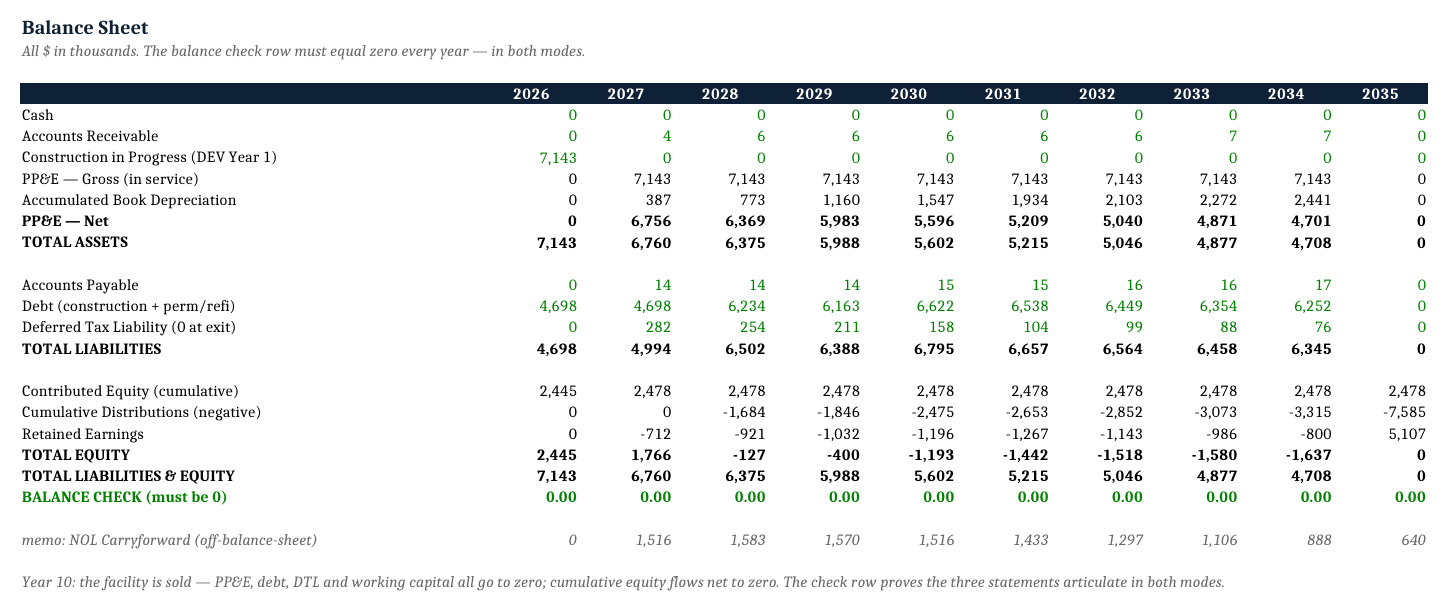
- Full 3-statement integration with a visible balance check — linked P&L, Cash Flow, and Balance Sheet with a balance check displayed on every year that must equal zero, and the deferred tax liability fully settled at sale (no orphan liability).
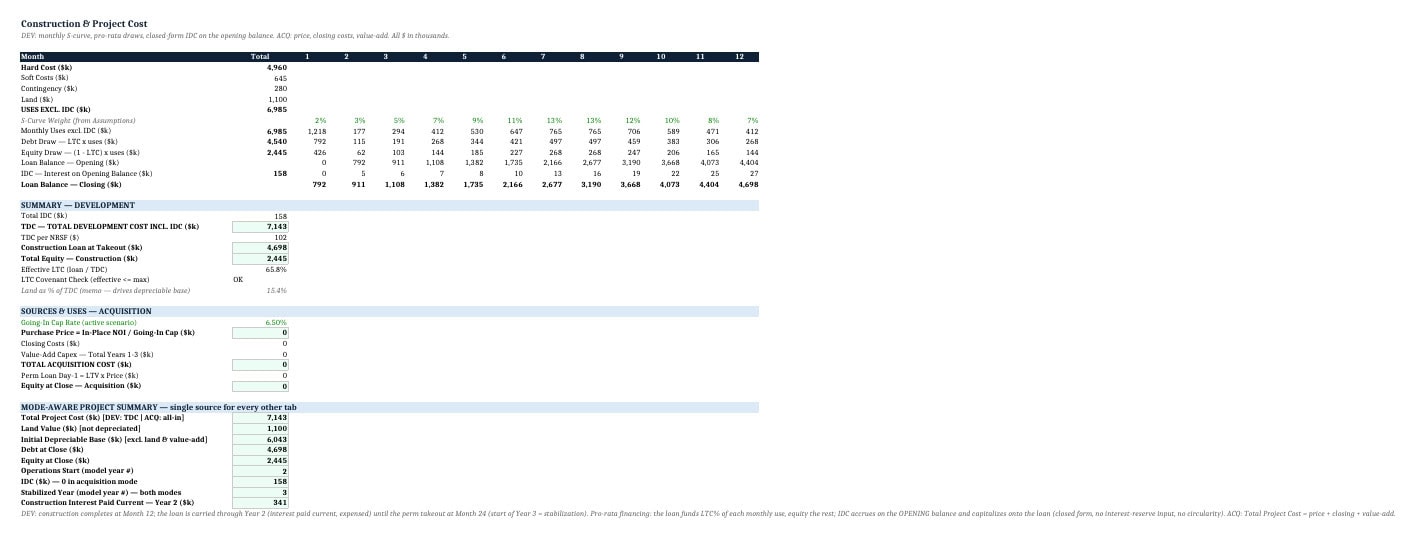
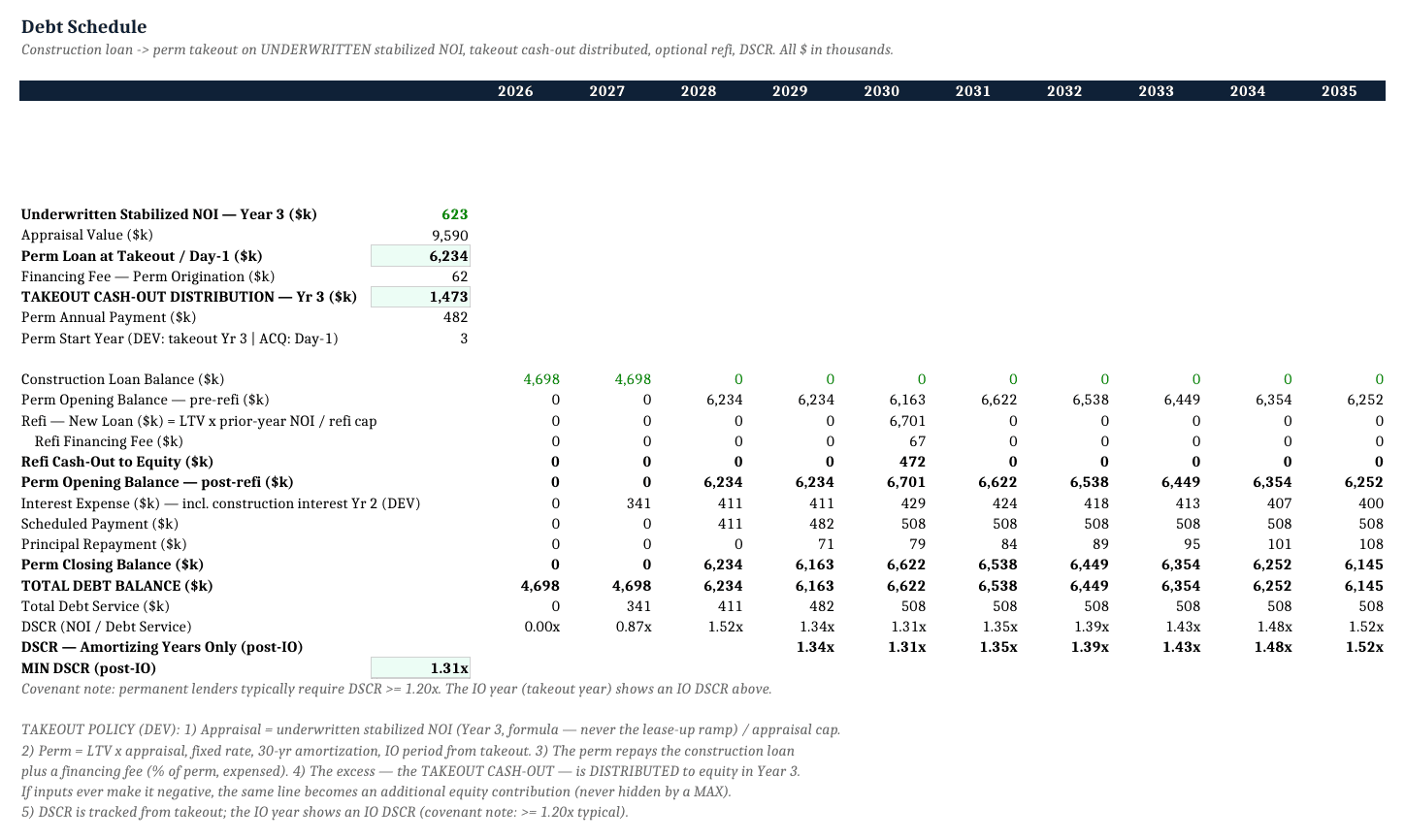
- Complete debt stack — construction loan with pro-rata draws and capitalized Interest During Construction, permanent takeout sized on stabilized NOI with a distributed cash-out, an optional refinancing event with its own appraisal cap input, and annual DSCR covenant tracking.
- Itemized four-stream ancillary income — tenant insurance (penetration × premium), merchandise, truck rental, and admin/late fees, modeled separately rather than as one aggregate line.
- GP/LP equity waterfall — an 8% preferred return plus two IRR-based promote tiers, showing LP net returns and GP promote.
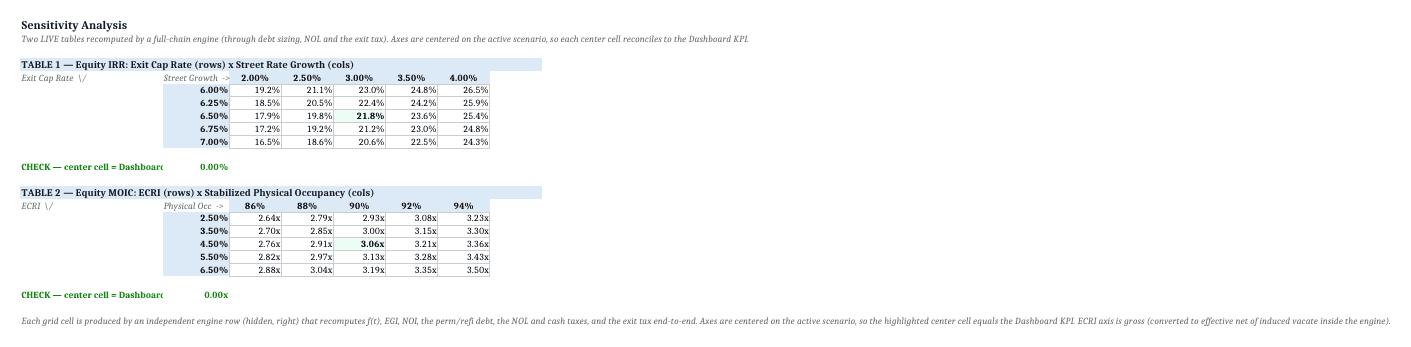
- Live sensitivity, no Data Tables — two formula-driven sensitivity tables (exit cap × rent growth; ECRI × stabilized occupancy) whose center cell ties back to the dashboard KPI, fully compatible across Excel versions and Google Sheets.
What’s Inside (Tab by Tab)
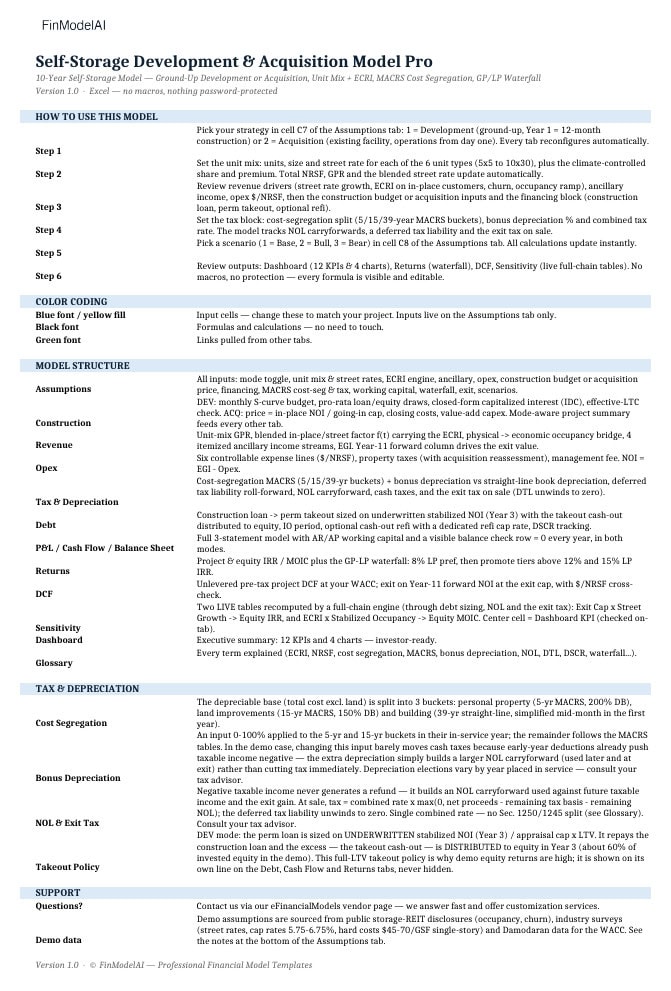
1) START HERE — Strategy selector guidance, six-step workflow, color-code legend (blue = inputs, black = formulas, green = cross-sheet links), model-structure map, and the tax/depreciation and takeout-policy notes. Read this before touching anything else.
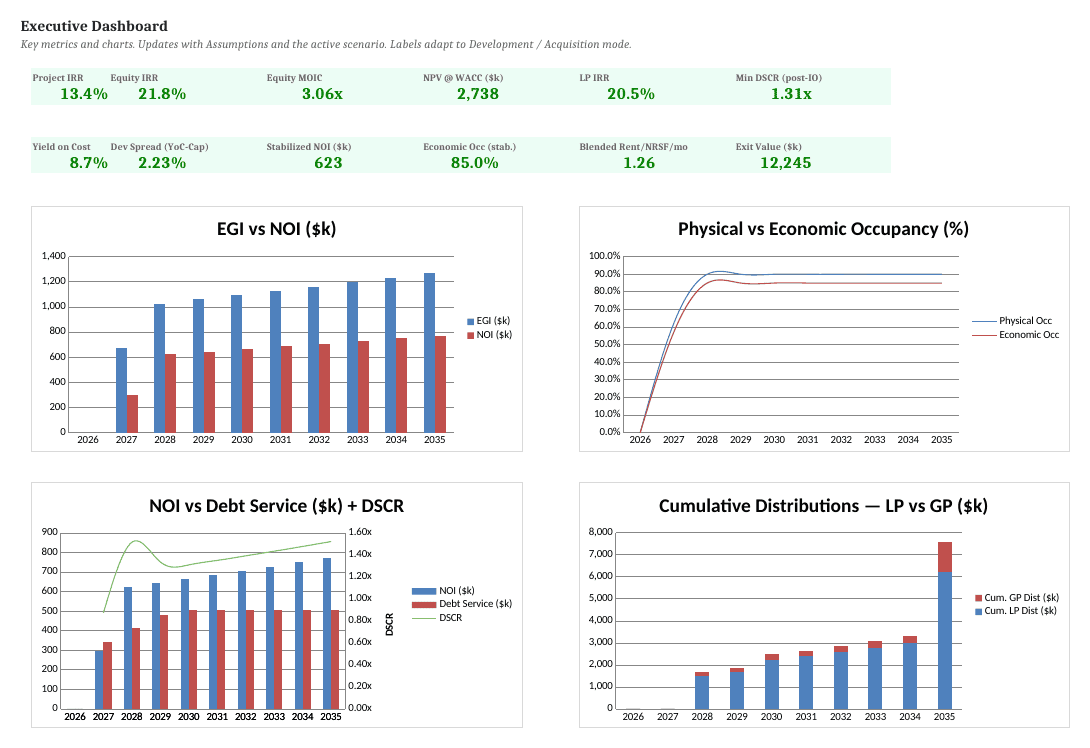
2) Dashboard — Executive summary with 12 KPIs in two rows of six and four charts in a 2×2 grid (EGI vs NOI by year; physical vs economic occupancy; NOI vs debt service with DSCR; cumulative LP vs GP distributions). Labels adapt automatically to Development or Acquisition mode. Everything updates with the Assumptions and the active scenario.
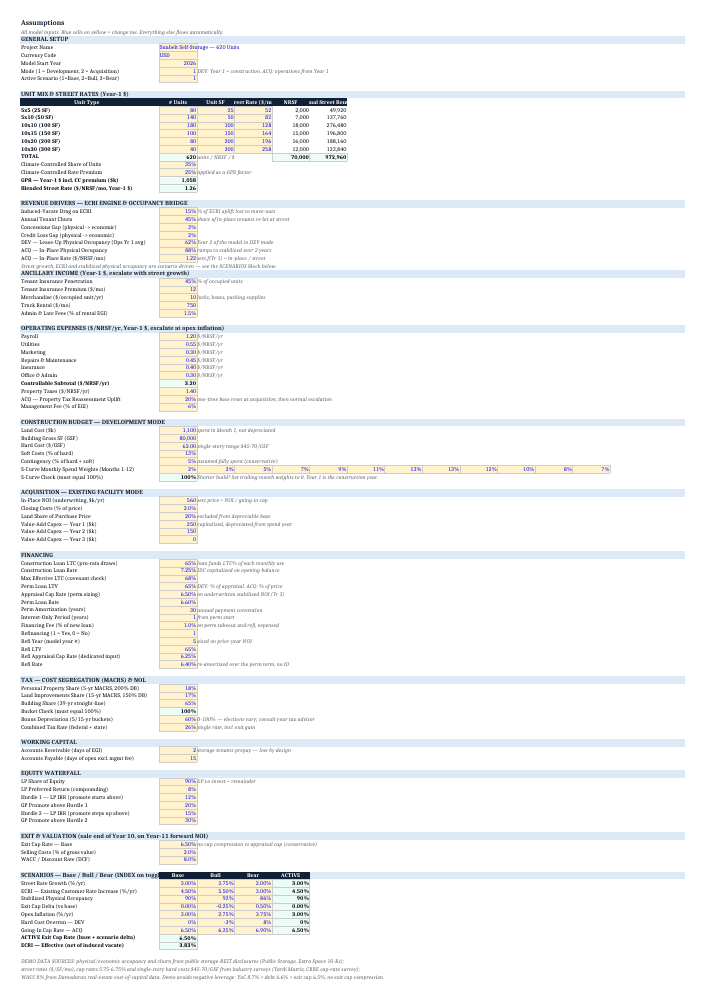
3) Assumptions — The single input hub (all blue cells): strategy toggle, unit mix and street rates, climate-controlled share, ECRI and street-rate growth, occupancy ramp and economic-occupancy gaps, ancillary drivers, operating expenses, construction budget and phasing, financing terms (construction LTC, permanent LTV and appraisal cap, refinancing year/LTV/cap, rates), tax inputs (combined rate, MACRS buckets, bonus depreciation, NOL), equity structure (GP/LP split, preferred return, promote hurdles), exit cap, WACC, and the Base/Bull/Bear scenario toggle.
4) Construction — Month-by-month construction budget with an S-curve draw across hard, soft, and financing costs; pro-rata loan/equity draws; capitalized IDC; total development cost and TDC per NRSF (Development mode). In Acquisition mode this tab resolves the purchase price from in-place NOI and the going-in cap, plus closing costs and optional value-add capex.
5) Revenue — Unit-mix build-up to gross potential rent, the ECRI engine (street vs in-place with induced vacates), the physical-to-economic occupancy bridge, and the four itemized ancillary streams — rolling up to effective gross income.
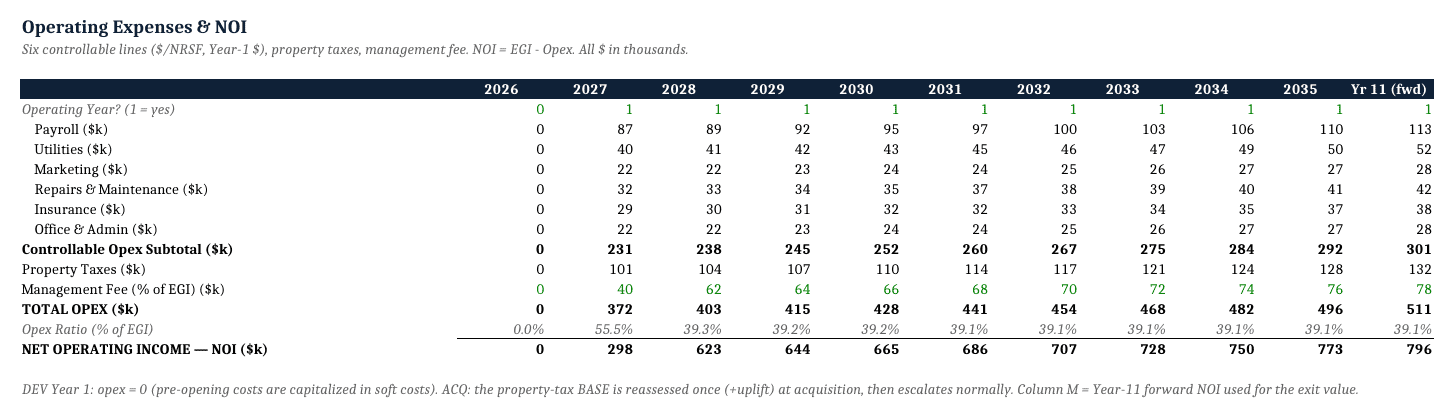
6) Opex — Controllable and non-controllable operating expenses ($/NRSF and fixed), property taxes, management fee, and escalation, producing net operating income.
7) Tax & Depreciation — Cost-segregation schedule across the three MACRS buckets, parameterizable bonus depreciation, book vs tax depreciation, NOL carryforward, the deferred tax liability build and unwind, and the tax on the disposition gain computed on the post-MACRS basis.
8) Debt — Construction loan draws and repayment, permanent takeout sized on stabilized NOI with the cash-out distribution shown explicitly, an optional refinancing event with a dedicated appraisal cap input and cash-out, interest-only handling, and annual DSCR covenant tracking.
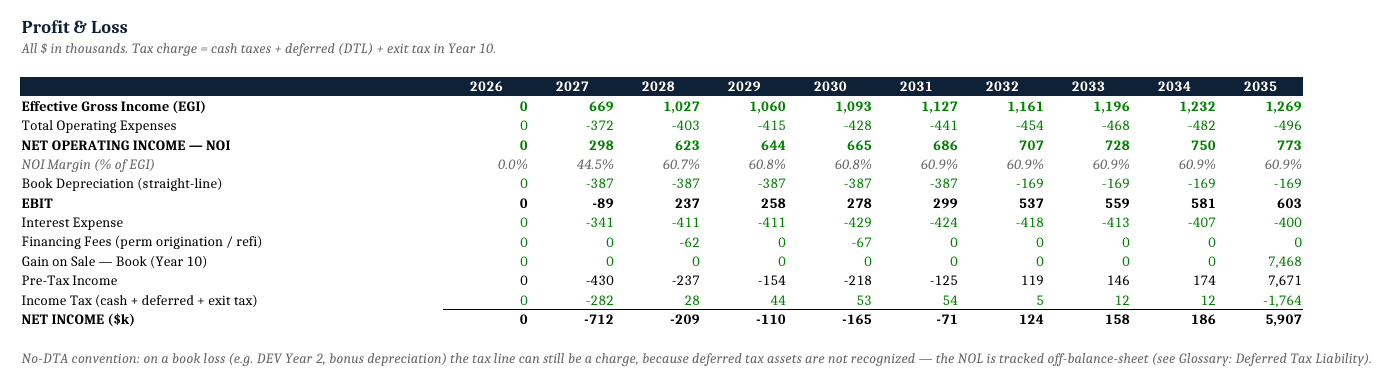
9) P&L — Income statement from effective gross income through NOI, depreciation, EBIT, interest, pre-tax income, taxes (on the MACRS/NOL base), and net income.
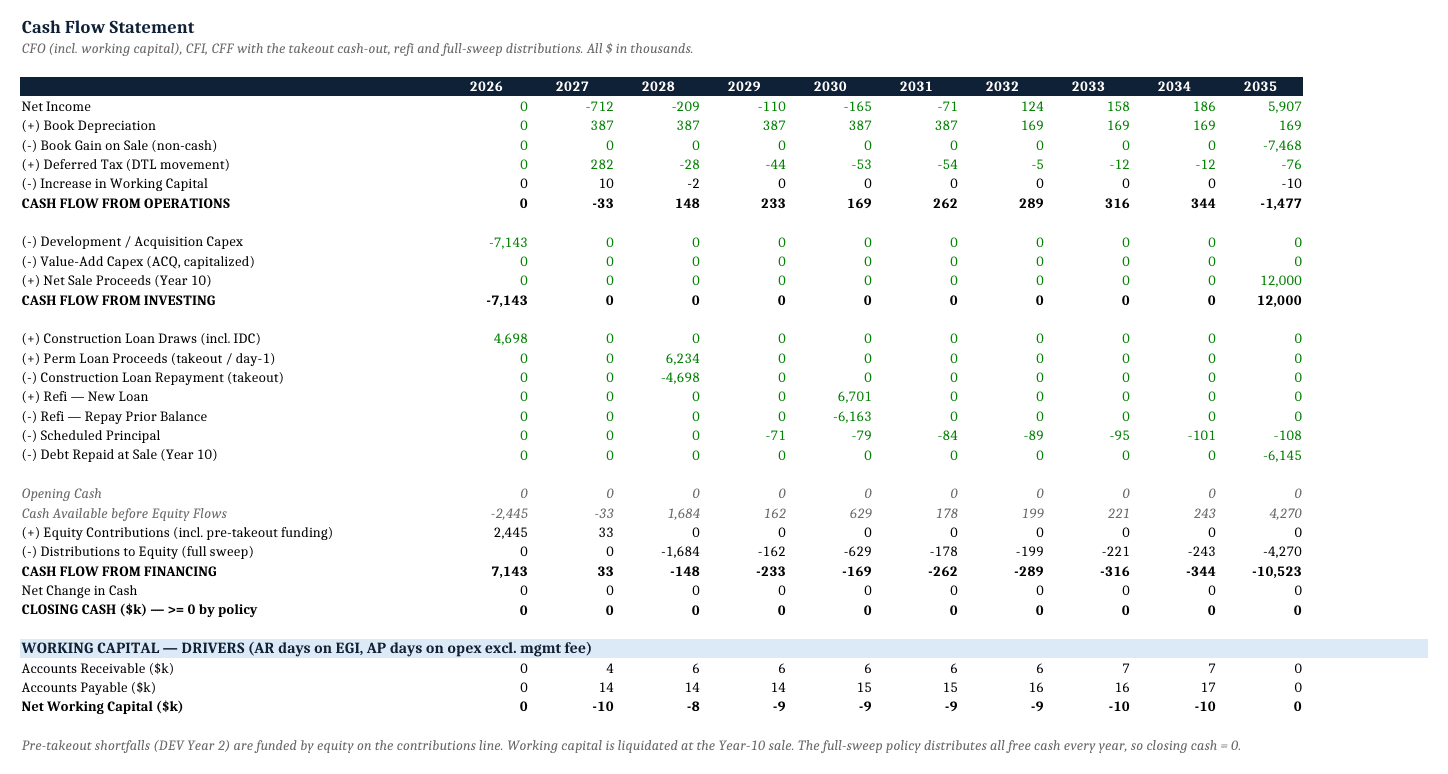
10) Cash Flow — Operating, investing (construction/acquisition capex, value-add, maintenance capex), and financing cash flows (draws, repayments, equity contributions and distributions), through free cash flow to equity and the exit.
11) Balance Sheet — Assets (capitalized cost, PP&E net of depreciation), liabilities (debt schedule, deferred tax liability), and equity (contributed capital, retained earnings), with a balance check on every year that must equal zero.
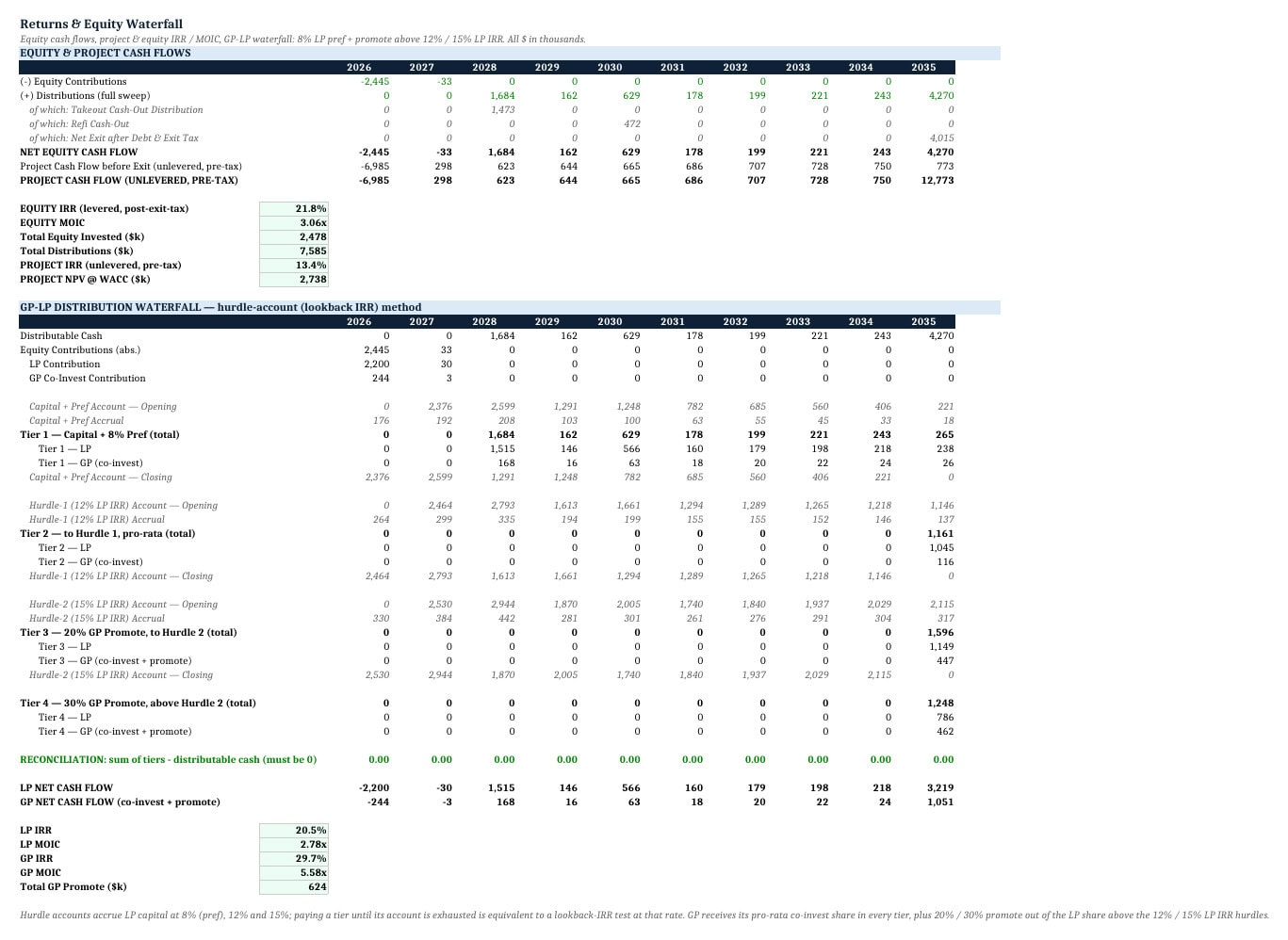
12) Returns — Project-level and equity-level returns: Project IRR, Equity IRR (levered, post-exit-tax), Equity MOIC, and the GP/LP waterfall with an 8% preferred return and two IRR-based promote tiers, including the Year-3 takeout cash-out and any refinancing cash-out as itemized equity flows.
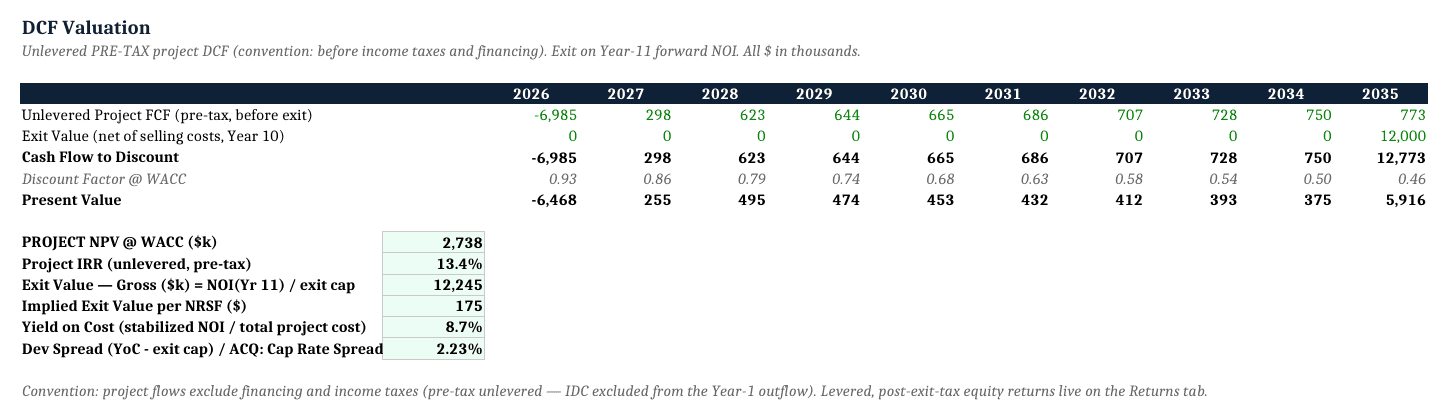
13) DCF — Discounted cash flow at a parameterizable WACC: project NPV, gross exit value (forward NOI ÷ exit cap) and implied exit value per NRSF, plus yield on cost and the development spread (YoC − exit cap).
14) Sensitivity — Two live, formula-driven sensitivity tables (exit cap × rent growth; ECRI × stabilized occupancy), recalculated through the exit tax, with the center cell tying back to the dashboard KPI. No Excel Data Tables required.
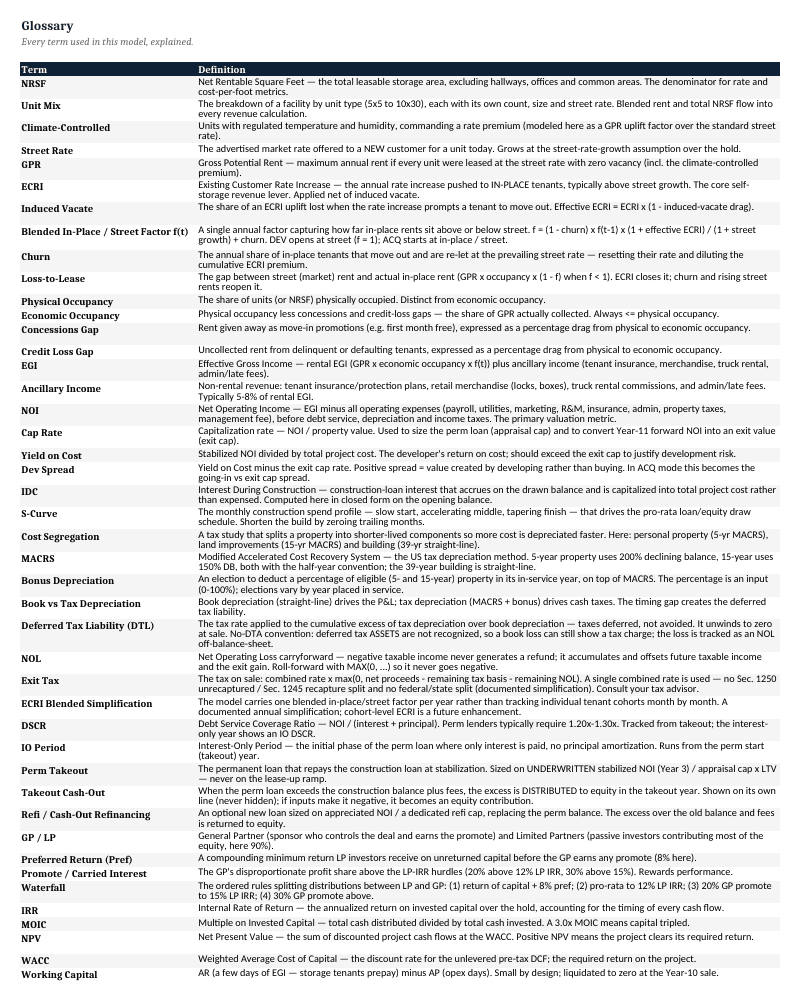
15) Glossary — Self-storage, tax, debt, and return terms defined: NRSF, ECRI, street vs in-place rate, induced vacate, economic vs physical occupancy, cost segregation, MACRS, bonus depreciation, NOL, deferred tax liability, DSCR, IDC, takeout, cap rate, yield on cost, development spread, IRR, MOIC, preferred return, and promote.
Key Outputs
Base-case demo, Development mode, 10-year hold:
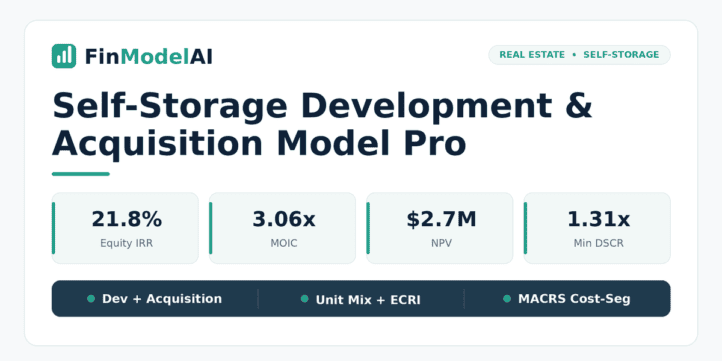
Metric Demo Scenario (Base Case) Project IRR (unlevered, pre-tax) 13.4% Equity IRR (levered, post-exit-tax) 21.8% Equity MOIC 3.06x LP Net IRR 20.5% NPV @ WACC (8%) $2.74M Min DSCR (post-IO) 1.31x Yield on Cost (stabilized) 8.7% Development Spread (YoC − exit cap) 2.23% (223 bps) Stabilized NOI (Year 3) $623k Economic Occupancy (stabilized) 85% Blended Street Rate (Year 1) $1.26 / NRSF / month Exit Value (gross) $12.24M Total Development Cost (incl. IDC) $7.14M (~$102 / NRSF) Exit Cap Rate 6.50%
All pre-filled figures are illustrative and fully editable from the Assumptions tab. The elevated equity IRR reflects an explicit full-LTV takeout policy that distributes roughly $1.47M of cash-out in Year 3 — shown as an itemized equity flow on the Returns tab, not buried in a formula.
Who It’s For
- Self-storage investors and syndicators underwriting an acquisition of an existing facility — pricing off an in-place cap rate, ECRI, DSCR, and a GP/LP waterfall for LPs.
- Storage developers studying a ground-up build — construction budget, lease-up, construction loan to permanent takeout, and yield on cost versus exit cap.
- Real estate private equity and family offices comparing “build” versus “buy” on the same asset in one workbook.
- Lenders and credit analysts sizing debt and testing DSCR and construction-loan risk.
- Analysts and RE-finance students learning storage underwriting on a clean, fully documented three-statement model.
What Makes It Different
Several capable self-storage templates exist — dedicated acquisition-underwriting models with ECRI engines, and solid development models with GP/LP waterfalls. We do not claim to be the only model that does any one of these things. What sets this one apart is the combination in a single workbook: it does both ground-up development and in-place acquisition from one toggle, on top of a full three-statement engine with a visible balance check, a US cost-segregation MACRS module with bonus depreciation and exit-gain tax, an itemized four-stream ancillary stack, and live formula-driven sensitivity tables — priced under the premium development templates.
Where competitors are stronger, we say so. The closest acquisition-focused competitor ships a sourced benchmarks sheet (occupancy, rent/sf, cap, ECRI, DSCR ranges) and an 18-page PDF guide; this model does not replicate that benchmarks sheet in v1, though its demo assumptions are sourced in the Assumptions notes. Features such as ECRI, the GP/LP waterfall, scenario toggles, unit-mix granularity, dual exit (cap rate and $/NRSF), and no-macro/Google Sheets compatibility are parity features offered by one or more benchmarked competitors — not exclusive claims.
Technical Notes / Compatibility
- Built for Microsoft Excel (Windows and Mac); compatible with Google Sheets (some charts may render differently).
- No VBA / macros, no circular references, nothing password-protected.
- Roughly 8,900 auto-calculating formulas, zero formula errors.
- Automatic balance check (must equal zero every year); the deferred tax liability is settled at exit.
- Currency and start year are parameterizable; the Development/Acquisition toggle drives dynamic labels.
Files Included
You download a single Excel workbook (.xlsx) — 15 linked worksheets, roughly 8,900 live formulas, no macros, no add-ins, no circular references. It opens in Excel 2016 or later, Microsoft 365, and Mac Excel, and is compatible with Google Sheets (some charts may render differently).
The workbook opens on a START HERE tab that walks you through the model in the order it was built, and closes on a 44-term Glossary covering every metric it produces. A short README accompanies the file with the quick start, the tab list, and the license terms.
Disclaimer
For illustrative and informational purposes only — not investment, financial, legal, or tax advice. Provided “as is” without warranty of any kind; all figures and pre-filled examples are illustrative and must be independently verified by the user before use. The US tax module (MACRS, bonus depreciation, NOL, gain recapture) is a project-level simplification and is not tax advice — consult a qualified tax advisor for your situation. To the maximum extent permitted by law, total liability is limited to the amount paid for the model, and no liability is accepted for any indirect or consequential loss. Single-user license; redistribution or resale is prohibited. © 2026 FinModelAI.
Similar ProductsOther customers were also interested in...



 eFinancialModels
Electric Vehicle (EV) Charging Station Financial M...
With this comprehensive 5- or 10-year monthly tool, investors can assess the viability of setting up... Read more

Financial Model for Mobile App | Mobile App Busine...
The Mobile App Financial Plan Template in Excel allows you to develop financial projections when lau... Read more

 HenrySheykin
Food Truck Financial Model Excel Template
The Food Truck Financial Model helps entrepreneurs, founders, business owners, consultants, and anal... Read more

Green Hydrogen Production from Wind Energy Financi...
The Green Hydrogen from Wind Financial Model aims to comprehensively forecast a horizon of 40 years ... Read more

Simple Mutual Non-Disclosure Agreement Template
Protect your business secrets with ease using our Simple Mutual Non-Disclosure Agreement Template. S... Read more

Solar Energy Financial Model
The Solar Energy Financial Model Spreadsheet Template in Excel assists you in preparing a sophistica... Read more

 Peter Graf
The Customer-Centric Financial Model for Restauran...
Starting a restaurant without a financial plan is like driving a car blindfolded. You wouldn´t do i... Read more
You must log in to submit a review.