0 ITEMS

eFinancialModels vs Wall Street Prep, CFI and Free Templates

eFinancialModels fits buyers who need a ready-built Excel model for one specific use case, Wall Street Prep and the Corporate Finance Institute (CFI) fit buyers who mainly want training, and free templates fit low-stakes drafts that someone checks line by line. The right choice depends on three-year cost, template quality and the rework a team can absorb, and the worked example below prices cost and rework hours with generic options, because vendor terms change and must be confirmed on each vendor’s own page.
Key Takeaways
- Define the use case first: a startup pitch, a corporate budget and a bank model need different depth, so the best provider differs by job.
- Compare three-year total cost of ownership, not sticker price: setup hours and upkeep outweigh licence fees for three of four example options.
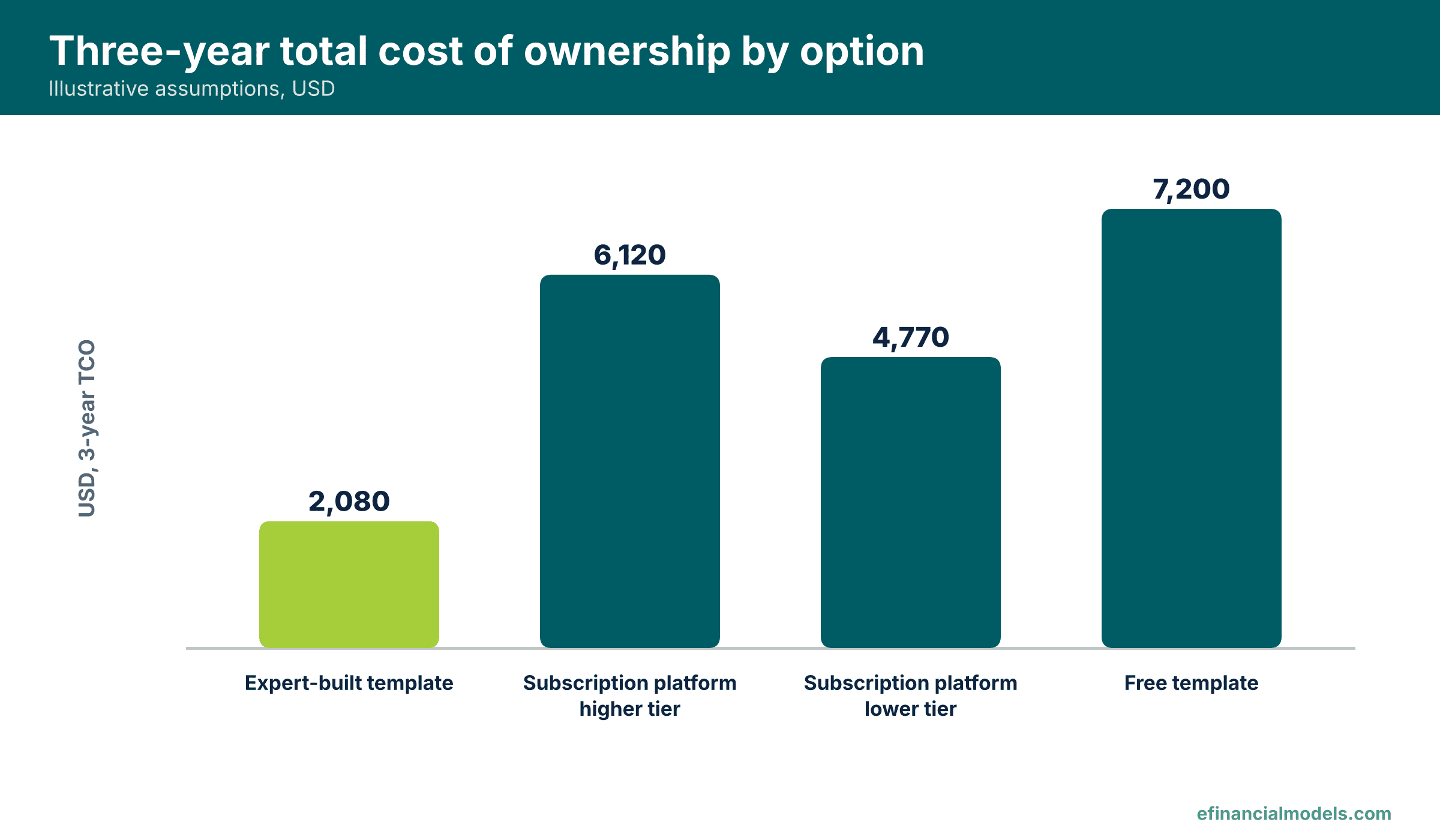
- On illustrative assumptions (3 users, 3 years, USD 60 an hour), the expert-built template costs USD 2,080 and the free template costs USD 7,200, excluding training.
- A subscription earns its price when a team also needs the training content, which a pure cost model does not price.
- Validate every template before buying: read the formulas, test extreme inputs and confirm that a check cell reports OK.
Why Comparing Providers Before Buying Pays Off
TrustRadius found in 2024, across 2,164 technology buyers, that 63% of shortlists include two to three products and 96% include five or fewer (TrustRadius, 2024).
Gartner Digital Markets reported in its 2025 survey of 3,500 business-to-business (B2B) decision makers that buyers now interact with 22% fewer vendors than a year earlier (Gartner Digital Markets, 2025).
The Financial Planning Software Market Is Growing
Technavio projects that the global financial planning software market will grow at a compound annual growth rate (CAGR) of 28.1% from 2025 to 2030 (Technavio, 2025). The category covers planning software, not Excel templates, but it shows how fast the tool set is changing.
How to Evaluate Financial Modeling Platforms Step by Step
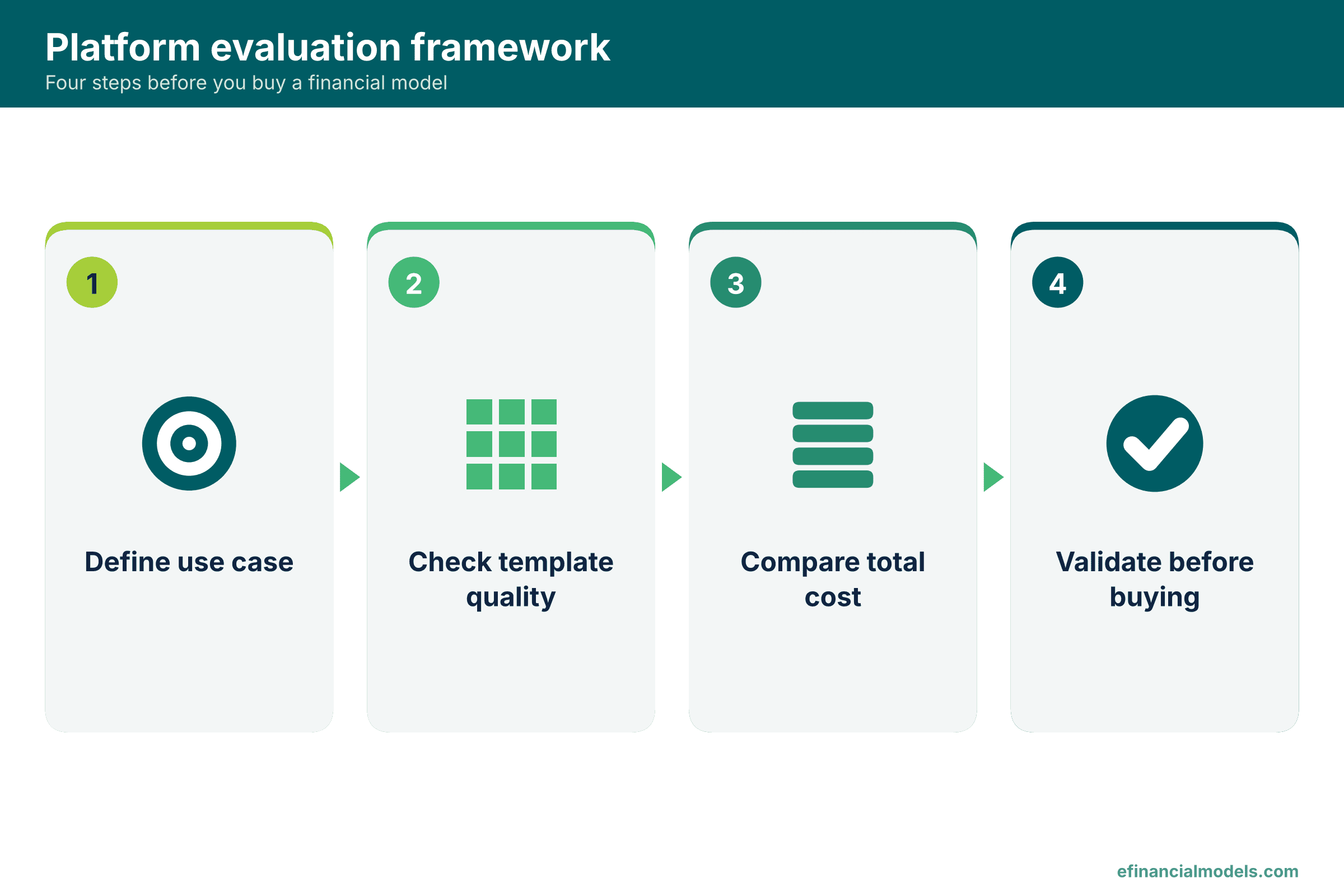
Four steps keep the evaluation honest: define the use case, test quality, compare total cost and validate.
Step 1: Define Your Use Case
A startup founder needs a pitch-ready forecast, so a ready-built template usually fits. A controller at a growing small and medium-sized enterprise (SME) needs a budget that matches the ledger, so an industry template fits. A finance team that wants to learn valuation fits a training-led provider such as Wall Street Prep or the Corporate Finance Institute (CFI). Write the job down first, because the two kinds of seller solve different jobs.
Step 2: Assess Template Quality and Customization
Quality means formulas that trace, inputs separated from calculations and a check that proves the model balances. Spreadsheet errors are hard to see: Panko argues in a 2016 paper that large spreadsheets very likely contain at least one incorrect bottom-line value and that errors are very hard to detect (Panko, 2016).
Step 3: Compare Pricing Models and Total Cost of Ownership
Total cost of ownership (TCO) is the full cost of using a tool over a set period, including licence fees, setup time and upkeep. Training-led providers typically charge a recurring subscription, often through the software as a service (SaaS) model, in which a vendor hosts the product and customers pay a recurring fee, while template sellers usually charge once per file. A low price with heavy rework also lowers return on investment (ROI), the benefit gained for each dollar spent, so TCO is the fairer yardstick.
Worked Example: A Three-Year Cost Estimator in Excel
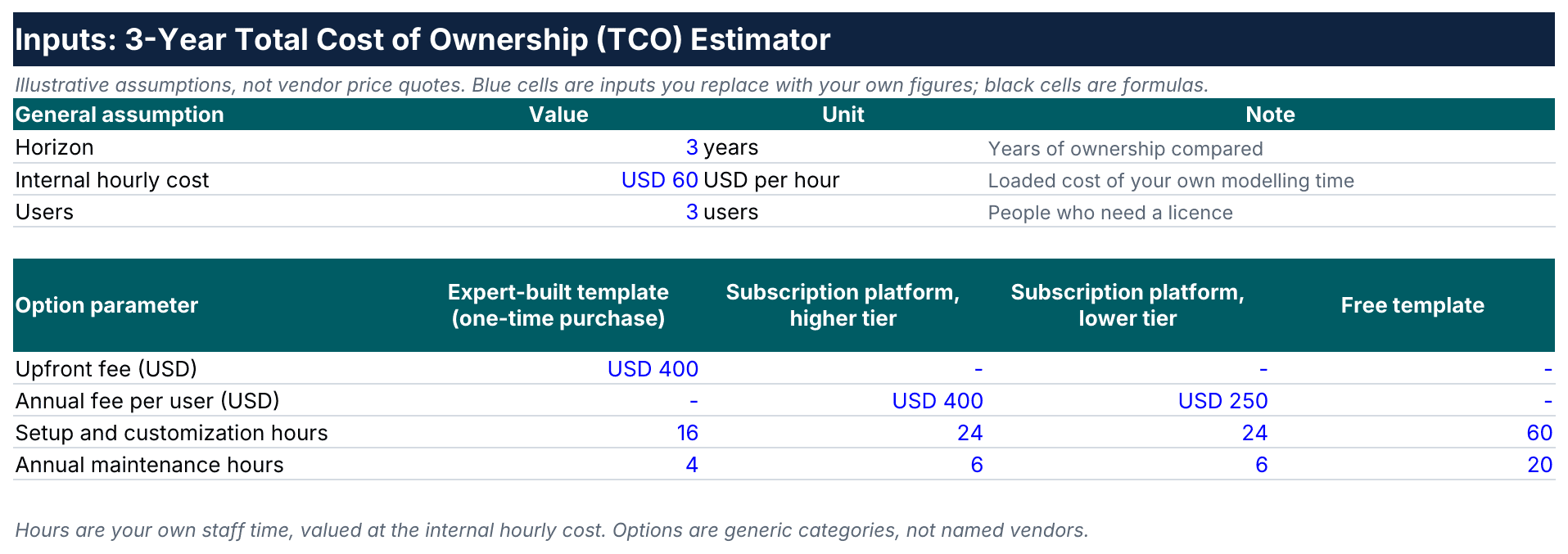
The estimator compares four generic options, and every number is an illustrative assumption, not a vendor price, that a reader replaces with real quotes.
Inputs: Team Size, Fees and Labour Hours
The model assumes a horizon of 3 years, 3 users and an internal labour cost of USD 60 per hour. Each option has an upfront fee, a yearly fee per user, setup hours and yearly maintenance hours. The expert-built template costs USD 400 once and needs 16 setup hours and 4 maintenance hours a year. The higher-tier subscription costs USD 400 per user each year, the lower tier USD 250, and both need 24 setup hours and 6 maintenance hours a year, on the assumption that a generic file needs more adaptation than an industry-specific one. The template’s single purchase is assumed to cover all three users; a licence per user would raise its total to USD 2,880, still the lowest. Even with the template’s hours, the two tiers would cost USD 5,280 and USD 3,930, so the ranking does not depend on the extra hours. The free template has no licence fee but needs 60 setup hours and 20 maintenance hours a year.
The Model: Formulas Behind the Three-Year TCO
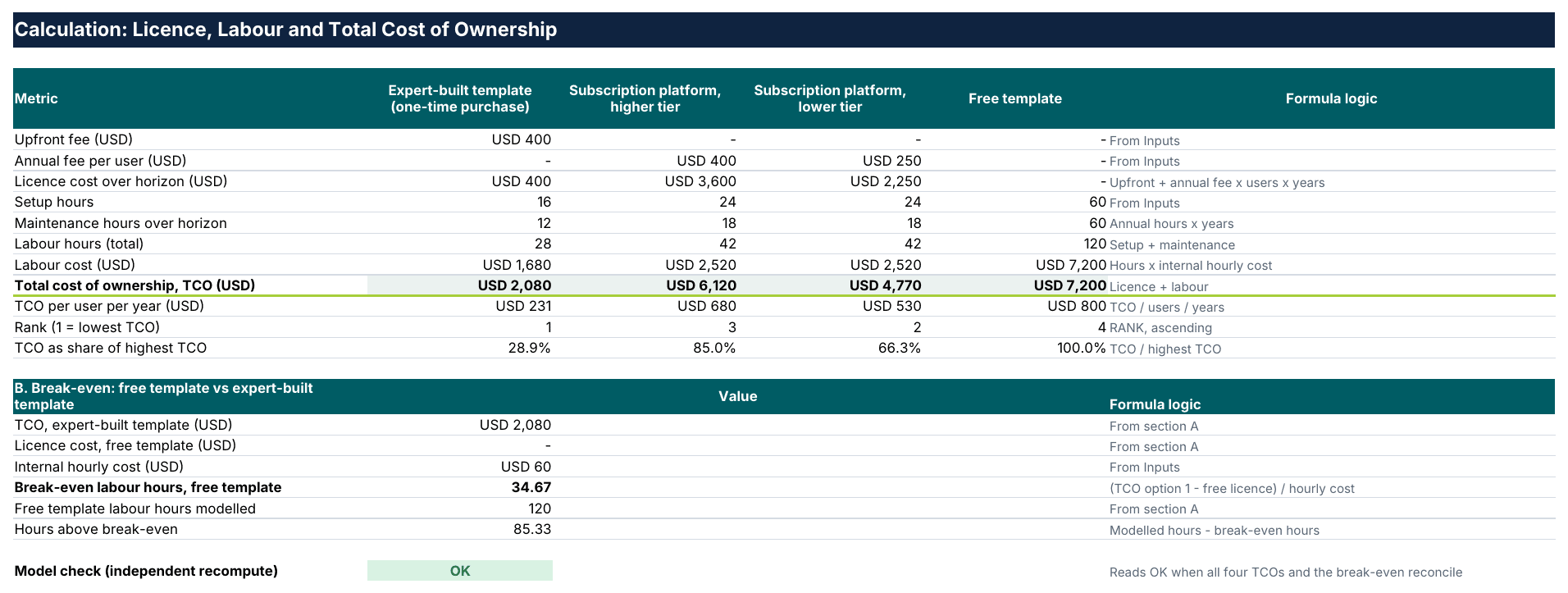
Each option follows one formula: TCO = upfront fee + yearly fee per user x users x years + (setup hours + maintenance hours x years) x hourly cost. For the expert-built template that gives 400 + (16 + 4 x 3) x 60 = USD 2,080. The higher tier gives 400 x 3 x 3 + (24 + 6 x 3) x 60 = 3,600 + 2,520 = USD 6,120, the lower tier 250 x 3 x 3 + (24 + 6 x 3) x 60 = 2,250 + 2,520 = USD 4,770, and the free template 0 + (60 + 20 x 3) x 60 = USD 7,200. A check cell recomputes every total independently and reads OK.
Interpreting the Results: When Each Option Makes Financial Sense
Under these assumptions the expert-built template is cheapest at USD 2,080, the lower-tier subscription costs USD 4,770, the higher tier USD 6,120 and the free template USD 7,200. The free template ranks last because of its assumed hours.
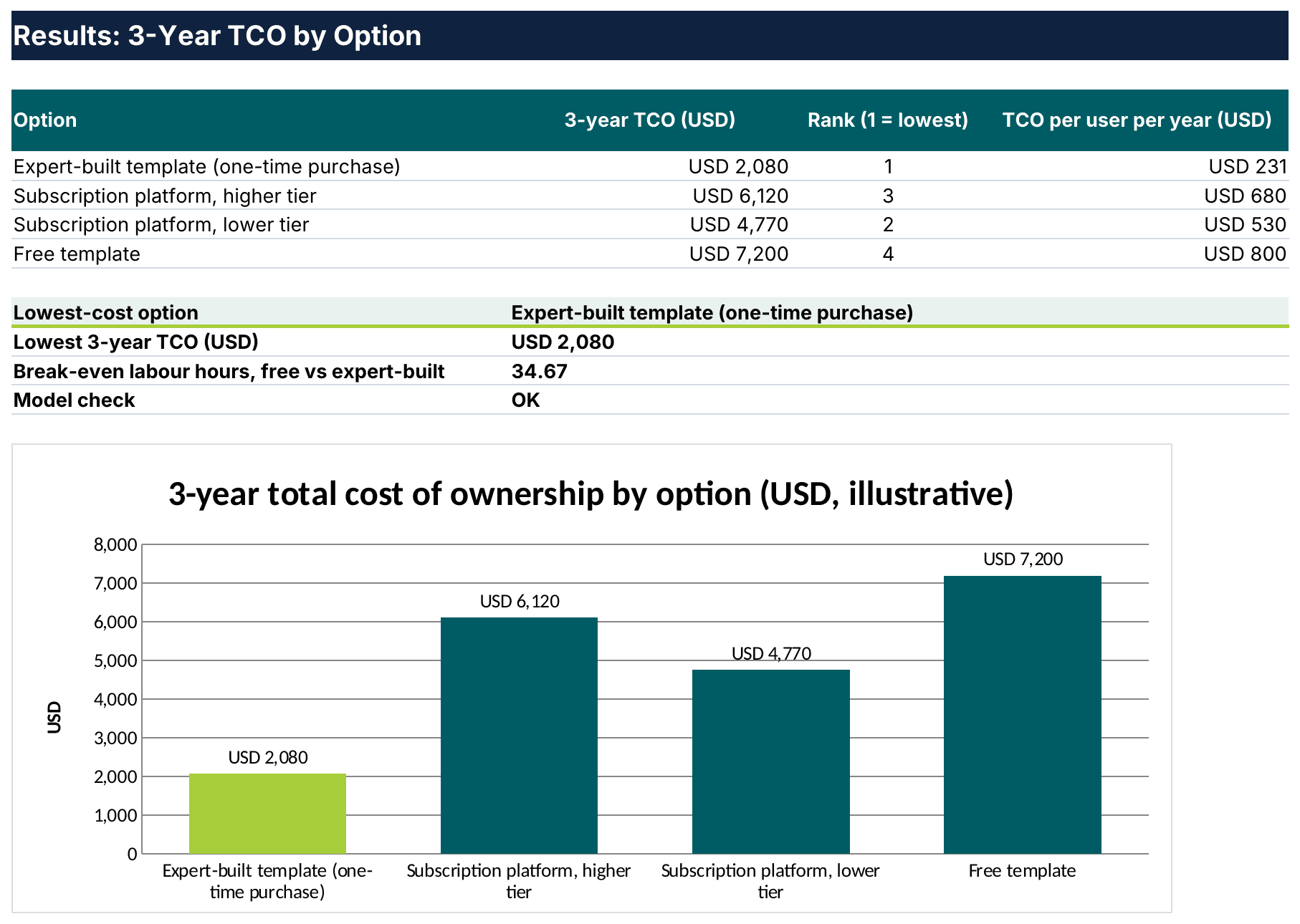
Subscriptions earn their price when a team also needs the training content, which the model does not price, and a free template wins only when its labour stays far below the assumed hours, which a team can test by changing the hour inputs.
Side-by-Side Comparison: Templates, Training Platforms and Free Files
The table compares the three source types on typical models, not guaranteed terms, so confirm current prices and policies on each vendor page.
| Criterion | eFinancialModels (expert-built templates) | Wall Street Prep and CFI (training-led providers) | Free templates |
|---|---|---|---|
| Main product | Industry-specific Excel models | Courses, certifications and templates | Generic spreadsheets |
| Pricing model | Usually one payment per file | Typically a subscription | No licence fee |
| Support | Ask the seller before buying | Ask the provider before buying | Ask the author before using |
| Best fit | A defined use case, fast start | Team learning and upskilling | Drafts and learning |
| Reviews | Check independent review sites | Check independent review sites | Check independent review sites |
Common Mistakes When Choosing a Financial Modeling Platform
Overlooking Hidden Costs
Training, customization and renewals rarely appear on the price tag. In the worked example, labour is the largest cost for three of the four options, so a quote that ignores hours understates the real cost.
Ignoring Vendor Credibility
Credibility is the proof that a provider knows the subject. Google’s search quality guidelines assess content with Experience, Expertise, Authoritativeness and Trustworthiness (E-E-A-T), and buyers can borrow the same test for vendors: named authors, documented methods, sample files and verifiable reviews.
Assuming Free Means Zero Trade-offs
A free file still costs hours to audit. Panko’s findings cover spreadsheets in general, so a review step belongs in every template workflow, paid or free.
Tools and Templates You Can Trust
These eFinancialModels pages group ready-made Excel models by purpose:
- The Startup Financial Models tag collects forecasts for founders preparing a pitch or a runway plan.
- The Three Statement Model tag lists models that link income statement, balance sheet and cash flow, the backbone of a corporate budget.
- The Free Financial Model Templates tag shows no-cost files that suit the drafting scenario in the worked example.
Conclusion: Match the Source to the Job
No single provider wins every case: on the illustrative assumptions the expert-built template led on three-year cost, training-led providers add learning, and free files win only when the labour stays small. Buyers who want to test the first route can open the Free Three Statement Financial Model to apply the validation checks above, then browse the Financial Model templates category on eFinancialModels and run the same three-year cost check on their own numbers.
Frequently Asked Questions
Is eFinancialModels cheaper than Wall Street Prep?
No fixed answer exists, because price depends on the file, the plan and the number of users. In the estimator a one-time purchase costs less than yearly seat licences for three users, though real quotes may differ, and a subscription may bundle courses that a template does not. Collect current quotes from each vendor page and enter them into the estimator, so the comparison reflects real fees and the hours each option needs.
Can I use CFI templates for a startup pitch?
Any well-built template can support a pitch, but investors test the assumptions, not the file. A generic structure often misses the revenue drivers of a young company, such as churn or sales cycle length. Read the licence terms for commercial use, rebuild the drivers around the actual business, and prepare to explain every input. A model that the founder cannot defend line by line weakens the pitch.
Are free financial models safe for sensitive data?
An Excel file stored locally sends nothing anywhere unless it contains macros or external links, so the main risks sit inside the file. Macros, hidden sheets and links to external workbooks can leak or corrupt figures. Open unknown files in protected view, disable macros unless the source is trusted, break external links and keep real company numbers out until the file passes an audit.
What if my needs change after I buy?
A one-time template can be edited freely if the licence allows it, so keep inputs on one sheet and avoid hard-coded numbers that block later changes. A subscription lets the plan change monthly or yearly, but cancelling can also remove access to the files. Before buying, ask the seller whether future versions are included and whether a file bought for one use case can be reused for another.
How do I validate a template’s quality before purchasing?
Request a preview or sample, then check four things: formulas that trace back to labelled inputs, a check cell that confirms the balance, documentation that names every assumption and consistent results under extreme inputs. Replace the sample numbers with a case whose answer is known, such as a loan with a published repayment schedule. If the model reproduces the known answer, the structure is sound.