
0 ITEMS

DSCR Debt Sizing and Loan Underwriting Model (Multifamily and Commercial Real Estate)
Size the maximum loan on a stabilized property under LTV, DSCR and debt-yield constraints, identify the binding constraint, run a 360-month amortization with an interest-only period, and stress the loan against rate and NOI.
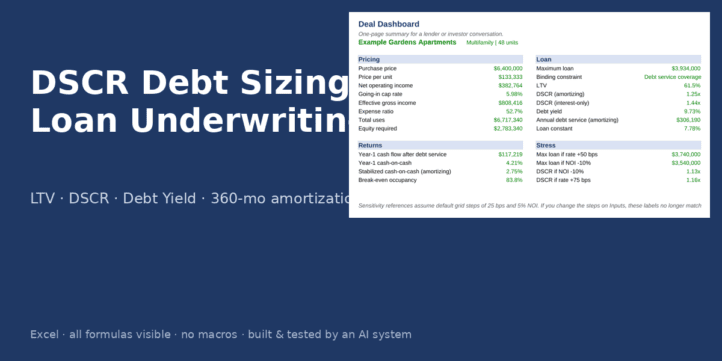
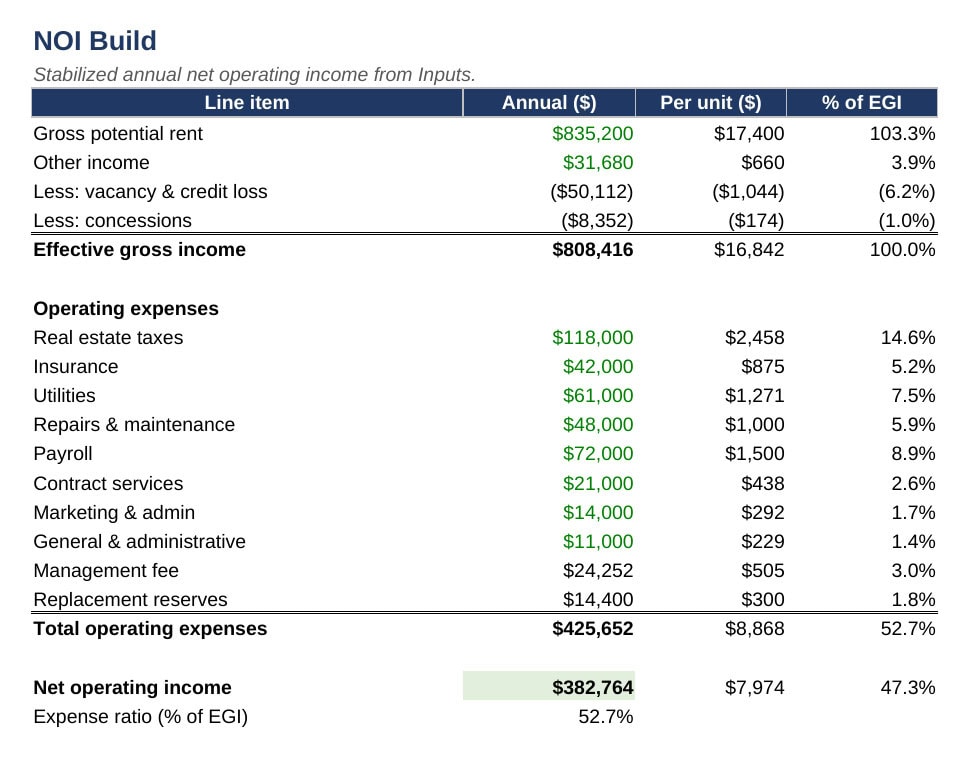
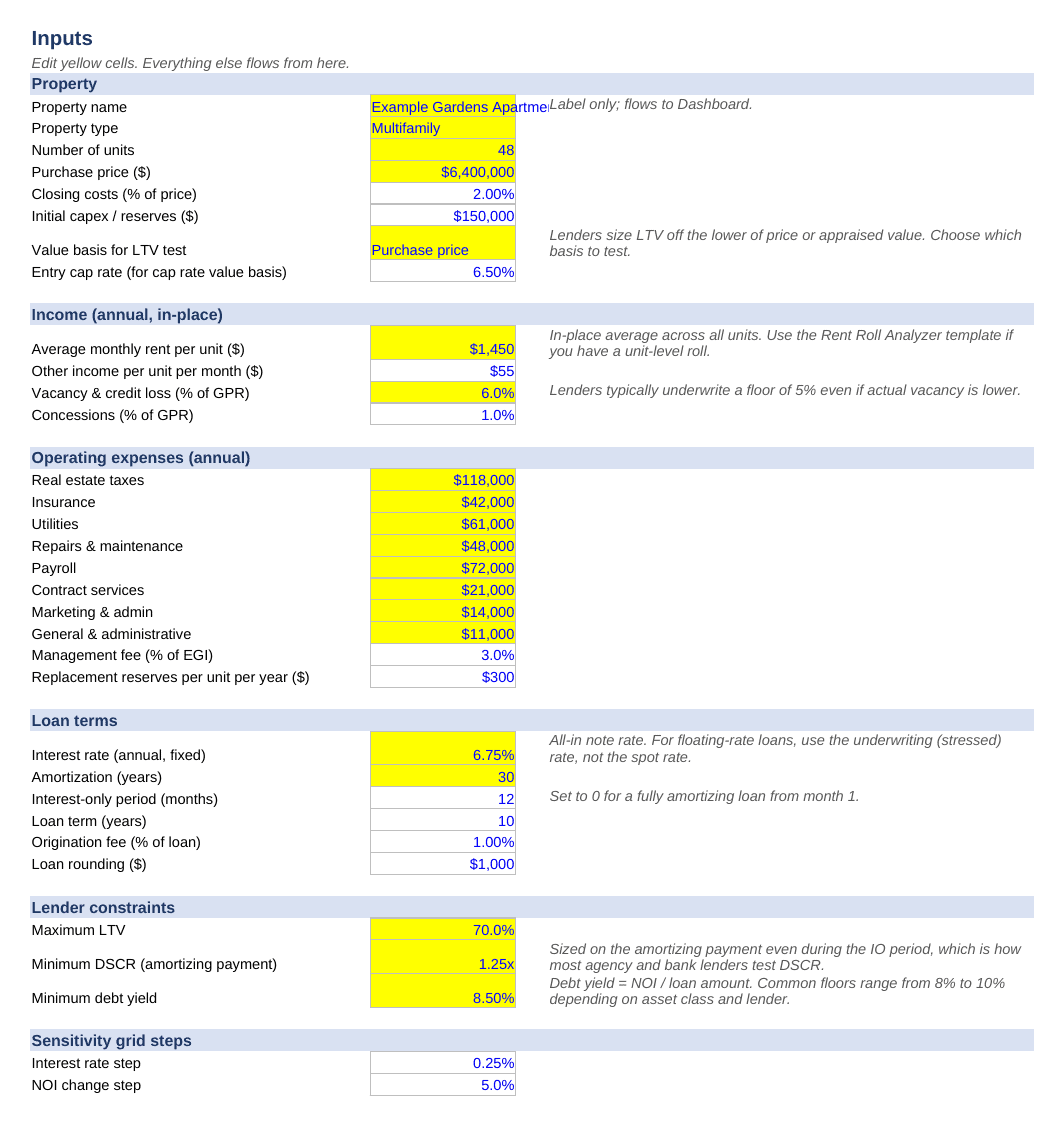
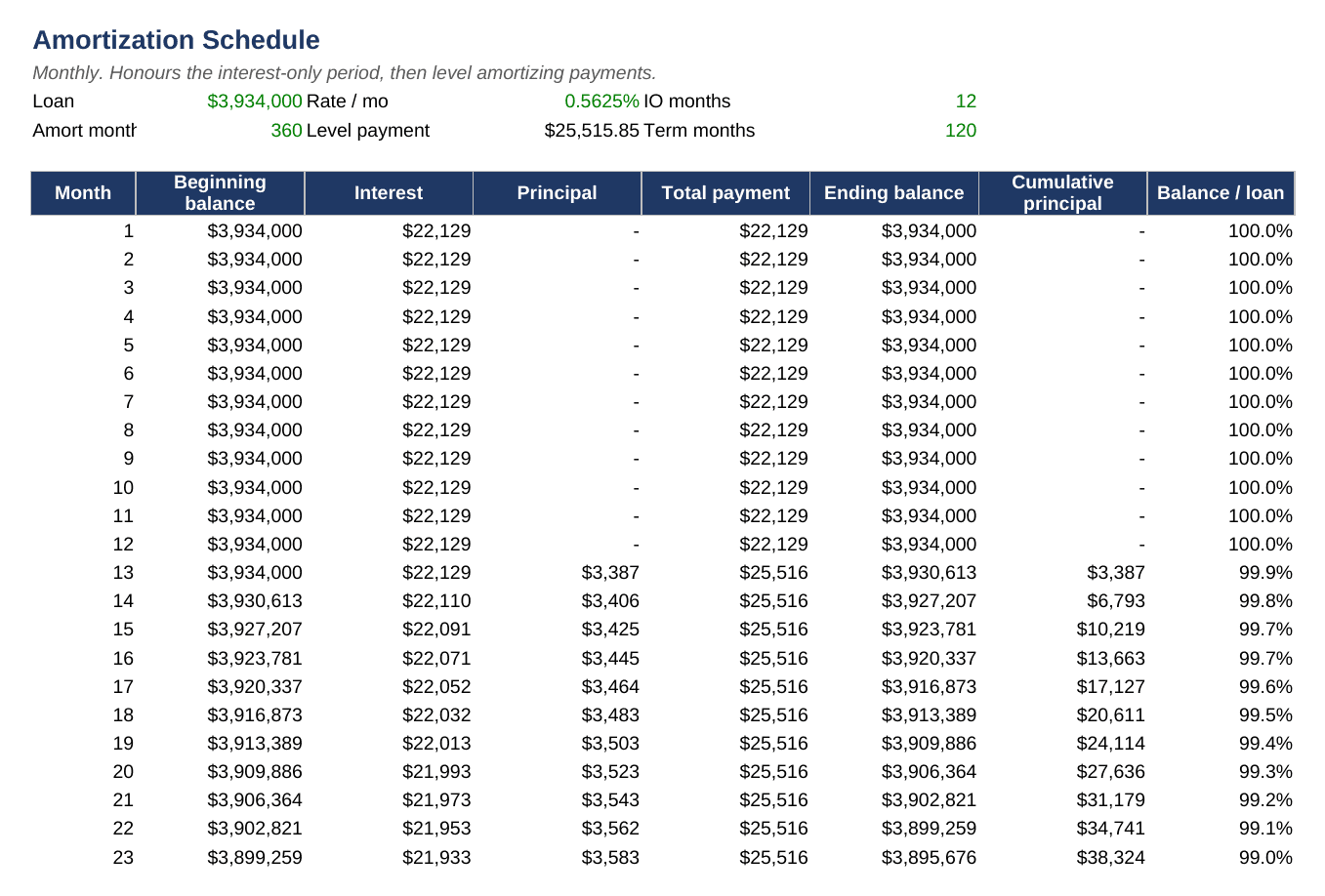
Every commercial real estate lender sizes a loan three ways and takes the smallest answer: a loan-to-value limit, a minimum debt service coverage ratio, and a minimum debt yield. This Excel model performs that sizing exactly as an agency, bank or debt-fund underwriter would, and shows you which constraint is binding so you know what to negotiate.
What the template is for
Use it when you are preparing a loan request, checking a lender’s quote, deciding how much equity a deal needs, or testing how much leverage survives a rate increase or a drop in net operating income. It is written for stabilized multifamily, self-storage, retail and industrial assets, and works for any property with an annual NOI.
What it includes
Inputs: a single sheet with every assumption in a yellow cell: unit count, purchase price, closing costs, initial capital expenditure, in-place rent, other income, vacancy and concessions, eight operating expense lines, a management fee as a percentage of effective gross income, replacement reserves, and the loan terms (rate, amortization, interest-only months, term, origination fee, rounding increment). The three lender constraints sit together so they can be changed in seconds. You choose whether the LTV test runs on purchase price or on a cap-rate value.
NOI Build: gross potential rent to net operating income with per-unit and percent-of-EGI columns and an expense ratio.
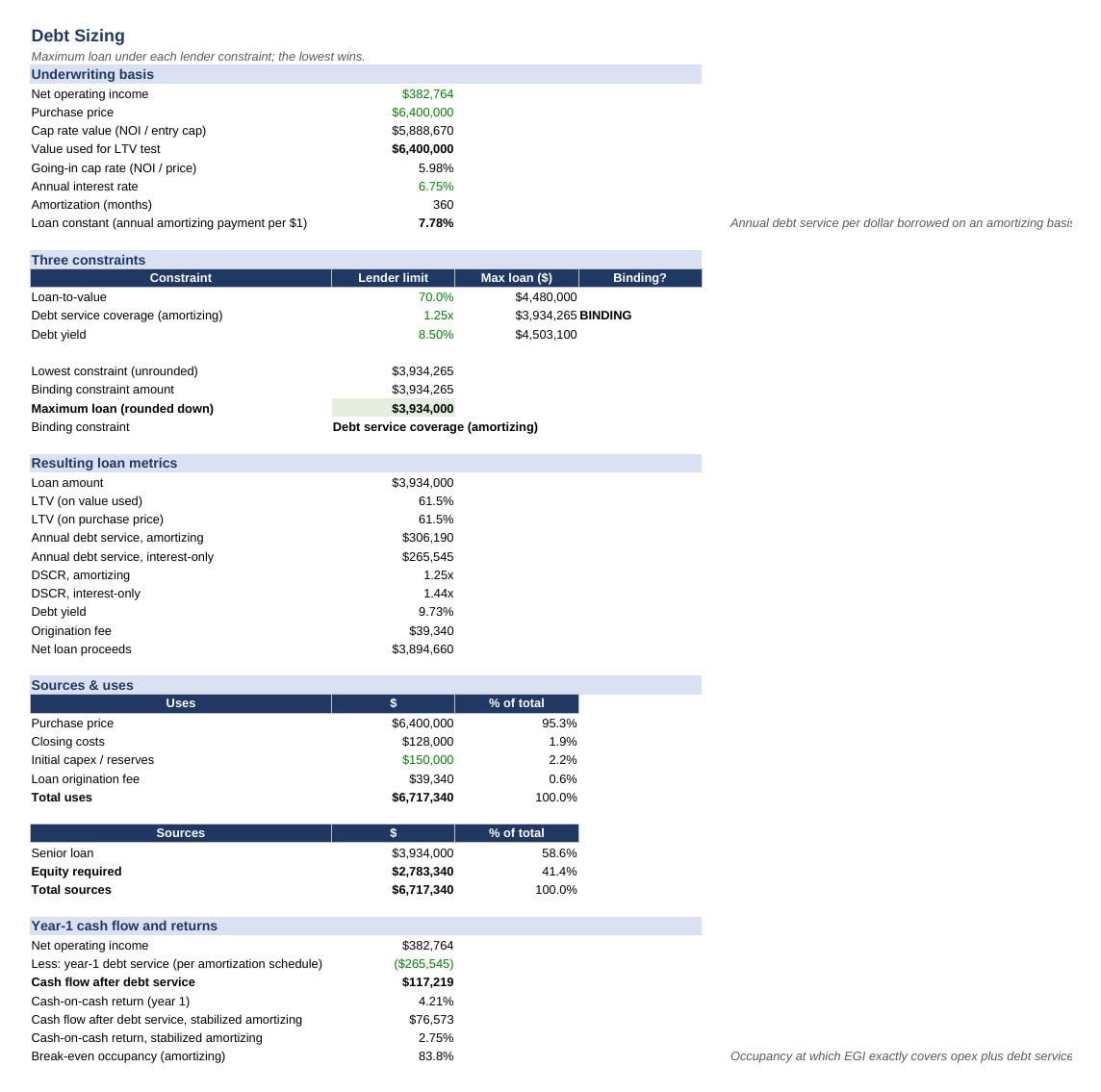
Debt Sizing: the LTV loan, the DSCR loan (sized on the amortizing payment, which is how most lenders test coverage even during an interest-only period) and the debt-yield loan side by side, the lowest flagged as BINDING, the result rounded down to your lender’s increment, resulting LTV, DSCR on both an amortizing and interest-only basis, debt yield, origination fee, net proceeds, a sources-and-uses table, equity required, year-one cash flow after debt service from the actual schedule, cash-on-cash return, and break-even occupancy.
Amortization: a 360-month schedule that honours the interest-only period and then amortizes with a level payment, with cumulative principal and remaining balance as a percentage of the original loan.
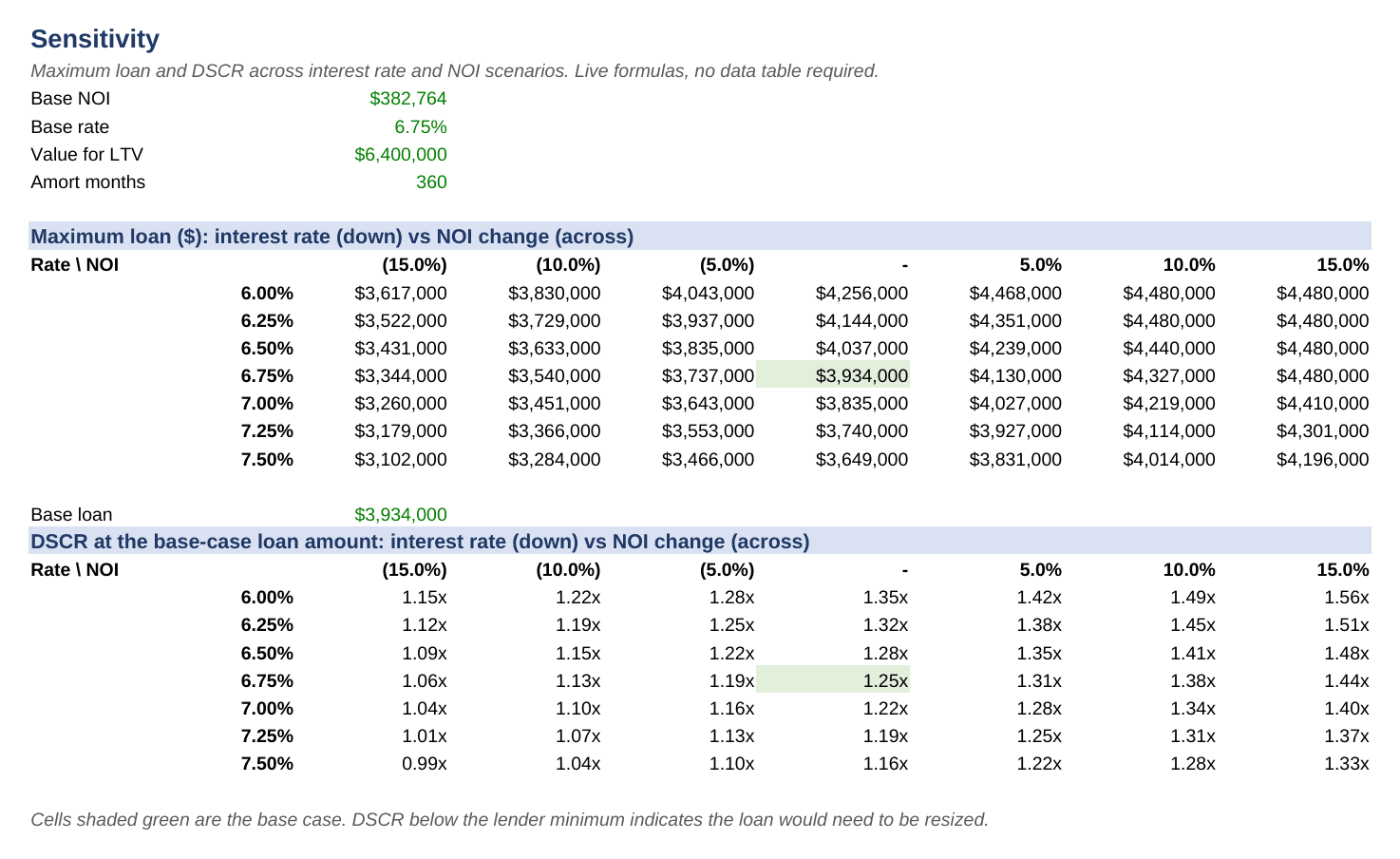
Sensitivity: two seven-by-seven grids built entirely from live formulas (no Excel data tables to refresh): maximum loan, and DSCR at the base loan, across interest rate steps and NOI changes. The step sizes are inputs.
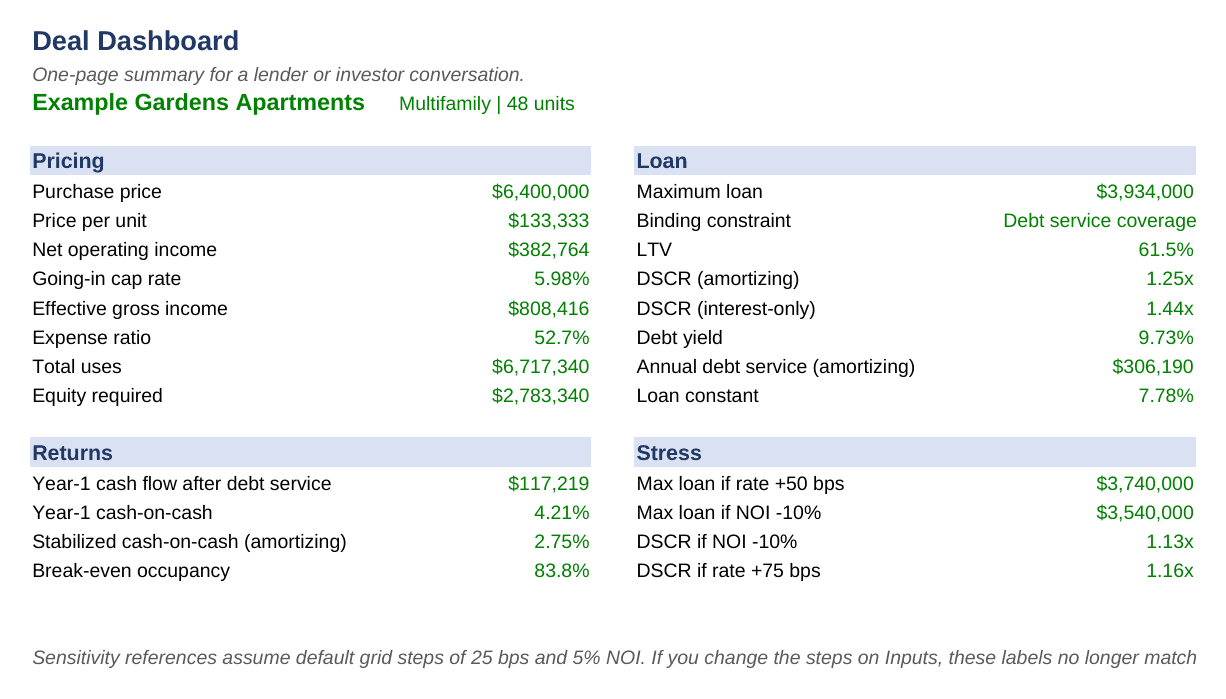
Dashboard: a one-page summary for a lender or investor conversation, including the maximum loan if rates rise 50 basis points and if NOI falls 10 percent.
How to use it
Fill the yellow cells on Inputs, read the maximum loan and the binding constraint on Debt Sizing, then use Sensitivity to see how far the loan moves before the DSCR floor breaks. Blue text marks inputs, black text marks formulas, green text marks links to another sheet. There are no macros, no external links and no protected sheets, so it runs offline in Excel 2016 or later and in LibreOffice.
Free demo: the $0 price option is a locked demo of this model (Inputs editable, Debt Sizing and NOI Build outputs visible but locked, no amortization, sensitivity or dashboard) so you can test the sizing logic with your own numbers before buying. The $79 full version has every cell unlocked and every formula editable.
This template was built and tested by an AI system under a standing specification from a finance professional, recalculated with an independent engine and reviewed before release. All cells are unlocked and every formula is visible. Example data is included. It is a modelling tool, not financial, investment, lending or legal advice.
Similar ProductsOther customers were also interested in...



 eFinancialModels
Electric Vehicle (EV) Charging Station Financial M...
With this comprehensive 5- or 10-year monthly tool, investors can assess the viability of setting up... Read more

Financial Model for Mobile App | Mobile App Busine...
The Mobile App Financial Plan Template in Excel allows you to develop financial projections when lau... Read more

 HenrySheykin
Food Truck Financial Model Excel Template
The Food Truck Financial Model helps entrepreneurs, founders, business owners, consultants, and anal... Read more

Green Hydrogen Production from Wind Energy Financi...
The Green Hydrogen from Wind Financial Model aims to comprehensively forecast a horizon of 40 years ... Read more

Simple Mutual Non-Disclosure Agreement Template
Protect your business secrets with ease using our Simple Mutual Non-Disclosure Agreement Template. S... Read more

Solar Energy Financial Model
The Solar Energy Financial Model Spreadsheet Template in Excel assists you in preparing a sophistica... Read more

 Peter Graf
The Customer-Centric Financial Model for Restauran...
Starting a restaurant without a financial plan is like driving a car blindfolded. You wouldn´t do i... Read more
You must log in to submit a review.