
0 ITEMS

Contractor Job Profit Kit — Excel Job Costing and 8-Week Cash Forecast
Plan estimates, track job expenses and approved changes, review projected job profit, and forecast cash over eight weeks. Includes two Excel workbooks: a blank template and a fictional roofing example, each with six tabs. No macros or subscription.
| Construction, Contractor, Financial Model |
| Budgeting, Cash Flow Projections, Cost Calculation, Excel, Forecast, Profitability Analysis, Tracking |
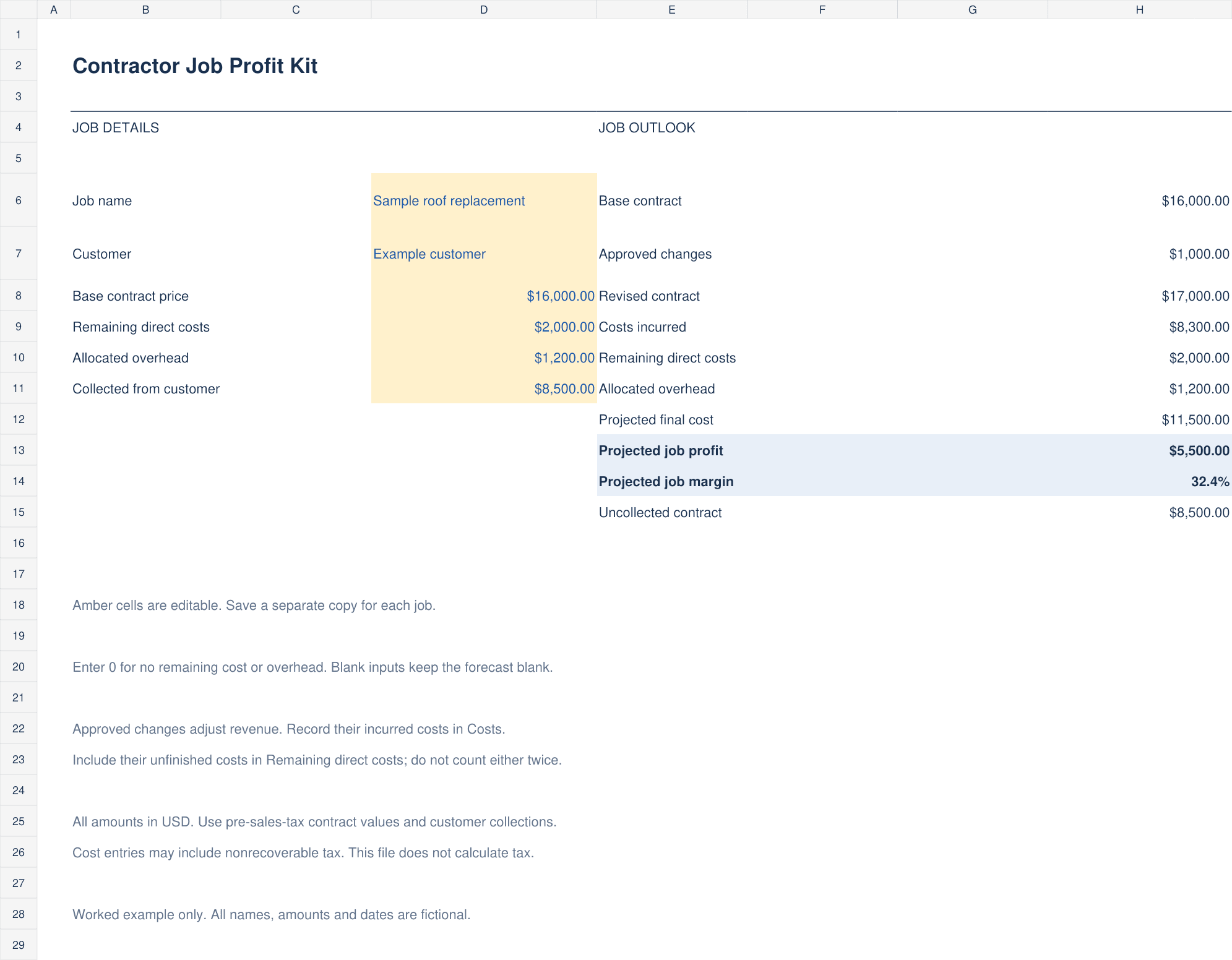
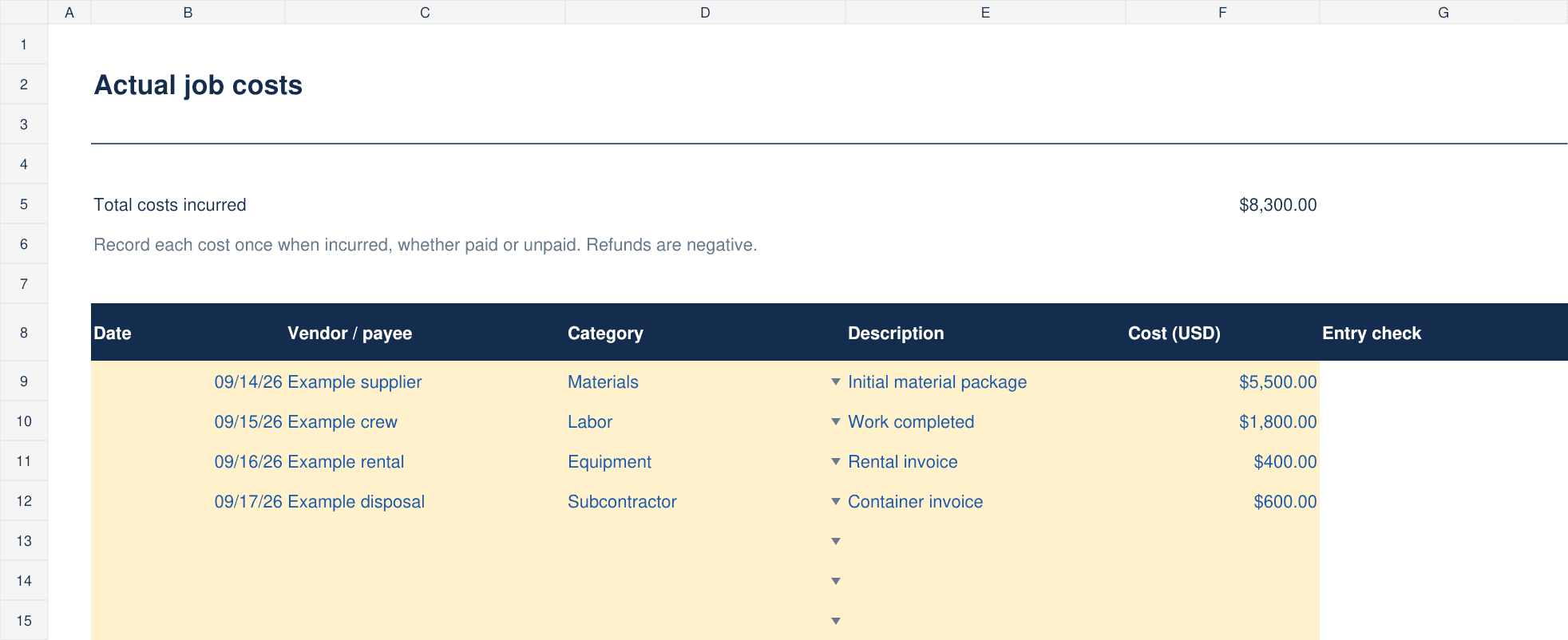
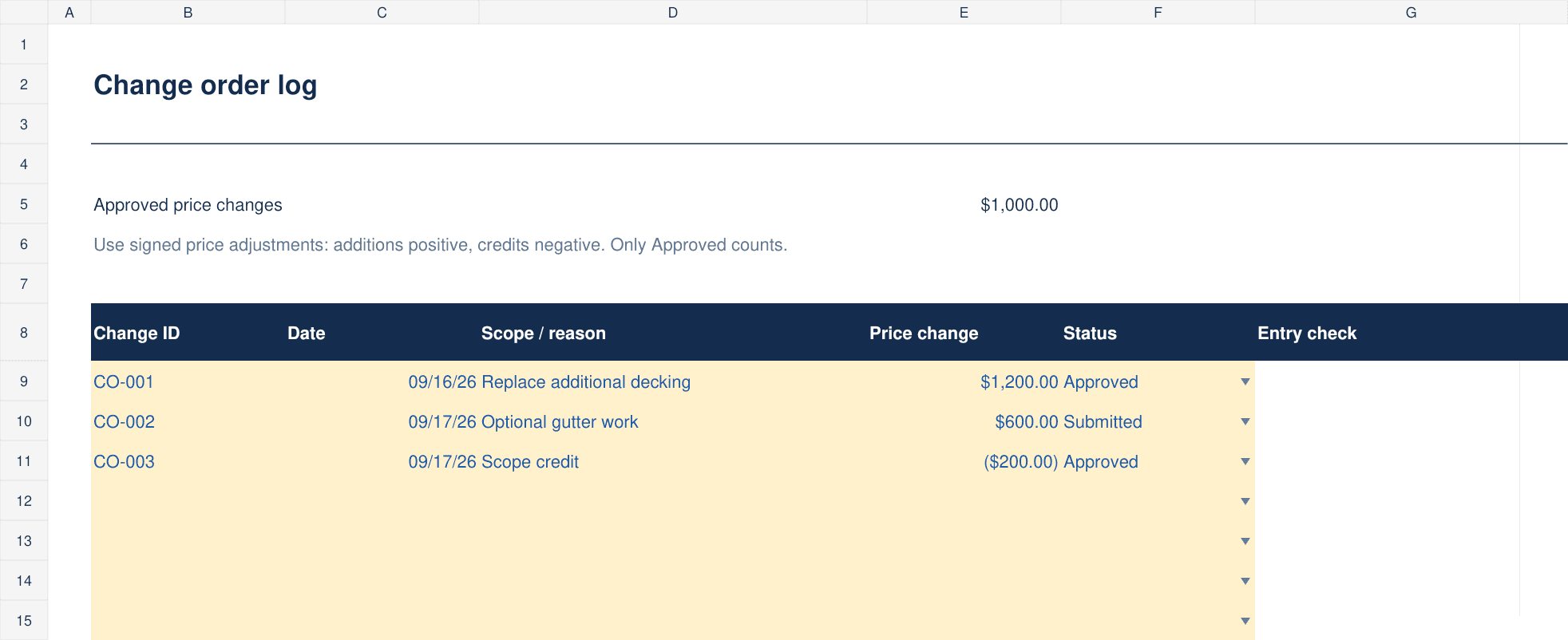
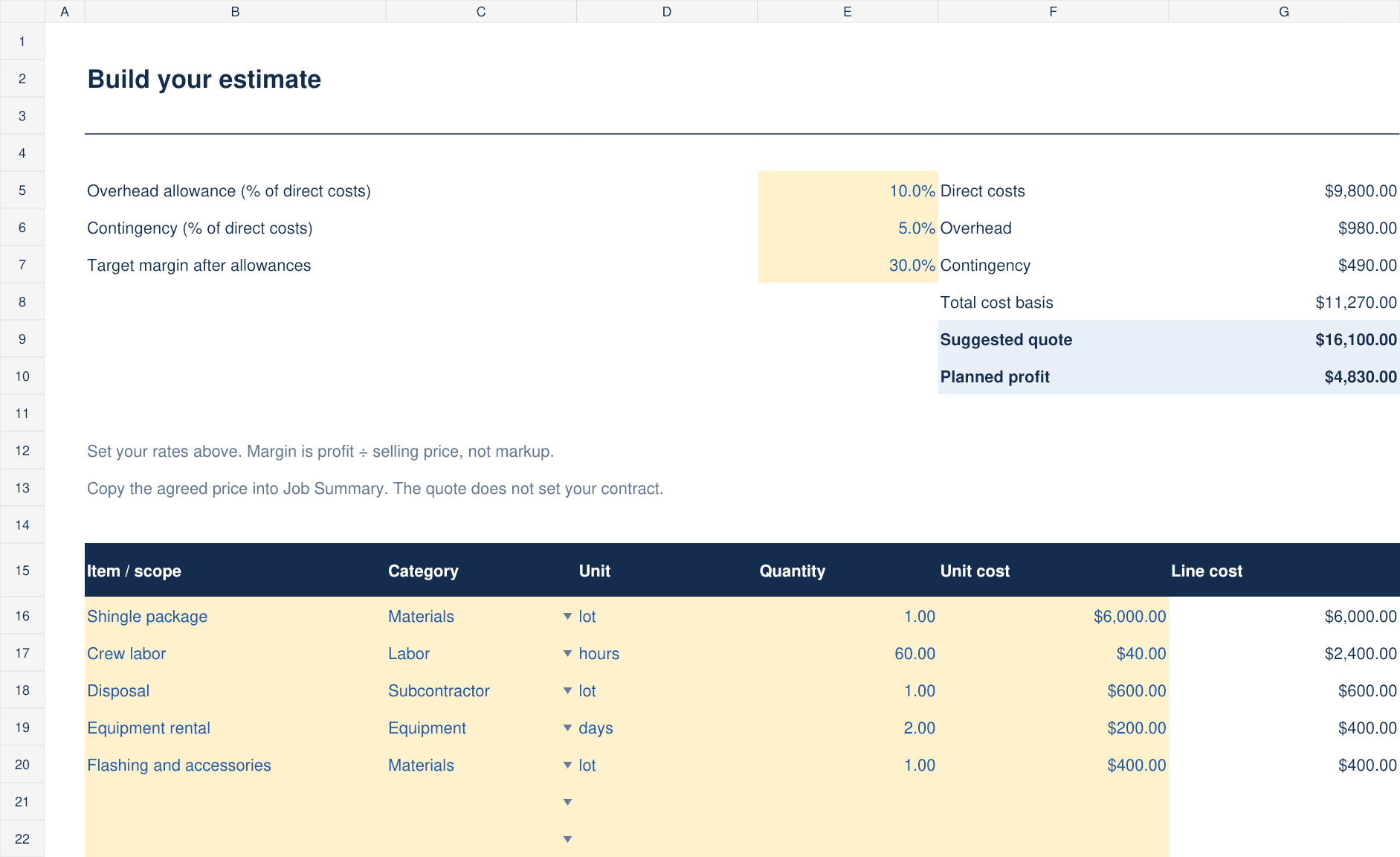
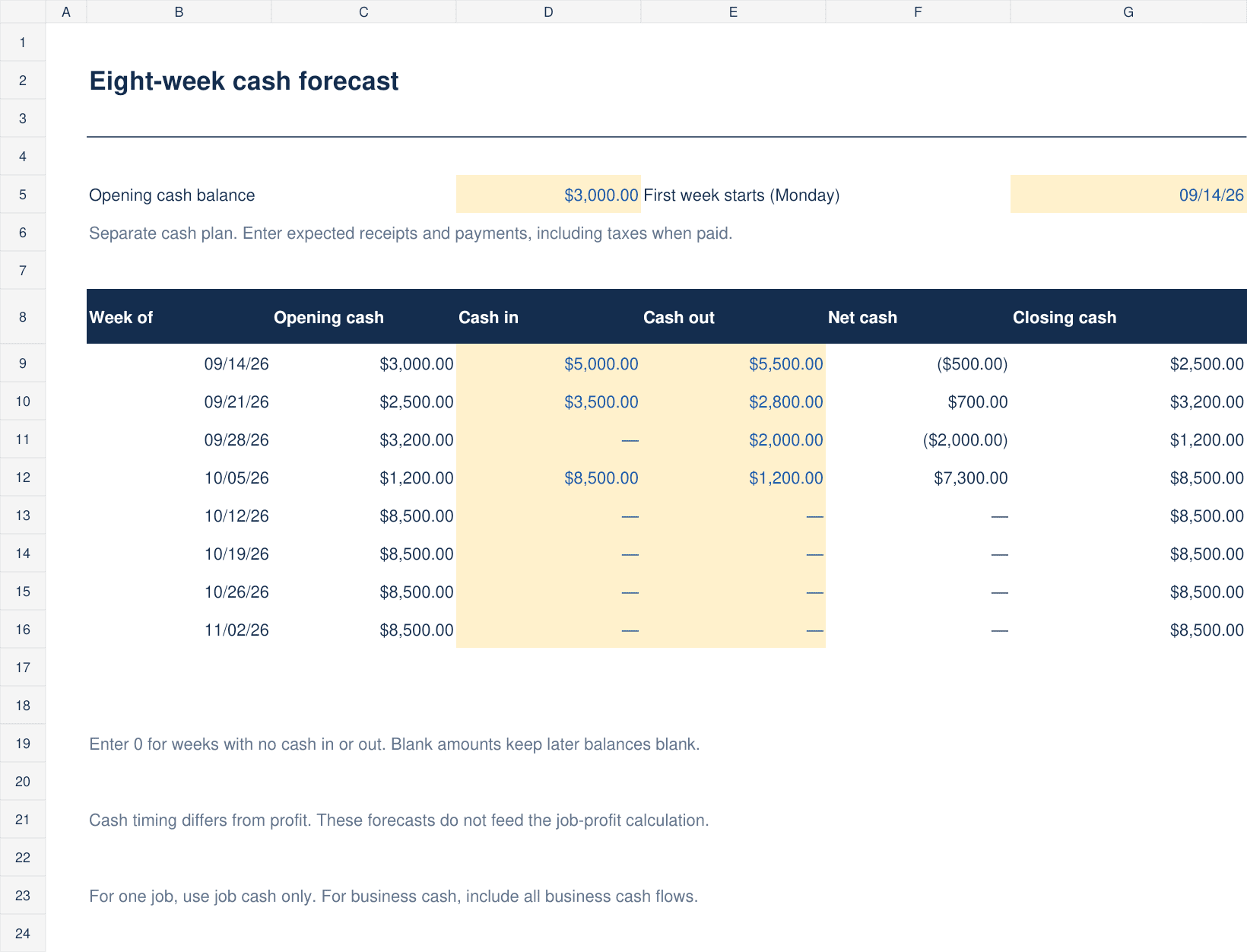
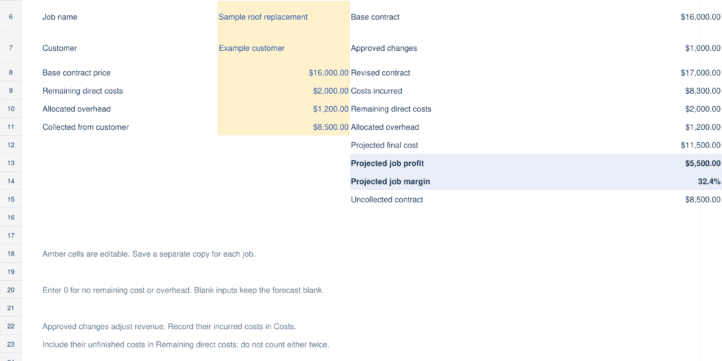
Contractor Job Profit Kit is an Excel planning package for small contractors who want a clearer view of individual job costs, projected profit and near-term cash needs. It is designed for users who prefer entering their own job information in a spreadsheet rather than subscribing to another software service.
The download contains two Excel workbooks: a blank template for your own jobs and a completed fictional roofing example that illustrates the workflow. Each workbook contains six tabs: Start Here, Job Summary, Estimate, Costs, Change Orders and Cash Forecast. The sample names, dates and amounts are fictional and are not customer results or earnings promises.
Start by saving a separate copy of the blank workbook for each job. In Estimate, enter the scope, quantities and unit costs, then set overhead, contingency and target margin. The template provides 20 estimate lines. In Job Summary, enter the agreed base contract price, estimated unfinished costs, allocated overhead and collections. Update those inputs as the job progresses so the projected result reflects your latest information.
The Costs tab supports 200 actual-cost entries. Record each expense once, including incurred costs that have not yet been paid. The Change Orders tab supports 30 entries; approved price changes adjust the contract total. Keep submitted or unapproved changes separate from approved work when assessing the job outlook.
Use the eight-week Cash Forecast to enter opening cash, a Monday start date and expected receipts and payments. This schedule highlights timing: cash available and projected job profit are different measures. Enter zero when you know an amount is zero; required inputs left blank can leave dependent forecasts blank. Instructions explain how to avoid counting overhead twice.
Editable input cells are highlighted in amber. The workbooks use standard Excel formulas with no macros or external links, and there is no subscription. Desktop Excel is recommended; Google Sheets and mobile compatibility have not been verified. Keep all six tabs together when saving a job copy.
This kit is a planning aid, not accounting software or professional advice. It does not calculate sales tax, connect to a bank, run payroll or issue invoices. Use pre-sales-tax contract values and maintain your own bookkeeping records. A forecast depends on the accuracy and completeness of the information you enter; the kit does not guarantee profit.
Similar ProductsOther customers were also interested in...



 eFinancialModels
Electric Vehicle (EV) Charging Station Financial M...
With this comprehensive 5- or 10-year monthly tool, investors can assess the viability of setting up... Read more

Financial Model for Mobile App | Mobile App Busine...
The Mobile App Financial Plan Template in Excel allows you to develop financial projections when lau... Read more

 HenrySheykin
Food Truck Financial Model Excel Template
The Food Truck Financial Model helps entrepreneurs, founders, business owners, consultants, and anal... Read more

Green Hydrogen Production from Wind Energy Financi...
The Green Hydrogen from Wind Financial Model aims to comprehensively forecast a horizon of 40 years ... Read more

Simple Mutual Non-Disclosure Agreement Template
Protect your business secrets with ease using our Simple Mutual Non-Disclosure Agreement Template. S... Read more

Solar Energy Financial Model
The Solar Energy Financial Model Spreadsheet Template in Excel assists you in preparing a sophistica... Read more

 Peter Graf
The Customer-Centric Financial Model for Restauran...
Starting a restaurant without a financial plan is like driving a car blindfolded. You wouldn´t do i... Read more
You must log in to submit a review.