
0 ITEMS

AI Data Center Liquid Cooling Financial Model – 15-Year Excel Retrofit, PUE, Energy Savings & Investment Valuation
Premium 15-year Excel financial model for AI data center liquid cooling and retrofit investments. Compare air, direct-to-chip and immersion cooling, analyze PUE, WUE, energy savings, CAPEX, service revenue, NPV, IRR and payback. Includes 21 worksheets, 180 monthly periods, six scenarios, 12 dashboard charts and a 28-page PDF guide.
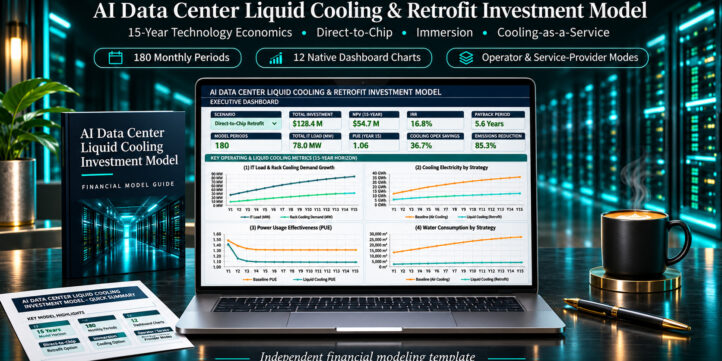
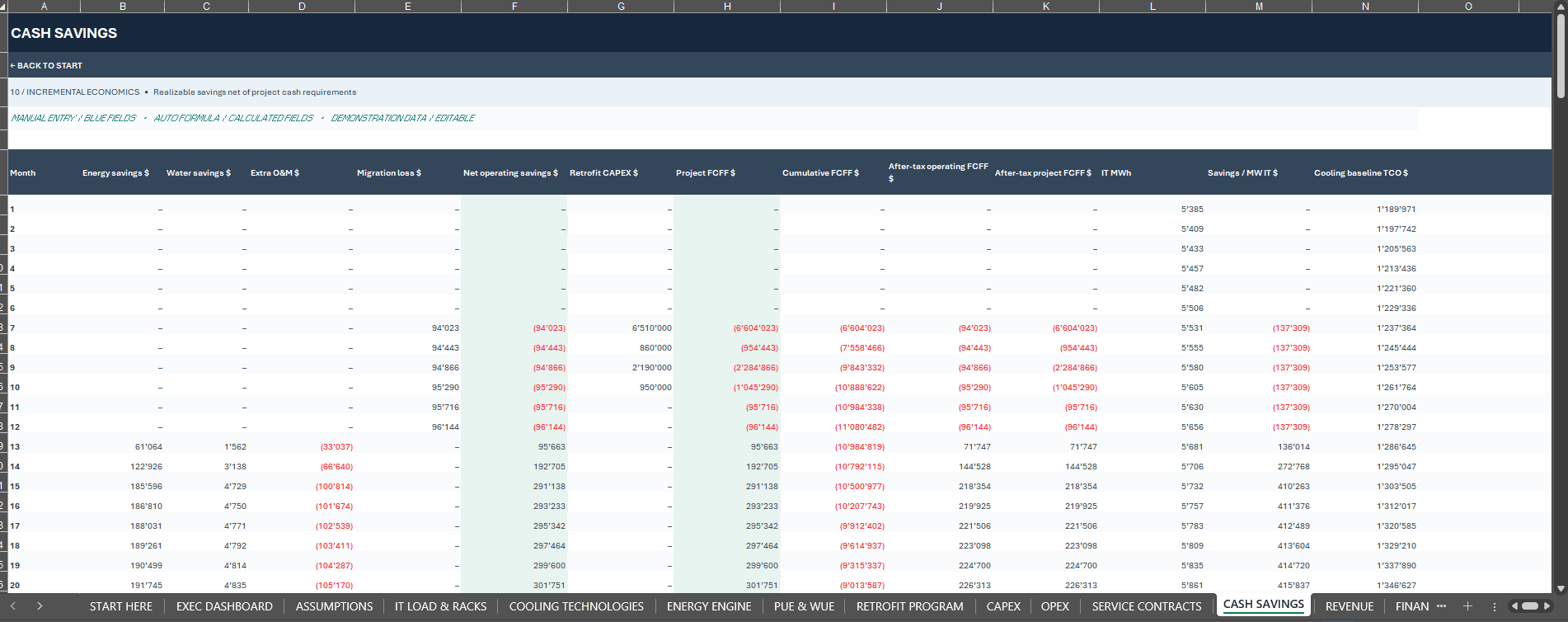
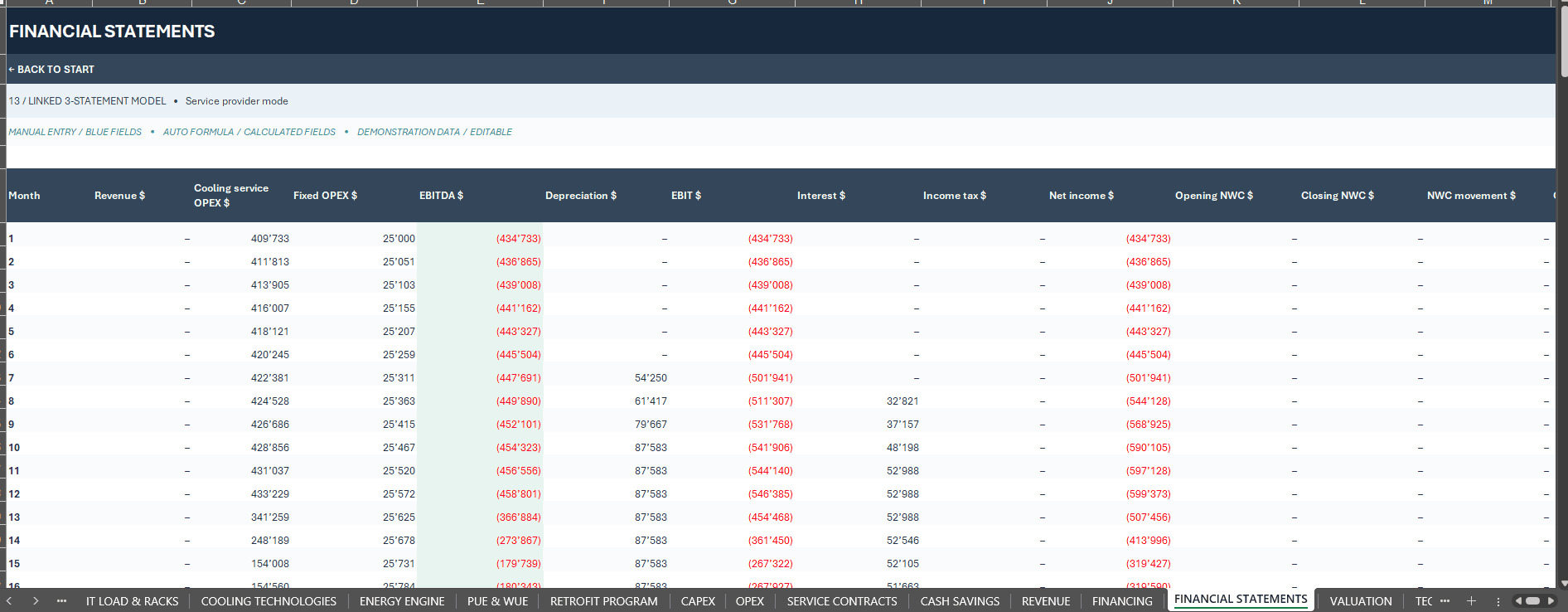
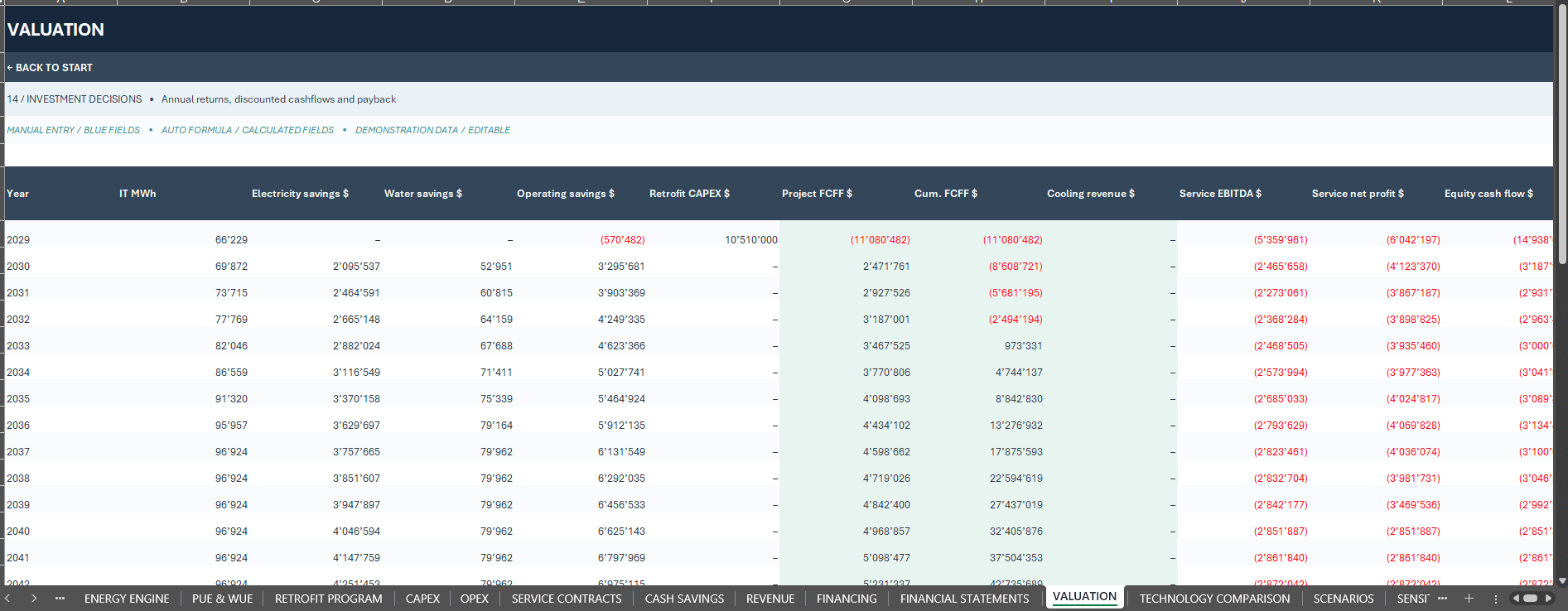
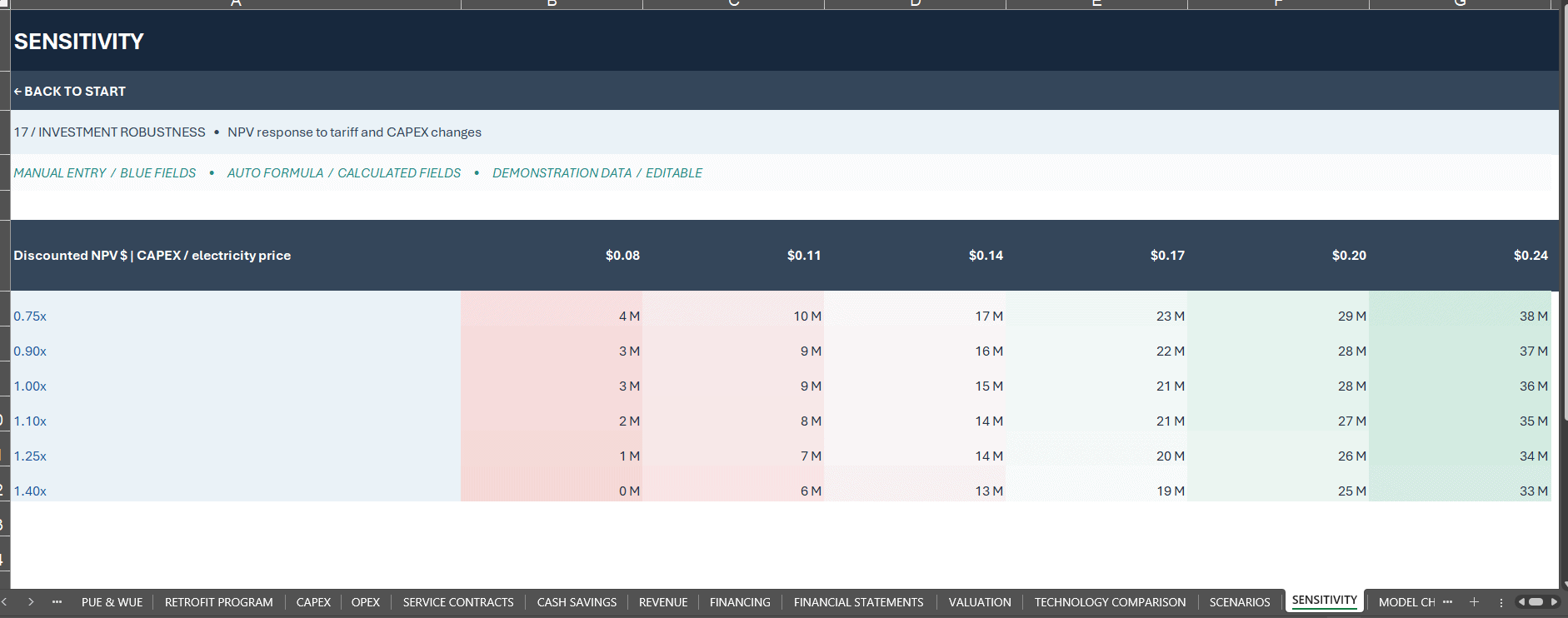
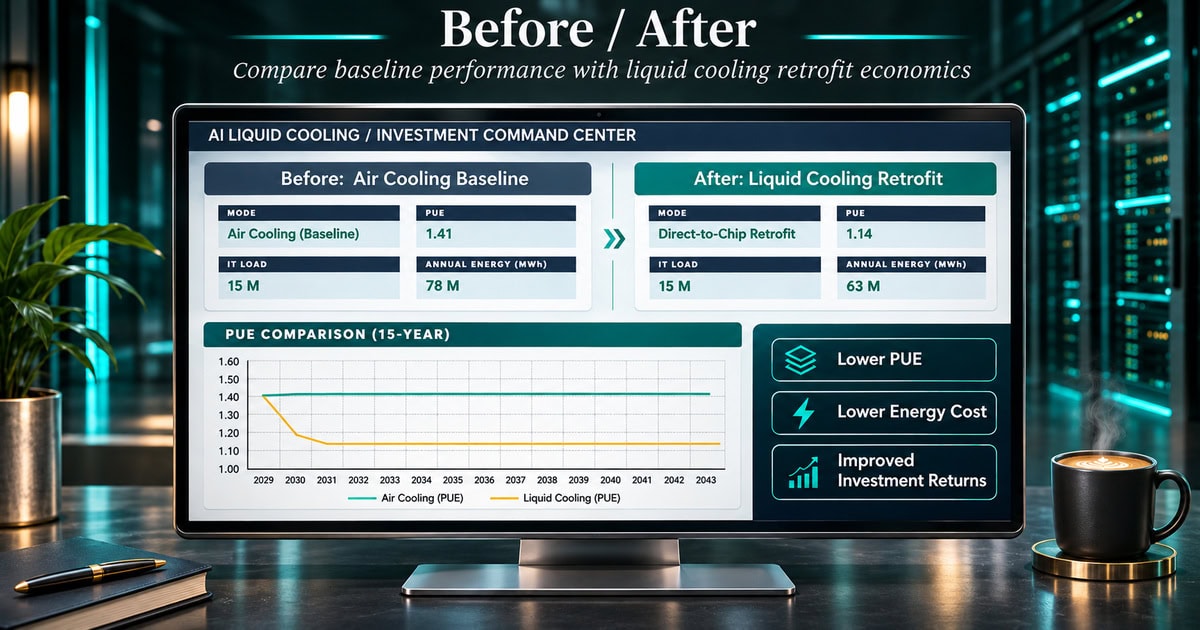

❄️ AI DATA CENTER LIQUID COOLING & RETROFIT INVESTMENT MODEL
15-Year Technology Economics, Energy Efficiency & Financial Investment Model
Premium Excel Template | Direct-to-Chip Cooling • Immersion Cooling • PUE & WUE • Retrofit CAPEX • NPV & IRR
Compare cooling technologies, evaluate retrofit investments, and connect data center energy performance with long-term financial outcomes.
The AI Data Center Liquid Cooling & Retrofit Investment Model by SheetworksStudio is a professional, fully editable Excel planning tool for AI data center operators, infrastructure investors, engineering consultants, financial analysts, and cooling technology providers.
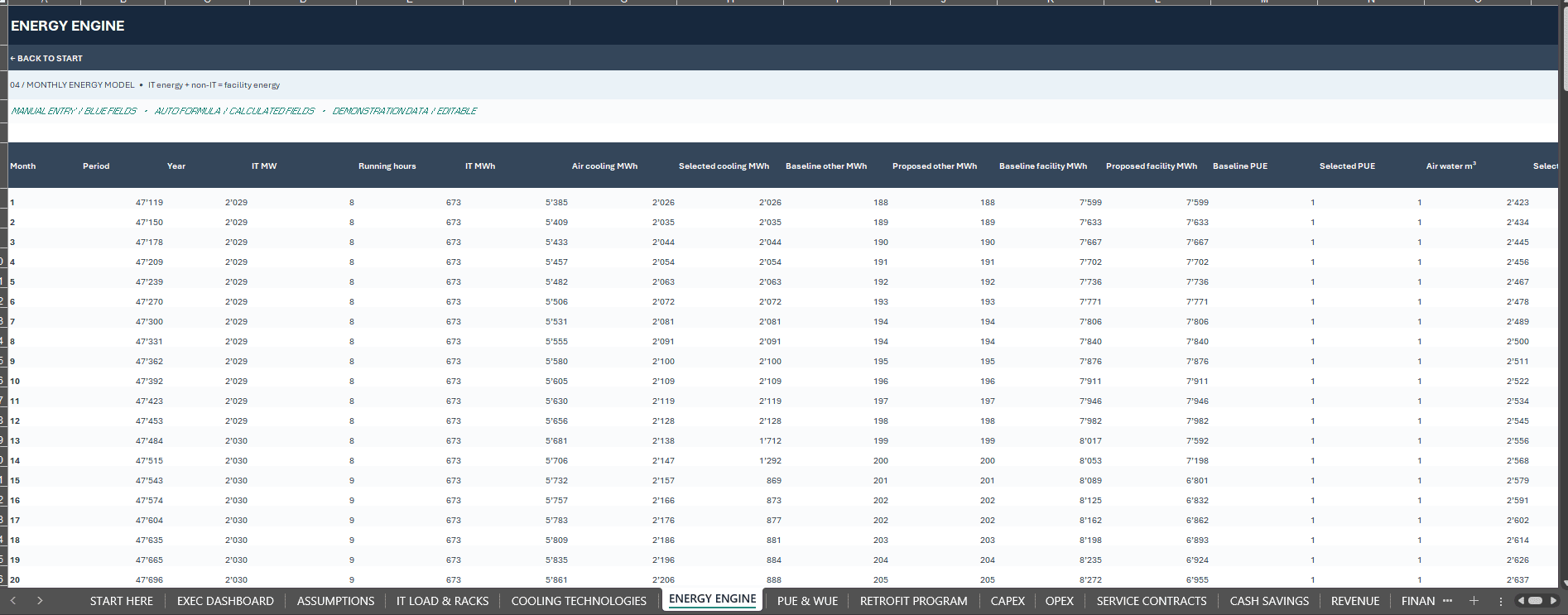
Designed specifically for liquid cooling investments, the workbook connects IT power demand, cooling equipment efficiency, electricity and water consumption, retrofit expenditure, operating savings, recurring cooling services, and investment returns.
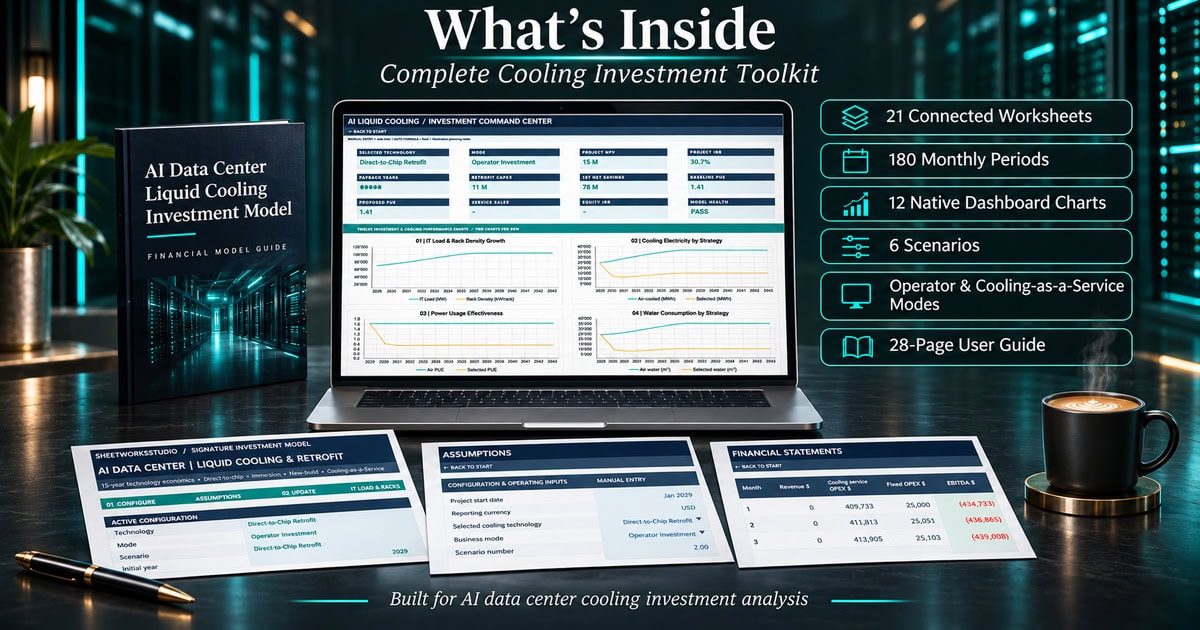
With 21 connected worksheets, 180 monthly periods, six financial scenarios, 12 native Excel dashboard charts, and a comprehensive 28-page PDF guide, the model provides an integrated framework for preliminary technology and investment planning.
⚡ 1. FIVE COOLING & INVESTMENT CONFIGURATIONS
Explore five configurable approaches:
- Existing Air-Cooled Facility — Reference cooling baseline.
- Direct-to-Chip Liquid Cooling Retrofit — Evaluate cooling infrastructure upgrades.
- Immersion Cooling Retrofit — Analyze immersion-based cooling investments.
- New-Build Liquid-Cooled Facility — Plan a liquid-cooling operating configuration.
- Cooling-as-a-Service — Explore recurring cooling infrastructure service economics.
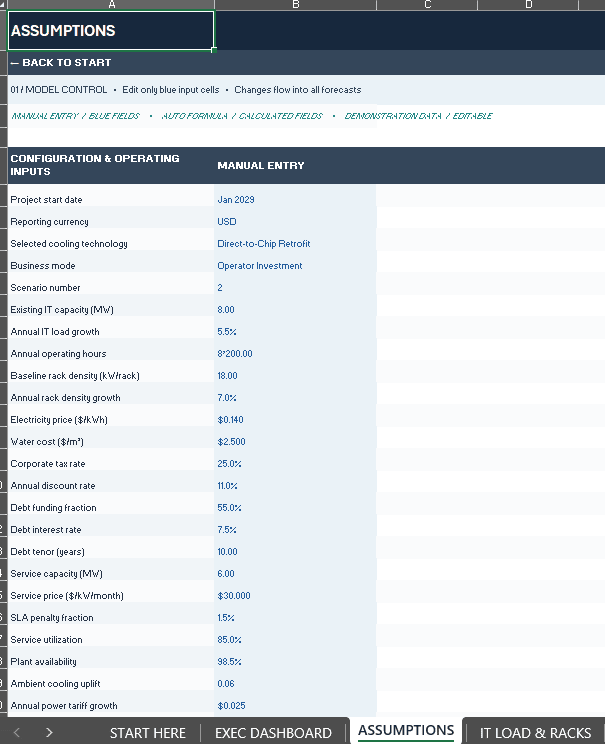
Adjust facility load, cooling technology, operating assumptions, equipment investments, service contracts, and financing parameters.
🌡️ 2. COOLING TECHNOLOGY & ENERGY ECONOMICS
Analyze the relationship between IT capacity, cooling requirements, facility electricity consumption, and operating expenses.
Key technical capabilities:
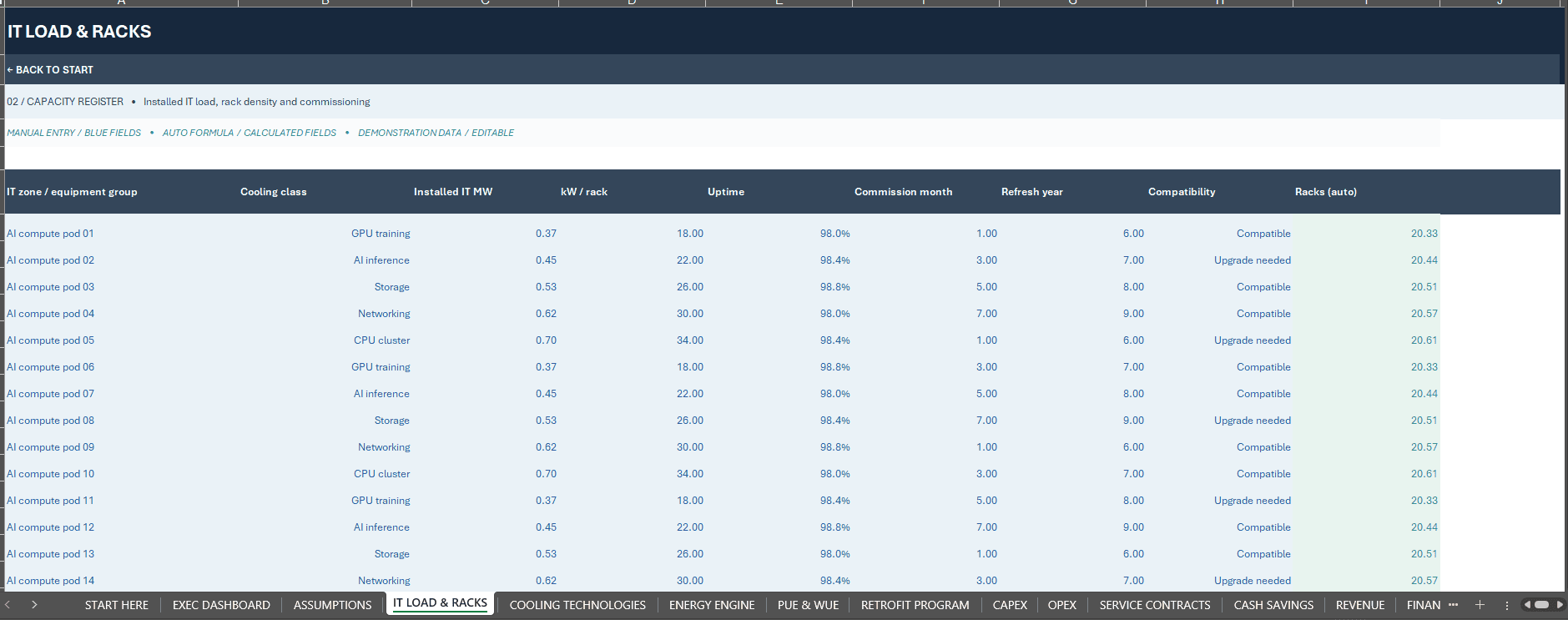
- IT load and capacity growth
- Rack density and utilization
- Cooling technology comparisons
- Fan and pump electricity consumption
- Equipment capacity and availability
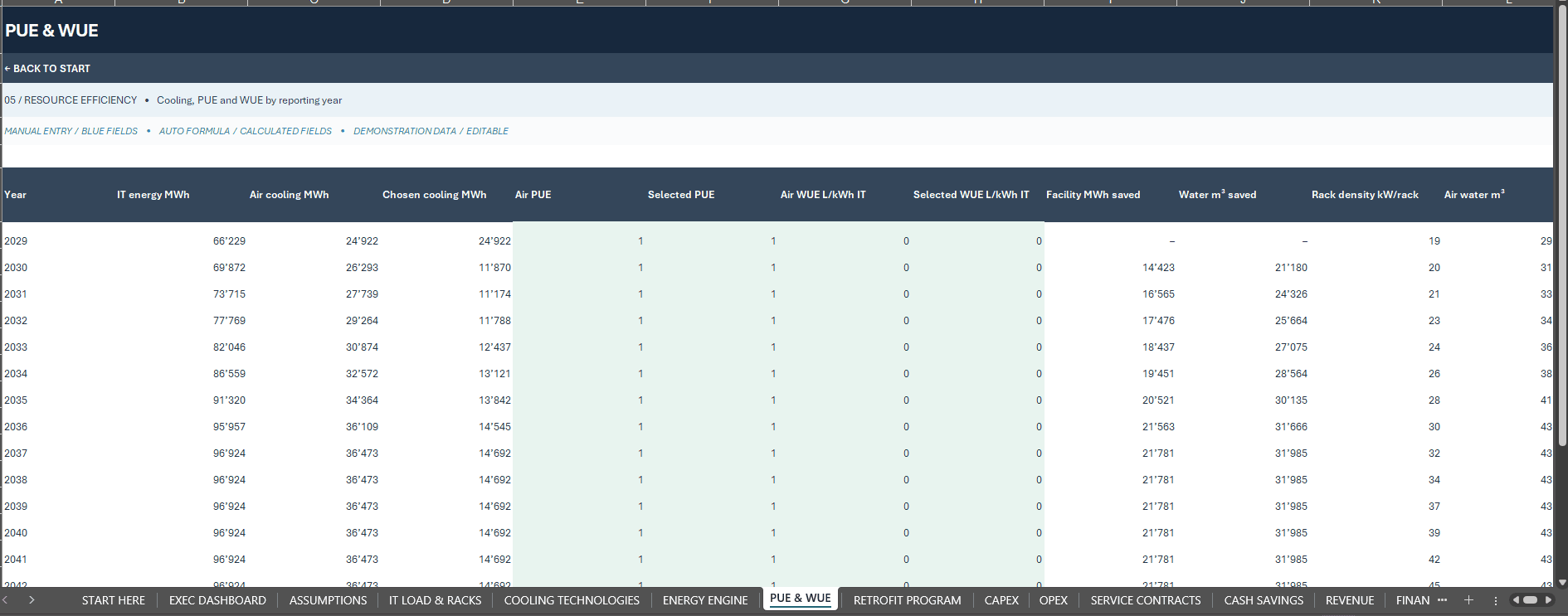
- Power Usage Effectiveness (PUE)
- Water Usage Effectiveness (WUE)
- Water consumption and tariffs
- Electricity pricing and escalation
- Cooling operating expenditures
The workbook calculates facility energy from IT electricity and modeled non-IT electricity consumption.
PUE is treated as a calculated performance indicator rather than an additional multiplier that duplicates previously calculated energy savings.
🏗️ 3. LIQUID COOLING RETROFIT & CAPEX PLANNING
Evaluate the financial implications of cooling infrastructure investments.
Illustrative investment categories include:
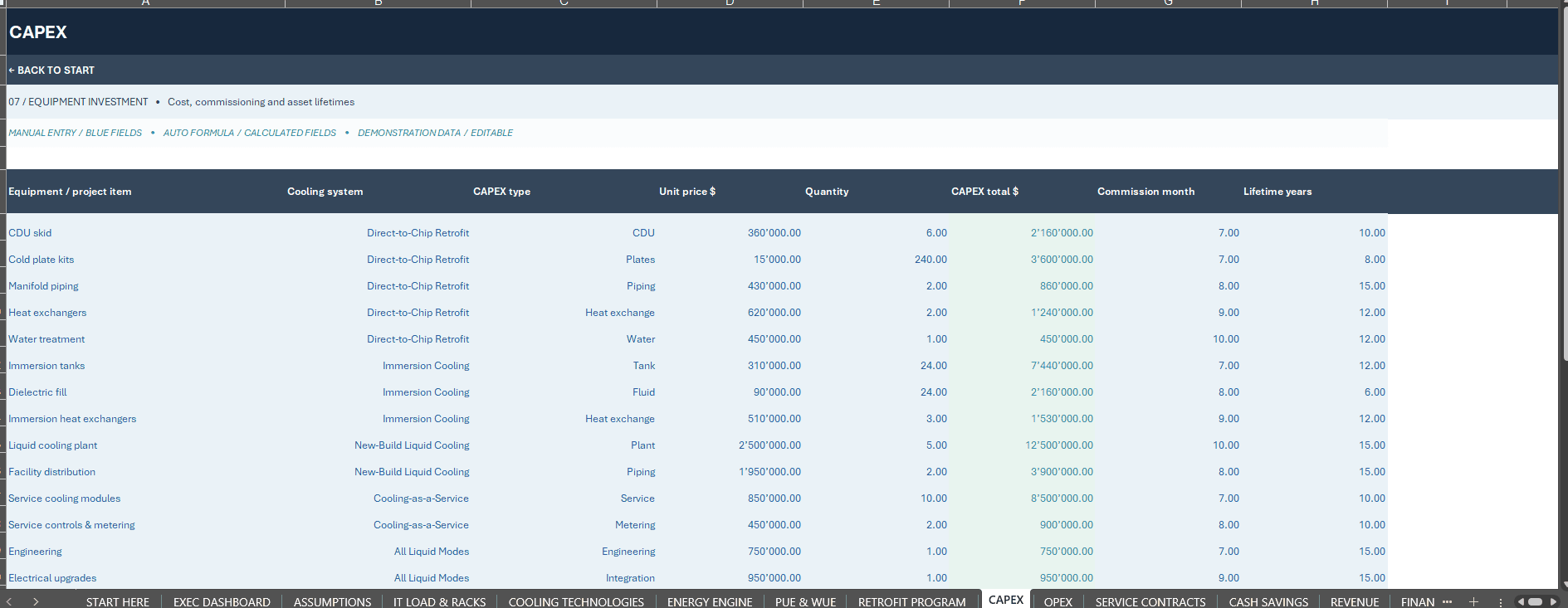
- Cooling Distribution Units (CDUs)
- Direct-to-chip cooling equipment
- Immersion cooling systems
- Piping and heat exchange infrastructure
- Water treatment equipment
- Engineering and installation
- Facility modifications
- Equipment replacement
- Retrofit implementation schedules
Review investment timing, project costs, facility operating effects, and incremental capital requirements.
💰 4. OPERATING SAVINGS & INVESTMENT RETURNS
Compare liquid cooling upgrades with the modeled existing air-cooling baseline.
Financial analysis includes:
- Electricity cost savings
- Water and operating cost impacts
- Incremental retrofit investment
- Annual operating savings
- Net investment cash flows
- Net Present Value (NPV)
- Internal Rate of Return (IRR)
- Investment Payback
- Technology-specific financial comparisons
- Discount rate and operating cost sensitivities
Investment outputs reflect editable assumptions and should not be interpreted as guaranteed project returns.
🏢 5. COOLING-AS-A-SERVICE ECONOMICS
Evaluate cooling infrastructure from the perspective of a service provider.
Included planning features:
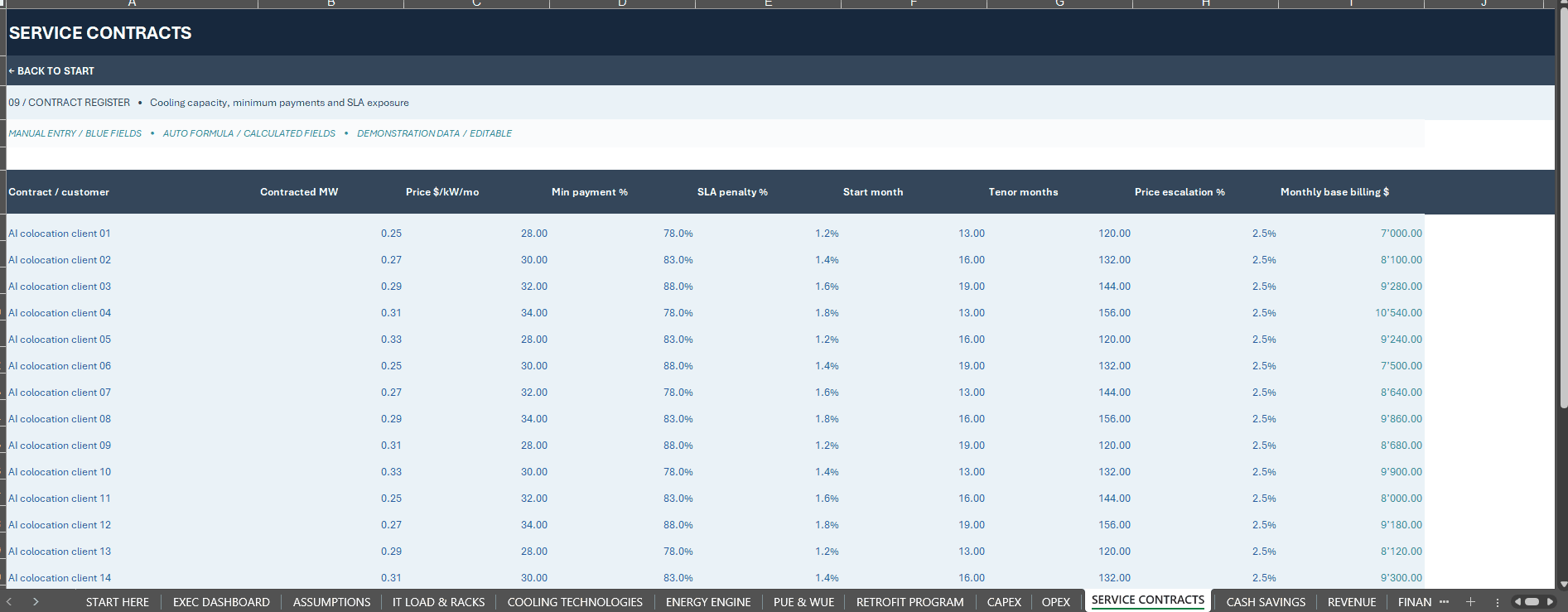
- Customer cooling contracts
- Contracted service capacity
- Recurring service revenue
- Service pricing and utilization
- Service operating expenditure
- Capital investment
- Debt financing
- EBITDA and operating results
- Financial statements
- Investment valuation
This operating business perspective complements the data center operator’s retrofit investment analysis.
🔄 6. SIX FINANCIAL & OPERATING SCENARIOS
Explore six illustrative cases:
- Air Cooling Baseline — Reference cooling economics.
- Direct-to-Chip Retrofit — Liquid cooling investment and efficiency.
- Immersion Cooling — Alternative cooling technology.
- High Electricity Cost — Increased electricity tariffs.
- Increased Rack Density — Higher-density IT infrastructure.
- Delayed Retrofit & Higher CAPEX — Delayed implementation and increased investment costs.
The dedicated SCENARIOS, TECHNOLOGY COMPARISON, and SENSITIVITY worksheets support investment comparisons and downside analysis.
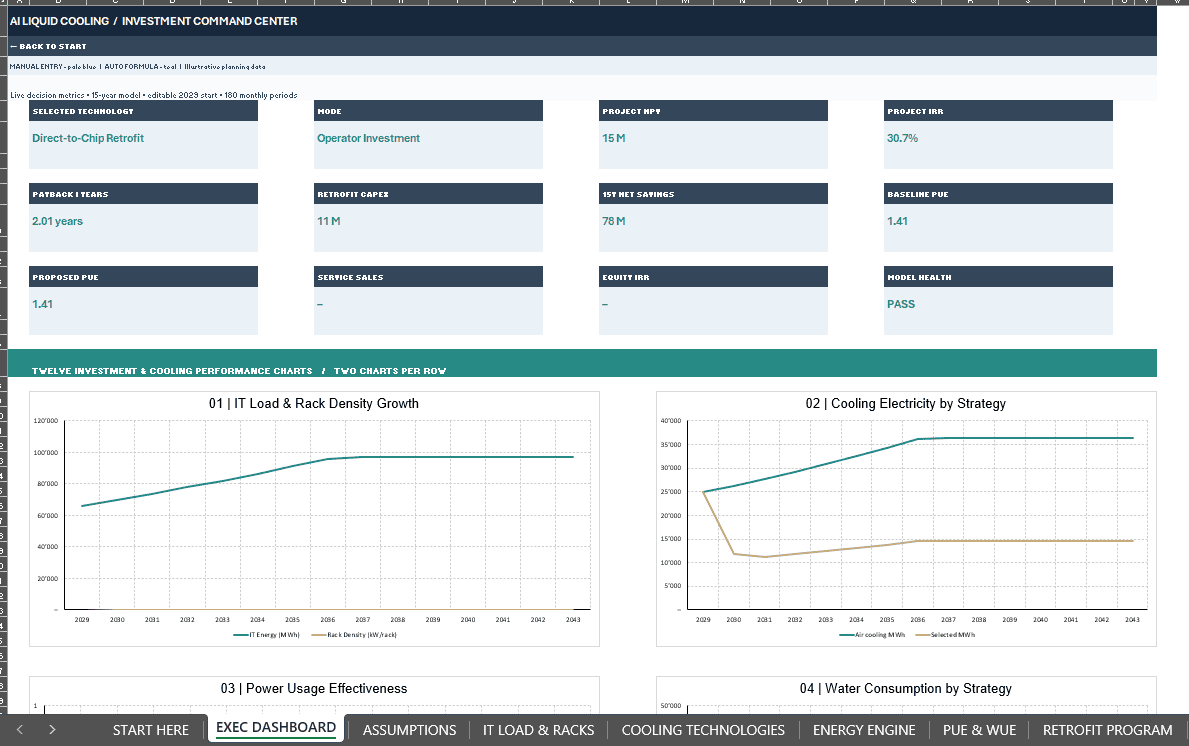
📊 7. EXECUTIVE DASHBOARD — 12 NATIVE EXCEL CHARTS
A dedicated executive dashboard combines technical, operational, and investment indicators.
Dashboard metrics include:
- Selected Cooling Technology
- Business Operating Mode
- Project NPV and IRR
- Investment Payback
- Retrofit CAPEX
- Long-Term Net Savings
- Baseline and Proposed PUE
- Model Health
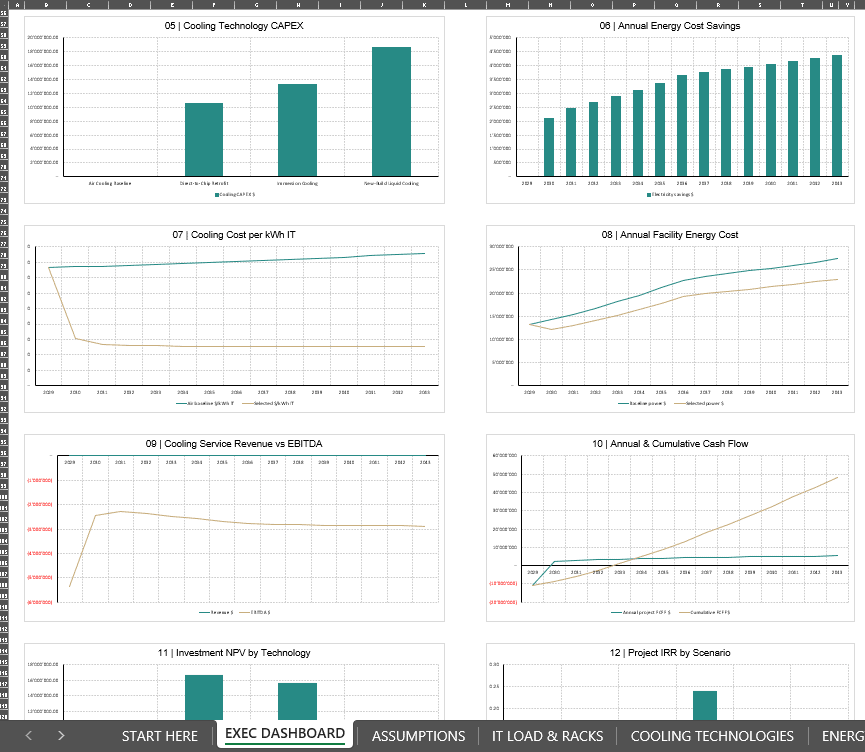
12 Native Dashboard Charts
- IT Load & Rack Density Growth
- Cooling Electricity by Strategy
- Power Usage Effectiveness
- Water Consumption by Strategy
- Cooling Capital Expenditure
- Annual Energy Cost Savings
- Cooling Unit Economics
- Operating Cost Breakdown
- Service Revenue & EBITDA
- Incremental Investment Cash Flows
- Technology Investment Comparison
- Scenario Financial Outcomes
The dashboard uses a two-chart-per-row layout with twelve Excel charts connected to the underlying model.
✅ 8. BUILT-IN FINANCIAL & TECHNICAL CONTROLS
The MODEL CHECKS worksheet includes automated controls for selected:
- Forecast horizon consistency
- IT and facility energy reconciliation
- PUE calculation boundaries
- Cooling capacity headroom
- Water consumption
- CAPEX reconciliation
- Energy savings accounting
- Balance sheet reconciliation
- Cash flow roll-forward
- Debt balance validation
- Scenario selection
- Overall model status
These controls support internal model review and do not replace independent engineering or financial verification.
📦 WHAT’S INCLUDED
✅ 1 Fully Editable Excel Financial Model (.xlsx)
✅ 21 Connected Worksheets
✅ 180 Monthly Forecast Periods / 15 Years
✅ 5 Cooling & Investment Configurations
✅ 6 Financial and Operational Scenarios
✅ Technical PUE, WUE & Energy Analysis
✅ Retrofit CAPEX & Operating Cost Schedules
✅ Cooling-as-a-Service Revenue Analysis
✅ Integrated Financial Reporting
✅ NPV, IRR, Payback & Cash Flow Analysis
✅ Technology Comparison & Sensitivity Analysis
✅ Executive Dashboard with 12 Native Charts
✅ Built-In Model Integrity Checks
✅ Detailed 28-Page English PDF Guide
All demonstration assumptions and financial figures are fictional.
⚙️ HOW TO USE
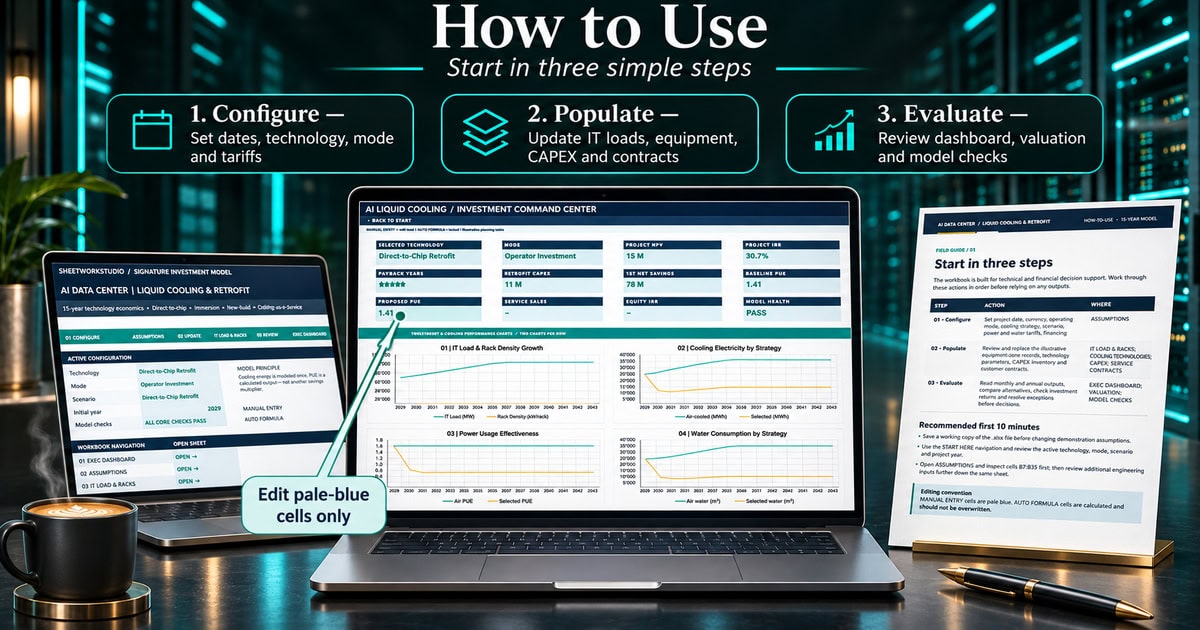
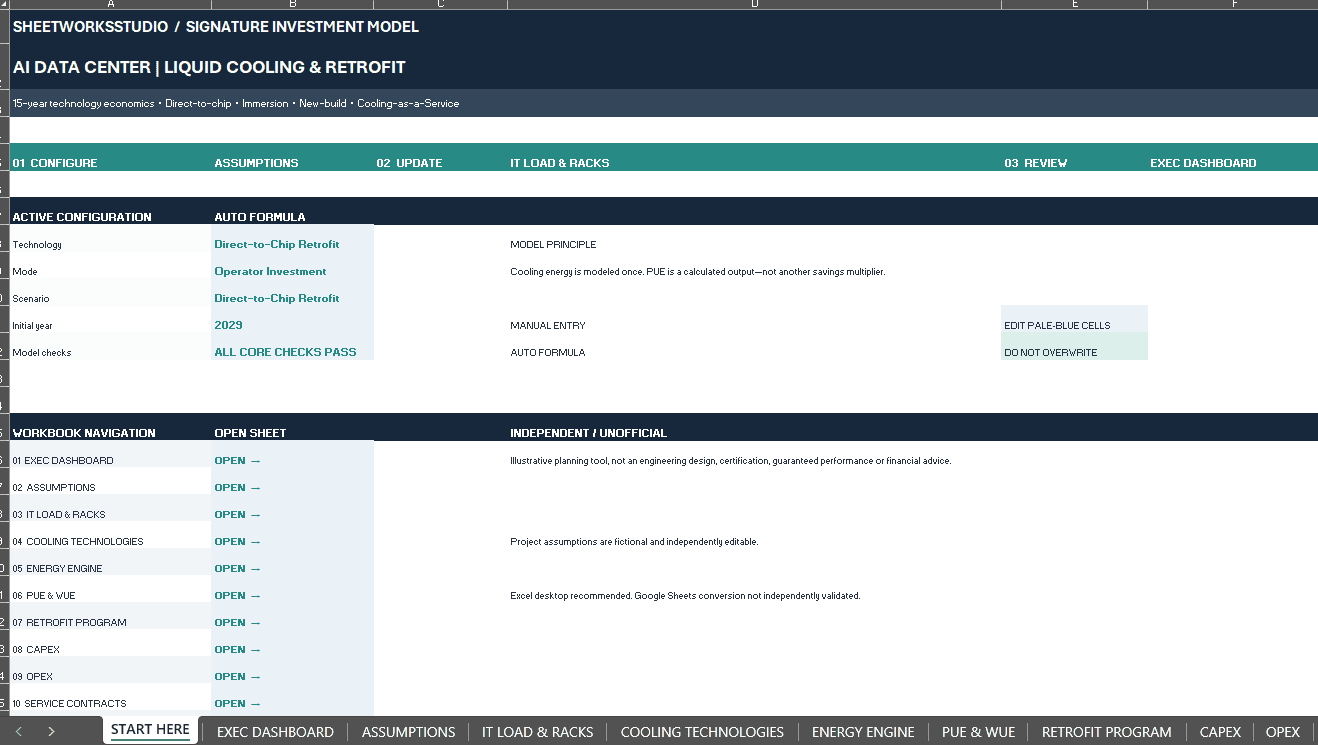
STEP 1 — Configure: Open START HERE and enter facility, technology, electricity, water, and financing assumptions.
STEP 2 — Select Technology: Compare air cooling, direct-to-chip liquid cooling, immersion cooling, and other operating configurations.
STEP 3 — Plan Investments: Review retrofit programs, capital expenditure, operational costs, and service contracts.
STEP 4 — Analyze Economics: Examine PUE, WUE, energy consumption, operating savings, cash flows, NPV, IRR, and payback.
STEP 5 — Compare Scenarios: Explore six cases, technology comparisons, and sensitivity assumptions.
STEP 6 — Validate: Review the executive dashboard, automated checks, and supporting calculation schedules.
The included 28-page PDF guide provides detailed instructions and methodological explanations.
👥 WHO IS THIS MODEL FOR?
- AI Data Center Operators & Developers
- Liquid Cooling Technology Providers
- Data Center Retrofit Planners
- Cooling-as-a-Service Businesses
- Infrastructure Investment Analysts
- Energy Efficiency Consultants
- Engineering and Financial Advisors
- Corporate Finance and Investment Teams
Typical applications: Liquid cooling investment feasibility, technology comparison, AI data center power planning, retrofit budgeting, energy efficiency analysis, recurring cooling service economics, financial forecasting, and investment scenario analysis.
💻 TECHNICAL SPECIFICATIONS
Specification Details File Format Microsoft Excel XLSX Planning Horizon 15 Years / 180 Months Connected Worksheets 21 Cooling Configurations 5 Financial Scenarios 6 Dashboard Charts 12 Native Excel Charts Guide 28-Page English PDF Demonstration Start January 2029, Editable Macros None Required External Connections None Recommended Software Microsoft Excel Desktop Language English
Google Sheets import has not been independently validated and may require adjustments to formulas, charts, and formatting.
⚠️ MODEL SCOPE & LIMITATIONS
This workbook is a simplified cooling technology, retrofit economics, and investment planning model.
It is not a certified cooling engineering design, thermodynamic simulation, equipment procurement specification, facility performance certification, or lender-approved investment model.
Cooling capacity, PUE, WUE, efficiency, electricity demand, service economics, depreciation, financing, and investment returns depend on illustrative assumptions.
The workbook does not replace detailed engineering studies, site-specific capacity assessments, supplier quotations, commissioning tests, or professional due diligence.
All material technical and financial assumptions must be independently verified before making operational or investment decisions.
🛡️ INDEPENDENT TEMPLATE & LEGAL NOTICE
Digital product only — no physical item will be shipped.
This independent, unofficial financial planning template by SheetworksStudio is not audited, certified, regulator-approved, lender-approved, or endorsed by any software provider, bank, engineering association, or government authority.
It does not constitute financial, investment, engineering, accounting, tax, or legal advice.
All examples are fictional. No particular energy saving, cooling performance, financial return, or investment outcome is guaranteed.
SHEETWORKSSTUDIO
Calm design. Clear logic.
Premium Financial Models • Infrastructure Investment Analysis • Professional Excel Templates
Similar ProductsOther customers were also interested in...


 eFinancialModels
Electric Vehicle (EV) Charging Station Financial M...
With this comprehensive 5- or 10-year monthly tool, investors can assess the viability of setting up... Read more

Financial Model for Mobile App | Mobile App Busine...
The Mobile App Financial Plan Template in Excel allows you to develop financial projections when lau... Read more

 HenrySheykin
Food Truck Financial Model Excel Template
The Food Truck Financial Model helps entrepreneurs, founders, business owners, consultants, and anal... Read more

Green Hydrogen Production from Wind Energy Financi...
The Green Hydrogen from Wind Financial Model aims to comprehensively forecast a horizon of 40 years ... Read more

Simple Mutual Non-Disclosure Agreement Template
Protect your business secrets with ease using our Simple Mutual Non-Disclosure Agreement Template. S... Read more

Solar Energy Financial Model
The Solar Energy Financial Model Spreadsheet Template in Excel assists you in preparing a sophistica... Read more

 Peter Graf
The Customer-Centric Financial Model for Restauran...
Starting a restaurant without a financial plan is like driving a car blindfolded. You wouldn´t do i... Read more
You must log in to submit a review.