
0 ITEMS

Renewable Energy Project Financial Model: Excel Guide
A renewable energy project financial model in Excel is the analytical backbone every solar, wind, or battery storage developer needs before approaching lenders, tax equity investors, or offtakers. This guide walks you through every layer — from PPA revenue logic to LCOE formulas to debt service waterfalls — with real cell-reference examples you can implement today.
Key Takeaways
- A renewable energy financial model differs from generic project finance by incorporating capacity factors, degradation curves, PPA escalators, and tax equity flip structures that standard templates omit.
- The Inflation Reduction Act extended the Investment Tax Credit (ITC) at 30% for solar projects and the Production Tax Credit (PTC) at $0.0275/kWh (2024 base, inflation-adjusted) for wind, making tax equity modeling a non-negotiable model component.
- Utility-scale solar capacity factors average 20-29% in the U.S. Sun Belt, while onshore wind averages 30-45% depending on site class, according to the U.S. Energy Information Administration.
- LCOE (Levelized Cost of Energy) — the all-in cost per MWh over a project’s life — is the single most-cited metric in renewable energy investment decisions and requires a 5-step Excel formula sequence.
- Standard project finance debt for renewables requires a minimum Debt Service Coverage Ratio (DSCR) of 1.25x-1.40x, with lenders sculpting repayment schedules to match actual cash flow profiles.
- Solar panel degradation averages 0.5% per year per leading manufacturer data, compounding to roughly 12% output loss over a 25-year project life — a figure that must be hard-coded into every revenue projection.
- PPA contracts for utility-scale solar typically run 15-25 years; wind PPAs commonly run 20-25 years, creating a “merchant tail” period that requires separate price-curve assumptions.
What Makes Renewable Energy Financial Models Different
Renewable energy financial models differ from traditional project finance models in four structural ways: technology-specific production curves, tax credit monetization mechanics, resource variability risk, and the bifurcated revenue stack of contracted versus merchant income. A generic infrastructure model ignores all four.
In a conventional toll road or pipeline model, revenue is a function of throughput times tariff. In a solar or wind model, revenue is a function of irradiance or wind speed (converted to MWh via a capacity factor), multiplied by a PPA rate that may escalate at 1-2% annually, plus any Renewable Energy Credits (RECs) sold separately. Add a tax equity investor who owns 99% of the project during the ITC/PTC period, and the cash flow waterfall becomes genuinely complex.
The U.S. Energy Information Administration reports that utility-scale solar capacity factors averaged 24.9% nationally in 2023, meaning a 100 MW solar farm produces roughly 218,000 MWh per year. That single input — capacity factor — drives every revenue, debt sizing, and return calculation downstream.
Essential Components of a Renewable Energy Excel Model
A complete renewable energy Excel model contains six distinct modules, each on a separate worksheet tab. Mixing inputs, calculations, and outputs on a single sheet is the fastest way to introduce errors that survive audit. Excel supports up to 64 levels of nested functions, which is more than sufficient for the conditional logic required in tax equity flip and waterfall calculations.
The six core modules are:
- Inputs Dashboard — all assumptions in one place: capacity (MW), capacity factor, degradation rate, PPA price, escalator, ITC/PTC election, debt sizing, interest rate, O&M cost per MW.
- Production Model — annual MWh generation with degradation applied year-by-year.
- Revenue Model — PPA revenue, merchant revenue (post-PPA), and REC revenue.
- Cost Model — O&M, insurance, land lease, asset management, and reserve contributions.
- Financing Structure — construction loan, term debt with sculpted repayment, tax equity tranche.
- Returns Dashboard — project IRR, equity IRR, DSCR by year, LCOE, and sensitivity tables.
EFM’s renewable energy financial model templates include all six modules pre-built with dynamic inputs, so analysts can skip the architecture phase and focus on project-specific assumptions.
Revenue Modeling: PPAs, Merchant Sales, and RECs
Revenue in a renewable energy model comes from three sources: contracted PPA income, merchant electricity sales after PPA expiry, and Renewable Energy Credit (REC) sales. Each source carries different risk and requires a different modeling approach.
Power Purchase Agreements (PPAs): A PPA is a long-term contract where an offtaker (utility, corporate buyer) agrees to purchase electricity at a fixed or escalating price per MWh. Model PPA revenue as:
PPA Revenue (Year N) = Annual MWh(N) × PPA Price × (1 + Escalator)^(N-1)
For a 100 MW solar project with a 24.9% capacity factor, 1.5% annual PPA escalator, and $45/MWh starting price:
- Year 1 MWh: 100 MW × 8,760 hours × 24.9% = 218,124 MWh
- Year 1 PPA Revenue: 218,124 × $45 = $9,815,580
- Year 5 PPA Revenue: 218,124 × $45 × (1.015)^4 = $10,427,000 (before degradation)
Merchant Tail: After PPA expiry (typically year 15-25), the project sells into the spot market. Model this using a long-run electricity price forecast, discounted for basis risk and curtailment. Merchant tail revenue is the primary source of equity upside — and downside.
RECs: One REC represents 1 MWh of renewable generation. REC prices vary by state and compliance market. In voluntary markets, solar RECs (SRECs) in New Jersey traded above $200/MWh in 2023 according to the New Jersey Board of Public Utilities. Model REC revenue as a separate line item, not bundled into PPA price, because REC contracts often have different counterparties and durations.
Calculating LCOE in Excel: Step-by-Step
LCOE (Levelized Cost of Energy) is the net present value of all project costs divided by the net present value of all energy produced, expressed in $/MWh. It is the standard metric for comparing renewable technologies and benchmarking against grid electricity prices.
The LCOE formula is:
LCOE = NPV(Discount Rate, All Costs) / NPV(Discount Rate, All MWh Produced)
Here’s the 5-step Excel implementation for a 100 MW solar project:
Step 1 — Build the cost column (Column C): Enter capital cost in year 0 (e.g., $130,000,000 for $1,300/kW installed cost), then annual O&M costs in years 1-25 (e.g., $1,500,000/year escalating at 2%).
Step 2 — Build the production column (Column D): Enter annual MWh with 0.5% annual degradation: =D2*(1-0.005) copied down.
Step 3 — Calculate NPV of costs: In cell C30: =NPV(0.07, C2:C26) + C1 (the C1 term adds year-0 capex since NPV() discounts from period 1). The Excel NPV function accepts up to 254 value arguments, making it well-suited for modeling 25-year project cost streams in a single formula.
Step 4 — Calculate NPV of production: In cell D30: =NPV(0.07, D2:D26)
Step 5 — Compute LCOE: In cell E30: =C30/D30
For our 100 MW example with $130M capex, $1.5M Year 1 O&M, 24.9% capacity factor, 0.5% degradation, and 7% discount rate, LCOE calculates to approximately $47-52/MWh — competitive with current utility-scale solar benchmarks published by Lazard.
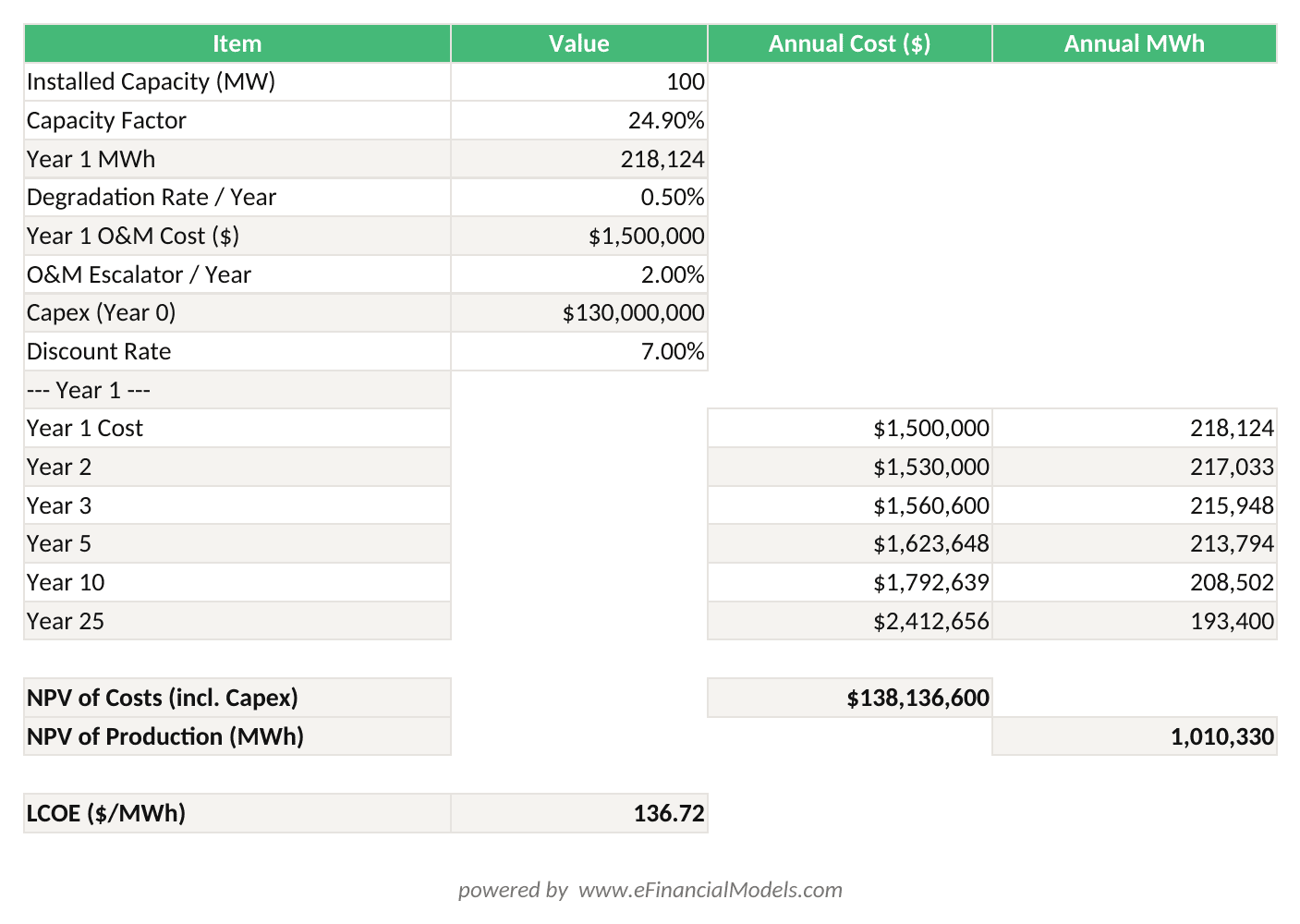
LCOE = NPV(Costs, 7%) / NPV(Production, 7%) — for a 100 MW solar project with $130M capex and 24.9% capacity factor, LCOE calculates to approximately $49/MWh.
Common LCOE pitfalls: Never use a nominal discount rate with real cost escalators (or vice versa). Always apply degradation before discounting production. Include interconnection costs and development fees in the capex base — omitting them understates LCOE by 5-15%.
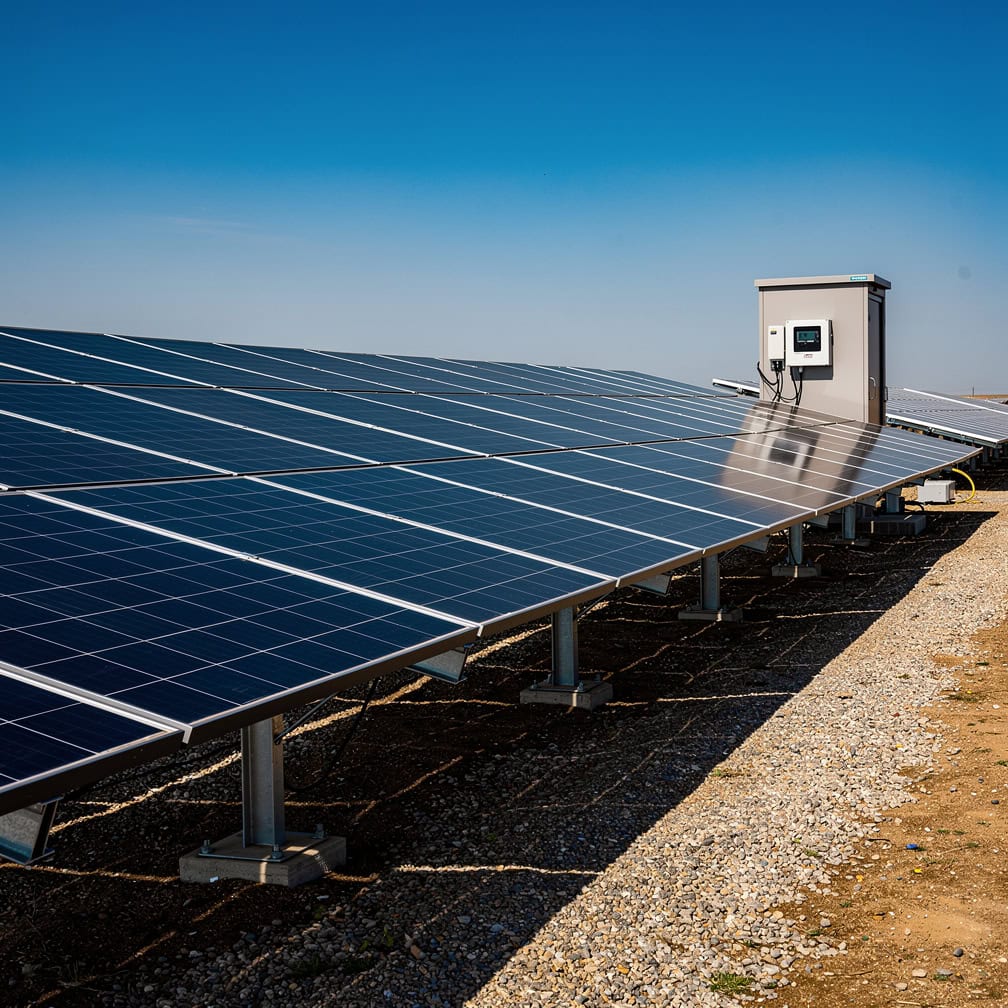
LCOE calculation requires five Excel steps: build cost and production columns, compute NPV of each, then divide — a sequence that takes under 10 minutes once the model architecture is in place.
Modeling Tax Equity Structures: ITC and PTC Mechanics
Tax equity is the most technically complex element of U.S. renewable energy finance. A tax equity investor contributes capital in exchange for the project’s federal tax credits and depreciation benefits, then exits after a defined period.
The Inflation Reduction Act of 2022 set the base ITC at 30% of eligible project costs for solar, with bonus adders for domestic content (10%), energy communities (10%), and low-income communities (up to 20%) according to the U.S. Department of Energy. The PTC for wind is $0.0275/kWh (2024, inflation-adjusted) for 10 years of production.
ITC vs. PTC: Which to model?
| Feature | ITC | PTC |
|---|---|---|
| Trigger | Project placed in service | Annual production |
| Duration | One-time credit | 10 years |
| Best for | Solar, storage | Wind, geothermal |
| Cash timing | Year 1 lump sum | Years 1-10 |
| Basis reduction | 50% of ITC | None |
Partnership Flip Structure: The most common tax equity structure. The tax equity investor owns 99% of the project during the “pre-flip” period (typically 5-7 years), capturing ITC and MACRS depreciation. After the investor reaches its target IRR (typically 7-9% after-tax), ownership flips to 5% and the developer recaptures cash flow.
In Excel, model the flip using a running IRR check:
- Column A: Year
- Column B: Tax equity cash flows (negative investment, positive tax benefits + cash distributions)
- Column C: Cumulative IRR:
=XIRR(B$2:B2, A$2:A2) - Column D: Flip trigger:
=IF(C2>=0.08, "POST-FLIP", "PRE-FLIP")
Once the flip triggers, redirect 94% of cash flow to the developer and 5% to the tax equity investor. The XIRR function can handle up to 250 cash flow periods, making it reliable for modeling the full pre-flip period across multi-year tax equity structures.
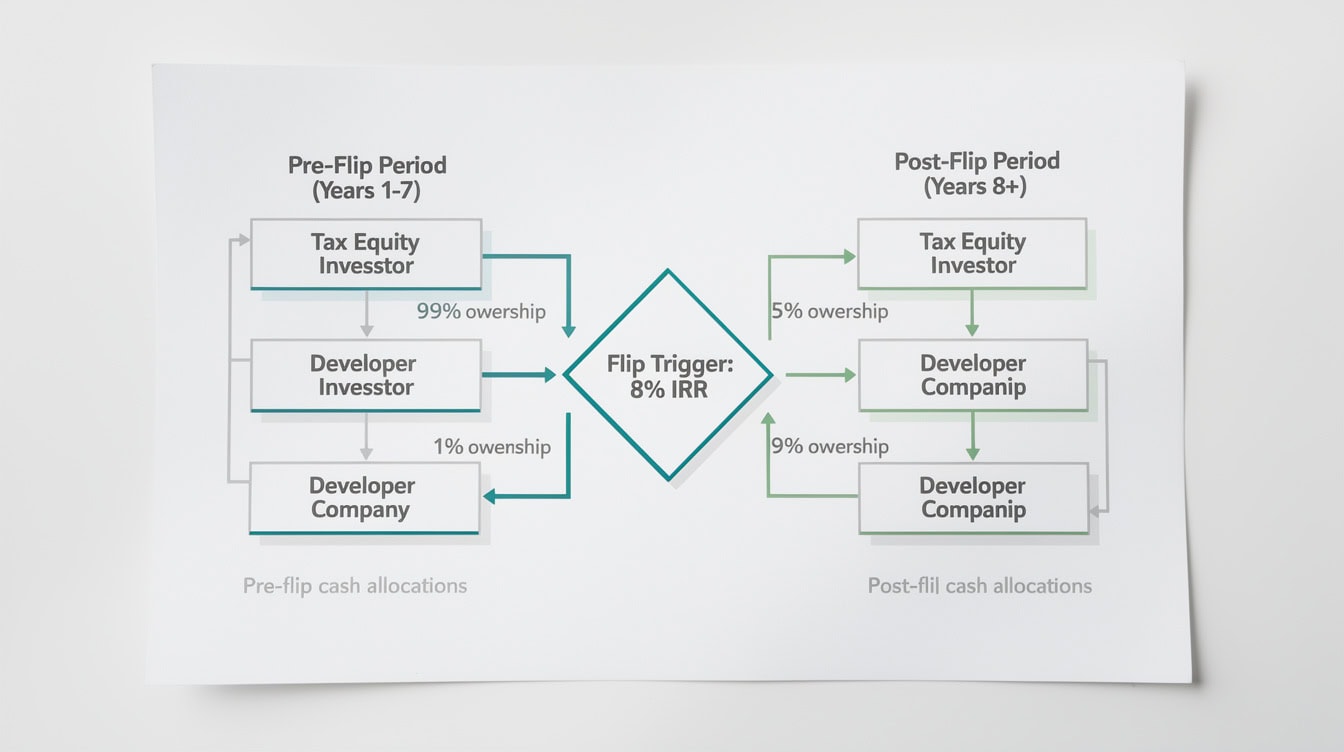
The partnership flip structure allocates 99% of tax benefits to the investor pre-flip, then shifts 95% of cash flow to the developer once the investor’s 7-9% IRR target is achieved.
Construction Period and Development Cost Modeling
Construction period modeling captures costs incurred before the project generates revenue. For utility-scale solar, construction typically runs 6-18 months; for onshore wind, 12-24 months; for offshore wind, 36-60 months, according to the National Renewable Energy Laboratory.
Key construction-period line items to model:
- EPC (Engineering, Procurement, Construction) contract: typically 60-70% of total project cost
- Development costs: permitting, interconnection studies, land acquisition (5-10% of total)
- Interconnection and transmission upgrades: $50,000-$200,000/MW depending on grid proximity
- Owner’s costs: legal, insurance, lender fees (3-5% of total)
- Interest During Construction (IDC): accrued interest on the construction loan
IDC is calculated as: IDC = Construction Loan Balance × Monthly Draw × Interest Rate / 12, summed across the construction period. For a $100M project with a 12-month construction period and 6% construction loan rate, IDC typically adds $3-4M to total project cost.
Model construction draws on an S-curve: 10% in month 1, ramping to peak spend in months 4-8, tapering in the final months. Use Excel’s OFFSET() function to build a dynamic draw schedule that adjusts when the construction period changes.
Operating Cash Flow Waterfall and Debt Service
The operating cash flow waterfall defines the priority order in which cash is distributed. In renewable energy project finance, the waterfall follows a strict sequence that protects lenders before equity investors receive any return.
The standard waterfall order is:
- Operating expenses (O&M, insurance, land lease, asset management)
- Debt service (interest + principal on term loan)
- Debt service reserve account (DSRA) funding — typically 6 months of debt service
- Major maintenance / equipment replacement reserve
- Tax equity distributions (pre-flip)
- Sponsor equity distributions
Lenders require a minimum DSCR of 1.25x-1.40x for renewable energy projects, meaning operating cash flow must cover debt service by at least that multiple. Model DSCR as:
DSCR (Year N) = CFADS(N) / Debt Service(N)
where CFADS (Cash Flow Available for Debt Service) equals revenue minus operating costs minus reserve contributions.
Debt sculpting means sizing each year’s principal repayment so that DSCR stays constant (typically at 1.30x) throughout the loan term. In Excel, use =SOLVER or a manual iteration to back-solve principal payments from a target DSCR. EFM’s cash flow projection templates include pre-built sculpting logic.
Degradation, O&M Escalation, and Equipment Reserves
Degradation, O&M cost escalation, and equipment replacement reserves are the three cost-side variables that most analysts undermodel, yet they determine whether a project remains bankable in years 15-25.
Solar panel degradation: Leading manufacturers including First Solar and LONGi publish linear degradation rates of 0.4-0.7% per year. Use 0.5% as the base case. Apply it to the production column: =B2*(1-$B$Degradation_Rate) where B2 is prior-year MWh. Over 25 years at 0.5%/year, output falls to 88.2% of Year 1 production.
O&M cost escalation: Solar O&M runs $10-$17/kW-year for utility-scale projects; wind O&M runs $40-$50/kW-year, according to the National Renewable Energy Laboratory’s 2023 Annual Technology Baseline. Escalate O&M at CPI (typically 2-2.5%) using: =C2*(1+$B$OM_Escalator).
Inverter replacement reserve: Solar inverters require replacement every 10-15 years at a cost of $30-$60/kW. Model this as an annual reserve contribution: =Inverter_Cost / Reserve_Period. For a 100 MW project with $40/kW replacement cost and 12-year cycle: $4,000,000 / 12 = $333,333/year.
Wind major maintenance: Gearbox overhauls and blade replacements create lumpy costs in years 10-15. Model these as discrete capital events, not smoothed reserves, to accurately reflect cash flow timing.
Sensitivity and Scenario Analysis for Renewable Projects
Sensitivity analysis in a renewable energy model tests how project returns change when key assumptions move. The five variables that drive the most return volatility are resource (capacity factor), electricity price, capex, interest rate, and degradation rate.
Build a two-variable data table in Excel using Data > What-If Analysis > Data Table. Set the row input to capacity factor (ranging from 20% to 35% in 2.5% steps) and the column input to PPA price (ranging from $35/MWh to $60/MWh in $5 steps). The output cell is project IRR. This produces a 6×6 matrix showing IRR across 36 scenarios in seconds.
For scenario analysis, build three named scenarios using Excel’s Scenario Manager or a manual toggle:
- Base Case: P50 resource, contracted PPA price, 0.5% degradation
- Downside: P90 resource (10% lower than P50), 10% capex overrun, 0.7% degradation
- Upside: P10 resource, merchant price 15% above base, ITC bonus adders captured
P50 and P90 are probabilistic resource estimates: P50 means 50% probability of exceeding that production level; P90 means 90% probability of exceeding it. Lenders typically size debt to P90 production. EFM’s financial projection templates include pre-built scenario toggle logic.
Excel Architecture Best Practices for Renewable Models
A well-architected renewable energy Excel model separates inputs, calculations, and outputs across distinct sheets, uses named ranges for every key assumption, and never hardcodes numbers inside formulas.
Four architecture rules that prevent the most common model failures:
- Color-code inputs vs. formulas: Blue font for hardcoded inputs, black for formulas. Any blue cell inside a formula tab is an error.
- Use annual columns, not monthly, for the operating period: Monthly granularity adds complexity without improving accuracy for a 25-year model. Reserve monthly detail for the construction period only.
- Handle partial first year with a stub period: If the project reaches commercial operation on April 1, Year 1 revenue is 9/12 of a full year. Use
=MIN(1, (12 - COD_Month + 1) / 12)as a partial-year factor. - Audit with F2 and trace precedents: Before finalizing, press F2 on every output cell and verify the formula chain reaches back to the inputs sheet. Excel’s
Formulas > Trace Precedentsarrow tool visualizes this in seconds.
For debt service, model semi-annual payments if the loan agreement specifies them — many project finance facilities do. Build a semi-annual schedule and then sum to annual for the main model using SUMIF() on a period flag column.
Common Modeling Mistakes and How to Avoid Them
Renewable energy financial models fail lender review or investor scrutiny for predictable reasons. Here are the 5 most common mistakes and their fixes.
Mistake 1: Applying degradation to capacity, not production. Degradation reduces MWh output, not installed MW. Fix: apply the degradation factor to the production column, not the nameplate capacity input.
Mistake 2: Omitting curtailment risk. Grid congestion can force a project to curtail output even when the sun is shining or wind is blowing. Fix: apply a curtailment haircut (typically 2-8% in congested markets) to gross production before calculating revenue.
Mistake 3: Using a single discount rate for ITC and operating cash flows. Tax equity investors use an after-tax discount rate; project lenders use a pre-tax rate. Fix: build separate return calculations for each capital tranche with the appropriate rate.
Mistake 4: Forgetting the DSRA funding ramp. The Debt Service Reserve Account must be funded at financial close, not gradually. Fix: model the full DSRA draw at construction loan conversion, reducing equity available for other uses.
Mistake 5: Ignoring interconnection cost uncertainty. Interconnection queue studies frequently revise cost estimates upward by 30-100%. Fix: include a 20-30% contingency on interconnection costs in the base case capex.
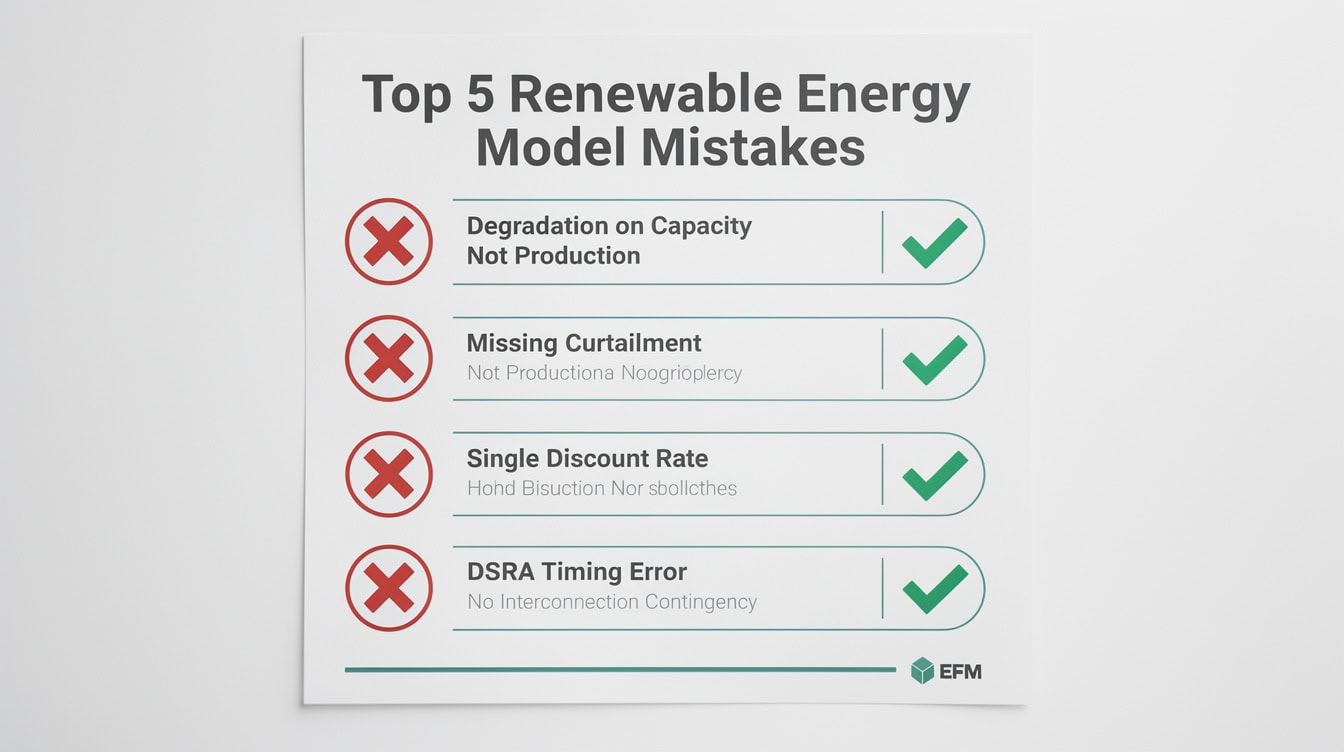
The 5 most common renewable energy modeling errors — from misapplying degradation to ignoring curtailment risk — are each fixable with a single formula or assumption adjustment.
Frequently Asked Questions
What is a renewable energy project financial model in Excel?
A renewable energy project financial model in Excel is a structured spreadsheet that projects all cash flows, costs, and returns for a solar, wind, hydro, or battery storage project over its full operating life (typically 20-35 years). It includes a production model (MWh by year with degradation), a revenue model (PPA income, merchant sales, RECs), a cost model (O&M, reserves, insurance), a financing structure (construction loan, term debt, tax equity), and a returns dashboard showing project IRR, equity IRR, DSCR, and LCOE. EFM’s renewable energy templates at efinancialmodels.com provide all six modules pre-built, allowing analysts to input project-specific assumptions and generate bankable outputs within hours rather than weeks.
How do I calculate LCOE in Excel for a solar project?
Calculate LCOE in Excel using five steps: (1) build a cost column with year-0 capex and annual O&M costs escalating at CPI; (2) build a production column with annual MWh applying 0.5% annual degradation; (3) compute NPV of costs using =NPV(discount_rate, cost_range) + capex; (4) compute NPV of production using =NPV(discount_rate, production_range); (5) divide NPV of costs by NPV of production. For a 100 MW solar project with $130M capex, $1.5M Year 1 O&M, 24.9% capacity factor, and 7% discount rate, LCOE calculates to approximately $47-52/MWh. The most common error is forgetting to add year-0 capex separately, since Excel’s NPV function starts discounting from period 1, not period 0.
What is a tax equity flip structure and how do I model it?
A tax equity flip structure is a partnership arrangement where a tax equity investor owns 99% of a renewable energy project during the credit period (typically 5-7 years), capturing the ITC or PTC and MACRS depreciation, then “flips” to a 5% ownership stake once the investor reaches its target IRR (typically 7-9% after-tax). To model it in Excel, build a cash flow column for the tax equity investor that includes the initial investment (negative), annual tax benefits (ITC in year 1, depreciation shield in years 1-5), and cash distributions. Use =XIRR() on a running basis each year. When the cumulative XIRR hits the flip threshold, switch the distribution waterfall from 99%/1% to 5%/95% using an IF() statement tied to the flip trigger cell. The Inflation Reduction Act of 2022 maintained the 30% ITC for solar, making tax equity a critical financing layer for projects above 5 MW.
What capacity factor should I use for a utility-scale solar project?
Use a site-specific capacity factor derived from a solar resource assessment (P50 estimate from a resource consultant), not a generic national average. That said, the U.S. Energy Information Administration reports that utility-scale solar capacity factors averaged 24.9% nationally in 2023, ranging from roughly 20% in the Northeast to 29% in the Southwest. For a Texas project, 26-28% is a reasonable starting assumption; for a Massachusetts project, 18-20% is more appropriate. Always model three scenarios: P50 (base case), P90 (lender case, roughly 10% below P50), and P10 (upside case). Lenders size debt to P90 production to ensure DSCR covenants hold even in below-average resource years. Never use a single-point capacity factor without sensitivity analysis.
What DSCR do renewable energy lenders require?
Renewable energy project finance lenders typically require a minimum annual DSCR of 1.25x-1.40x, with 1.30x being the most common covenant threshold for utility-scale solar and wind. Some lenders also require a minimum average DSCR of 1.40x-1.50x over the loan term. DSCR is calculated as Cash Flow Available for Debt Service (CFADS) divided by total debt service (interest plus principal) in each period. If your model shows DSCR dipping below 1.25x in any year, you have three options: reduce debt sizing, extend the loan tenor, or sculpt repayments to shift principal to higher-cash-flow years. EFM’s financial model templates include pre-built DSCR covenant checks with conditional formatting that flags covenant breaches in red.
How do I model the merchant tail after PPA expiration?
Model the merchant tail by building a long-run electricity price forecast for the project’s market (ERCOT, PJM, CAISO, etc.) and applying a basis discount of 5-15% to reflect the project’s locational marginal price versus the hub price. Start the merchant period in the year after PPA expiry (typically year 16-26 depending on contract length). Apply a price escalator of 1-2% annually in real terms, but run a downside scenario with flat real prices to stress-test equity returns. The merchant tail is where most of the equity upside lives in a well-sited project, but it’s also the primary source of refinancing risk. Lenders typically do not extend debt into the merchant tail period, so model a balloon repayment or refinancing event at PPA expiry.
What are the key differences between solar and wind financial models in Excel?
Solar and wind models share the same six-module architecture but differ in four key areas. First, capacity factors: solar averages 20-29% with strong seasonality (summer peaks); wind averages 30-45% with different seasonal patterns (often winter-peaking in the U.S. Midwest). Second, O&M costs: solar O&M runs $10-17/kW-year versus $40-50/kW-year for wind, reflecting wind’s mechanical complexity. Third, tax credit election: solar projects almost universally elect the ITC; wind projects often elect the PTC because 10 years of production credits outperform a one-time ITC for high-capacity-factor sites. Fourth, construction timeline: solar construction runs 6-18 months; wind runs 12-24 months, increasing IDC and construction risk. Battery storage models add a fourth dimension: time-of-day pricing, charge/discharge cycles, and round-trip efficiency (typically 85-92%) that require an hourly or at minimum monthly production model rather than annual averages.
Conclusion
Building a renewable energy project financial model in Excel requires mastering six interconnected modules: production, revenue, costs, financing, tax equity, and returns. The mechanics that separate a bankable renewable model from a generic spreadsheet are LCOE calculation with degradation, PPA revenue with escalators, tax equity flip structures with XIRR-based flip triggers, sculpted debt service tied to DSCR covenants, and a merchant tail with explicit price assumptions. Get those five elements right, and your model will survive lender due diligence and investor scrutiny.
I recommend downloading EFM’s renewable energy financial model template — it includes pre-built PPA revenue logic, ITC/PTC tax equity structures, LCOE calculators, and sculpted debt service waterfalls for solar, wind, and battery storage projects, so you can focus on your project’s specific assumptions rather than rebuilding the architecture from scratch.























































