
0 ITEMS

ROI Cheat Sheet: Formulas, Math Symbols & Pitfalls

Return on investment (ROI) is the single most-used metric in finance, yet miscalculations cost analysts credibility and businesses real money.
Key Takeaways
- The standard ROI formula is ROI = (Net Return – Cost of Investment) / Cost of Investment × 100, expressed as a percentage.
- Annualized ROI adjusts for holding period using the formula: Annualized ROI = (1 + ROI)^(1/n) – 1 × 100, where n is years held.
- The S&P 500 has delivered an average annual return of approximately 10% before inflation over the long run, making it a common benchmark for equity ROI.
- 5 symbols dominate ROI math: Δ (change), Σ (sum), % (percent), ^ (exponent), and | | (absolute value for loss scenarios).
- Ignoring time period inconsistency is the most common ROI error — always annualize before comparing investments of different durations.
- After-tax ROI = ROI × (1 – Tax Rate); at a 25% tax rate, a 20% gross ROI shrinks to 15%.
- ROI is best for simple comparisons; use IRR for multi-period cash flows and NPV when the time value of money matters most.
Basic ROI Formula and Mathematical Notation
ROI measures the gain or loss generated on an investment relative to its cost, expressed as a percentage. The standard formula is:
ROI = (Net Return – Cost of Investment) / Cost of Investment × 100
Breaking down each symbol:
- Net Return: the total value received from the investment (sale price + dividends + any income)
- Cost of Investment: the total amount paid, including fees, taxes on purchase, and transaction costs
- [ ]: brackets indicate this subtraction happens before division (order of operations)
- / (division): divides the net gain by the original cost to produce a ratio
- × 100: converts the decimal ratio to a percentage
An equivalent form you’ll see in financial reports:
ROI = (Final Value – Initial Value) / Initial Value × 100
Both versions are mathematically identical. The first is clearer when costs and returns are tracked separately; the second works when you only know start and end values.

Each element of the ROI formula has a specific role: brackets enforce order of operations, division produces a ratio, and ×100 converts to a percentage.
Mathematical Symbols and Operators Used in ROI
Every ROI formula relies on a small set of symbols. Knowing what each one means prevents calculation errors.
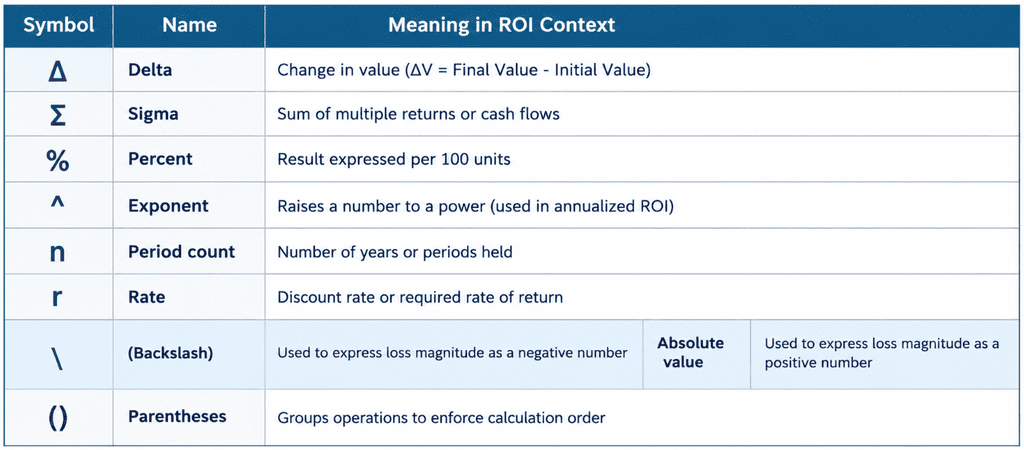
Using delta notation, the standard formula becomes: ROI = (ΔV / V₀) × 100, where V₀ is the initial investment value and ΔV is the change in value.

Five symbols account for nearly all ROI notation: Δ (change), Σ (sum), % (percent), ^ (exponent), and | | (absolute value for losses).
Step-by-Step ROI Calculation Examples
The fastest way to internalize ROI math is to work through real numbers. Here are two examples: a profitable investment and a loss scenario.
Example 1: Profitable Stock Investment
You buy 100 shares at $50 each and sell them 2 years later at $68 each, collecting $200 in dividends along the way.
- Cost of Investment: 100 × $50 = $5,000
- Net Return: (100 × $68) + $200 = $6,800 + $200 = $7,000
- Net Gain: $7,000 – $5,000 = $2,000
- ROI: ($2,000 / $5,000) × 100 = 40% over 2 years
- Annualized ROI: (1 + 0.40)^(1/2) – 1 × 100 = (1.40)^0.5 – 1 × 100 = 1.1832 – 1 × 100 = 18.3% per year
Example 2: Negative ROI (Loss Scenario)
You invest $10,000 in equipment. After one year, the equipment is worth $7,500 and generated $500 in revenue.
- Net Return: $7,500 + $500 = $8,000
- Net Gain: $8,000 – $10,000 = -$2,000
- ROI: (-$2,000 / $10,000) × 100 = -20%
Negative ROI means the investment destroyed value. Report it as -20%, not as a loss of $2,000, so it’s comparable to other percentage-based metrics.
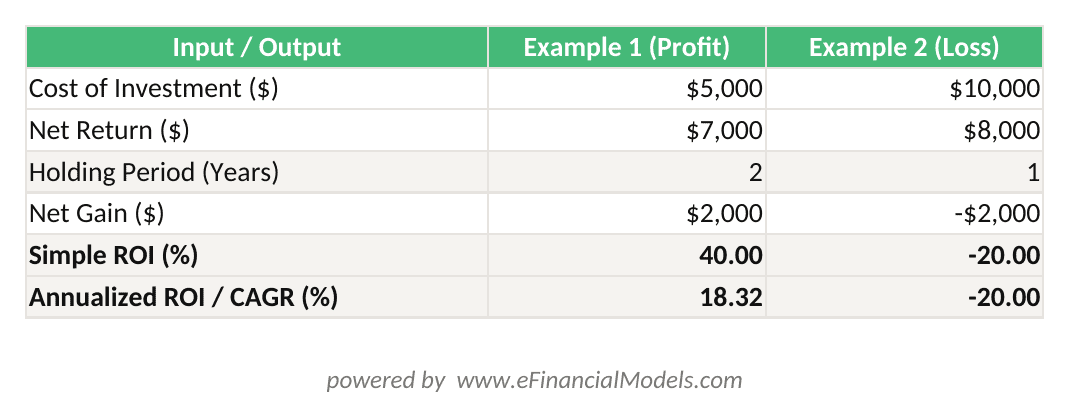
ROI = (Net Return – Cost) / Cost × 100. Annualized ROI = (1 + ROI)^(1/n) – 1 × 100. The Excel formulas update automatically when you change any input.

Negative ROI follows the same formula as positive ROI — the sign tells you whether value was created or destroyed.
Alternative ROI Formulas: Annualized, Time-Weighted, and Simple Returns
Simple ROI ignores how long money was at risk. These three alternatives fix that problem in different ways.
Annualized ROI (CAGR Method)
CAGR (Compound Annual Growth Rate) is the annualized ROI for a single lump-sum investment:
Annualized ROI = (Ending Value / Beginning Value)^(1/n) – 1 × 100
Where n = number of years. This is the correct formula when returns compound over time. When automating this calculation in a spreadsheet, Excel’s XIRR function can handle up to 1,000 cash flow values (Microsoft), making it well-suited for multi-period ROI analysis with irregular cash flows.
Time-Weighted Return (TWR)
TWR removes the distortion caused by external cash flows (deposits and withdrawals). Portfolio managers use it to measure their own performance independently of client behavior:
TWR = (1 + R₁) × (1 + R₂) × … × (1 + Rₙ) – 1 × 100
Where R₁, R₂, … Rₙ are sub-period returns between each cash flow event.
Simple (Unannualized) ROI
Use simple ROI only when comparing investments over the same time period:
Simple ROI = (Net Gain / Cost) × 100
This is the fastest calculation but misleads when holding periods differ.
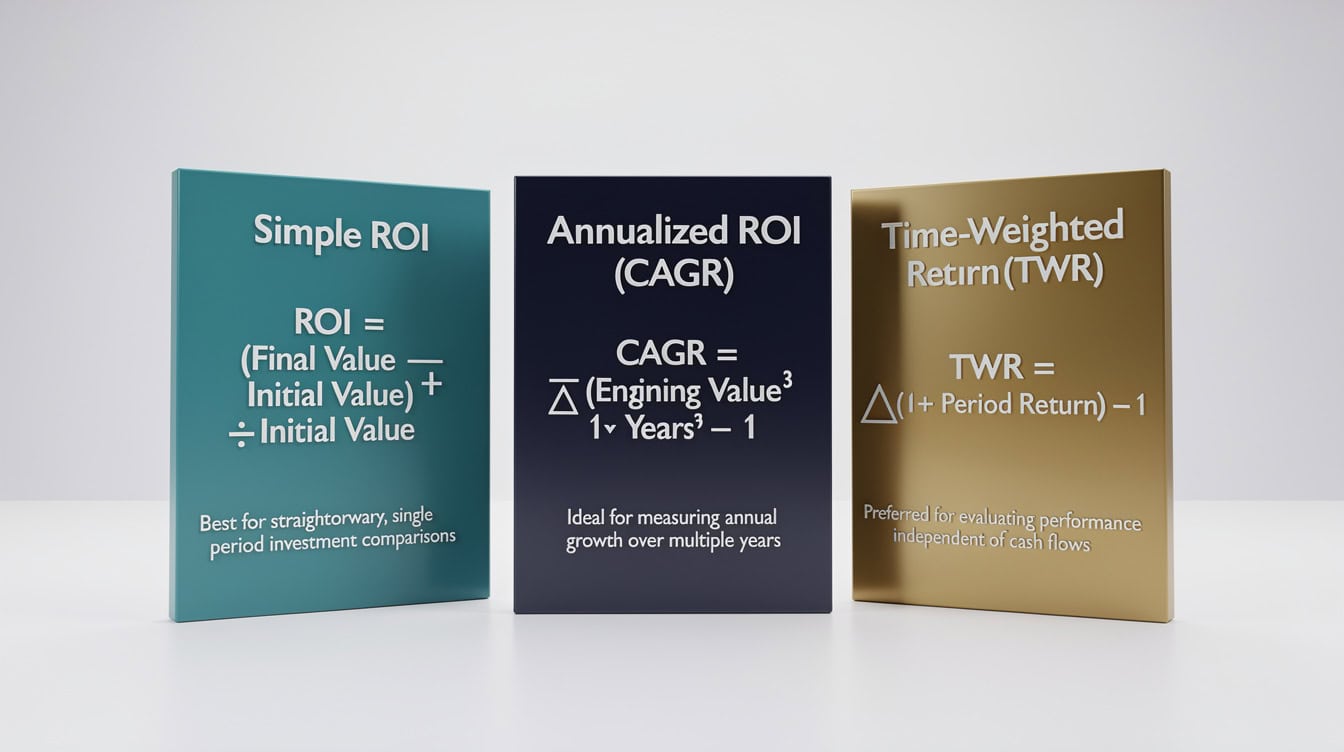
Choose your ROI formula based on holding period and cash flow complexity: simple for single periods, CAGR for compounding, TWR for portfolios with deposits and withdrawals.
Common ROI Calculation Pitfalls and Errors
Five mistakes account for the majority of ROI errors in practice.
Pitfall 1: Comparing unannualized returns across different time periods. A 30% ROI over 5 years is not better than a 20% ROI over 1 year. Always annualize before comparing. Fix: apply the CAGR formula to both investments.
Pitfall 2: Omitting transaction costs and fees. Brokerage commissions, fund management fees, and closing costs reduce actual ROI. Fix: include all costs in the denominator. A $10,000 investment with $300 in fees has a cost basis of $10,300.
Pitfall 3: Ignoring opportunity cost. ROI tells you what you earned, not what you gave up. Fix: subtract the risk-free rate (e.g., current U.S. Treasury yield) from your ROI to get excess return. If your ROI is 6% and Treasuries yield 4.5%, your excess return is only 1.5%.
Pitfall 4: Cherry-picking the start date. Selecting a market low as your start date inflates ROI artificially. Fix: use consistent, documented start and end dates tied to actual transaction dates.
Pitfall 5: Confusing gross and net return. Gross ROI ignores taxes and inflation. Net ROI reflects what you actually keep. Always specify which version you’re reporting.

Transaction costs alone can reduce reported ROI by 2-5 percentage points on short-term trades — always include them in the cost basis.
Adjusting ROI for Taxes, Inflation, and Risk
Raw ROI overstates real-world returns. Three adjustments bring it closer to economic reality.
After-Tax ROI
After-Tax ROI = ROI × (1 – Tax Rate)
Example: A 20% ROI with a 25% capital gains tax rate yields an after-tax ROI of 20% × (1 – 0.25) = 15%. For most U.S. investors, the long-term capital gains tax rate is 15% (IRS), meaning a 20% gross ROI on an asset held longer than 1 year becomes 17% after federal tax — before accounting for any applicable state taxes.
Inflation-Adjusted (Real) ROI
Real ROI = (1 + Nominal ROI) / (1 + Inflation Rate) – 1 × 100
Example: A 10% nominal ROI with 3% inflation gives a real ROI of (1.10 / 1.03) – 1 × 100 = 6.8%. The U.S. Bureau of Labor Statistics publishes monthly CPI data (BLS) that you can use as the inflation rate input. The 12-month CPI increase through 2023 was 3.4 percent (BLS), meaning any nominal ROI below that threshold represented a real loss in purchasing power for that year.
Risk-Adjusted ROI (Sharpe-Style)
For comparing investments with different risk profiles, subtract the risk-free rate and divide by the standard deviation of returns:
Risk-Adjusted ROI = (ROI – Risk-Free Rate) / Standard Deviation
This is the logic behind the Sharpe Ratio (a measure of return per unit of risk), which the CFA Institute defines as a core portfolio performance metric (CFA Institute).

A 20% gross ROI can shrink to 10.2% after a 25% tax rate and 3% inflation — always report which adjustments you have applied.
ROI vs. Other Investment Metrics: When to Use Each
ROI is powerful but limited. Use the right metric for the right decision.
| Metric | Best For | Limitation vs. ROI |
|---|---|---|
| ROI | Simple, single-period comparisons | Ignores time value of money |
| IRR | Multi-period projects with uneven cash flows | Assumes reinvestment at IRR rate |
| NPV | Absolute value creation, capital budgeting | Requires a discount rate assumption |
| Payback Period | Liquidity and risk assessment | Ignores returns after payback date |
| CAGR | Long-term compounding performance | Only works for lump-sum investments |
| TWR | Portfolio manager performance evaluation | Complex to calculate with many flows |
For projects with multiple cash flows over several years, IRR modeling gives a more accurate picture than simple ROI. For capital budgeting decisions where you need to compare absolute value, a 3-statement financial model with exit assumptions incorporates NPV alongside ROI.

ROI is the fastest metric to calculate but the least precise for multi-period decisions — pair it with IRR or NPV for capital budgeting.
Industry ROI Benchmarks and Performance Standards
What counts as a good ROI depends entirely on the asset class and risk level. The S&P 500 has delivered an average annual total return of approximately 10% per year before inflation since 1926, according to data compiled by NYU Stern School of Business, making it the standard equity benchmark. Real estate investments typically generate total annual returns of 8% to 12% when combining appreciation and rental income, according to the National Council of Real Estate Investment Fiduciaries (NCREIF). Marketing ROI benchmarks vary widely by channel, but the Data & Marketing Association has historically cited a 4:1 return ($4 revenue per $1 spent) as the minimum threshold for sustainable marketing programs.
| Asset Class | Typical Annual ROI | Risk Level |
|---|---|---|
| U.S. Equities (S&P 500) | ~10% (nominal) | Medium-High |
| Real Estate | 8%-12% | Medium |
| Corporate Bonds | 4%-6% | Low-Medium |
| Marketing Campaigns | 300%-500% (4:1 to 5:1) | Varies |
| Capital Projects | 15%-25% (hurdle rate) | High |
| Savings Accounts | 4%-5% (2024 rates) | Very Low |
For capital projects, most large corporations set a hurdle rate (the minimum acceptable ROI) between 10% and 15%, according to research published by the Association for Financial Professionals (AFP). Any project ROI below the hurdle rate destroys shareholder value relative to the cost of capital.
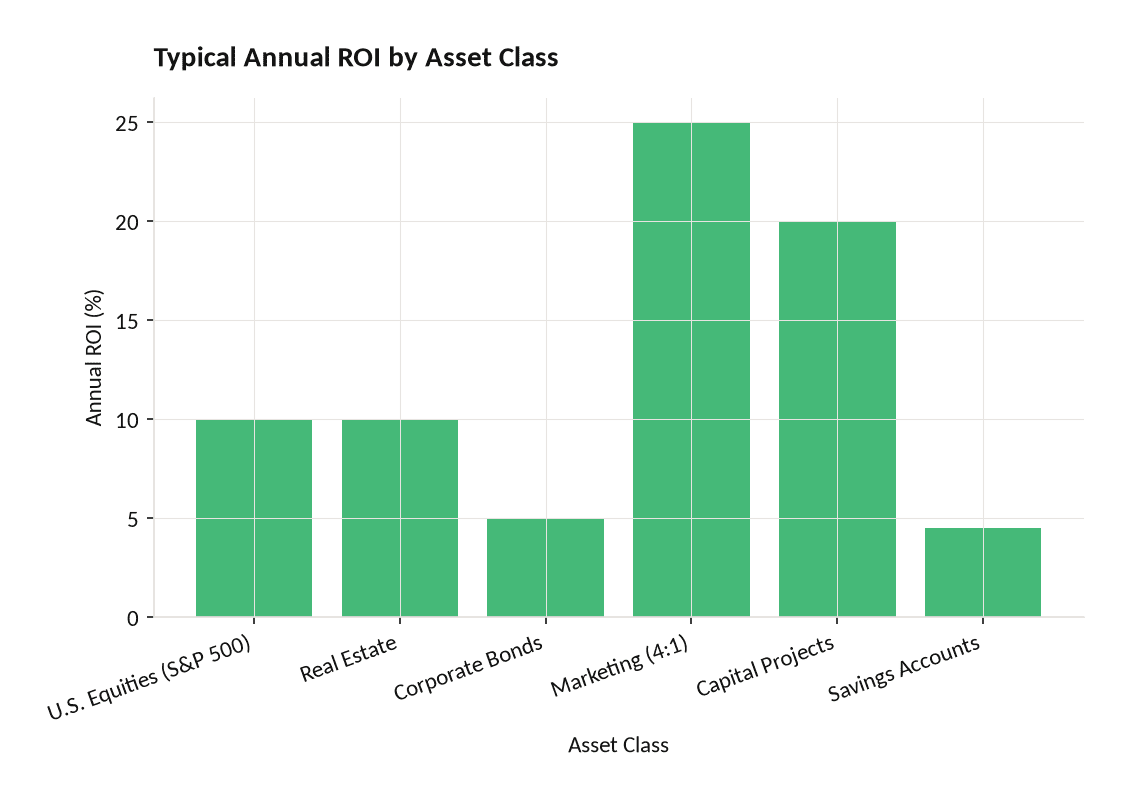
ROI benchmarks vary from 4.5% for savings accounts to 25% for high-performing capital projects — always compare against the relevant benchmark for your asset class.
Quick Reference: ROI Formula Cheat Sheet
This section is designed for printing or bookmarking. All formulas use consistent notation.
Core Formulas:
- Standard ROI:
ROI = (Net Return - Cost) / Cost × 100 - Annualized ROI (CAGR):
(Ending Value / Beginning Value)^(1/n) - 1 × 100 - After-Tax ROI:
ROI × (1 - Tax Rate) - Real (Inflation-Adjusted) ROI:
(1 + Nominal ROI) / (1 + Inflation Rate) - 1 × 100 - Time-Weighted Return:
(1 + R₁) × (1 + R₂) × ... × (1 + Rₙ) - 1 × 100
Symbol Reference:
- Δ = change in value
- Σ = sum of values
- n = number of periods (years)
- V₀ = initial investment value
- r = discount or required rate of return
- ^ = exponent (raise to a power)
Decision Rules:
- ROI > Hurdle Rate: accept the investment
- ROI < Risk-Free Rate: reject (you’re not compensated for risk)
- ROI negative: investment destroyed value; calculate |ROI| to size the loss
- Compare investments: always annualize first, then compare
For a ready-to-use spreadsheet that automates all these formulas, the ROI templates on eFinancialModels include built-in benchmarks and scenario analysis. You can also track investment cash flows alongside ROI using the Cash Flow Dashboard Spreadsheet.

Bookmark or print this reference: the five formulas and three decision rules cover 95% of ROI calculation scenarios.
Frequently Asked Questions
How do I calculate ROI as a percentage?
Divide your net gain by your cost of investment, then multiply by 100. Here’s the exact formula: ROI = (Net Return – Cost of Investment) / Cost of Investment × 100. For example, if you invested $5,000 and received $6,500 back, your net gain is $1,500. Divide $1,500 by $5,000 to get 0.30, then multiply by 100 to get 30%. Always express ROI as a percentage so it’s comparable across investments of different sizes. If your result is negative, the investment lost money, and you report it as a negative percentage (for example, -15%).
What is the difference between simple ROI and annualized ROI?
Simple ROI measures total return over the entire holding period without adjusting for time. Annualized ROI (also called CAGR) converts that total return into an equivalent yearly rate. A 50% simple ROI over 5 years sounds impressive, but its annualized equivalent is only (1.50)^(1/5) – 1 × 100 = 8.4% per year, which is below the S&P 500 average of approximately 10%. Always annualize when comparing investments held for different durations. Use the formula: Annualized ROI = (1 + Simple ROI/100)^(1/n) – 1 × 100, where n is the number of years.
What is a good ROI for a business investment?
A good ROI depends on the asset class and risk level. For equity investments, the S&P 500’s long-run average of approximately 10% per year is the standard benchmark. For capital projects, most corporations set a hurdle rate of 10% to 15%, meaning any project below that threshold is rejected. For marketing, a 4:1 return (400% ROI) is considered the minimum viable threshold. For real estate, 8% to 12% annual total return is typical. The key rule: your ROI must exceed your cost of capital, or the investment destroys value even if the raw number looks positive.
How do I adjust ROI for inflation?
Use the real ROI formula: Real ROI = (1 + Nominal ROI) / (1 + Inflation Rate) – 1 × 100. If your investment returned 9% and inflation ran at 3.5% (close to the U.S. 2023 CPI figure published by the Bureau of Labor Statistics), your real ROI is (1.09 / 1.035) – 1 × 100 = 5.3%. This matters because a 9% nominal return in a high-inflation environment may feel like a gain but represents only modest real purchasing power growth. Always use real ROI when evaluating long-term investments spanning 5 or more years.
When should I use IRR instead of ROI?
Use IRR (Internal Rate of Return, the discount rate that makes an investment’s net present value equal to zero) when your investment generates multiple cash flows at different points in time, such as a rental property with monthly rent, annual maintenance costs, and a lump-sum sale at the end. Simple ROI can’t handle uneven cash flows accurately. IRR accounts for the timing of each cash flow. For example, receiving $10,000 in year 1 is worth more than receiving $10,000 in year 5. ROI treats both identically; IRR does not. Use ROI for simple, single-period comparisons and IRR for multi-year projects.
How do taxes affect ROI calculations?
Taxes reduce your actual return significantly. The after-tax ROI formula is: After-Tax ROI = ROI × (1 – Tax Rate). At the U.S. long-term capital gains rate of 15% for most investors (20% for high earners, per IRS Publication 550), a 20% gross ROI becomes 20% × (1 – 0.15) = 17% after tax. Short-term gains taxed as ordinary income at rates up to 37% reduce that same 20% ROI to just 12.6%. Always specify whether you’re reporting pre-tax or after-tax ROI in any financial report or investment memo, as the difference can be substantial.
What does a negative ROI mean and how do I report it?
A negative ROI means the investment lost money: your net return was less than your cost. Calculate it exactly the same way as a positive ROI. If you invested $8,000 and got back $6,400, your net gain is -$1,600 and your ROI is (-$1,600 / $8,000) × 100 = -20%. Report it as -20%, not as a $1,600 loss, so it’s comparable to other percentage-based metrics. Use absolute value notation |ROI| = 20% when you want to communicate the magnitude of the loss without the negative sign in a table or chart. Negative ROI is not always a reason to exit: if the loss was expected during a growth phase, compare it against the plan.

Combining ROI with IRR and NPV in a single model gives analysts a complete picture of investment performance across time horizons.
Conclusion
ROI is a precise metric when you apply the right formula for the right situation. Use the standard formula for simple comparisons, annualize with CAGR for multi-year investments, adjust for taxes and inflation when reporting real returns, and switch to IRR or NPV when cash flows are uneven or the time value of money matters. The five pitfalls (mismatched time periods, hidden costs, ignored opportunity costs, cherry-picked dates, and gross vs. net confusion) account for most ROI errors in practice.
I recommend downloading the ROI templates from eFinancialModels to automate every formula in this cheat sheet, with built-in scenario analysis and industry benchmarks that make investment comparisons faster and more accurate.
























































