
0 ITEMS

Organizational Chart Excel Template
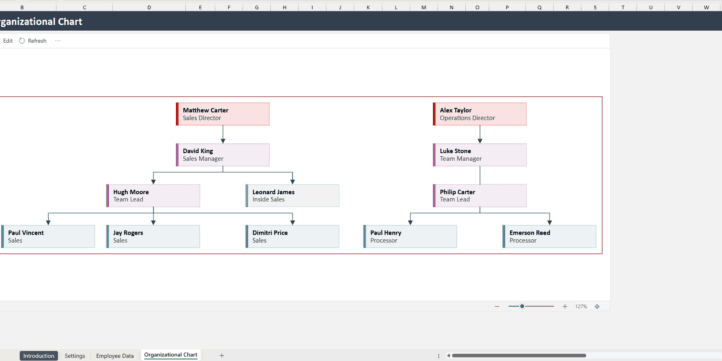
Visualize your company structure effortlessly with this Organizational Chart Excel Template — designed for HR teams, startups, managers, and business owners. This easy-to-use template helps you create a professional organizational chart that updates automatically. Simply input your employee information, and the chart will build itself — no complex setup required. It’s a complete solution for mapping out roles, reporting structures, and team hierarchies in just a few clicks.
| All Industries, Financial Model, Fintech, General Excel Financial Models |
| Dashboard, Excel, List, Management, Project Plan |


Visualize your company structure effortlessly with this Organizational Chart Excel Template — designed for HR teams, startups, managers, and business owners.
Simply enter your company and employee details, then click Refresh on the Organizational Chart sheet — and the chart will automatically populate with your data.
Note:
This template uses a built-in Excel add-in that must be accepted once when you first open the Organizational Chart sheet.
To use this add-in, you must have an Office 365 Business or School account.
Explanation of Sheets Settings Sheet
This sheet is where you enter a list of employee names, role types, and position titles that will appear in the drop-down menus on the Employee Data sheet.
Instructions:
Enter your Company Name on the provided line — it will appear as the Organizational Chart title.
Add all active employees you want to include in the chart. The table automatically expands as you add new names. If not, use the small dark triangle in the bottom-right corner of the table to expand it manually.
To sort names alphabetically, click the gray arrow in the table header and select Sort A to Z.
Enter all position titles in the Title table.
Enter all role types in the Role table.
Employee Data Sheet
This sheet is where you enter each employee’s details and define their roles, titles, and management structure.
Instructions:
Fill out each row completely for every employee.
To add more employees, start typing on the line below the last row — the table will automatically expand and update drop-down menus.
The table supports up to 100 employees.
If the Manager field is left blank, that employee will appear as a top-level position (with no manager) on the Organizational Chart.
Organizational Chart Sheet
This sheet automatically generates the company chart based on the data entered in the Employee Data sheet.
Instructions:
Click the Refresh button in the top-left corner to update the chart with the latest employee data.
The Edit button should not be used on this sheet.
It’s a complete solution for mapping out roles, reporting structures, and team hierarchies in just a few clicks.
Similar ProductsOther customers were also interested in...



 eFinancialModels
Electric Vehicle (EV) Charging Station Financial M...
With this comprehensive 5- or 10-year monthly tool, investors can assess the viability of setting up... Read more

Financial Model for Mobile App | Mobile App Busine...
The Mobile App Financial Plan Template in Excel allows you to develop financial projections when lau... Read more

 HenrySheykin
Food Truck Financial Model Excel Template
The Food Truck Financial Model helps entrepreneurs, founders, business owners, consultants, and anal... Read more

Green Hydrogen Production from Wind Energy Financi...
The Green Hydrogen from Wind Financial Model aims to comprehensively forecast a horizon of 40 years ... Read more

Simple Mutual Non-Disclosure Agreement Template
Protect your business secrets with ease using our Simple Mutual Non-Disclosure Agreement Template. S... Read more

Solar Energy Financial Model
The Solar Energy Financial Model Spreadsheet Template in Excel assists you in preparing a sophistica... Read more

 Peter Graf
The Customer-Centric Financial Model for Restauran...
Starting a restaurant without a financial plan is like driving a car blindfolded. You wouldn´t do i... Read more
You must log in to submit a review.