
0 ITEMS

Dynamic Appointment Scheduler / Calendar Monthly View
Having a schedule is crucial for all aspects of your life. It serves not only as a time management tool but also as a means to reduce stress, track your progress, and prepare for unexpected events.

| All Industries, General Excel Financial Models |
| Calendar, Excel, Management |
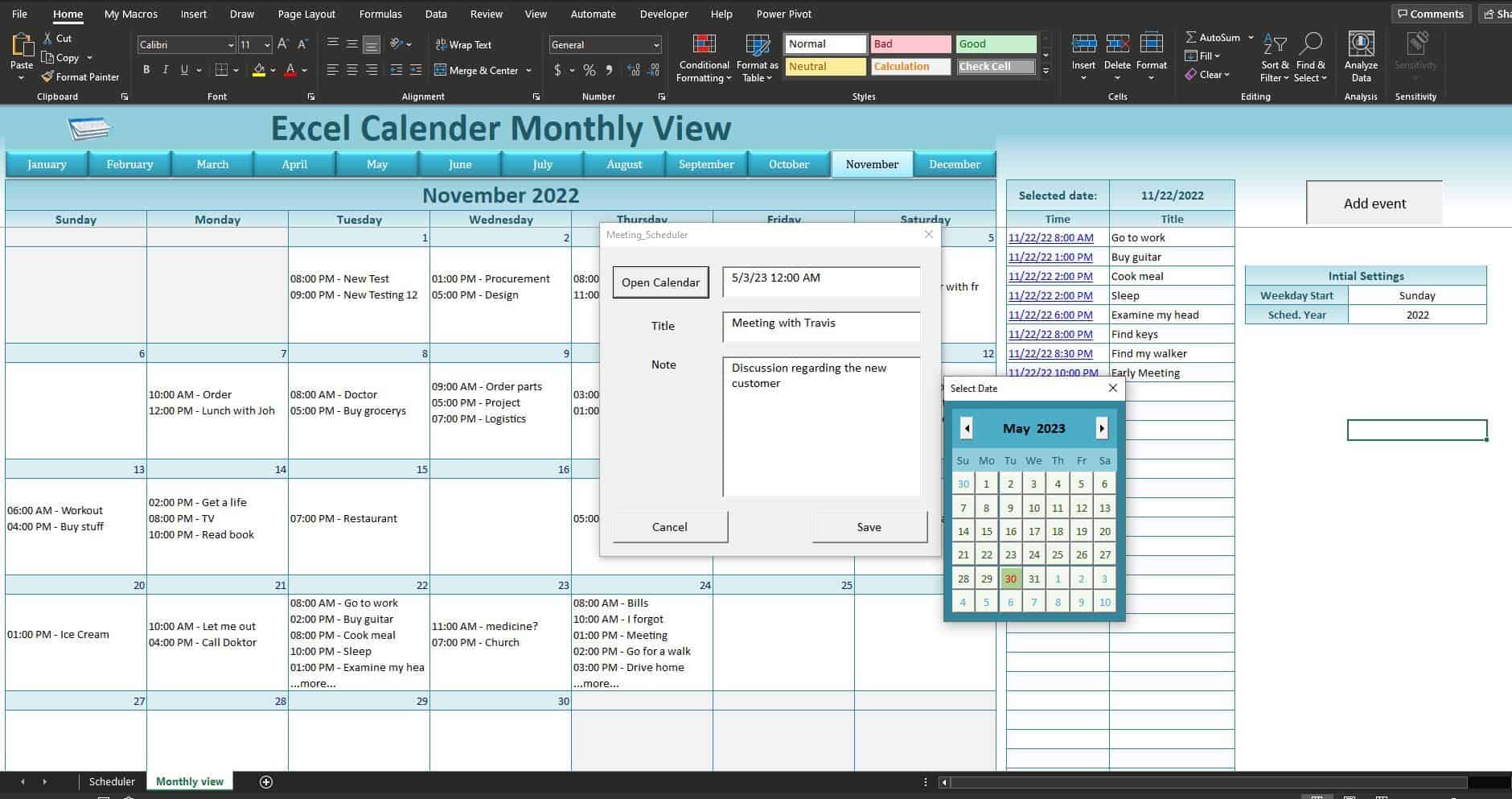


This template has only two sheets:
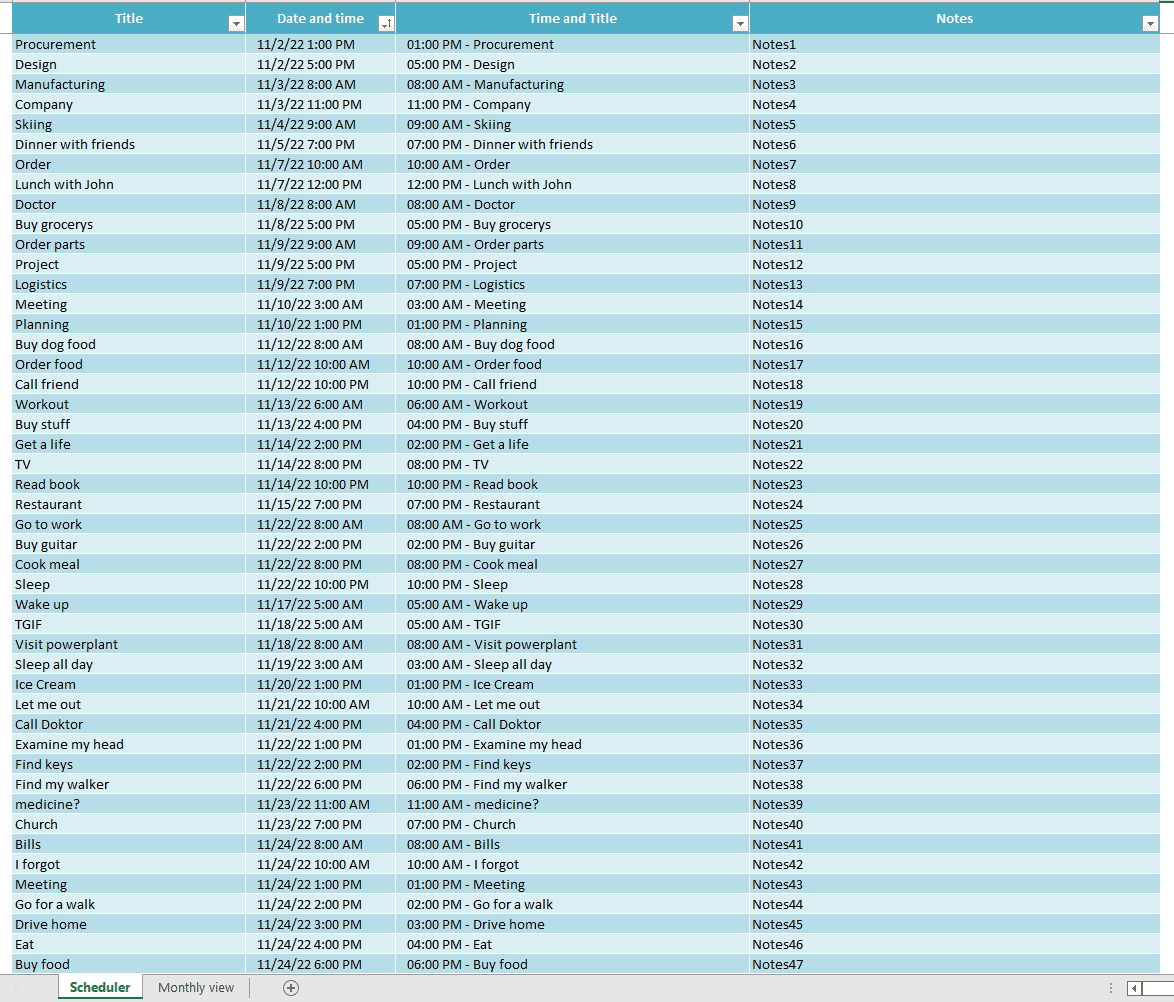
1. Schedule Sheet: This sheet is made for you to organize and save your meeting details easily. You can input the data manually or use the “Add Event” button in the “Monthly View” sheet. Clicking on the button will open a window with three boxes:
• First, choose the date and time for the meeting from the calendar.
• Second, enter the title of the meeting.
• Third, if you have any notes, you can input them there. Once you click the save button, all the data will be automatically stored in the Schedule sheet, which has three columns:
• Title
• Date and Time
• Notes
2. Monthly View Sheet: In this sheet, you can view your data for a specific month under specific dates. You can change the month using the button at the top of the calendar. Also, you can adjust the “Week Start Day” below the “Add Event” button. The sheet has a two-column table showing data for a particular date.
YOU HAVE THE CAPABILITY TO FILTER THE DATA BASED ON SPECIFIC VALUES.
• Clicking on a specific date in the calendar will display the data in the table.
• If you want to modify the data, click on the hyperlink in the first column of the table, and it will take you to the corresponding row in the “Schedule” sheet.
Utilizing an appointment schedule template can be highly beneficial for effectively managing a busy day filled with client meetings. These templates in Excel allow you to record appointments, note important details, track meetings, and review outcomes.
The monthly calendar template provides a comprehensive view of each date and offers a glimpse of the previous and following months, making planning more convenient. This versatile template can be used for multiple years, allowing you to retain all the meeting data for each year.
This file ensures that you avoid any unintentional oversights regarding your appointments. It is user-friendly and features a visually appealing layout and format.
Please note that this is a template worksheet. If it does not meet your needs 100%, and you are unable to customize it yourself, let me know, and we will provide a quote to develop the customizations you need to get you exactly what you want in your Appointment Scheduler.
File Types:
1) Excel Template – .xlsm
2) Macros Instructions – .pdf
Similar ProductsOther customers were also interested in...



 eFinancialModels
Electric Vehicle (EV) Charging Station Financial M...
With this comprehensive 5- or 10-year monthly tool, investors can assess the viability of setting up... Read more

Financial Model for Mobile App | Mobile App Busine...
The Mobile App Financial Plan Template in Excel allows you to develop financial projections when lau... Read more

 HenrySheykin
Food Truck Financial Model Excel Template
The Food Truck Financial Model helps entrepreneurs, founders, business owners, consultants, and anal... Read more

Green Hydrogen Production from Wind Energy Financi...
The Green Hydrogen from Wind Financial Model aims to comprehensively forecast a horizon of 40 years ... Read more

Simple Mutual Non-Disclosure Agreement Template
Protect your business secrets with ease using our Simple Mutual Non-Disclosure Agreement Template. S... Read more

Solar Energy Financial Model
The Solar Energy Financial Model Spreadsheet Template in Excel assists you in preparing a sophistica... Read more

 Peter Graf
The Customer-Centric Financial Model for Restauran...
Starting a restaurant without a financial plan is like driving a car blindfolded. You wouldn´t do i... Read more
You must log in to submit a review.