0 ITEMS

How to Vet Financial Models: AI Limitations & Expert Advantages

A financial model deserves trust only when an independent reviewer can trace every number, recompute the totals and break the model on purpose, and AI-written formulas often fail those tests. A first-time founder can apply a seven-step routine in an afternoon to tell an expert-built model from an AI-generated one or from a template-mill file, meaning a generic spreadsheet mass-produced for resale.
Key Takeaways
- Trust a model only after independent checks: traceable inputs, recomputed totals, statements that balance and a test that deliberately breaks it.
- AI tools draft formulas quickly, but published benchmarks show they miss many finance and spreadsheet tasks, so every AI-written formula needs verification.
- One pasted number inside a formula column can distort cash by far more than its own size, because later months compound it.
- Expert-built models list assumptions in one place, document their checks and recalculate consistently when any input changes.
- Template-mill and AI-generated files can look polished, so judge them by how they behave under questions, not by formatting.
AI Tools Still Miss Many Finance and Spreadsheet Tasks, So Every Figure Needs Checking
Finance-specific tests show that large language models (LLMs), the technology behind most AI chat assistants, still miss many tasks. The first two benchmarks below measure financial question answering and research, not formula writing, while the third measures spreadsheet work directly. In 2023, the FinanceBench benchmark reported that a generative pre-trained transformer (GPT) model from OpenAI called GPT-4 Turbo, used with a retrieval system, incorrectly answered or refused to answer 81% of questions in its sample of 150 cases about publicly traded companies (arXiv, 2023). In 2025, the Finance Agent Benchmark from Vals AI, built from 537 expert-written questions, found that the best model tested, OpenAI’s o3, reached only 46.8% accuracy at an average cost of $3.79 per query (arXiv, 2025). Both tests used the models of their day.
Spreadsheet work shows the same gap. The 2024 SpreadsheetBench benchmark, built from 912 real questions gathered from online Excel forums, reported that Copilot in Excel reached an accuracy of roughly 20%, while GPT-4o scored around 17% (arXiv, 2024). Microsoft’s own support page, read in November 2026, tells users to “Review, edit, and verify anything Copilot creates before you rely on it” (Microsoft Support, 2026).
The practical risk is a plausible number from one wrong cell reference, one invented assumption or one typed value hiding inside a formula.
Human-Built Models Fail Too, So the Standard Is Independent Checking
A 2015 review by Raymond Panko of the University of Hawaii covered earlier intensive spreadsheet inspections and reported that “these studies found errors in 94% of the spreadsheets studied” (Panko, arXiv, 2015). That figure counts spreadsheets with any error, so it is not comparable to the per-question AI scores above. The United States Senate Permanent Subcommittee on Investigations reported in 2013 that JPMorgan’s synthetic credit portfolio losses reached at least $6.2 billion by the end of 2012, and that the bank’s updated value-at-risk (VaR) model, which estimates how much a portfolio could lose over a set period, had understated risk by a factor of two and was error prone (United States Senate, 2013).
Nobody who built a model is the right person to certify it.
How to Vet a Financial Model in Seven Steps
Work through these steps in order on any model, whoever built it.
- Collect the assumptions in one place. Ask for a single inputs sheet. If growth rates, prices or tax rates sit inside formulas, the author has hidden the decisions that drive the answer.
- Trace where each headline number comes from. Pick revenue, cash and profit, and follow each back to its inputs using the formula auditing tools in Excel. Every link in the chain should be a formula or a labelled input.
- Hunt for typed numbers inside formula ranges. Select a whole row and compare its formulas month by month. A hard-coded value, which is a typed number sitting where a formula should be, usually shows up as the one cell that breaks the pattern.
- Recompute the totals a second way. Rebuild a total with a different route, such as a closed-form formula, a single equation that gives the total directly, or a calculator, and compare. The Institute of Chartered Accountants in England and Wales (ICAEW), the professional body for accountants, advises in its 2024 Financial Modelling Code to “Include an equality check for each set of values that are calculated separately but ought to be equal” (ICAEW, 2024).
- Confirm the statements tie together. A three-statement model links the income statement, balance sheet and cash flow statement, so the balance sheet must balance and closing cash on the cash flow statement must equal cash on the balance sheet.
- Break the model on purpose. Run a sensitivity analysis, which changes one input at a time to show how far the result moves, and watch whether outputs react sensibly.
- Ask who built it and how it was tested. Expert builders can name their reviewer, show a change log and explain each check. Silence, or a vague answer about “AI-assisted” work, is a warning.
Worked Example: One Pasted Number Overstates Year-End Cash by 28.8%
In this example, a founder reviews a twelve-month cash plan, stated in one currency. Assume opening cash of 250,000, month 1 revenue of 20,000 and costs of 45,000 a month, with each later month’s revenue formula multiplying the previous month’s cell by 1.05, a growth rate of 5% a month. Revenue is collected in cash in the month earned, and the plan ignores tax and equipment purchases. One cell in the revenue column, month 7, holds a typed 28,000 instead of the formula result.
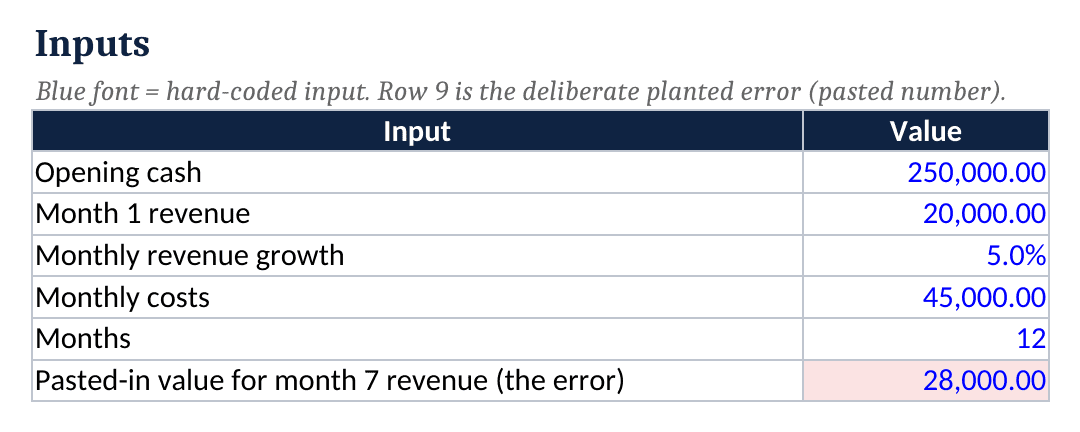
The formula column gives month 7 revenue of 26,801.91, so the typed 28,000 is 4.5% too high. The next months build on the typed value, which is why the error grows. A closed-form check reaches the correct revenue total directly: 20,000 × (1.05^12 − 1) ÷ (1.05 − 1) = 20,000 × 0.795856326 ÷ 0.05 = 20,000 × 15.91712652 = 318,342.53. The formula column matches it, so its check cell reads OK. The pasted column totals 326,491.82, about 8,149 higher, so its check fails.
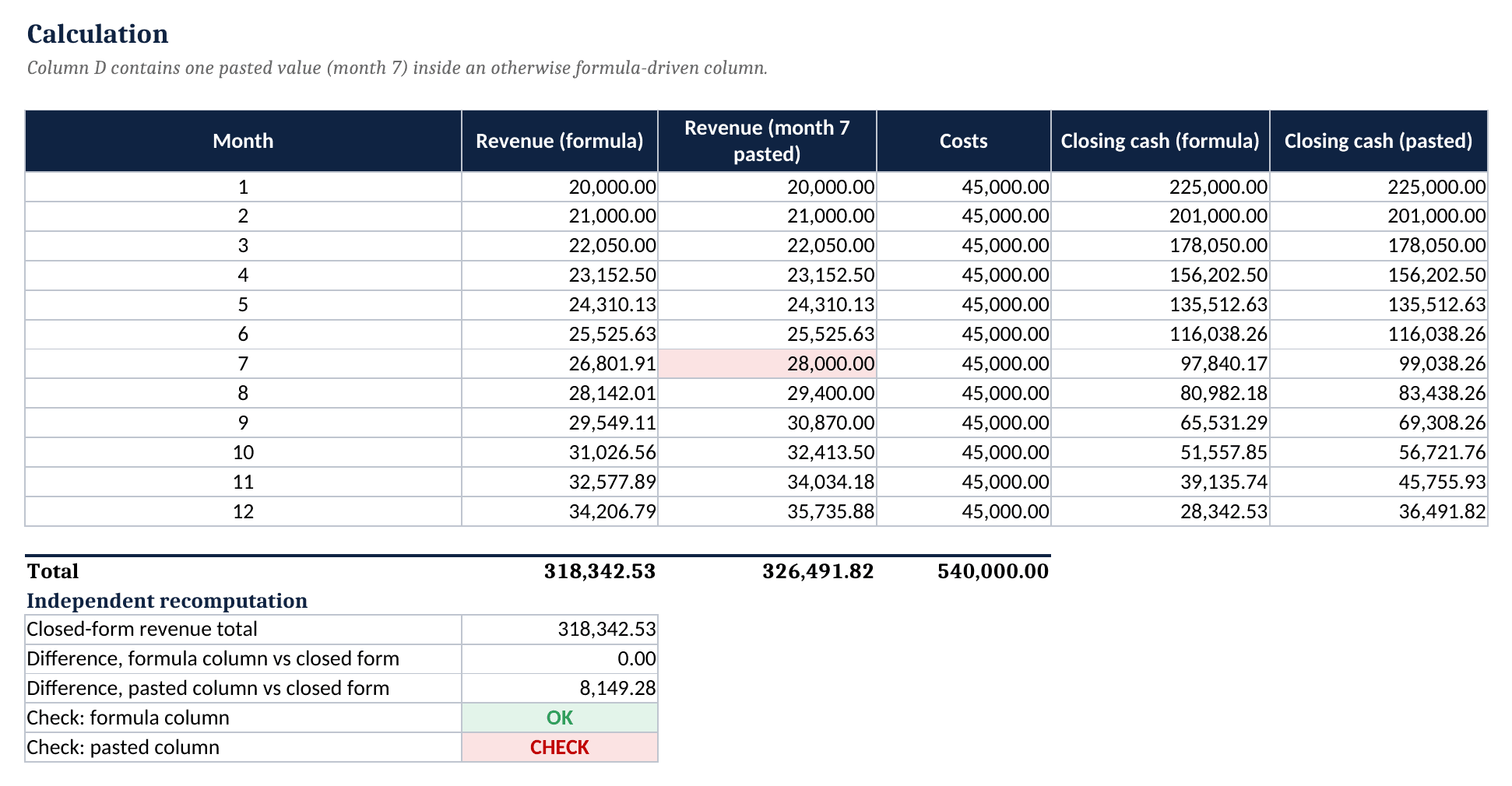
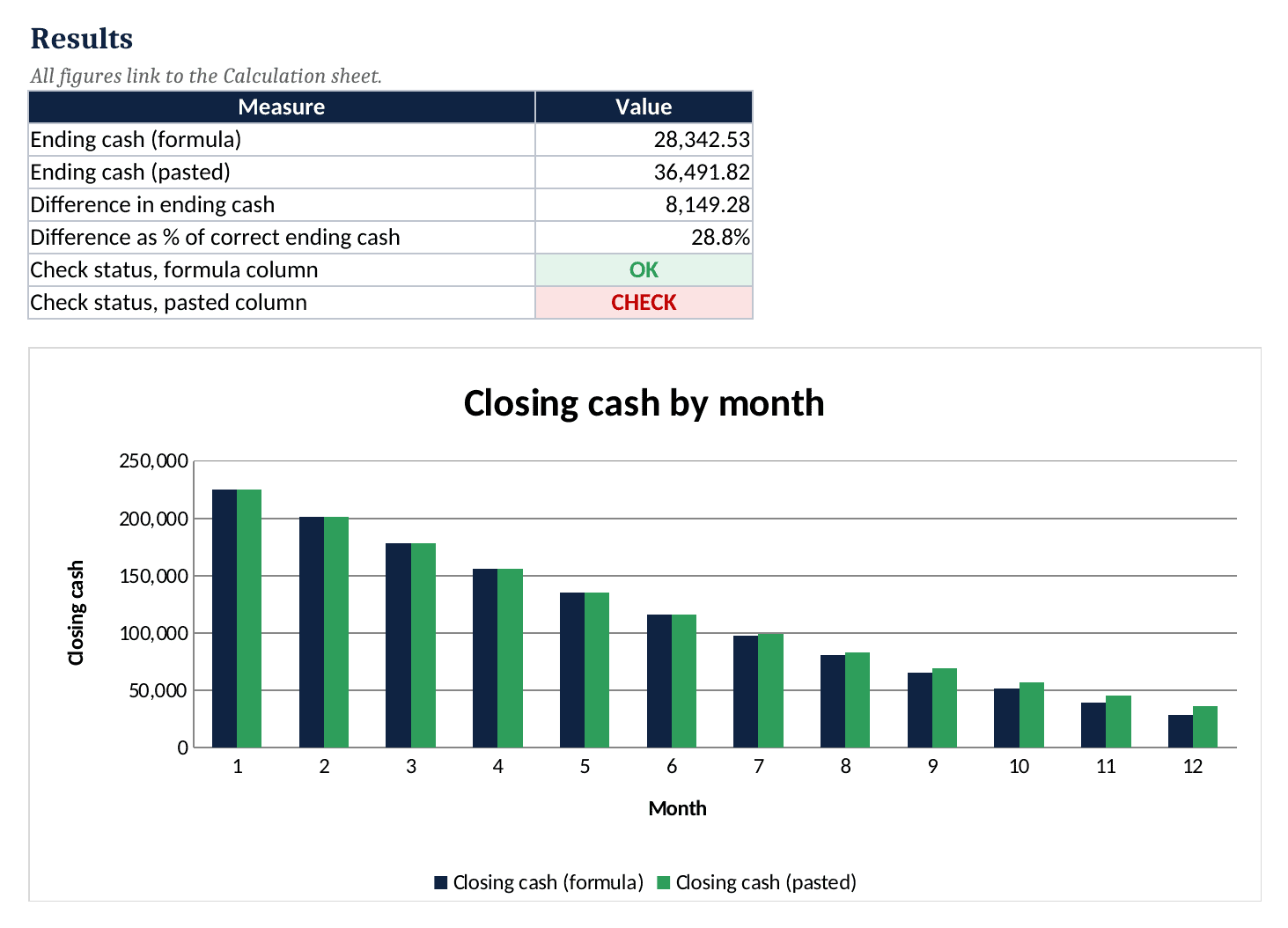
Ending cash is 250,000 + 318,342.53 − 540,000 = 28,342.53 in the formula column. The pasted column ends at 36,491.82, so one typed cell makes year-end cash look 28.8% healthier, a difference of about 8,149. A founder who hired against the higher figure would run short of cash.
Expert-Built Versus AI-Generated or Template-Mill Models: How to Tell the Difference
Polish tells nothing, because AI tools and template mills both produce clean formatting. The table lists the signals that behave differently under questioning.
| Signal | Expert-built | AI-generated or template-mill |
|---|---|---|
| Assumptions | One labelled inputs sheet | Scattered inside formulas |
| Checks | Visible check cells that reconcile | None, or checks that always read OK |
| Formula consistency | Same formula across each row | Typed values mixed into formulas |
| Documentation | Change log, notes, named reviewer | No author, no tests described |
| Live change | Outputs move sensibly when an input changes | Outputs freeze or break |
Ask the seller to change the growth rate live and to explain where the closing cash figure comes from. A competent builder can usually answer in minutes, and the model should recalculate cleanly. Founders can browse startup financial models or the All Industries category to see how documented models present assumptions.
When a Founder Needs a Professional Reviewer
The seven steps cover mechanics, but some questions fall outside them. Tax treatment belongs with an accountant, investment terms with a lawyer, and a valuation or audit opinion with a qualified valuer or auditor.
Conclusion
Vetting is a habit: collect assumptions, trace outputs, recompute independently, tie the statements, stress the inputs and ask who built the model. Founders who want a documented starting point can test the seven steps against eFinancialModels’ Free Three Statement Financial Model.
Frequently Asked Questions
Can an AI tool build a financial model that a founder can trust?
An AI tool can draft structure and formulas faster than most beginners, which makes it a useful assistant. Trust is a separate matter, because the tool cannot prove its own arithmetic or know the business behind each assumption. The safe pattern is to let the tool propose, verify every output independently and keep a named person accountable for the final numbers before investors see them.
How long does a first review of a startup model take?
As an editorial estimate, a simple startup model with one revenue stream takes one to two hours for a careful first pass. Larger models with several products or entities take longer, and sections relying on macros or external links need extra time. Any model that cannot be opened, traced and recalculated in that time deserves suspicion. Starting with the inputs sheet and the check cells saves effort, because problems there often explain several downstream anomalies.
Does a passing check cell prove the model is correct?
No. A check cell proves internal consistency, such as a balance sheet that balances or a total that matches a second calculation. It cannot prove that a growth rate is realistic, that a cost was not forgotten or that the check itself is wired to the right cells. Founders should confirm that each check can actually fail, for example by typing a wrong value, and then treat assumptions as a separate review.
Which questions quickly expose a template-mill model?
Three questions work well. Who built the model and who reviewed it? Which cell holds the most important assumption, and what happens to cash when it changes by a fifth? Where are the tests documented? Genuine builders answer with names, cell locations and examples. Sellers recycling one generic file tend to deflect or point to marketing pages. A pause or a vague reply is itself useful evidence.
What should a founder do when an AI-generated model already exists?
Keep the model, but audit it before using it. Freeze a copy, list every input, scan for typed numbers inside formula ranges and rebuild the key totals independently. Fix what fails and record each change in a log. A repaired model with a visible audit trail is more credible to investors than a polished file nobody can explain. Treat rebuilt sections as new work and test them again.