
0 ITEMS

Feasibility Study Financial Model with Debt Sizing, DSCR, NPV and IRR (Excel)
A feasibility study exists to answer two questions, and most templates answer only the first. Is the project worth doing, and can it be financed? This Excel model answers both, for any project with a construction period followed by an operating life. It sizes the funding need including the arrangement fee and the interest that accrues during construction — a circular reference most templates quietly ignore, understating the raise and overstating the equity return. Here the loop is solved in twelve visible columns with a residual you can watch fall to zero, and Excel’s iterative calculation setting is never touched. It then builds a debt schedule from that need and answers the lender’s question: does the cash arrive in time to service the loan in the year it is thinnest? The cover ratio is reported every operating year, tested against your covenant, and compared with the debt a bank would actually have sized on this cash flow. Tax is computed twice — with and without the interest deduction — so the project return does not take credit for a saving that came from the balance sheet. Ten tabs, twelve years, three scenarios from one cell, 1,419 live formulas, three sensitivity ladders that re-derive the whole cash flow from scratch, and seventeen integrity checks that must all read PASS. No macros, no locked cells, no passwords.
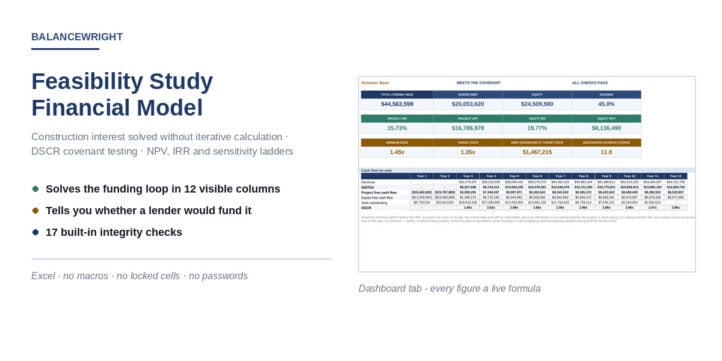


A feasibility study exists to answer two questions, and most templates answer only the first. Is the project worth doing, and can it be financed?
This Excel model answers both. It sizes the capital cost and the funding need, builds a debt schedule from that need, reports the cover ratio in every operating year against the covenant a lender would set, and computes the return to the project and to the equity separately. It is industry-agnostic: a plant, a hotel, a fleet, a processing line — anything with a construction period followed by an operating life.
The circular reference every project model has
The interest that accrues while a project is being built has to be funded. Funding it enlarges the amount to be raised; a larger raise means a larger debt; a larger debt accrues more interest. Most feasibility templates deal with this by pretending it does not exist — they size the debt on the capex alone and add the construction interest afterwards, which understates the funding need and overstates the equity return. In the worked example the difference is $1.56m on a $43m project.
This model puts the loop on the page. Twelve columns run left to right: column zero assumes no fee and no interest, and each column afterwards recomputes the facility, the fee and the construction interest from the need the column before it produced. The residual row falls from $1.6m to zero and an integrity check confirms it got there. Excel’s iterative calculation setting is never touched.
The question a lender asks
An investor asks whether the return beats the cost of capital. A lender asks something narrower: does the cash arrive in time to service the loan in the year it is thinnest. A project can clear its hurdle rate comfortably and still be unfundable.
The Debt Schedule tab reports the DSCR every operating year, tests it against your covenant and gives a verdict. It also reports the debt a lender would have sized on this cash flow — the annuity the weakest year supports at your target ratio, discounted over the tenor. In the worked example that is $21.5m against a facility of $20.1m: the gearing survives, with $1.5m to spare and no more. The binding year is the first year of operations, at 1.45x, against about 2.95x for the rest of the loan’s life.
Two tax lines
Interest is deductible, so a geared project pays less tax than an ungeared one — but that saving belongs to the financing, not to the project. The model computes tax twice, charges the unlevered figure to the project cash flow and the levered one to the equity, and an integrity check proves the two cash flows differ by exactly the drawdowns, the debt service and the shield.
What is inside
- Ten tabs, twelve years (two of construction, ten of operations), three scenarios from one cell.
- 1,419 live formulas. No macros, no add-ins, no external links, no password protection, no locked cells.
- Three sensitivity ladders — price, capital cost, operating cost — each re-deriving the whole cash flow from scratch. In the worked example a 10% fall in price takes the return below the WACC, and so does a 20% rise in operating cost.
- NPV, IRR, MIRR, payback, discounted payback and profitability index for the project; NPV, IRR, payback and money multiple for the equity.
- A five-page PDF guide — free to download here — documenting every convention and every limitation.
- Seventeen integrity checks, all of which must read PASS.
This workbook models the arithmetic of your own project. It is not investment advice, and the worked example is invented.
Similar ProductsOther customers were also interested in...



 eFinancialModels
Electric Vehicle (EV) Charging Station Financial M...
With this comprehensive 5- or 10-year monthly tool, investors can assess the viability of setting up... Read more

Financial Model for Mobile App | Mobile App Busine...
The Mobile App Financial Plan Template in Excel allows you to develop financial projections when lau... Read more

 HenrySheykin
Food Truck Financial Model Excel Template
The Food Truck Financial Model helps entrepreneurs, founders, business owners, consultants, and anal... Read more

Green Hydrogen Production from Wind Energy Financi...
The Green Hydrogen from Wind Financial Model aims to comprehensively forecast a horizon of 40 years ... Read more

Simple Mutual Non-Disclosure Agreement Template
Protect your business secrets with ease using our Simple Mutual Non-Disclosure Agreement Template. S... Read more

Solar Energy Financial Model
The Solar Energy Financial Model Spreadsheet Template in Excel assists you in preparing a sophistica... Read more

 Peter Graf
The Customer-Centric Financial Model for Restauran...
Starting a restaurant without a financial plan is like driving a car blindfolded. You wouldn´t do i... Read more
You must log in to submit a review.