
0 ITEMS

Budget vs Actual Model — Driver-Based FP&A Reforecast with Price/Volume/Mix, Rolling Forecast & Scenarios | Excel & Google Sheets
A 17-tab Excel & Google-Sheets FP&A model: driver-based revenue (units × price), three scenarios, a rolling latest estimate, and a three-way price/volume/mix split (turnover basis) that ties exactly — plus departments, sensitivity and a cash bridge.
| All Industries, Financial Model, General Excel Financial Models |
| Budget, Chart, Excel, Financial Analysis, Financial Planning |


The Annual Budget & Reforecast Model (Advisor edition) is a driver-based annual operating model for finance practitioners who have to explain a variance, not just report one. Revenue is planned from units and price per line rather than typed in as a total; a single scenario switch flexes volume, price and cost inflation across every tab; actuals replace budget month by month to produce a rolling latest estimate; and every revenue variance is decomposed into price, volume and mix on the CIMA turnover basis, with the tab carrying its own tie-out check. It ships pre-filled with a complete, tied-out worked year.
The differentiator is defensibility. The price/volume/mix split is the real three-way decomposition and sums back to the revenue variance exactly, per line and in total. The comparison is like-for-like — actuals through the closed months are measured against the budget for those same months, not against the full year, which is the defect that flips the sign of the answer in most templates. Every figure traces to a blue input cell and no result is hard-coded, including the sensitivity grid axes. Three fixed constants exist by design and are disclosed on the tabs that use them: the Departments check tolerance (0.5pp, which governs only whether the REVIEW flag shows), the Cash Bridge’s 30-day cap on DSO/DPO, and its zero opening receivables and payables. All 829 formulas were independently recomputed in a separate engine and every headline rebuilt from raw inputs, in both editions.
**Model Structure — 17 tabs**
1. **START HERE** — what the model does, input order, five-step quick start, licence
2. **Setup** — business name, budget year, fiscal start month, currency, scenario, current month, revenue target
3. **Scenario Drivers** — volume / price / cost-inflation factors for Base, Upside and Downside
4. **Revenue Build** — units and price per line, per month, flexed by the active scenario
5. **Expense Budget** — COGS as a % of revenue plus eight direct cost categories
6. **Actuals** — actual units, prices and costs entered as each month closes
7. **Reforecast** — the rolling latest estimate, month by month
8. **Budget vs Actual** — the price/volume/mix split with its own tie-out check column
9. **Annual Summary** — budget / actual / LE / variance / % of plan across revenue, expenses, EBITDA
10. **Dashboard** — scenario-aware KPI tiles and charts
11. **3-Year Plan** — the budget extended on revenue and expense growth rates
12. **Departments** — nine cost categories across four cost centres, with a 100%-allocation guard
13. **Sensitivity** — two-way EBITDA grid (volume × cost inflation) with editable axes
14. **Variance Bridge** — waterfall from budget to latest estimate
15. **Cash Bridge** — budget P&L to cash via DSO/DPO, with the accrual-to-cash reconciliation
16. **Exec Summary** — board one-pager, narrative generated from your figures
17. **AI Commentary** — 7 CFO-voice prompts, worked sample outputs, self-updating figure block
**Key Methodological Features**
– Driver-based revenue: Line Revenue = (Units × Active Volume Factor) × (Price × Active Price Factor)
– Scenario engine: one input on Setup selects a factor row and feeds every tab
– Expenses: COGS as a % of revenue (so it flexes with volume) plus direct categories, with cost inflation applied to the total
– Rolling latest estimate: IF(Month ≤ Current Month, Actual, Budget)
– Three-way variance: Price = (Actual Price − Budget Price) × Actual Units; Mix = (Actual Mix % − Budget Mix %) × Total Actual Units × Budget Price; Volume = (Total Actual Units − Total Budget Units) × Budget Mix % × Budget Price — where Budget Price and Budget Units are scenario-flexed and phased to the closed months, so the three sum exactly to the revenue variance
– Valued at budgeted price (turnover method) because the tab bridges revenue; CIMA and ACCA value mix and quantity variances at contribution when bridging profit, which is a different question — the basis is stated on the tab and in the PDF
– Three independent checks built in: price + mix + volume ties to the revenue variance; the sensitivity base cell ties to Annual Summary EBITDA in every scenario; the Cash Bridge ties EBITDA to cash through working capital
– Arithmetic only — ABS, CHOOSE, IF, IFERROR, INDEX, INT, MAX, MIN, MOD, OR, SUM, SUMPRODUCT, TEXT — so both editions run unchanged in Excel and Google Sheets
**Worked Example**
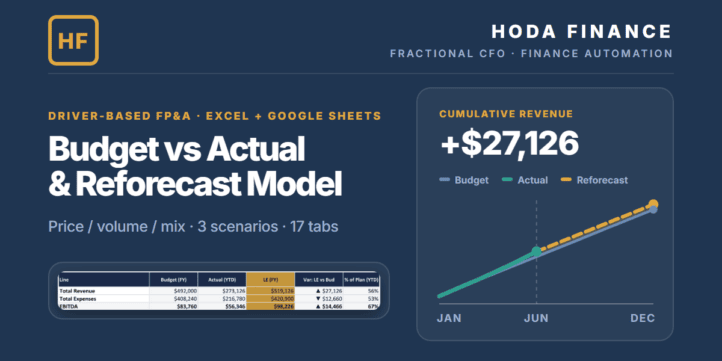
Pre-loaded with “Acme Studio LLC” (budget year 2026, four revenue lines, month 6 of 12): revenue budget $492,000, actual to date $273,126, latest estimate $519,126 (+$27,126 vs plan) — splitting into price +$3,036, mix +$2,751 and volume +$21,339, with the tab’s check column agreeing to the cent. Expenses: budget $408,240, actual to date $216,780, LE $420,900 — $12,660 above plan. EBITDA: budget $83,760, actual to date $56,346 (20.6% margin), LE $98,226 — +$14,466 against plan, and the three variances tie (+$27,126 less $12,660 = +$14,466). At month 6 that is 56% of the revenue plan, 53% of the expense plan and 67% of the EBITDA plan; like-for-like, $273,126 of actual revenue against a year-to-date plan of $246,000 is the same +$27,126 ahead. Scenario switch: Upside $578,592 revenue / $133,924 EBITDA; Downside $419,971 / $11,669. Department contribution reconciles to the $83,760 budget EBITDA. The 3-Year Plan extends 492,000 → 541,200 → 595,320 with margin rising 17.0% → 19.3% → 21.5%. The Cash Bridge converts the budget to +$72,273 full-year net cash and $122,273 closing cash on DSO 25 / DPO 20 and $50,000 opening, with the $11,487 accrual-to-cash gap shown as working-capital timing. Replace the inputs and every output re-prices.
**Scope**
Plans revenue and operating expenses only — the profit line is EBITDA; interest, tax and depreciation are not modelled. No balance sheet or 3-statement model. Actual COGS is derived at the budget rate, so no separate gross-margin variance appears. Single currency, single entity — no consolidation, no FX, no headcount module. The Cash Bridge is a working-capital approximation: zero opening receivables and payables, single-month lag, DSO/DPO capped at 30 days. The price/volume/mix split is valued at price, not contribution. Enter actuals only through the month set as “Current month” on Setup — months entered beyond it misstate every year-to-date figure and variance until you advance it; the Actuals tab raises a REVIEW warning when that happens.
**Suitable For**
– Fractional CFOs and finance consultants running budgets across several clients
– FP&A managers and analysts who reforecast monthly
– Founders and operators who must explain variances to a board or lender
– Bookkeepers and accountants adding budgeting to their service line
**Technical Specifications**
– Format: .xlsx (Excel edition) + .xlsx (Google Sheets edition) + .pdf (2-page methodology)
– Compatibility: Excel 2016, 2019, 2021, Microsoft 365 (Windows and Mac) and Google Sheets
– No macros, no VBA, no add-ins; no XLOOKUP, LET, LAMBDA or dynamic arrays
– 17 tabs · 829 formulas · pre-filled worked year · data validation on every numeric input
– Delivery: instant digital download · multi-client / commercial licence included
ABOUT THE AUTHOR
Built by Hoda Elmorshidy — Financial Controller & Fractional CFO, 9+ years in IFRS reporting, FP&A, commodity trading, CFO/board reporting, UAE VAT & Corporate Tax, and finance automation. Also the author of the FP&A Variance & Forecast Toolkit and the CFO Board Reporting System on eFinancialModels. Practitioner-grade tools, not generic templates.
DISCLAIMER
This template is an analytical and educational planning tool, not professional financial, investment, tax, accounting, audit or legal advice, and its use creates no professional relationship. All assumptions and figures are illustrative — outputs are only as good as your assumptions, and past or sample results are not indicative. Verify every figure before use in any decision. The sample company “Acme Studio LLC” and all of its figures are fictional. AI commentary drafts text from the numbers you provide — verify every figure in the output before sharing it. Liability is limited as set out in the licence terms below.
LICENSE & LIABILITY
LICENSE GRANT: Multi-client / commercial licence — use internally and to deliver budgeting and FP&A work for your own clients, including client-branded copies of the outputs. No resale, redistribution, sublicensing or repackaging of the file or its templates as a template. One purchase covers one practitioner.
AS IS: Provided “as is” without warranty of any kind, express or implied, including merchantability or fitness for a particular purpose.
LIMITATION OF LIABILITY: To the maximum extent permitted by law, total liability for any claim arising from this product is limited to the amount you paid for it. Not liable for indirect, incidental or consequential losses.
NON-WAIVABLE RIGHTS: Nothing here limits rights that cannot be excluded under the consumer-protection law of your jurisdiction.
GOVERNING LAW: Governed by the terms of the platform you bought it on and by the consumer-protection law of your country of residence. Where those permit, the limitations above apply to the maximum extent allowed.
REFUNDS: Digital download — handled per the platform’s refund policy for digital/instant-download items.
TRADEMARKS & NON-AFFILIATION: Microsoft Excel and Google Sheets are trademarks of Microsoft Corporation and Google LLC respectively; this product is not affiliated with, endorsed by or sponsored by either. CIMA and ACCA are referenced for methodological attribution only.
Similar ProductsOther customers were also interested in...



 eFinancialModels
Electric Vehicle (EV) Charging Station Financial M...
With this comprehensive 5- or 10-year monthly tool, investors can assess the viability of setting up... Read more

Financial Model for Mobile App | Mobile App Busine...
The Mobile App Financial Plan Template in Excel allows you to develop financial projections when lau... Read more

 HenrySheykin
Food Truck Financial Model Excel Template
The Food Truck Financial Model helps entrepreneurs, founders, business owners, consultants, and anal... Read more

Green Hydrogen Production from Wind Energy Financi...
The Green Hydrogen from Wind Financial Model aims to comprehensively forecast a horizon of 40 years ... Read more

Simple Mutual Non-Disclosure Agreement Template
Protect your business secrets with ease using our Simple Mutual Non-Disclosure Agreement Template. S... Read more

Solar Energy Financial Model
The Solar Energy Financial Model Spreadsheet Template in Excel assists you in preparing a sophistica... Read more

 Peter Graf
The Customer-Centric Financial Model for Restauran...
Starting a restaurant without a financial plan is like driving a car blindfolded. You wouldn´t do i... Read more
You must log in to submit a review.