
0 ITEMS

Month-End Close Checklist: 7-Day Framework for FP&A
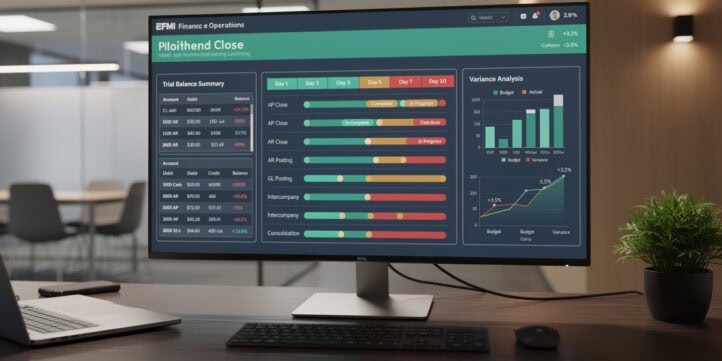
A disciplined month-end close process turns chaotic deadline sprints into a repeatable, auditable workflow that finance teams can defend to auditors and executives alike.
Key Takeaways
- Top-performing finance teams close their books in 4 days or fewer, compared to an industry median of 6.4 days, according to APQC benchmarking data.
- Pre-close preparation starting at T-3 days eliminates roughly 60% of day-of-close firefighting by resolving data issues before the ledger locks.
- A materiality threshold of 5% of budget or $10,000 (whichever is lower) gives most mid-market teams a defensible, auditor-ready variance escalation rule.
- Updating financial models with actuals requires 5 distinct steps: data export, mapping validation, formula-safe paste, version tagging, and audit trail logging.
- Pseudo-code decision trees embedded in your close runbook cut average reconciliation review time by standardizing the logic every analyst follows.
- Post-close variance commentary should be drafted within 24 hours of ledger lock to capture root-cause context before institutional memory fades.
- Version control on model files, using a naming convention like
YYYY-MM_ModelName_vX.xlsx, prevents overwrite errors that affect up to 88% of teams relying on manual file management Ventana Research.
Month-End Close Framework Overview
The month-end close is the structured sequence of accounting, reconciliation, and reporting activities that produces a verified set of financial statements for a given period. Think of it as a production line: each station must complete its work before the next station can start, and a breakdown at any point delays the entire output.
A well-designed close framework has four phases: pre-close preparation (T-3 to T-0), day-of-close execution, post-close reporting, and continuous improvement. Each phase has defined owners, checkpoints, and exit criteria. Without those guardrails, close cycles expand to fill whatever time is available, a phenomenon finance operations teams call “close creep.”
According to APQC’s Open Standards Benchmarking data, the median organization closes its books in 6.4 calendar days APQC, but top-quartile performers finish in 4.0 days or fewer. That 2.4-day gap represents roughly 30% more time for analysis, forecasting, and strategic work each month.
Pre-Close Preparation: T-3 to T-0 Activities
Pre-close preparation is the single highest-leverage phase of the close process. Resolving data quality issues, confirming cutoff dates, and aligning stakeholders before the ledger locks prevents the majority of day-of-close delays.
T-3: Data Validation and Stakeholder Alignment
- Confirm period-end cutoff dates with Accounts Payable, Accounts Receivable, and Payroll.
- Run a preliminary trial balance and flag any accounts with zero balances that normally carry activity.
- Send a close calendar reminder to all sub-ledger owners (AP, AR, Fixed Assets, Inventory, Payroll) with submission deadlines.
- Validate that all intercompany transactions are matched and elimination entries are staged.
T-2: Sub-Ledger Reconciliation Kickoff
- Pull AR aging and confirm all cash receipts through the cutoff date are posted.
- Confirm all vendor invoices received before cutoff are entered, even if unpaid.
- Run the fixed asset depreciation schedule and post the journal entry.
- Verify payroll accruals match the payroll register for any pay periods straddling month-end.
T-1: Accruals and Adjusting Entries
- Post all accruals: revenue accruals, expense accruals, prepaid amortization, and deferred revenue releases.
- Complete bank reconciliations for all operating accounts.
- Confirm all intercompany eliminations net to zero.
- Freeze the sub-ledgers (AP, AR, Inventory) to prevent late postings.
T-0: Ledger Lock and Final Review
- Run the final trial balance and confirm it ties to the prior period ending balance plus net activity.
- Obtain controller sign-off before closing the period in the ERP system.
- Archive the pre-close trial balance as a version-controlled snapshot.
Pre-close data validation gate: for each account in the chart of accounts, if the account is expected to show activity but its period balance is zero, it gets flagged as “Missing Activity — Investigate” and the account owner is notified via a close calendar alert; if instead the balance falls outside its normal range, it gets flagged as “Unusual Balance — Confirm or Adjust”; otherwise it’s marked “Pre-Close Validated.” Once every account has been checked, if any accounts were flagged, the close progression halts and the issue is escalated to the controller — otherwise the process proceeds to day-of-close.
Day-of-Close Execution Checklist
Day-of-close execution is the sequenced set of actions that moves the ledger from “open” to “locked and reconciled.” Every step has an owner, a completion criterion, and a sign-off requirement.
Post all remaining journal entries with supporting documentation attached in the ERP (SAP, Oracle, NetSuite, or equivalent).
Run the trial balance and confirm total debits equal total credits.
Reconcile each balance sheet account to its supporting schedule (bank statement, sub-ledger, amortization table).
Review P&L for unusual line items: any account with a variance greater than your materiality threshold triggers an investigation before sign-off.
Obtain tiered approvals: preparer signs, reviewer approves, controller certifies.
Close the period in the ERP: in NetSuite, this is the “Lock Accounting Period” function; in SAP, it is the period-end closing transaction (F.16 / OB52); in Oracle, it is the “Close Period” action in General Ledger.
Export the final trial balance in a version-controlled file for model update.
Day-of-close approval gate: for each journal entry in the period, if its status isn’t “Posted” it gets flagged as “Unposted Entry” and the preparer is notified, and if it has no supporting document it gets flagged as “Missing Support” and approval is blocked. Once every entry has been checked, if the trial balance’s debits don’t equal its credits, the process halts and the controller is alerted that the trial balance is out of balance; otherwise reviewer approval is requested, and once approved, controller certification is requested — if certified, the ERP period close executes, and if not, the entry is returned to the reviewer along with the controller’s notes.
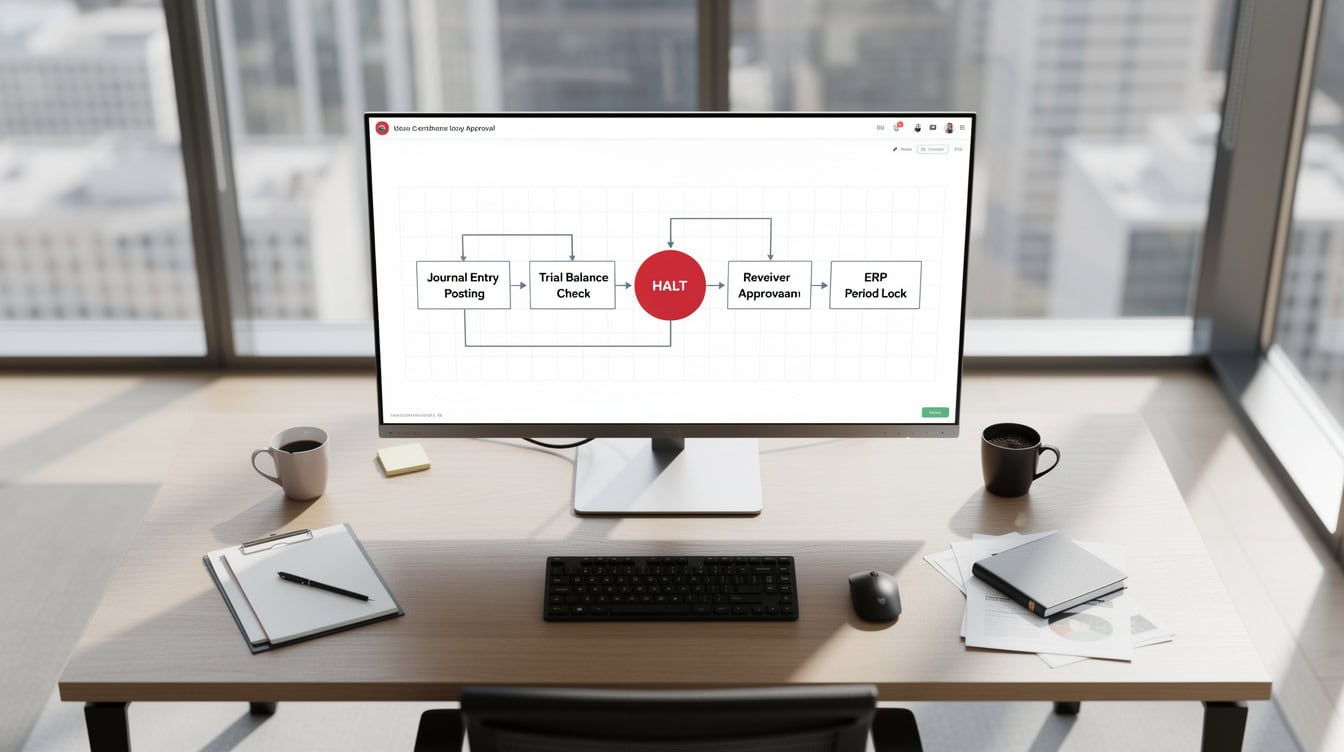
The day-of-close sequence requires tiered approvals before the ERP period lock executes, preventing unauthorized postings.
Account Reconciliation and Validation Procedures
Account reconciliation (the process of confirming that a general ledger account balance matches an independent source) is the backbone of a defensible close. Every balance sheet account must reconcile; P&L accounts reconcile through the sub-ledger activity that drives them.
The Public Company Accounting Oversight Board (PCAOB) and internal audit standards both require that reconciliations be documented, reviewed, and retained. The SEC’s Staff Accounting Bulletin guidance reinforces that reconciliation documentation must be sufficient for an auditor to re-perform the work independently SEC.
Prioritize reconciliations in this order:
- Cash and bank accounts (daily or weekly during close)
- Accounts Receivable to AR sub-ledger
- Accounts Payable to AP sub-ledger
- Inventory to perpetual inventory system
- Fixed Assets to depreciation schedule
- Accrued liabilities to accrual schedule
- Intercompany balances to elimination schedule
- Deferred revenue to contract schedule
For each reconciliation, the format is: GL Balance = Sub-Ledger Balance + Reconciling Items. Any unreconciled difference above your materiality threshold requires a root-cause note before the controller signs off.
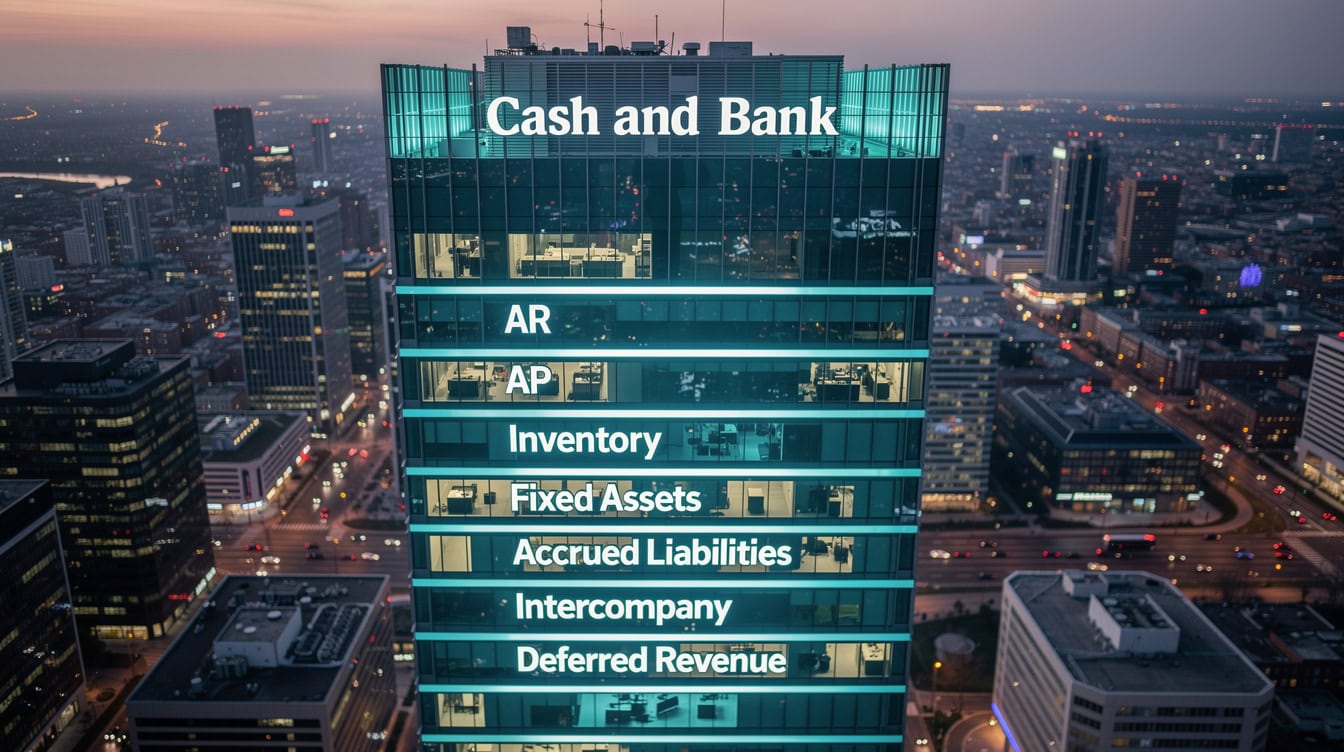
Cash reconciliations run daily or weekly during close; deferred revenue and intercompany reconcile last because they depend on all other accounts being settled first.
Variance Analysis Methodology and Thresholds
Variance analysis (comparing actual results to budget, prior period, or forecast) transforms raw numbers into management insight. It is not a post-close activity; it runs in parallel with reconciliation so that explanations are ready when the ledger locks.
Setting Materiality Thresholds
A materiality threshold defines the minimum variance size that requires a written explanation. A practical rule for mid-market companies: flag any variance exceeding 5% of the budgeted line item OR $10,000 in absolute dollars, whichever is lower. Larger enterprises often set the absolute threshold at $50,000 to $100,000 to focus analyst time on meaningful variances.
Root Cause Framework
Every material variance falls into one of four categories:
- Volume: more or fewer units/transactions than planned.
- Price/Rate: unit price, wage rate, or cost per unit differed from budget.
- Timing: revenue or expense recognized in a different period than planned.
- Error: a misclassification, duplicate posting, or cutoff failure.
// PSEUDO-CODE: Variance Investigation Decision Tree
FOR EACH account IN p_and_l:
    actual_vs_budget = account.actual - account.budget
    pct_variance = actual_vs_budget / ABS(account.budget)

    IF ABS(actual_vs_budget) > materiality_threshold OR ABS(pct_variance) > 0.05:
        CLASSIFY variance_type:
            IF volume_driver_available:
                SET root_cause = "Volume"
            ELSE IF price_rate_data_available:
                SET root_cause = "Price/Rate"
            ELSE IF timing_flag = TRUE:
                SET root_cause = "Timing"
            ELSE:
                SET root_cause = "Error — Investigate"
                ESCALATE TO controller
        DRAFT variance_commentary WITH:
            - actual_amount
            - budget_amount
            - variance_amount
            - root_cause
            - corrective_action (if Error)
END FOR
Updating Financial Models with Actuals: Step-by-Step
Updating a financial model with actuals means replacing forecast or budget figures with verified period-end data while preserving all formulas, structure, and audit integrity. This is the step most FP&A analysts get wrong, either by hard-coding over formulas or by skipping version control.
Here is the 5-step process:
Step 1: Export the Locked Trial Balance
Export the final, controller-certified trial balance from your ERP as a structured data file (CSV or Excel). Include account code, account name, and period balance. Do not use a preliminary or pre-lock export. Excel supports up to 1,048,576 rows per worksheet Microsoft, which means even the most granular trial balance export will fit within a single sheet without truncation.
Step 2: Map Actuals to Model Structure
Create a mapping table that links each GL account code to the corresponding model line item. This mapping table lives on a dedicated “Data Map” tab and is the single source of truth for how ERP data flows into the model.
// PSEUDO-CODE: Actuals Mapping Validation
FOR EACH gl_account IN trial_balance_export:
    IF gl_account.code EXISTS IN mapping_table:
        model_line = mapping_table.lookup(gl_account.code)
        ASSIGN gl_account.balance TO model_line.actuals_column
    ELSE:
        FLAG gl_account AS "Unmapped Account"
        NOTIFY fp_and_a_lead
        DO NOT post to model until mapping confirmed
END FOR

IF unmapped_accounts.count > 0:
    HALT model_update
    RESOLVE mappings BEFORE proceeding
Step 3: Paste Actuals Using Formula-Safe Method
Never paste raw values directly over formula cells. Instead, paste actuals into a dedicated “Actuals Input” range (hard-coded cells), and let existing SUMIF or INDEX/MATCH formulas pull from that range into the P&L, balance sheet, and cash flow statement. This preserves every formula and makes the model re-runnable. A single Excel workbook can contain up to 255 sheets Microsoft, so there is ample room to maintain separate tabs for Actuals Input, Data Map, Change Log, and all financial statements within one file.
Step 4: Tag the Version
Rename the file immediately after the actuals update using the convention: YYYY-MM_ModelName_vX.xlsx (for example, 2025-06_OperatingModel_v1.xlsx). Save the prior version to an archive folder before overwriting. This two-file approach gives you a clean rollback point.
Step 5: Log the Audit Trail
On the model’s “Change Log” tab, record: date of update, updater name, period updated, data source (trial balance export filename and date), and any manual adjustments made. This log satisfies both internal audit and external auditor requests for model documentation. Excel’s SUMIF function can reference up to 127 range/criteria pairs Microsoft, making it well-suited to aggregate actuals across large, multi-segment chart-of-accounts structures without requiring helper columns or manual totaling.
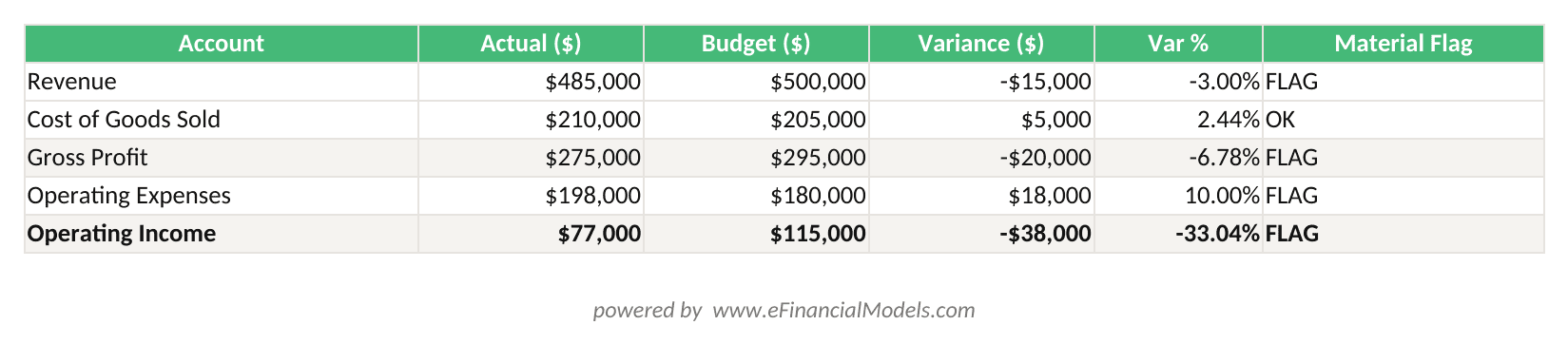
Variance = Actual – Budget. Rows flagged in amber exceed the 5% or $10,000 materiality threshold and require root-cause commentary before controller sign-off.
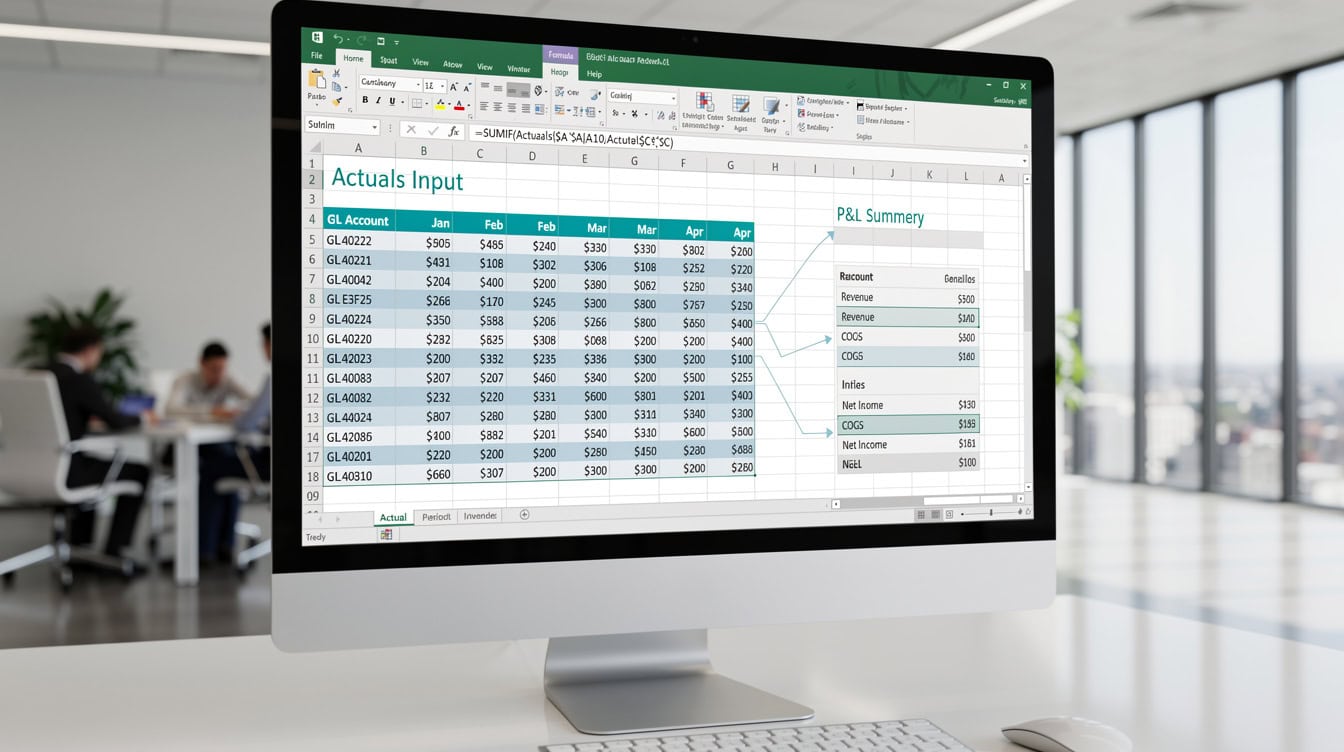
Pasting actuals into a dedicated input range and referencing it with SUMIF formulas preserves every model formula and makes the update repeatable each month.
Post-Close Documentation and Reporting
Post-close activities convert the closed ledger into management-ready reporting and institutional knowledge. The 24-hour window after ledger lock is the most valuable time for commentary drafting because the close team’s context is freshest.
- Variance commentary: Draft explanations for all material variances within 24 hours. Use the root-cause framework from the variance analysis section.
- Management reporting package: Assemble the P&L, balance sheet, cash flow statement, and KPI dashboard. Most finance teams target a 2-3 day turnaround from ledger lock to board-ready package.
- Forecast update: Roll the actuals into the forward forecast. Replace the closed period’s forecast with actuals and re-run the rolling forecast for the remaining periods.
- Process improvement log: Capture any close issues, delays, or workarounds in a running log. Review this log monthly to identify systemic fixes.
For teams building structured financial reporting, the Finance Close Control Tower template provides a pre-built dashboard that tracks close status, variance flags, and reporting deadlines in one view.
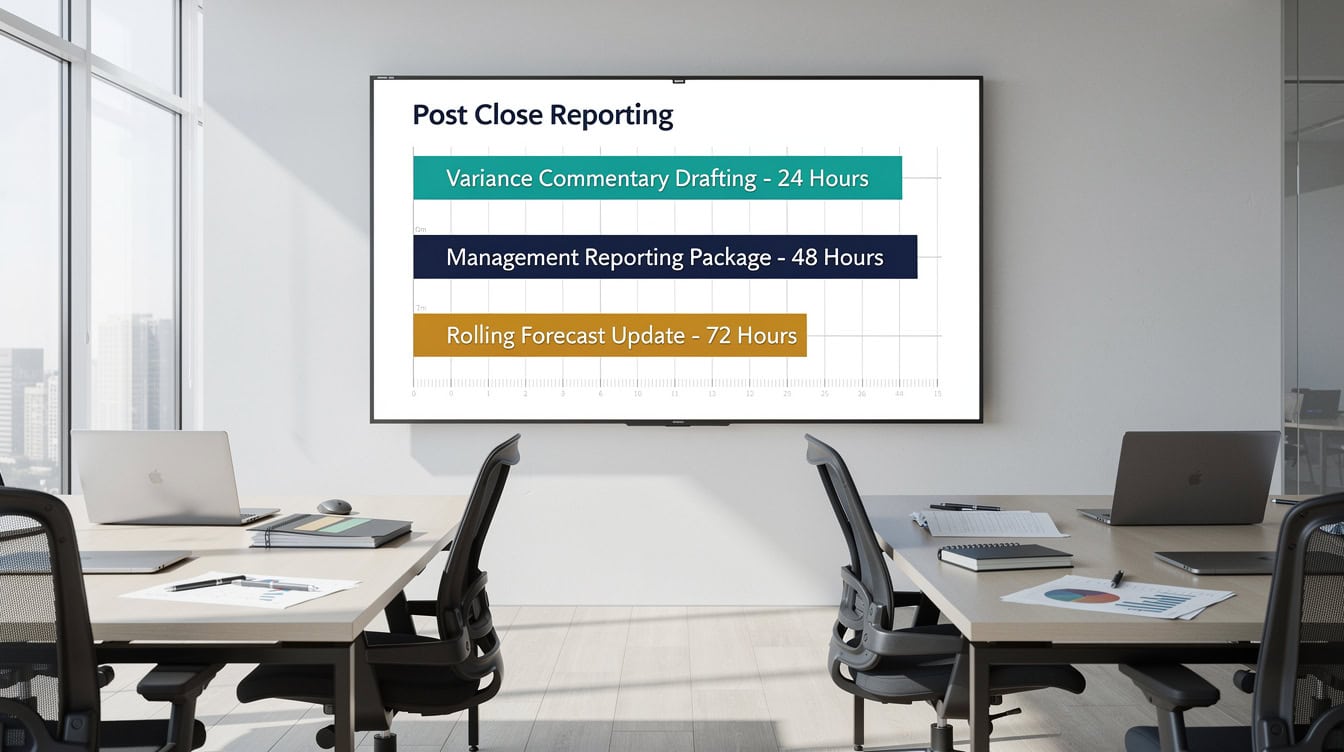
The 24-hour window after ledger lock is the highest-value time for variance commentary because the close team’s institutional context is freshest.
Common Close Pitfalls and Remediation Strategies
Even experienced finance teams repeat the same close mistakes. Here are the 5 most damaging pitfalls and how to fix them.
| Pitfall | Root Cause | Remediation |
|---|---|---|
| Late sub-ledger submissions | No enforced cutoff | Publish a signed close calendar; lock sub-ledgers at T-1 |
| Overwriting model formulas | Paste-as-values habit | Use dedicated Actuals Input cells; protect formula ranges |
| Missing audit trail | No change log discipline | Add a mandatory Change Log tab; make it part of sign-off |
| Variance commentary too vague | No root-cause framework | Adopt the Volume/Price/Timing/Error classification |
| Version control failures | Manual file naming | Enforce YYYY-MM_ModelName_vX naming; archive before update |
Ventana Research found that 88% of finance teams using manual spreadsheet processes experience version control errors at least once per quarter Ventana Research. Automating the file-naming and archiving step alone eliminates the majority of those incidents.
Continuous Improvement: Optimizing Your Close Process
A close process that never improves will never get faster. The best finance teams treat each close cycle as a sprint retrospective: what slowed us down, what broke, and what can we automate or eliminate next month?
Track three close KPIs every month:
- Close cycle time: calendar days from period-end to ledger lock.
- Reconciliation error rate: number of reconciling items requiring manual correction divided by total reconciliations.
- Variance commentary completion rate: percentage of material variances with documented root-cause commentary by the reporting deadline.
For teams looking to build a structured financial planning process around their close data, the 10-Step Financial Planning Checklist for Smart Executives provides a complementary framework for translating close outputs into forward planning decisions.
The Financial Reporting Checklist is another practical tool for ensuring your post-close reporting package meets both internal and external standards.
For teams building or refining Excel-based tracking tools, the Ultimate Guide to Excel Checklist Templates covers how to structure dynamic checklists that update status automatically as tasks are completed.

Tracking three close KPIs monthly creates the feedback loop that drives continuous improvement from a 6-day close toward a 4-day close.
Frequently Asked Questions
How do I update my financial model with actuals each month without breaking formulas?
The safest method is to create a dedicated “Actuals Input” section in your model, a range of hard-coded cells where you paste the period’s verified trial balance data. All P&L, balance sheet, and cash flow formulas then reference this input range using SUMIF or INDEX/MATCH logic. You never paste directly over a formula cell. After pasting, run a check: compare the model’s total revenue and total expenses to the trial balance totals. If they match to the penny, the update is clean. If not, your mapping table has a gap. This approach means you can re-run the model at any time without re-entering data, and every formula stays intact for the next month’s update.
What is a reasonable materiality threshold for variance analysis?
For mid-market companies with annual revenue between $10M and $500M, a practical threshold is 5% of the budgeted line item OR $10,000 in absolute dollars, whichever is lower. This means a $5,000 variance on a $50,000 budget line (10%) gets flagged, but a $5,000 variance on a $500,000 line (1%) does not. Larger enterprises often raise the absolute floor to $50,000 or $100,000 to keep the variance list manageable. The key is consistency: document your threshold in the close runbook so every analyst applies the same rule, and auditors can see the logic is systematic rather than ad hoc.
How long should a month-end close take?
According to APQC benchmarking, the median organization closes in 6.4 calendar days, while top-quartile performers close in 4.0 days or fewer. The gap is almost always explained by pre-close preparation quality, not day-of-close speed. Teams that start sub-ledger reconciliations at T-3 and enforce hard cutoffs at T-1 consistently outperform teams that treat close as a single-day event. If your close regularly exceeds 8 days, the first place to look is your accrual process and intercompany elimination workflow, which are the two most common bottlenecks in multi-entity environments.
What version control protocol should finance teams use for model files?
The most reliable protocol for Excel-based models is a two-part system: a consistent file-naming convention and a mandatory archive step. Name files as YYYY-MM_ModelName_vX.xlsx (for example, 2025-06_OperatingModel_v1.xlsx). Before each actuals update, copy the current file to an “Archive” subfolder, then open the live file and update it. This gives you a clean rollback point for every period. Add a “Change Log” tab to the model itself, recording the date, updater, period, data source, and any manual adjustments. Ventana Research data shows that 88% of teams using manual file management experience version control errors quarterly; this two-step protocol eliminates most of them.
What ERP-specific steps do I need to know for period close?
The period-close sequence varies by system but follows the same logical order: post all entries, run the trial balance, reconcile, obtain approvals, then lock the period. In NetSuite, you lock a period via Setup > Accounting > Manage Accounting Periods, then select “Lock” for the relevant period. In SAP, the key transactions are OB52 (open/close posting periods) and F.16 (balance carryforward). In Oracle Fusion, you close a period in the General Ledger work area under “Accounting Periods.” In all three systems, locking the period prevents any further postings, so controller sign-off must happen before you execute the lock. Always confirm with your system administrator that sub-ledger periods (AP, AR, Inventory) are closed before locking the general ledger.
How do I document variance commentary efficiently under deadline pressure?
The most efficient approach is a structured template with four mandatory fields: actual amount, budget amount, variance amount, and root-cause category (Volume, Price/Rate, Timing, or Error). Analysts fill in the category first, which forces them to think structurally rather than narratively. Then they add one to two sentences of context. For example: “Marketing spend was $42,000 vs. $35,000 budget, a $7,000 unfavorable variance (20%). Category: Timing. The Q3 digital campaign was prepaid in June rather than July as originally planned. No forecast impact; expense will be lower in July by the same amount.” This format takes under five minutes per variance and gives management everything they need to understand and act on the number.
What roles and responsibilities should a close RACI matrix include?
A standard close RACI (Responsible, Accountable, Consulted, Informed) covers at minimum: Staff Accountant (responsible for journal entries and sub-ledger reconciliations), Senior Accountant (responsible for accruals and complex reconciliations), Accounting Manager (accountable for reconciliation review and approval), Controller (accountable for trial balance sign-off and ERP period lock), FP&A Analyst (responsible for variance analysis and model actuals update), and CFO (informed via the management reporting package). In smaller teams, one person may hold multiple roles, but the accountability for sign-off and the ERP lock must always sit with a single named individual. Ambiguous ownership is the leading cause of close delays in organizations with fewer than 10 finance staff.
Conclusion
A repeatable month-end close process is not a luxury for large finance teams; it is the operational foundation that makes every other FP&A activity, from rolling forecasts to board reporting, faster and more credible. The 7-day framework in this checklist, anchored by T-3 pre-close preparation, formula-safe actuals updates, and a structured variance root-cause methodology, gives your team a defensible, auditor-ready process that improves with every cycle.
I recommend downloading the Finance Close Control Tower template to implement this framework immediately. It includes a pre-built close status dashboard, reconciliation tracker, variance commentary log, and model update workflow, everything your team needs to cut close cycle time and produce management-ready reporting on deadline.
























































