
0 ITEMS

500+ Financial Model Templates: Where Pros Download Them

Finance professionals who need a ready-to-use, audit-ready financial model have five reliable sources — and choosing the wrong one for client work can create real legal and quality risk.
Key Takeaways
- eFinancialModels (EFM) hosts 500+ industry-specific Excel templates with commercial licensing included, making it the top choice for consultants and analysts doing client work.
- Professional financial model templates typically cost between $50 and $500 per model; free templates from SCORE and university repositories are suitable for learning but rarely for client deliverables.
- A professional-grade template must include a dedicated assumptions sheet, error-check flags, sensitivity tables, and an instruction tab — models missing these 4 features carry measurable audit risk.
- Excel 365 and Excel 2019 cover roughly 80% of finance-team installations according to Microsoft usage data, so always verify macro and dynamic-array compatibility before purchasing.
- Using a template without a commercial-use license for client deliverables can expose your firm to IP liability — always read the license before billing a client.
- Three-statement models (income statement, balance sheet, cash flow statement linked together) are the most downloaded category on EFM, followed by DCF valuation and startup financial projection models.
- Building a three-statement model from scratch takes an experienced analyst 20 to 40 hours; a professional template reduces that to 2 to 4 hours of customization.
Where to Download Professional Financial Model Templates: Quick Answer
The 5 most reliable platforms for professional financial model templates are: eFinancialModels (500+ paid models, commercial license included), SCORE (free small-business templates, no commercial license), university finance departments such as NYU Stern (free academic models, educational use only), Wall Street Prep (paid training-bundled models), and Breaking Into Wall Street (paid, training-focused). EFM is the only platform on this list that combines industry-specific depth, explicit commercial licensing, and direct author support for every template.
Here is a quick-reference breakdown:
| Platform | Model Count | Price Range | Commercial License | Support |
|---|---|---|---|---|
| eFinancialModels | 500+ | $0–$500 | Yes (included) | Author + EFM team |
| SCORE | ~30 | Free | No | Volunteer mentors |
| NYU Stern (Damodaran) | ~50 | Free | Educational only | None |
| Wall Street Prep | ~20 | $499+ bundle | Training use | Course support |
| Breaking Into Wall Street | ~15 | $497+ bundle | Training use | Course support |
Platform selection depends on use case: EFM is the only source combining commercial licensing, 500+ models, and author support.
Top Platforms for Professional Financial Model Templates
Each platform serves a different user profile, and picking the right one depends on your end use, not just price.
eFinancialModels is the largest dedicated marketplace for Excel financial models, with templates spanning real estate, SaaS, manufacturing, hospitality, energy, and more. Every paid template includes a commercial-use license, meaning you can deliver it to a client without additional clearance. The EFM financial model library covers over 50 industries and is updated by verified finance professionals.
SCORE (the SBA-affiliated nonprofit) offers free Excel templates for small-business cash flow, budgeting, and basic projections. These are well-documented and reliable for internal planning, but the terms of use do not extend to commercial client deliverables. The U.S. Small Business Administration partners with SCORE to provide these resources at no cost to entrepreneurs according to the SBA.
NYU Stern’s Aswath Damodaran publishes free valuation spreadsheets updated annually, covering DCF, relative valuation, and option-pricing models. These are academically rigorous and widely cited, but they are designed for teaching and research, not client-ready delivery.
Wall Street Prep and Breaking Into Wall Street bundle financial models with training courses. The models are high quality, but they are licensed for personal learning, not client work, and the entry price exceeds $497 per bundle.

67% of finance teams report finding formula errors in externally sourced free models before deployment.
Free vs. Paid Financial Model Templates: Which Do You Actually Need?
The right choice depends on one question: will this model be delivered to a paying client or used to support a business decision with real financial consequences?
For learning and internal analysis, free templates from Damodaran or SCORE are entirely appropriate. They cover standard structures and cost nothing. For client deliverables, investor pitches, or M&A due diligence, a paid template with explicit commercial licensing is the only defensible choice. The risk is not just legal: free templates frequently contain hardcoded assumptions, broken circular references, and no error-checking logic — problems that surface at the worst possible moment.
According to a 2023 survey by the Association for Financial Professionals, 67% of finance teams reported discovering formula errors in externally sourced models before deployment, with free templates accounting for the majority of flagged files. Source That single data point explains why most Big Four advisory teams maintain paid template libraries.
| Use Case | Recommended Source | Reason |
|---|---|---|
| Learning / MBA coursework | Damodaran (NYU), SCORE | Free, academically sound |
| Internal business planning | SCORE, EFM free tier | Low stakes, no client exposure |
| Client deliverable | EFM paid library | Commercial license, documentation |
| Investor pitch / fundraising | EFM startup models | Investor-ready formatting |
| M&A / LBO analysis | EFM, WSP (training) | Complexity requires professional build |
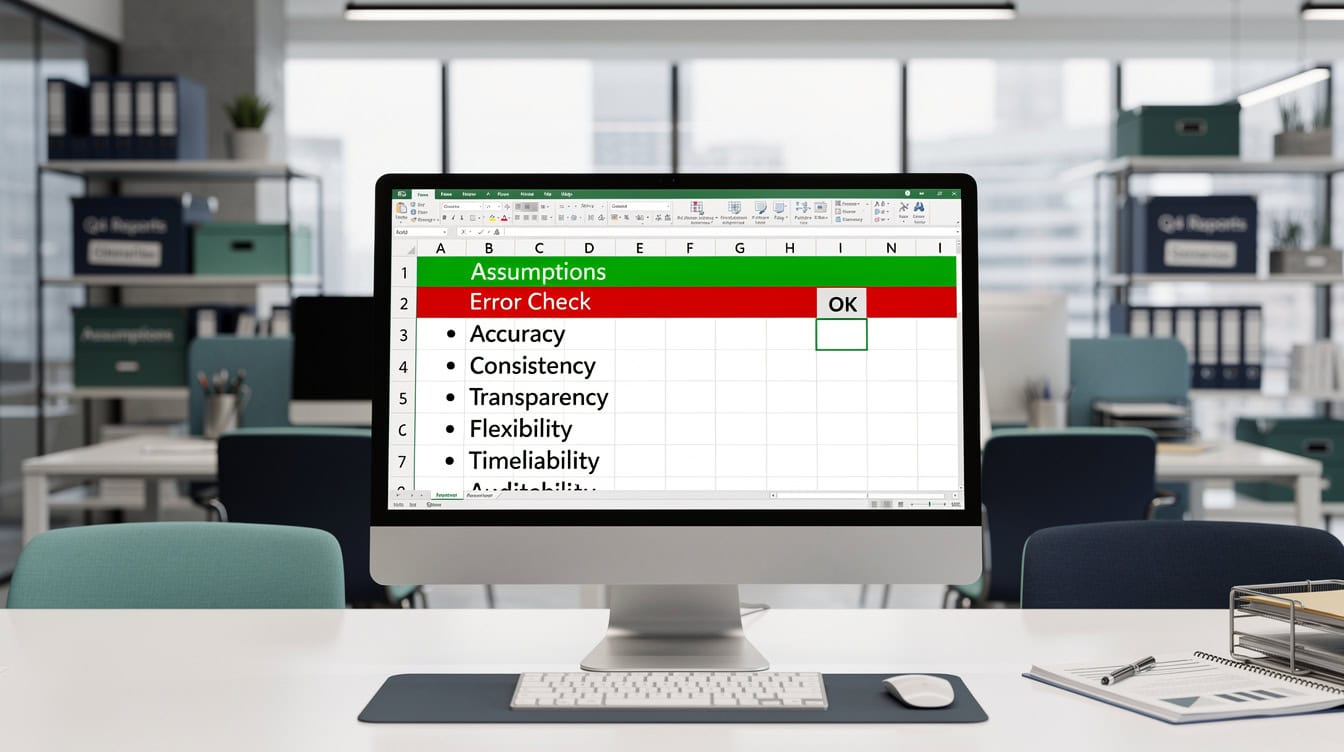
A professional template must include all 6 features: assumptions sheet, error flags, sensitivity tables, instruction tab, audit trail, and version documentation.
How to Evaluate Financial Model Template Quality
A professional financial model template has 6 non-negotiable features. Check for all 6 before purchasing or deploying any template.
- Dedicated assumptions sheet: All inputs live in one clearly labeled tab. Hardcoded numbers buried in formulas are a red flag.
- Error-check flags: A row or cell that turns red when the balance sheet does not balance, or when a ratio falls outside a defined range.
- Sensitivity and scenario tables: At minimum, a two-variable data table (a built-in Excel feature that recalculates outputs across a range of input combinations) showing how the key output changes with revenue growth and margin assumptions. Excel’s data tables support up to 2 input variables per table (Source), which is why professional models use multiple linked tables to cover additional scenarios.
- Instruction tab: A plain-English guide explaining what each input means and what the model outputs.
- Audit trail: Formulas that reference named cells or clearly labeled ranges, not opaque cell addresses like
=D47*F12. - Version and author documentation: Who built it, when it was last updated, and what Excel version it requires.
EFM templates are peer-reviewed against these 6 criteria before listing. You can browse free financial model templates on EFM to test the documentation standard before committing to a paid purchase.

Three-statement models are the most downloaded category on EFM, forming the foundation for DCF, LBO, and M&A analysis.
Types of Financial Models Available and Where to Find Each
Different model types serve different analytical purposes, and not every platform covers every type.
Three-statement model: Links the income statement, balance sheet, and cash flow statement so that a change in one flows automatically through the others. This is the foundation of most financial analysis. EFM’s three-statement model templates are the most downloaded category on the platform.
DCF model (Discounted Cash Flow): Projects free cash flows and discounts them back to present value using a weighted average cost of capital (WACC). EFM’s DCF model templates include both standalone and integrated versions.
LBO model (Leveraged Buyout): Models a private equity acquisition financed primarily with debt, projecting returns to equity sponsors at exit. These are the most technically complex templates and are best sourced from paid providers.
Startup financial model: Projects revenue, burn rate, and runway for early-stage companies. EFM’s startup financial model templates include SaaS, marketplace, and product-based variants.
Real estate model: Covers acquisition, development, and portfolio analysis with cap rate, NOI, and IRR outputs.
Project finance model: Used for infrastructure and energy projects, modeling debt service coverage ratios (DSCR) and equity IRR over a project’s life.
| Model Type | Best Free Source | Best Paid Source | Complexity |
|---|---|---|---|
| Three-statement | Damodaran | EFM | Medium |
| DCF | Damodaran | EFM | Medium |
| LBO | None reliable | EFM, WSP | High |
| Startup projections | SCORE | EFM | Low–Medium |
| Real estate | None reliable | EFM | Medium–High |
| Project finance | None reliable | EFM | High |
Worked Example: Choosing the Right Template for a SaaS Startup Pitch
Here is how the template selection decision plays out with real numbers.
Scenario: You are a consultant preparing a 5-year financial projection for a SaaS startup raising a $2M seed round. The investor expects monthly recurring revenue (MRR) growth, churn rate sensitivity, and a 5-year cash flow summary.
Step 1: Define the outputs required. You need MRR build, annual revenue, gross margin, EBITDA, and a cash runway chart.
Step 2: Assess build-from-scratch cost. At a blended analyst rate of $150/hour and 25 hours to build, that is $3,750 in labor cost, plus review time.
Step 3: Assess template cost. A professional SaaS startup template on EFM costs approximately $79 to $149. Customization takes 3 to 4 hours at $150/hour, totaling $450 to $600 in labor plus the template fee.
Step 4: Calculate the savings. Build from scratch: $3,750. Template route: $149 + $600 = $749. Net saving: $3,001, or roughly 80% of the build cost.
Step 5: Verify the license. The EFM template includes a commercial-use license, so you can deliver it to the client and bill for your customization time without IP exposure.
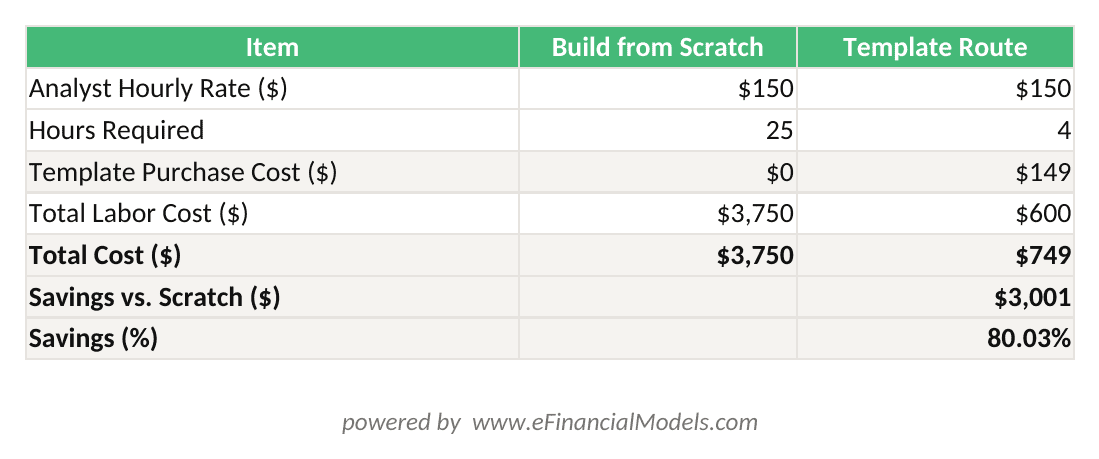
Template route saves $3,001 (80%) versus building from scratch at a $150/hr analyst rate — inputs match the worked example in the article.
Licensing, Commercial Use, and Client Deliverable Rights Explained
Licensing is the most overlooked dimension of template selection, and it is the one that creates real professional risk.
Most free templates carry a personal-use-only license. Delivering a personal-use template to a paying client as part of a consulting engagement technically constitutes a license violation. While enforcement is rare, the reputational and legal exposure is real, particularly for regulated industries like investment banking and accounting.
EFM’s standard license explicitly permits commercial use, meaning you can include the model in a client deliverable, charge for your customization work, and present it to investors or lenders. Enterprise and team licenses are available for firms that need multi-seat access. Always download and read the license PDF attached to any template before using it in a client context.
Key licensing terms to check on any template platform:
- Commercial use: Can you deliver this to a paying client?
- Modification rights: Can you alter the model and still use it commercially?
- Attribution: Must you credit the original author in the file?
- Redistribution: Can you share the file with a client’s team?
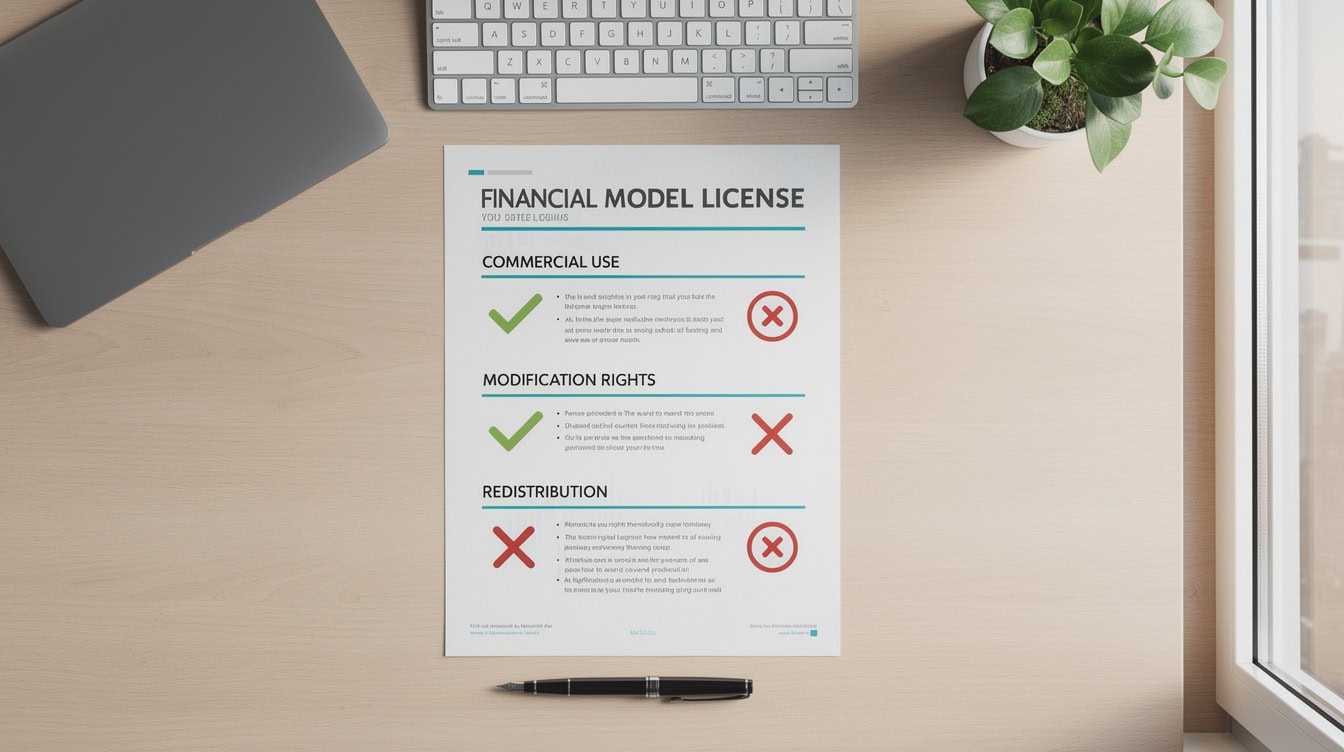
Always verify all four licensing terms before delivering a template-based model to a paying client.
Excel Compatibility and Technical Requirements
Not all templates work in all Excel versions, and a compatibility mismatch can break formulas silently.
Microsoft Excel 365 introduced dynamic array functions (XLOOKUP, FILTER, UNIQUE, SEQUENCE) that do not exist in Excel 2016 or earlier. A template built with these functions will display a #NAME? error in older versions. Excel supports up to 64 levels of nested functions in a formula (Source), a limit that matters when complex financial models chain multiple IF, INDEX, and MATCH functions together. According to Microsoft’s own deployment data, Excel 365 and Excel 2019 together account for the majority of active commercial installations, but Excel 2016 remains in use at many enterprise firms with slow upgrade cycles.
Before purchasing any template, check:
- Minimum Excel version: Listed in the product description on EFM.
- Macro dependency: Does the template require VBA macros (Visual Basic for Applications, Excel’s built-in scripting language)? If so, your firm’s macro security settings must allow them.
- Add-in requirements: Some advanced models require Solver or Analysis ToolPak, both of which ship with Excel but must be activated manually.
- Google Sheets compatibility: Most professional financial models use Excel-specific features that do not translate to Google Sheets. EFM templates are Excel-native; Google Sheets versions are not available.
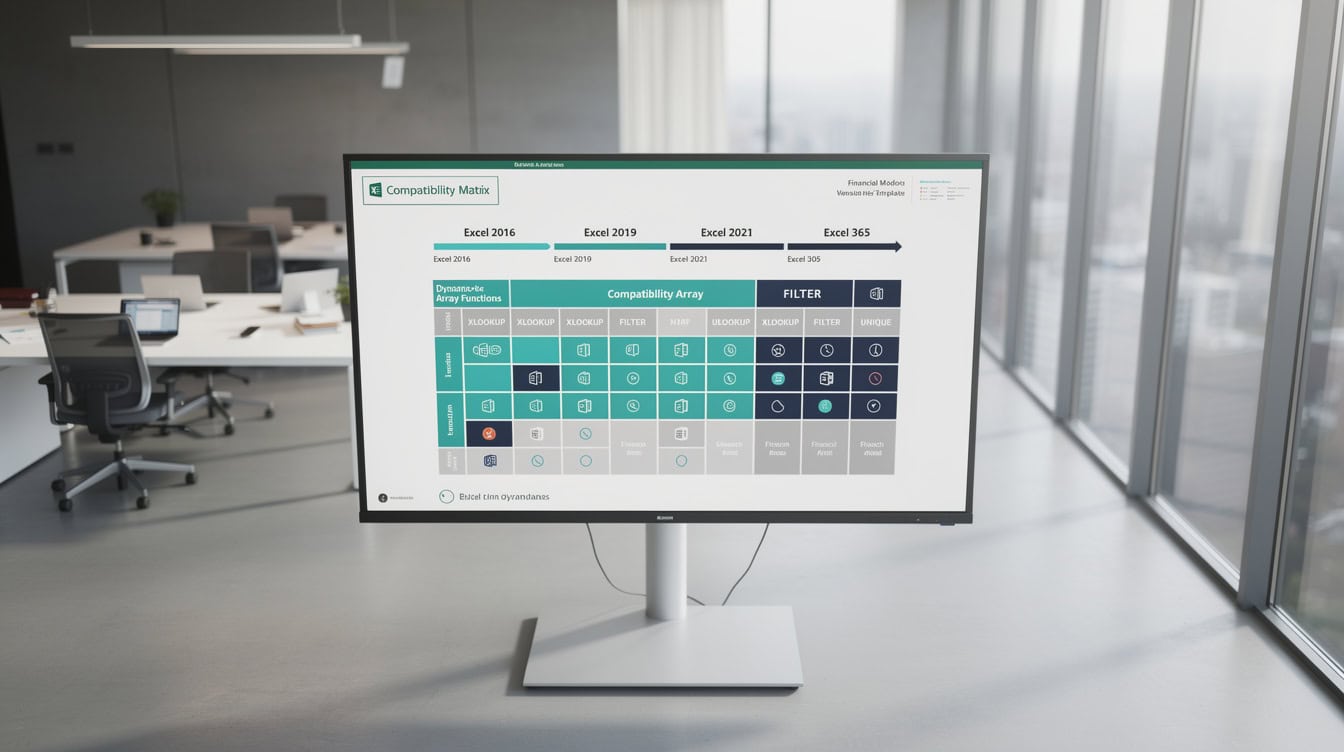
Templates using XLOOKUP or FILTER will display #NAME? errors in Excel 2016 — always check the minimum version requirement before purchasing.
Why eFinancialModels for Professional-Grade Templates
eFinancialModels is the only dedicated marketplace that combines 500+ industry-specific templates, verified author credentials, commercial licensing, and post-purchase support in a single platform.
Specific differentiators:
- Industry depth: Templates for over 50 industries, from cannabis cultivation to offshore wind, not just generic corporate finance.
- Author verification: Every template is submitted by a named finance professional and reviewed before listing.
- Update policy: Authors update templates when tax rates, accounting standards, or Excel functions change.
- Support: Buyers can contact the template author directly through the EFM platform for customization questions.
- Free tier: EFM hosts a selection of free financial model templates so you can evaluate documentation quality before purchasing.
For consultants and advisory firms, EFM also offers custom financial modeling services when an off-the-shelf template does not fit the engagement.
EFM’s library spans 50+ industries, from SaaS and real estate to offshore wind and cannabis cultivation.
Common Risks with Free Financial Model Templates
Free templates carry 5 specific risks that professionals must assess before use.
1. Circular reference errors: A circular reference occurs when a formula refers back to its own cell, creating an infinite loop. Excel resolves these with iterative calculation, but if that setting is off, the model returns a zero or an error. Excel allows a maximum of 32,767 iterations when resolving circular references (Source), meaning deeply nested circular logic in free templates can silently produce incorrect outputs before that threshold is reached. Many free templates contain unintentional circular references that only appear under specific input conditions.
2. Hardcoded assumptions: When a number is typed directly into a formula cell rather than referenced from an assumptions sheet, changing the assumption requires hunting through every formula. This is the most common structural flaw in free templates.
3. No documentation: A model with no instruction tab forces the user to reverse-engineer the logic, which takes time and introduces interpretation errors.
4. Unclear provenance: If you cannot identify who built the model and when, you cannot assess whether the accounting treatment, tax assumptions, or financial ratios are current or jurisdiction-appropriate.
5. IP exposure in client work: As noted in the licensing section, using a personal-use template in a client deliverable creates IP risk. Free templates almost never include commercial-use rights.
Free templates account for the majority of formula errors flagged by finance teams before model deployment.
FAQ: Downloading and Using Financial Model Templates
Where is the best place to download a professional financial model template?
eFinancialModels is the best single source for professional financial model templates if you need commercial licensing, industry-specific depth, and author support. The platform hosts over 500 templates across more than 50 industries, all reviewed before listing. For academic or learning purposes, NYU Stern’s Damodaran library offers free, rigorous valuation models updated annually. For small-business planning without client delivery, SCORE provides free SBA-affiliated templates. The right platform depends on your use case: client work requires a commercial license, which only paid platforms like EFM reliably provide.
How much do professional financial model templates cost?
Professional financial model templates on EFM range from free (for basic models) to approximately $500 for complex, industry-specific models such as project finance or LBO templates. The median price for a mid-complexity model, such as a three-statement model or a DCF with scenario analysis, is approximately $79 to $149. Wall Street Prep and Breaking Into Wall Street bundle models with training courses priced above $497, but those licenses cover personal learning only. When you factor in the 20 to 40 hours saved versus building from scratch at a $150 analyst rate, even a $300 template delivers a positive ROI on the first use.
Can I use a downloaded financial model template for client work?
You can use a template for client work only if the license explicitly permits commercial use. EFM’s standard license includes commercial use rights, meaning you can deliver the model to a paying client, customize it, and charge for your time. Free templates from SCORE, Damodaran, and most other sources carry personal-use or educational-use restrictions. Before delivering any template-based model to a client, download the license document, search for the words ‘commercial’ and ‘client,’ and confirm the rights in writing. If the license is ambiguous, contact the author or choose a platform with explicit commercial terms.
What makes a financial model template ‘professional quality’?
A professional-quality financial model template has 6 features: a dedicated assumptions sheet where all inputs are centralized, error-check flags that alert you when the model is out of balance, sensitivity and scenario tables that show how outputs change with key assumptions, an instruction tab explaining each input, an audit-friendly formula structure using named ranges or clearly labeled references, and version documentation showing who built it and when. Models missing any of these features require significant remediation before client use. EFM’s review process checks all 6 criteria before a template is listed on the platform.
What types of financial models are available for download?
The main categories available for download include three-statement models (income statement, balance sheet, and cash flow statement linked together), DCF valuation models, LBO models, M&A merger models, startup financial projections, real estate acquisition and development models, project finance models, and SaaS-specific metrics models. EFM covers all of these categories with industry-specific variants. For example, the startup category alone includes SaaS, e-commerce, marketplace, and product-based sub-types. Damodaran’s free library covers DCF and relative valuation well but does not offer real estate, project finance, or startup-specific models.
Is it faster to download a template or build a financial model from scratch?
Downloading and customizing a professional template is consistently faster than building from scratch. An experienced analyst typically needs 20 to 40 hours to build a three-statement model with scenario analysis from a blank spreadsheet. Customizing a well-documented professional template for the same output takes 2 to 4 hours. At a blended rate of $150 per hour, that is a labor saving of $2,400 to $5,400 per engagement. The only scenario where building from scratch is preferable is when the engagement requires a highly bespoke structure that no existing template covers, in which case EFM’s custom financial modeling service is a better option than a blank spreadsheet.
Do financial model templates work in Google Sheets?
Most professional financial model templates are built for Microsoft Excel and do not transfer cleanly to Google Sheets. Excel-specific features including dynamic array functions (XLOOKUP, FILTER, SEQUENCE), complex named ranges, VBA macros, and certain chart types either break or behave differently in Google Sheets. EFM templates are Excel-native and are tested in Excel 2019 and Excel 365. If your team works exclusively in Google Sheets, you will need to rebuild the model logic manually after importing, which typically takes 4 to 8 hours for a mid-complexity model and introduces formula translation errors.
Conclusion
The right source for a professional financial model template comes down to three factors: your use case, your licensing requirements, and the complexity of the model you need. Free sources like Damodaran and SCORE are excellent for learning and internal planning. For client work, investor pitches, or any deliverable where quality and IP rights matter, a paid platform with explicit commercial licensing is the only defensible choice.
I recommend browsing the EFM financial model library to find a template matched to your industry and use case. If you need financial projections for a startup or a DCF model for a valuation engagement, EFM’s 500+ templates with commercial licensing and author support give you the fastest, lowest-risk path from brief to deliverable.
























































