
0 ITEMS

13 Week Cash Flow Forecast Template | Rolling Dashboard for Small Business
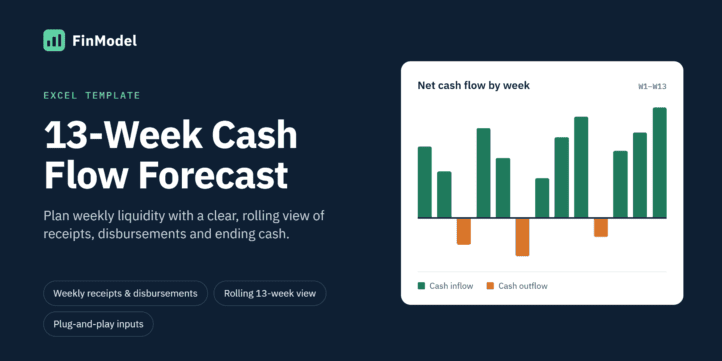
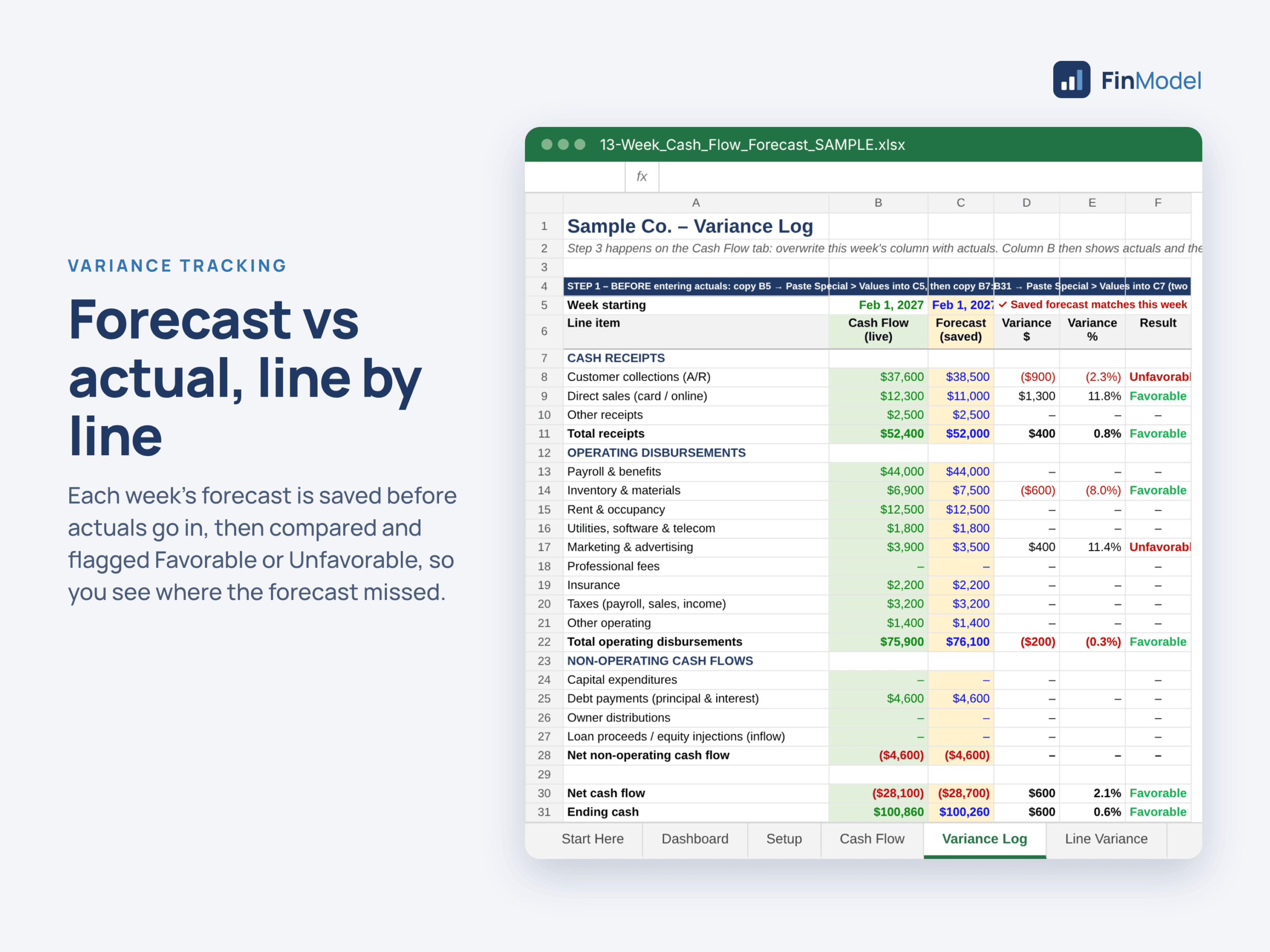
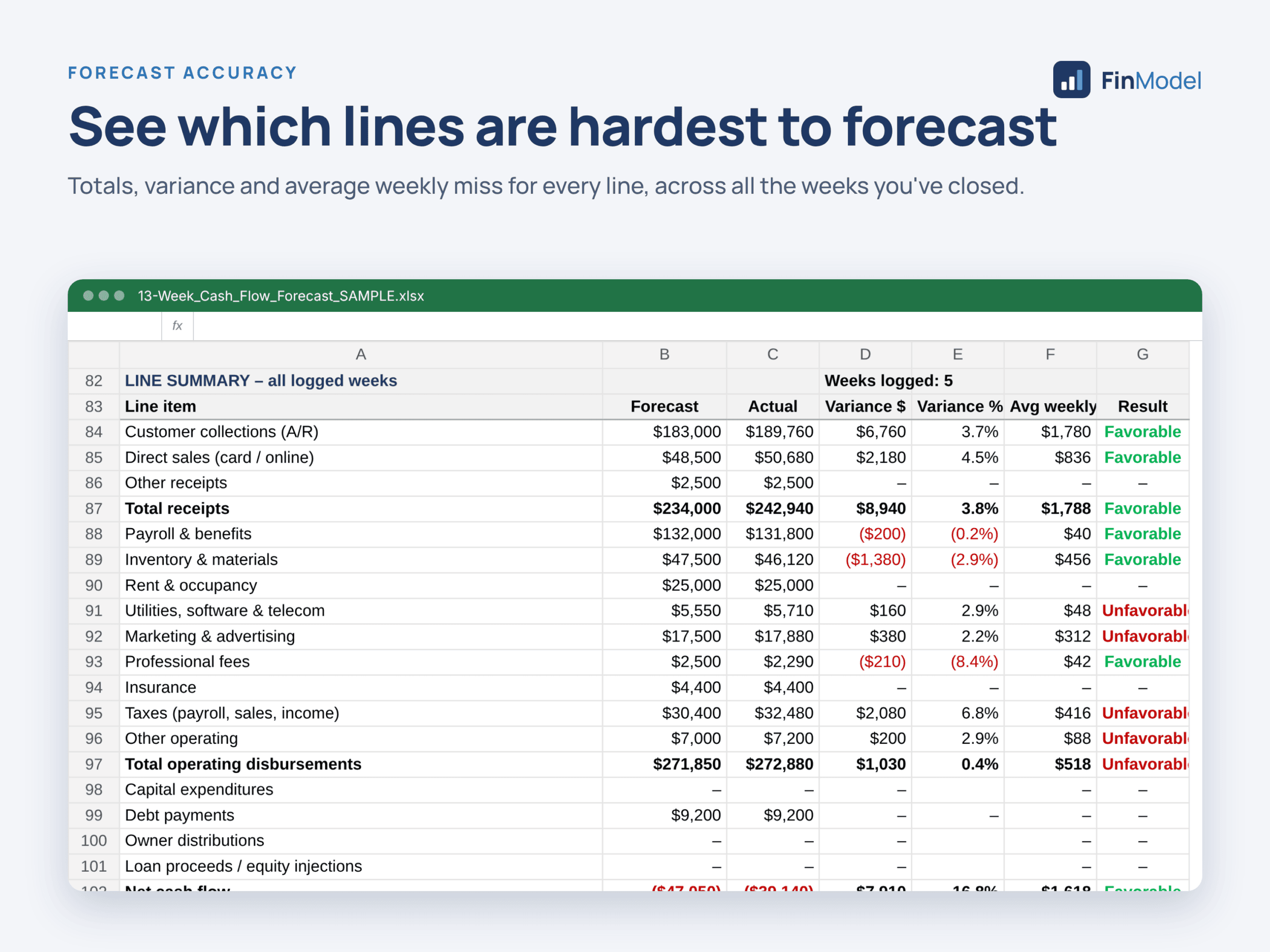
Know exactly where your cash is heading – 13 weeks ahead. This rolling 13-Week Cash Flow Forecast puts your actuals and forecast on one timeline, warns you before cash drops below your safety buffer, and turns your weekly cash review into a simple 10-minute routine. Built for small business owners, controllers, bookkeepers and fractional CFOs. ━━━━━━━━━━━━━━━━ WHAT IT DOES ━━━━━━━━━━━━━━━━ ✔ Rolling 13-week window – close a week and the forecast moves forward automatically. No copying or shifting columns. ✔ Dashboard – cash at last close, lowest cash point and when it happens, weeks below buffer, peak credit line use, plus two charts. ✔ Credit line auto-draw – set your buffer and credit limit; forecast weeks borrow just enough to stay safe, then repay. Supports limit changes over time. ✔ Weekly close checklist – 8 simple steps with a built-in checklist that tells you what’s missing until “Ready to close = YES.” ✔ Variance tracking – save each week’s forecast, compare it to actuals line by line, and see Favorable / Unfavorable results. ✔ Forecast accuracy – see which lines are hardest to predict across all closed weeks. ✔ Covers a full year: 52 weeks to close plus 13 weeks of lookahead. ━━━━━━━━━━━━━━━━ WHAT’S INCLUDED ━━━━━━━━━━━━━━━━ 1. README (PDF) – start here 2. BLANK template (.xlsx) – your ready-to-use working file 3. SAMPLE template (.xlsx) – 4 closed weeks of example data to learn from 4. GUIDES (PDF) – 3-page Quick Start Guide + full User Guide 5. VIDEO TUTORIAL (MP4) – about 6 minutes, step by step ━━━━━━━━━━━━━━━━ COMPATIBILITY ━━━━━━━━━━━━━━━━ – Microsoft Excel 2010 or later (Windows & Mac) – Google Sheets (one-click “Make a copy” links in the README) – No macros – no security warnings Note: sheet protection does not carry over to Google Sheets. ━━━━━━━━━━━━━━━━ HOW IT WORKS ━━━━━━━━━━━━━━━━ 1. Set up (about 30 min): enter opening cash, minimum buffer and credit line, then forecast your next 14 weeks. 2. Watch the dashboard: always looking 13 weeks ahead. 3. Close each week (about 10 min): save the forecast, enter actuals, add the new 13th week, follow the checklist.
| Financial Model, General Excel Financial Models |
| Accounting, Budget, Cash Flow Projections, Excel, Financial Analysis, Financial Model, Financial Planning, Free Cash Flows |
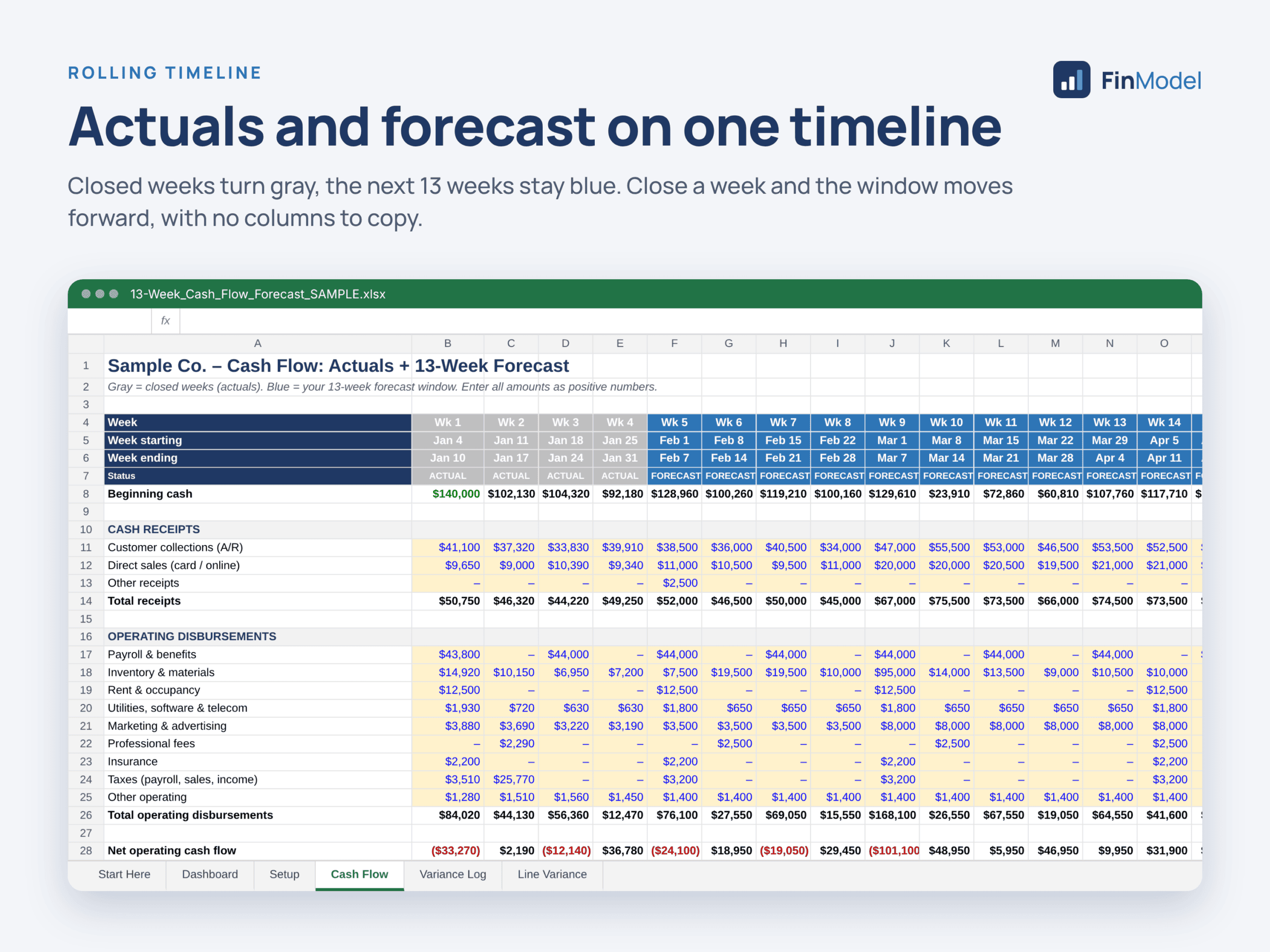
The 13-Week Rolling Cash Flow Forecast is an Excel model that shows, week by week, how much cash a business will have over the next three months. It combines actual results for closed weeks with a forecast for the 13 weeks ahead on one timeline, so you can see a cash shortfall weeks before it happens and act in time.
What is this model template used for?
The template is used for short-term cash planning and liquidity management. It answers questions such as: Can we make payroll next month? Which week will cash be at its lowest? How many weeks will we fall below our minimum cash buffer? How much of our credit line will we need, and when can we repay it? It suits small and mid-sized businesses, controllers, CFOs, fractional CFOs, bookkeepers and anyone who reports cash to owners or lenders.
What are the main features of this template?
– Rolling 13-week window: one timeline of 65 weeks (52 weeks to close plus 13 weeks of lookahead). Increase “Weeks closed” by one each week and the forecast window, colors and dashboard move forward automatically, with no columns to copy.
– Setup tab: company name, start date, opening cash, minimum cash buffer, credit line limit and opening balance in one place.
– Cash Flow tab: receipts, operating disbursements and non-operating flows (capex, debt payments, owner distributions, new funding), with net cash flow, ending cash and a buffer status for every week.
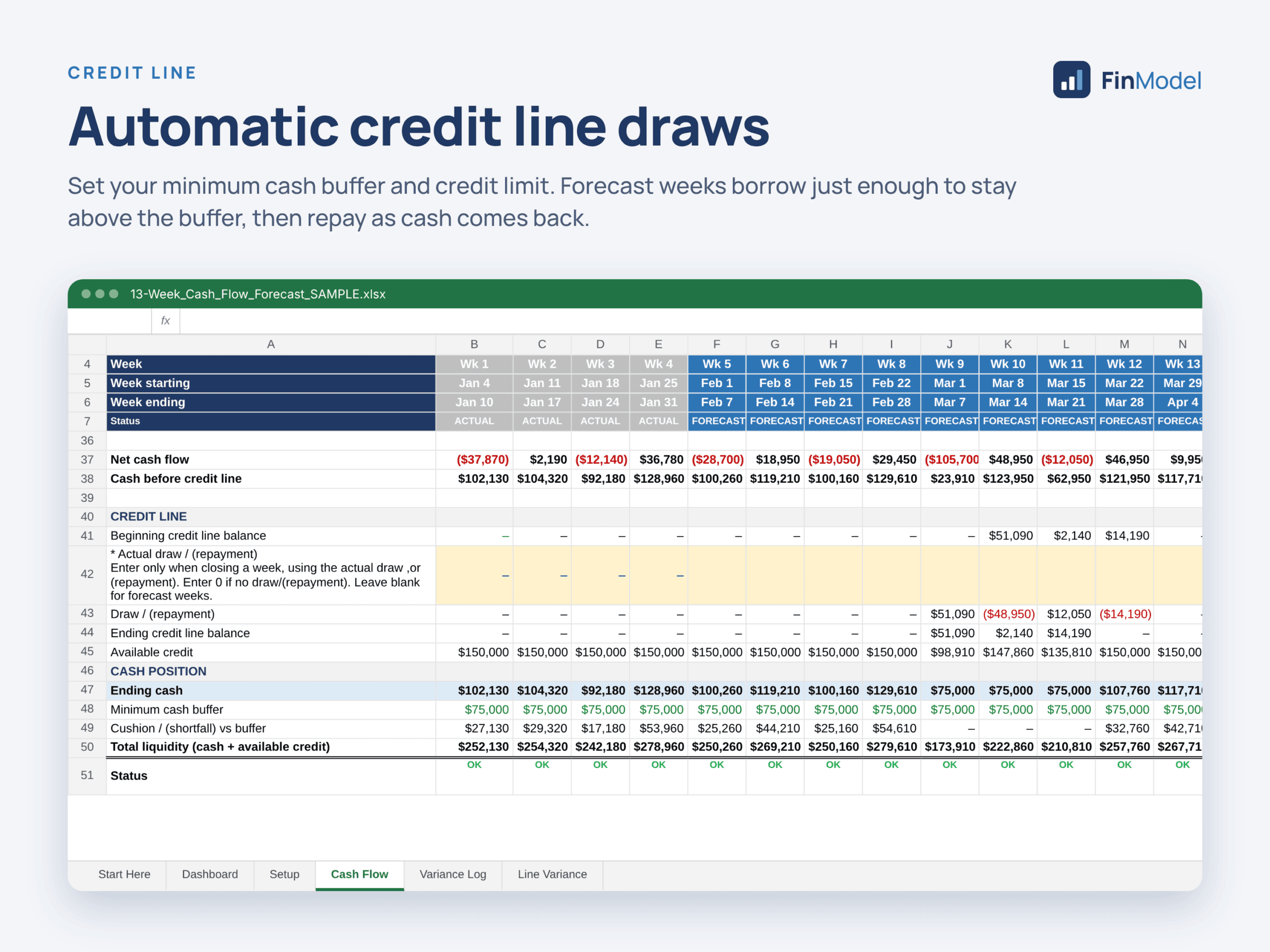
– Optional credit line auto-draw: forecast weeks draw just enough to stay above the buffer, capped by the available limit, and repay when cash recovers. A limit-changes table handles limit increases or decreases over time.
– Dashboard: cash at last close, cash at end of window, lowest cash point and its week, weeks below buffer, peak credit line use, total receipts and disbursements, plus two charts.
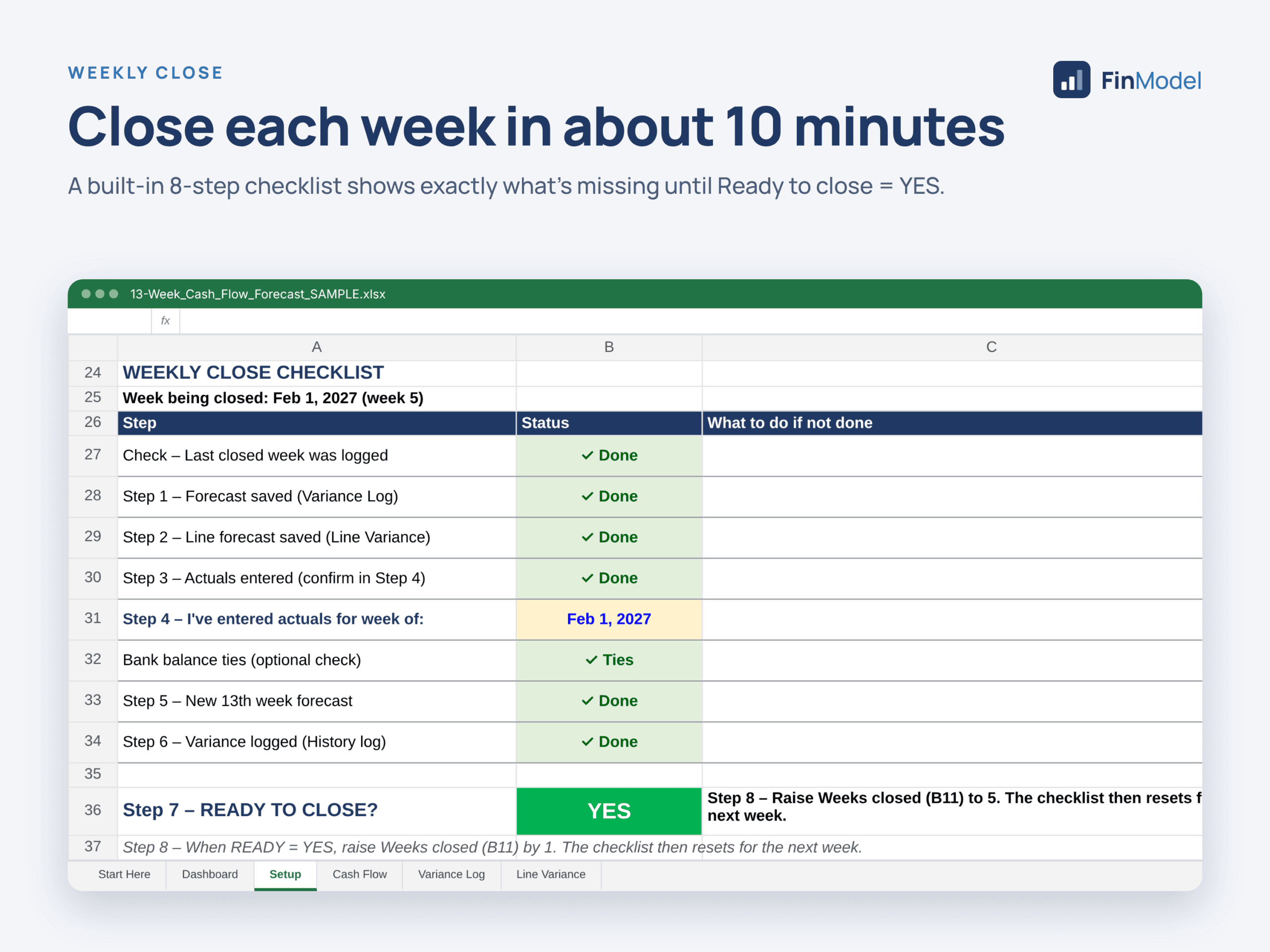
– Weekly close checklist: eight steps with automatic checks that show “Ready to close = YES” only when every step is complete.
– Variance Log and Line Variance: save each week’s forecast, compare it to actuals line by line, flag favorable or unfavorable results, and track forecast accuracy over time.
How to best work with this template?
Start with the Setup tab, then enter expected weekly receipts and payments as positive numbers in the week the cash actually moves. Each week, save the forecast, enter actual results, forecast the new 13th week, log the variance and close the week. This takes about 10 minutes. Both a blank version and a sample version with four closed weeks are included. The model works in Microsoft Excel 2010 or later (Windows and Mac) and in Google Sheets, uses no macros, and can be customized by renaming or adding lines.
Why do you need this Financial Model Template?
Profit is not cash. A profitable business can still run short when large payments, slow collections or loan payments fall in the same weeks. A 13-week cash flow forecast is a standard tool for finance teams and is often requested by banks and lenders. This template gives you a structured, repeatable process to see problems early, plan borrowing, and make confident decisions about hiring, purchases and payments.
Similar ProductsOther customers were also interested in...



 eFinancialModels
Electric Vehicle (EV) Charging Station Financial M...
With this comprehensive 5- or 10-year monthly tool, investors can assess the viability of setting up... Read more

Financial Model for Mobile App | Mobile App Busine...
The Mobile App Financial Plan Template in Excel allows you to develop financial projections when lau... Read more

 HenrySheykin
Food Truck Financial Model Excel Template
The Food Truck Financial Model helps entrepreneurs, founders, business owners, consultants, and anal... Read more

Green Hydrogen Production from Wind Energy Financi...
The Green Hydrogen from Wind Financial Model aims to comprehensively forecast a horizon of 40 years ... Read more

Simple Mutual Non-Disclosure Agreement Template
Protect your business secrets with ease using our Simple Mutual Non-Disclosure Agreement Template. S... Read more

Solar Energy Financial Model
The Solar Energy Financial Model Spreadsheet Template in Excel assists you in preparing a sophistica... Read more

 Peter Graf
The Customer-Centric Financial Model for Restauran...
Starting a restaurant without a financial plan is like driving a car blindfolded. You wouldn´t do i... Read more
You must log in to submit a review.