
0 ITEMS

How to Discount Cash Flows in Excel: 5 Steps

To discount cash flows in Excel, divide each forecast year’s free cash flow (the cash a business generates after operating costs, tax and investment) by (1 + discount rate) raised to the power of the year number, using the formula =CF/(1+r)^n, and sum the results. The arithmetic takes seconds, and the judgement lies in three inputs, the cash flow forecast, the discount rate and the growth assumed after the final forecast year, which is why eFinancialModels, a marketplace for Excel financial model templates, organises its discounted cash flow (DCF) model category around exactly those inputs.
Key Takeaways
- A DCF discounts future cash because money received later is worth less today; the discount rate is the return investors require for waiting and risk.
- The core Excel formula is =CF/(1+r)^n; Excel’s NPV() function assumes end-of-period cash flows, so a year 0 outflow must be added outside it.
- Mid-year discounting uses exponents 0.5, 1.5, 2.5 and lifts the worked example’s five-year present value from 447.70 to 469.55, a 4.9 percent rise.
- Terminal value, the worth of all cash flows after the forecast period, is 72.6 percent of the worked example’s total value, so its growth rate needs scrutiny.
- A one-point change in WACC moves the worked example’s value by 12.1 to 15.8 percent, making the discount rate the most powerful lever to manipulate.
Why Discount Cash Flows: Valuation Depends on the Time Value of Money
Analysts discount cash flows because money received in the future is worth less than money received today, so a valuation that ignores this overstates a business’s worth. The sum of the present values, each amount’s worth in today’s money, is the intrinsic value under the DCF method.
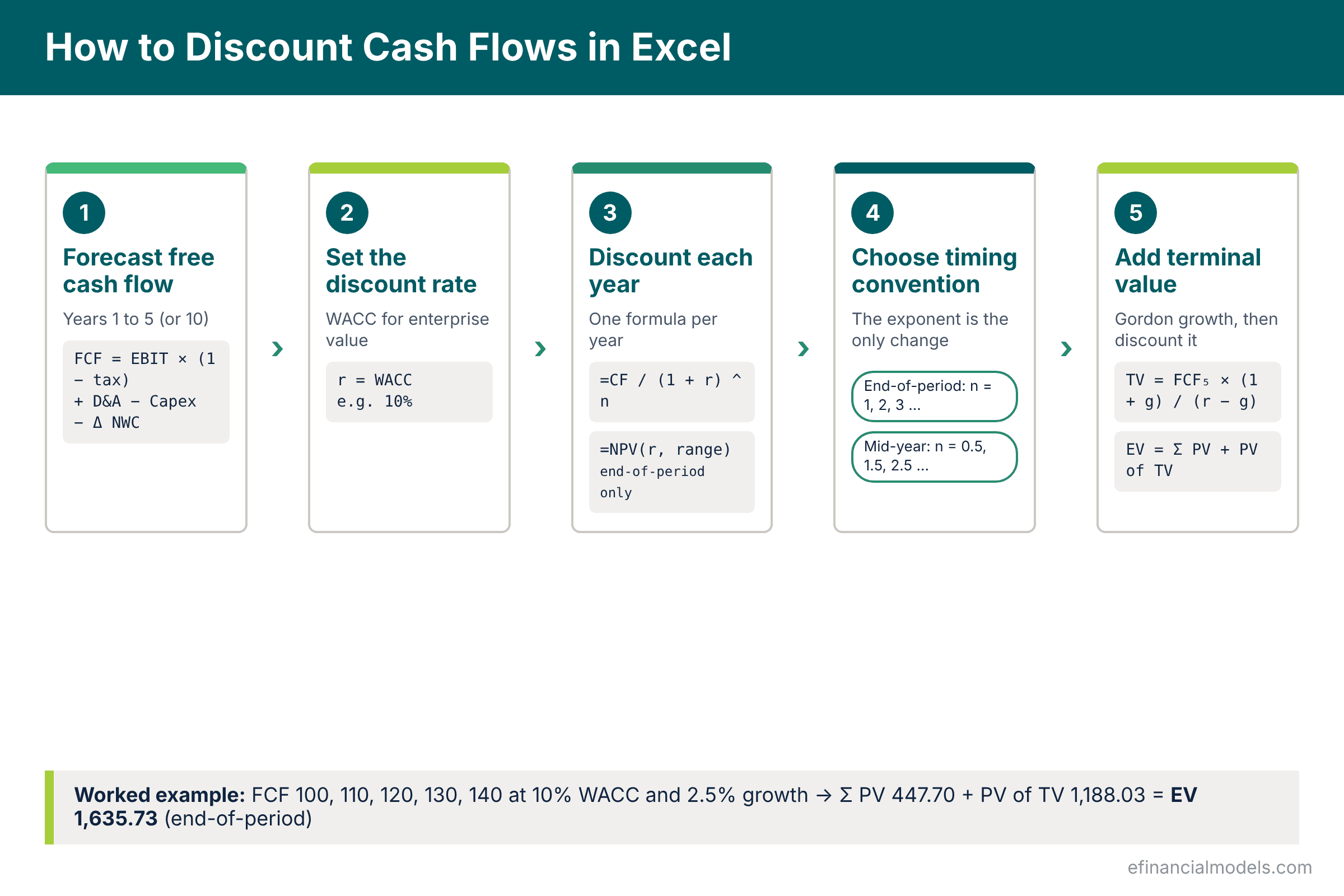
Step 1: Forecast Free Cash Flow for Five to Ten Years
The first step is to lay out unlevered free cash flow by year in a single row, because this is the series that will be discounted. Unlevered free cash flow means the cash a business generates for all of its investors, lenders and shareholders alike, before any interest is paid; it is called unlevered because it ignores how much debt the company carries. It is calculated as EBIT x (1 minus tax rate) + depreciation and amortisation minus capital expenditure minus the change in net working capital. Put years 1 to 5 in row 1 and the cash flow in row 2; the worked example forecasts 100, 110, 120, 130 and 140.
Step 2: Set the Discount Rate Using WACC
The discount rate for unlevered free cash flow is the weighted average cost of capital (WACC), the blended after-tax return that a company’s lenders and shareholders require, weighted by how much of the business each group funds. The cost of equity usually comes from the capital asset pricing model: the risk-free rate, normally a long-dated government bond yield, plus beta multiplied by the equity risk premium, and every one of those inputs must be sourced and dated in the model. Policy rates anchor the risk-free end. The Federal Reserve lowered the federal funds target range to 4.25 to 4.50 percent in December 2024, and the European Central Bank cut its deposit facility rate to 3.75 percent in June 2024, so a 10 percent WACC prices in a large premium for business risk. The worked example uses 10 percent; the full build-up is in the eFinancialModels guide on how to calculate the WACC in Excel.
Step 3: Discount Each Year with =CF/(1+r)^n or the NPV Function
Each year’s cash flow becomes present value when divided by (1 + r) raised to the power of the year number. With years in row 1 and cash flow in row 2, the present value of year 1 in cell B3 is =B2/(1+$B$10)^B1, where B10 holds the discount rate; copied across and summed, the five years give 447.70.
| Year | Free cash flow | Discount factor at 10% | Present value |
|---|---|---|---|
| 1 | 100.00 | 0.9091 | 90.91 |
| 2 | 110.00 | 0.8264 | 90.91 |
| 3 | 120.00 | 0.7513 | 90.16 |
| 4 | 130.00 | 0.6830 | 88.79 |
| 5 | 140.00 | 0.6209 | 86.93 |
| Sum | 600.00 | 447.70 |
The NPV() route, =NPV(10%,B2:F2), returns the same 447.70 but carries a timing trap. Microsoft describes the function as calculating net present value from a discount rate and a series of future payments and income, and it treats every value as arriving at the end of a period, so an upfront investment must be added outside the function: =NPV(rate, year1:year5) + year0.
Step 4: Choose End-of-Period or Mid-Year Discounting
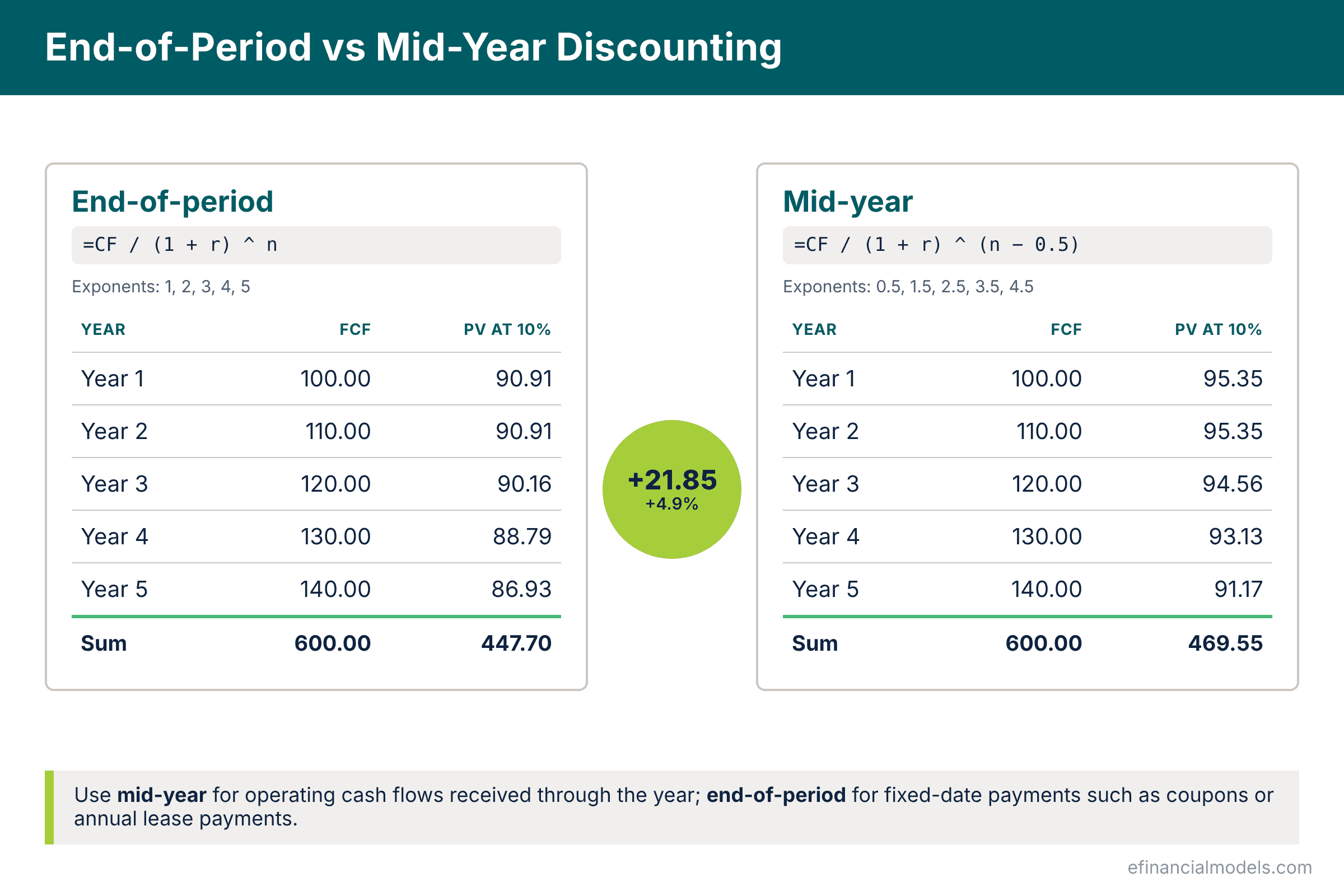
End-of-period discounting assumes each year’s cash flow lands on the last day of the year, while mid-year discounting assumes it arrives evenly through the year; the only change in Excel is the exponent. Most businesses generate cash continuously, so mid-year discounting is usually more realistic. The formula becomes =B2/(1+$B$10)^(B1-0.5), and the five-year present value rises from 447.70 to 469.55, an increase of 21.85 or 4.9 percent. End-of-period remains right when cash arrives on a fixed date, such as a bond coupon, and the model should state which convention it uses.
Step 5: Value the Years After the Forecast and Add Them Up
Terminal value (TV), the estimated value of all cash flows after the explicit forecast period, is the largest single component of most DCF models. Enterprise value (EV), the total value of a company to all its investors, debt and equity, equals the discounted forecast cash flows plus the discounted terminal value. The Gordon growth formula gives TV = final-year cash flow x (1 + g) / (r minus g), where g is the perpetual growth rate. With cash flow of 140, g of 2.5 percent and r of 10 percent, TV = 140 x 1.025 / (0.10 minus 0.025) = 1,913.333, and dividing by 1.10 to the power of five, which is 1.61051, gives its present value of 1,188.03. Enterprise value is therefore 447.70 + 1,188.03 = 1,635.73 with end-of-period timing, or 1,657.58 with mid-year timing (469.55 + 1,188.03), because under the mid-year convention only the yearly cash flows move to the midpoint while the terminal value stays discounted from the end of year 5. Terminal value is 72.6 percent of the end-of-period enterprise value. Alternatives are compared in the eFinancialModels article on ten ways to estimate terminal value in a DCF.
Where DCF Analysis Can Be Manipulated: The Forecast and the Discount Rate
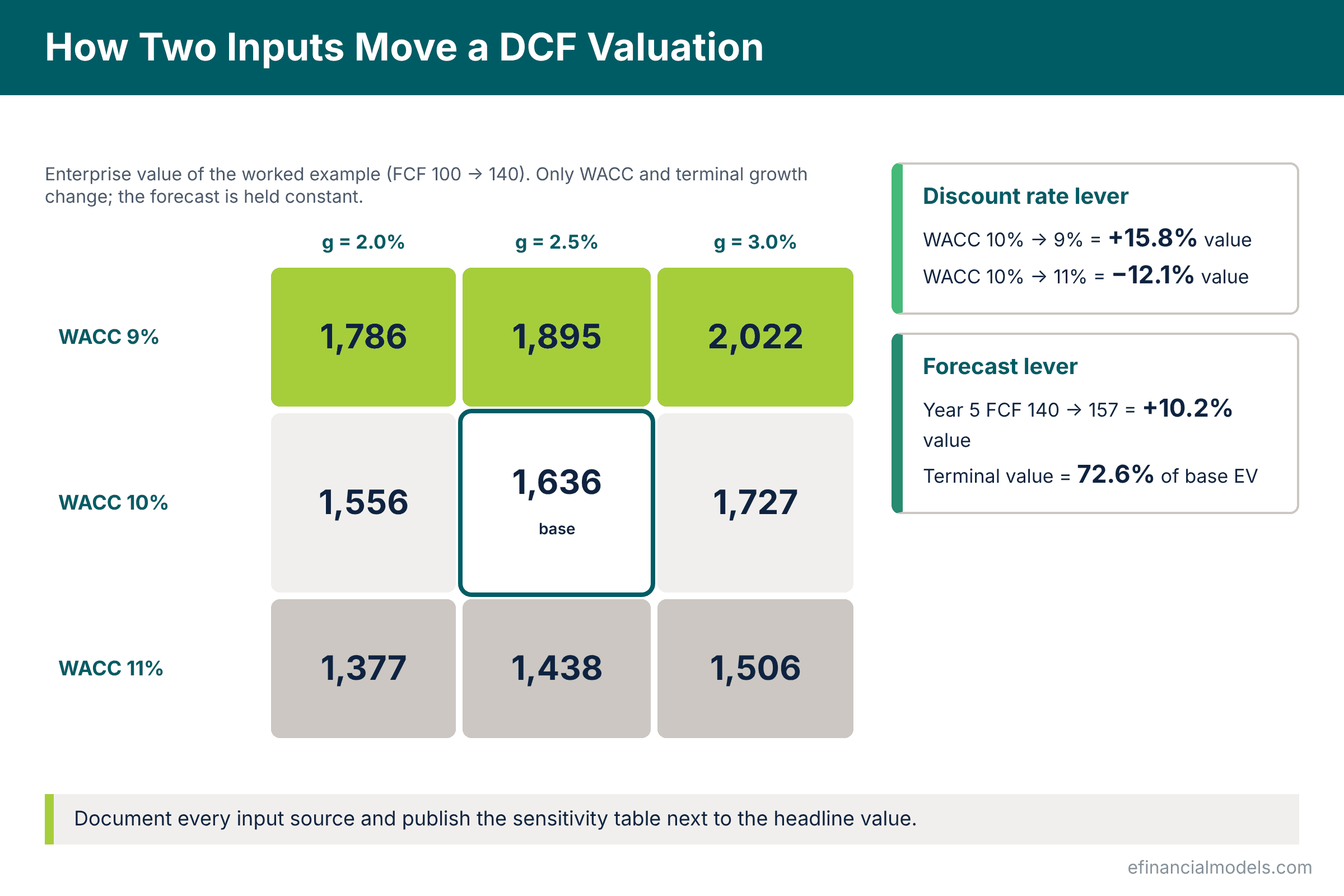
A DCF can be manipulated because every input is a subjective estimate, and the two inputs with the greatest leverage are the forecast, the easiest to tilt, and the discount rate, the most powerful per point. The table shows how far the worked example’s enterprise value moves when only WACC and growth change; in Excel it is built with a two-variable data table, a range of cells in which the values in some cells can be changed to see different results.
| Enterprise value | g = 2.0% | g = 2.5% | g = 3.0% |
|---|---|---|---|
| WACC 9% | 1,785.94 | 1,894.92 | 2,022.08 |
| WACC 10% | 1,556.04 | 1,635.73 (base) | 1,726.79 |
| WACC 11% | 1,377.44 | 1,437.72 | 1,505.53 |
The forecast is the easiest place to tilt a valuation because late-year growth and margin assumptions compound into the terminal value: changing the forecast to 100, 112, 125, 140 and 157 lifts the sum of present values to 470.49, the terminal value to 2,145.667 with a present value of 1,332.29, and enterprise value from 1,635.73 to 1,802.78, a 10.2 percent gain. The discount rate is the most powerful lever per point: WACC at 9 percent raises value by 15.8 percent and 11 percent cuts it by 12.1 percent, and because WACC is built from several estimates, each can be nudged while looking defensible. The safeguard is to benchmark year 5 margins against listed peers and document every WACC input.
Discounting Is Mechanical, the Inputs Are Not
Discounting cash flows in Excel comes down to one formula, =CF/(1+r)^n, applied to every forecast year and to the terminal value. Under mid-year timing the forecast-year exponents shift by 0.5 while the terminal value keeps its end-of-year-5 exponent. The result is only as good as the forecast, the discount rate and the growth rate behind it, so every DCF should carry its sensitivity table. The free Discounted Cash Flow (DCF) Valuation Model Template on eFinancialModels values a company from discounted free cash flows and terminal value, and compares the Gordon growth method with an exit multiple.
Frequently Asked Questions
Can a DCF value a business whose early cash flows are negative?
Yes, and the method does not change. A loss-making year simply produces a negative present value, which reduces the total rather than breaking the model, so a company that burns cash for three years and then turns profitable is valued on the later positive years and the terminal value. The practical difficulty is credibility rather than arithmetic. When almost all of the value sits beyond the loss-making period, a reviewer will want to see the funding that carries the business through those years, the evidence behind the turnaround and a discount rate that reflects the higher risk, so early-stage valuations usually come with a wider sensitivity table and a venture-style rate well above a mature company’s WACC.
How does a DCF differ from valuing a company with multiples?
A DCF builds value from the company’s own forecast cash flows and its required return, so it is an intrinsic method that depends on the assumptions entered. Valuation by multiples instead takes the price that comparable listed companies or recent transactions fetched, expressed as a ratio such as enterprise value to EBITDA, and applies it to the subject company’s figures, so it reflects what the market is currently paying rather than what the forecast implies. The two approaches are usually run together. A DCF that produces a value far outside the range implied by comparable multiples signals that either the forecast or the discount rate deserves a second look, while multiples alone cannot capture a company whose prospects differ from its peers.
How do you get from enterprise value to a value per share?
Enterprise value measures the whole business, so the claims of lenders and other non-equity holders must be removed before the figure can be compared with a share price. Subtract net debt, meaning borrowings minus cash, add any non-operating assets such as investments or surplus property that the forecast cash flows do not include, and subtract minority interests and preferred shares to reach equity value. Dividing equity value by the fully diluted share count, which includes options and convertibles that are in the money, gives the value per share that an investor can compare with the market. Each bridge item belongs in a labelled block below the enterprise value cell.
Should the cash flows and the discount rate be nominal or real?
They must match. Nominal cash flows that include expected inflation belong with a nominal discount rate, and real cash flows stated in today’s purchasing power belong with a real rate. Mixing the two is one of the most common DCF errors, because a nominal rate applied to real cash flows double-counts inflation and understates value. Most operating models work in nominal terms, since budgets, contracts, debt schedules and tax calculations are all expressed in nominal money, and the perpetual growth rate used in the terminal value must then be a nominal rate as well. The choice should be stated once in the assumptions block and applied throughout the model.
How can Goal Seek test whether a DCF valuation is realistic?
Goal Seek, found under the What-If Analysis menu on the Data tab, back-solves an input from a target output and turns the DCF into a sanity check rather than a one-way calculation. Setting the enterprise value cell to the price a buyer is actually offering, and letting Goal Seek change the perpetual growth cell, reveals the growth rate that the offered price implies, and if that rate is above the long-run growth of the economy the price is optimistic. Running the same test on the discount rate cell shows the rate the price implies, which can be compared with the rates that listed peers trade on. Because Goal Seek changes one cell at a time, it works best after the sensitivity table, to interrogate a single input.
























































