
0 ITEMS

The Essential Guide to Appsheet Inventory Management
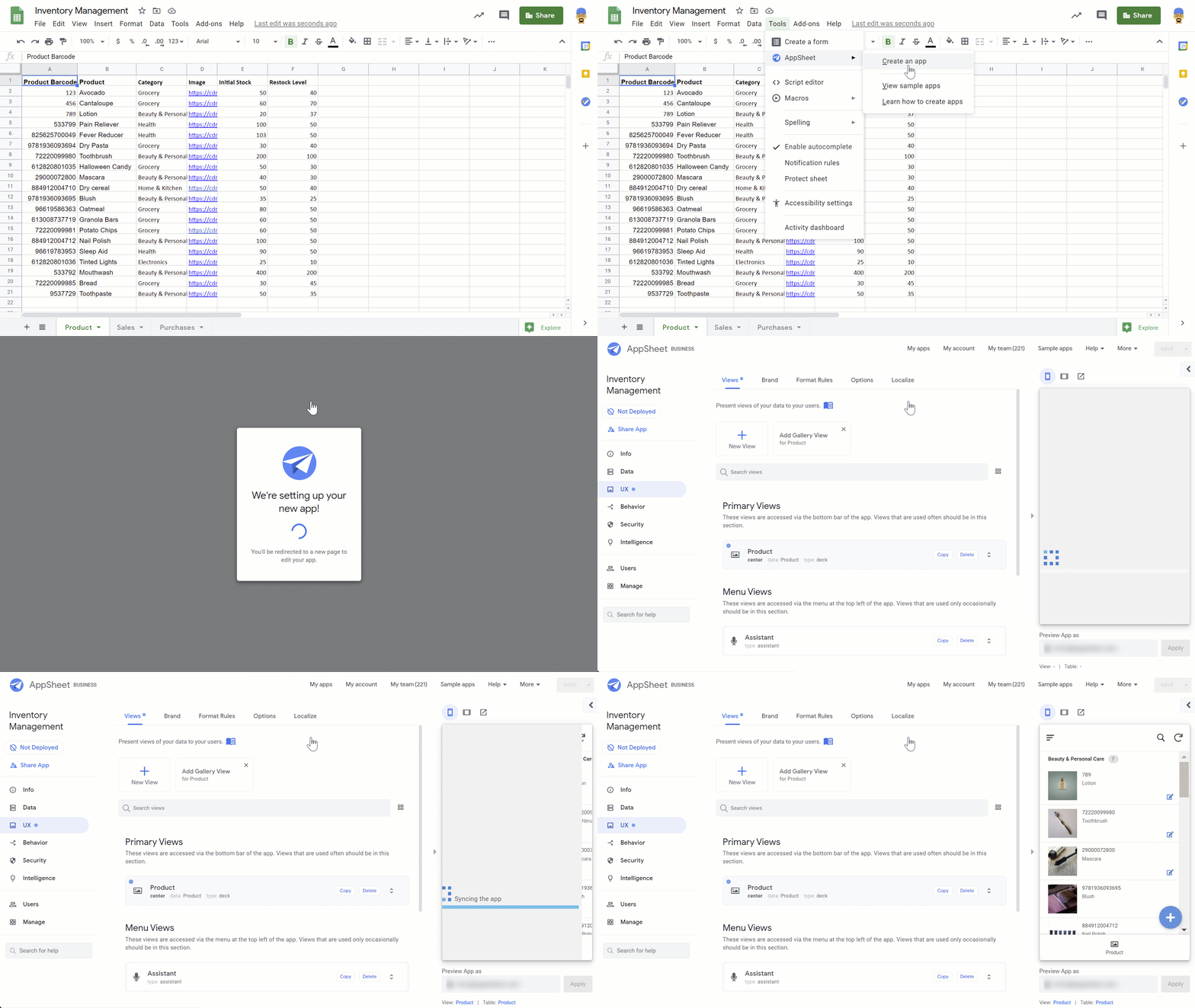
Effective inventory management reduces costs and improves business efficiency, especially when using tools like AppSheet.
- AppSheet enables no-code creation of custom inventory apps for real-time tracking and automation.
- Barcode scanning and cloud data integration streamline stock updates and minimize errors.
- Monitoring key metrics like turnover rate and safety stock helps maintain optimal stock levels.
- Setting up user permissions and securing data ensures only authorized access and protects assets.
- Advanced features like custom expressions and dashboards support smarter decision-making.
This guide highlights practical steps to use AppSheet for smarter inventory control and business growth.
Introduction To Appsheet
Imagine managing an inventory system with just your smartphone. Appsheet brings this idea to life. It is a platform that turns spreadsheets into powerful, user-friendly applications without writing a single line of code. Companies of all sizes use Appsheet for seamless inventory management, making their workflows more efficient and error-free.
The Power Of No-code Platforms
No-code platforms like Appsheet have revolutionized the tech world. Anyone with spreadsheet knowledge can create apps that work across devices. Here’s what no-code platforms offer:
- Accessibility: Simple interfaces mean anyone can build an app.
- Flexibility: Adapt apps to your business needs quickly.
- Cost-Efficiency: Save money on development and updates.
Appsheet’s Role In Business Automation
Appsheet serves as a key player in automating business processes. With features such as real-time updates and customized reports, it simplifies inventory tracking to a great extent. Key benefits include:
- Reduced manual input errors.
- Faster decision-making based on real-time data.
- Improved team collaboration with shared app access.
Fundamentals Of Inventory Management
Managing inventory means having the right items, in the right quantity, at the right time. It is a key part of running a successful business. Without good management, a company can lose money and disappoint customers. Tools like Appsheet can make this much easier. Inventory management keeps everything in balance. Let’s dive into the basics and key metrics that can help anyone master inventory management.
Inventory Tracking Basics
Inventory tracking is knowing what you have, and where it is. It helps avoid too much or too little stock. Here is how to start:
- SKU Numbers: Unique codes for each item.
- Barcodes: Quick scanning for data updates.
- Inventory Software: Use Appsheet to see real-time information.
By using these tools, businesses stay organized. They also meet customer needs without waste.
Critical Inventory Metrics
Understanding inventory metrics guides smart decisions. Here are a few must-know metrics:
| Metrics | Description |
|---|---|
| Turnover Rate | How fast items sell. |
| Order Accuracy | Shipping the right items. |
| Safety Stock Levels | Extra items for surprises. |
Track these with Appsheet to keep your stock healthy. This way, your business saves money and keeps customers happy.
Setting Up Your Appsheet Inventory App
Managing inventory can be complex and time-consuming. With AppSheet, setting up an inventory management app is straightforward. Let’s build an app that tracks stock levels, orders, and sales. Follow these steps for a seamless setup.
Building Blocks Of An Inventory App
Starting your Appsheet Inventory App involves understanding its core components. Here are the essentials:
- Tables: Store your data like products, quantities, and suppliers.
- Forms: Input new data or update existing records.
- Views: Display data in a user-friendly manner.
- Behaviors: Automate tasks like alerts or emails based on triggers.
Designing The User Interface
Creating a user-friendly interface is crucial for efficiency. Consider these factors:
| Type of Element | Function | Best Practice |
|---|---|---|
| Dashboard | Overview of key metrics | Keep it clean and readable |
| List Views | Review detailed entries | Include search and filter options |
| Form Views | Add new inventory items | Minimize fields for quick entry |
Make sure labels are clear and the layout is intuitive. Use bold buttons for common actions. The goal is to make inventory management a breeze.
Integrating Data Sources
An AppSheet inventory management system shines when it flawlessly integrates various data sources. This integration allows businesses to streamline their inventory processes. Now, let’s dive into the crucial steps to connect your data for seamless inventory tracking.
Connecting To Cloud Services
AppSheet’s power is its ability to connect with multiple cloud services.
- Google Drive
- Dropbox
- OneDrive
- Smartsheet
Users link these services through a simple authorization. Once connected, AppSheet can access files and folders to use in your inventory management. You get real-time synchronization, with updates reflecting instantly across all devices.
To connect:
- Choose your cloud service inside AppSheet.
- Click on ‘Add Data Source’.
- Follow the prompts to authorize access.
Using Spreadsheets As Databases
Spreadsheets turn into powerful databases with AppSheet. You can use Excel and Google Sheets to store inventory data.
These spreadsheets hold important inventory details like:
| Item | Quantity | Location |
|---|---|---|
| Widgets | 150 | Warehouse A |
| Gadgets | 300 | Warehouse B |
| Thingamajigs | 500 | Warehouse C |
The structure of your spreadsheet matters. This ensures AppSheet reads data correctly. Your columns should have distinct headers, and each row should represent a unique item or transaction.
To use a spreadsheet as your database:
- Open AppSheet.
- Select ‘New App’.
- Choose to start with ‘your own data’.
- Navigate to your spreadsheet and select it.
Now, you have a dynamic inventory system that’s both affordable and efficient! Data from spreadsheets directly powers your app, giving you ultimate control over inventory management.
Inventory Data Management
Managing inventory effectively is crucial for any business. With Appsheet, the struggle of keeping track of stock levels, orders, and sales becomes a breeze. The real-time inventory management features of Appsheet empower businesses to maintain perfect balance and avoid common pitfalls like overstocking or stockouts. Here’s how you can master Inventory Data Management using Appsheet.
Effective Data Entry
Data entry is the backbone of inventory management. Speed and accuracy are key. Appsheet simplifies this process. Users scan barcodes or input data directly into their devices. This minimizes errors and saves time.
- Pre-designed forms guide through the process.
- Data gets synced in real-time, keeping inventory levels accurate.
- No more manual logs that are hard to track and update.
Automating Calculations And Workflows
Manual calculations can be exhausting. Appsheet’s automation takes this load off your shoulders. Critical calculations are handled automatically, reducing errors and inefficiency.
- Reorder point calculations notify when to restock.
- Sales trends are assessed to predict inventory needs.
- Workflow triggers create orders or alerts automatically.
Manage stock levels, forecast demand, and generate reports with minimal effort. Appsheet turns complex inventory management into simple, streamlined processes.
Real-time Inventory Tracking
Keeping a close eye on your stock is crucial. Real-time inventory tracking lets you do just that. You can see what’s in, what’s out, and what’s moving at any moment. This means never missing a beat in the fast-paced world of inventory management.
Leveraging Barcode Scanning
Barcodes make life easier. One scan and all your product info pops up on the screen. With Appsheet, barcode scanning turns into a superpower. You can:
- Speed up checkout and stocktaking
- Reduce errors from manual entry
- Track items more accurately
Syncing Data Across Devices
Ever worried about mismatched stock numbers? Those days are gone. Syncing data across devices ensures:
| Consistency | Accessibility |
|---|---|
| Same info, wherever you are | Always at hand, on any device |
With Appsheet, everyone’s on the same page. Updates are instant, so your inventory records are always fresh and ready for action.
Access Control And Security
In the realm of AppSheet inventory management, keeping your data secure and accessible to the right people is a top priority. Robust access control and security features ensure that only authorized users can view, edit, or manage the inventory. This section delves into managing user permissions and securing inventory data—critical components for protecting your business’s assets.
Managing User Permissions
As an administrator, you have the power to control who gains access to your inventory system. With AppSheet, assigning and modifying user rights is straightforward. Follow these steps to ensure your team has the appropriate level of access:
- Define user roles: Label each team member as an editor, viewer, or admin.
- Create groups: Sort your users into groups based on their functions.
- Assign permissions: Give each group different access rights to various parts of the inventory.
- Update regularly: Keep user permissions current with shifting roles and responsibilities.
Securing Inventory Data
Protecting your data from unauthorized access is crucial. AppSheet offers powerful tools to safeguard your inventory information:
| Feature | Description |
|---|---|
| Data Encryption | Encrypts data at rest and in transit for top-notch security. |
| Backup and Recovery | Creates backups to prevent data loss and supports data recovery processes. |
| Authentication Layers | Adds layers like 2FA to verify user identities before granting access. |
| Audit Trails | Tracks user activity, providing insights into inventory changes and usage patterns. |
AppSheet’s inventory management system remains a secure and reliable platform for businesses of all sizes. By meticulously managing user permissions and securing inventory data, companies can build a fortress around their assets, keeping them safe and sound.
Advanced Features And Customization
AppSheet is not just about keeping track of inventory. This powerful platform takes things further with its advanced features and customization options. These allow for tailored experiences that match your unique business needs. Let’s dive into some ways you can beef up your inventory management.
Implementing Custom Logic With Expressions
AppSheet expressions act like superpowers for your inventory system. They’re formulas that trigger actions within your app. Picture a dynamic system that updates in real-time and automates complex tasks, all thanks to these expressions. Here are ways to use them:
- Automatic Reordering: Set expressions to reorder items when stocks dip below a certain level.
- Data Validation: Create rules ensuring data entries in your app are accurate and consistent.
- Personalized Views: Tailor the user experience based on who’s logged in and their role.
These expressions can seem daunting, but fear not. AppSheet provides extensive resources and guidance to get you started.
Creating Reports And Dashboards
Want insights at a glance? AppSheet’s dashboards are your go-to. They’re visual and interactive, letting you see patterns and make decisions quickly. Here’s what they offer:
| Feature | Benefit |
|---|---|
| Custom Reports | Generate timely reports that are specific to your business needs. |
| Scheduled Emails | Automate report sending to keep everyone informed. |
| Chart Widgets | Translate data into charts and graphs for easier analysis. |
With these tools, your dashboard becomes a powerful command center. You’ll identify trends, track performance, and forecast needs with ease.
Troubleshooting Common Issues
Running into snags with your Appsheet inventory management system might feel daunting. Fear not! This section aims to untangle those frustrating knots, ensuring smooth sailing ahead. By identifying typical hurdles and understanding best practices for app maintenance, you’ll keep your inventory app in top-notch condition.
Common Pitfalls In App Development
Even the most seasoned app creators face stumbling blocks. Recognize these usual suspects:
- Incorrect data syncing: Data refuses to update across devices.
- App overload: Too many features clutter the app, slowing performance.
- Access issues: Users can’t get into the app when they need to.
To fix these, check your sync settings, streamline features, and ensure user roles are set correctly.
Maintaining And Updating The Inventory App
Like a garden needs watering, your app demands regular care. Here’s a checklist:
| Task | Frequency |
|---|---|
| Check for Appsheet updates | Weekly |
| Review user feedback | Monthly |
| Test app features | Bi-Weekly |
| Backup your data | Weekly |
Keep a log of updates and tests to track your app’s health.
Case Studies
In the world of inventory management, theory meets reality in the form of case studies. These real-world examples showcase the transformative power of AppSheet in streamlining inventory processes. Let’s deep dive into some notable successes and instructive experiences from businesses that implemented AppSheet’s solutions.
Success Stories In Inventory Management
Businesses worldwide reap the benefits of efficient inventory management thanks to AppSheet. These stories highlight the impressive gains from adopting this innovative platform.
- Reduced Overstock: A retail chain saw a 25% decrease in overstock within months.
- Quicker Turnaround: An e-commerce business experienced a 40% faster inventory turnover rate.
- Better Accuracy: A manufacturing firm achieved 99% inventory accuracy, minimizing errors.
Lessons Learned From Real Business Cases
Learning from others’ experiences can pave the way for success. Here are key lessons drawn from businesses that utilized AppSheet.
- Data is king. Accurate tracking leads to informed decisions.
- Customization is crucial. Flexibility in app design caters to unique business needs.
- Staff training enhances adoption. Proper guidance ensures smoother implementation.
| Company | Improvement | Outcome |
|---|---|---|
| XYZ Distributors | Workflow Automation | Saved 20 hours weekly |
| ABC Retailers | Real-time Reporting | Increased sales by 15% |
Expanding Appsheet’s Capabilities
Managing stock effortlessly is key for any business. AppSheet’s Inventory Management excels at this. Now, let’s make it even better.
AppSheet shines when expanding its horizons. The platform becomes a powerhouse with added functionalities.
Integrating With Other Apps And Services
Connect AppSheet to the digital world; your inventory management goes up a level. AppSheet’s native APIs hook into many apps. This means a smoother workflow. Let’s look at how integration boosts performance:
- Sync with cloud services like Google Sheets for real-time data updates.
- Engage CRM systems to track customer interactions alongside stock levels.
- Link to financial software for seamless billing and invoicing based on your inventory.
These combinations automate repetitive tasks and free up valuable time.
Exploring Add-ons And Extensions
Expanding AppSheet means diving into a sea of add-ons and extensions. These tools offer tailored experiences:
| Add-on/Extension | Function |
|---|---|
| Barcode Scanner | Instantly update inventory counts. |
| Custom Reports | Create detailed analytics on demand. |
| Automated Alerts | Get notified when stock runs low. |
Select the right add-ons for your business and watch efficiency soar.
Conclusion And Next Steps
As we wrap up our journey with AppSheet Inventory Management, it’s time to reflect on gains and prepare for growth.
Evaluating The Impact On Your Business
Understanding the changes that AppSheet brought to your inventory processes is crucial. Start with these steps:
- Review inventory accuracy improvements
- Analyze time saved on inventory tasks
- Gauge staff responses to the new system
- Assess customer satisfaction levels
Use clear metrics to see where you stand after implementation. Has AppSheet streamlined operations?
| Before AppSheet | After AppSheet |
|---|---|
| Inventory Errors | Reduction in Errors |
| Time Spent | Time Saved |
Planning For Future Scalability
Look ahead and prepare. Scaling your inventory can be seamless with these tips:
- Anticipate inventory volume growth
- Configure AppSheet to adapt to new products
- Train staff on advanced AppSheet features
Regularly update the system to maintain efficiency. Aim for a dynamic model that grows with your business.
The next step? Take action. Use this guide as a roadmap to drive your inventory success with AppSheet.
Frequently Asked Questions
What Is Appsheet Inventory Management?
Appsheet Inventory Management is a versatile tool that helps businesses track and manage stock. Using Appsheet’s platform, users can create custom inventory management apps without coding expertise. It streamlines inventory tracking, reducing errors and saving time.
How Does Appsheet Improve Stock Tracking?
Appsheet improves stock tracking by offering real-time updates and customizable features. Users can scan barcodes, automate alerts for low stock levels, and generate reports. This results in enhanced accuracy and efficiency in managing inventory levels.
Can Appsheet Integrate With Other Services?
Yes, Appsheet can integrate with various services like Google Sheets, Excel, and other databases. This integration allows for seamless data syncing and extended functionality, which can optimize inventory processes and decision-making.
Is Appsheet Suitable For Small Businesses?
Absolutely, Appsheet is well-suited for small businesses due to its low-code nature and scalability. Small businesses can tailor the platform to fit their specific inventory needs without a significant investment in custom software development.
Conclusion
Mastering Appsheet for inventory control can revolutionize your asset management. This guide has offered a comprehensive roadmap to harness the platform’s full potential. Efficient stock tracking and data insights await those ready to implement these strategies. Begin optimizing your inventory processes with Appsheet today, and watch productivity soar.











































You might also like:
- The Benefits of Managing Days Inventory Outstanding Efficiently
- Boost Your Business’s Financial Management with this Excel Budget Template
- Financial Modeling for Startups and Small Businesses
- Understanding the Debt Service Coverage Ratio: An Essential Metric for Financial Analysis
- Inventory Management
- Retail
- Steps to Building Financial Models in Excel
- Cash Flow Statement: Streamline Financial Success
- Cash Flow Projections
- E-Commerce & Web Shops
- How to Use Excel for Financial Analysis?
- Finding a Valuation Model for Your Business
- Financial Modeling
- Food & Beverages)
- Creating a Budget Plan – Using the Best Excel Budget Template
- Financial Terms & Abbreviations
- Why Should You Use Excel for Financial Modeling?
- Scenario Analysis
- Financial Ratios Analysis and Its Importance
- Hospitality
- Financial Ratios Cheat Sheet


