
0 ITEMS

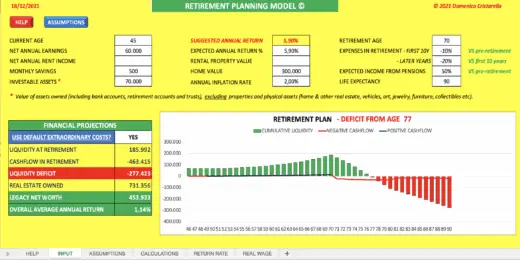
Secure Your Future: The Ultimate Retirement Calculator for Excel

A retirement calculator helps you estimate how much you need to save for a comfortable future, considering various financial factors.
- It factors in current savings, investment returns, and contribution rates to project growth over time.
- It helps forecast retirement expenses, including housing, healthcare, and lifestyle costs.
- It estimates income sources like Social Security and pension benefits based on your work history.
- You can adjust variables for inflation, interest rates, and unexpected expenses to create accurate scenarios.
- Regular updates and scenario testing keep your retirement plan realistic and adaptable as life changes.
By processing this data, it provides a detailed projection of the necessary funds to maintain your desired lifestyle post-retirement. Utilizing this tool simplifies the complex task of retirement planning, offering peace of mind and a clear path forward. With its intuitive interface and comprehensive analysis, Excel’s retirement calculator becomes indispensable for anyone serious about their financial security in the golden years.
Securing A Comfortable Retirement With Excel
Planning for retirement can seem daunting, but Excel simplifies this crucial task. With the right tools and knowledge, anyone can outline a clear path to a secure future. The Ultimate Retirement Calculator for Excel allows you to take control of your financial destiny, turning the complex into the achievable.
Retirement planning is essential for a stress-free future. It ensures you have the resources to enjoy your golden years. Without it, you might face financial strain when you least expect it.
- Assess current financial status
- Forecast future needs and expenses
- Adapt to life changes with ease
Early planning sets the foundation for a comfortable retirement. Excel’s retirement calculator helps you stay ahead, giving you peace of mind.
Microsoft Excel is a versatile platform. It offers comprehensive functionalities for retirement calculations:
| Feature | Benefit |
|---|---|
| Customizable templates | Personalize according to goals |
| Formulas | Automate complex calculations |
| Charts and graphs | Visualize financial progress |
With Excel, users track savings, investment growth, and estimated expenses. Real-time adjustments reflect changes in financial scenarios, enabling informed decision-making.
Key Components Of A Retirement Calculator
Preparing for retirement can feel daunting, but the right tools make it easier. An ultimate retirement calculator created in Excel can be such a powerful tool. It breaks down complex future planning into understandable, manageable parts. Key components work together to give a full picture of your retirement readiness. These components help pinpoint how much to save, what expenses to expect, and the income you can rely on. Let’s explore each essential feature of the calculator.
Current Savings And Investments
The foundation of your future is what you’ve accumulated to date. This section calculates the growth of current savings and investments until retirement. It takes into account variables like:
- Current account balances
- Estimated rate of return
- Contribution frequency
This component projects the value of your savings over time using compounding interest—offering a glimpse into future financial health.
Estimating Retirement Expenses
Understanding monthly and yearly expenses in retirement is essential. Key expenses include:
| Housing | Utilities | Groceries |
|---|---|---|
| Mortgage or rent | Electricity, gas, water | Food and supplies |
| Healthcare | Transportation | Leisure |
| Insurance, medications | Vehicle, public transit | Travel, hobbies |
This section helps forecast daily living costs and unexpected expenses.
Predicting Social Security And Pension Benefits
Retirement income typically comes from several sources. Your calculator should estimate benefits from:
- Social Security
- Employer-sponsored pension plans
- Other retirement plans
Input your work history and expected retirement age to determine your benefits.
Setting Up Your Excel Retirement Calculator
Welcome to the essential guide to setting up your Excel retirement calculator. Excel offers a powerful platform to forecast your financial readiness for retirement. This step-by-step section will guide you through crafting a tailored retirement planning tool.
Creating The Basic Structure
Constructing the foundation of your retirement calculator in Excel starts with setting up the fundamental categories. Begin with two key parts: income sources and expenses.
| Income Sources | Expenses |
|---|---|
| Employment Pensions Investments | Housing Healthcare Lifestyle |
Add rows and columns for each category and year. Your layout should feature the current year at the top, followed by subsequent years across the sheet horizontally.
Inputting Financial Data
Populate your Excel sheet with your financial data, including current balances and projected income. Use separate lines for different accounts to keep it clear and organized.
- Savings accounts: Enter current balances.
- Pension plans: Project future benefits.
- Social Security: Include government benefits.
Incorporating Inflation And Interest Rates
Account for inflation and interest to get a realistic view of your financial future. Insert formulas that apply inflation adjustments to expenses and interest earnings to savings.
- Find the average inflation rate and add a row for it.
- Apply an inflation formula to each expense item.
- For savings, use the compound interest formula.
Be sure to adjust these rates annually to reflect changes in the economy. Remember, a slight variation in rates can lead to big impacts over time.
Advanced Features For A More Accurate Picture
Planning for your golden years should feel empowering, not overwhelming. The Ultimate Retirement Calculator for Excel is designed to paint the most detailed financial landscape for your retirement. With its advanced features, you can dive into the nitty-gritty of your future finances, ensuring no stone is left unturned.
Adding Custom Scenarios And What-ifs
To secure a future that is both comfortable and realistic, your retirement plan must adapt to life’s unpredictabilities. The Ultimate Retirement Calculator lets you play with various scenarios:
- Market Fluctuations: Try different rates of return on investments to see potential outcomes.
- Employment Changes: Add or remove income sources to simulate career shifts or job loss.
- Expense Shocks: Factor in unexpected costs like major home repairs.
By adjusting these variables, you generate a clearer, customized view of possible financial standings during retirement.
Planning For Healthcare Costs And Long-term Care
An often underestimated factor in retirement is the rising cost of healthcare. The Ultimate Retirement Calculator addresses this head-on by:
- Evaluating current health expenses and projecting future costs.
- Including options for long-term care insurance to cover extensive needs.
- Estimating out-of-pocket expenses for medical procedures and medications.
These calculations are vital, ensuring you’re covered for health-related expenses that often increase with age.
Reviewing And Interpreting Results
Once you’ve crunched the numbers in the Ultimate Retirement Calculator, it’s time to make sense of it all. The results can unlock insights into your financial future. Let’s dive into what they mean and how to ensure you’re on track for a comfortable retirement.
Assessing The Sustainability Of Your Retirement Plan
Understanding the long-term viability of your retirement strategy is crucial. The calculator’s output shows if your savings will last. Look for these key indicators:
- Total Savings: Does this grow, fall, or hold steady over time?
- Annual Withdrawals: Are they a safe percentage of your nest egg?
- Yearly Balance: Will you have funds throughout retirement?
Analyze these results to gauge if your plan can weather various market conditions. Bold numbers can signal either robust health or potential shortfalls in your plan.
Adjustments To Improve Financial Security
If your results show potential risks, consider adjustments:
- Reduce Expenses: Lower your cost of living to stretch savings.
- Delay Retirement: Gain more years to save and reduce the withdrawal span.
- Investment Strategies: Look for growth opportunities to boost your nest egg.
Small tweaks can make a big difference. Keep running scenarios with the calculator until you find a strategy that shows a prosperous and secure retirement.
Maintaining And Updating Your Retirement Plan
As you plan your future with the Ultimate Retirement Calculator for Excel, remember that a robust retirement plan is not a one-time task. It needs regular care and adjustments, just like a garden. In this section, we will guide you on how to keep your retirement plan thriving through the years.
Scheduled Reviews And Adjustments
Lives change and so should retirement plans. Setting a schedule for reviewing your plan is critical. This ensures you stay on track with your retirement goals.
- Annual Check-ups: At a minimum, look at your plan once a year.
- Life Events: Review your plan when big changes happen, like a new job or moving house.
- Market Shifts: Adjust your investments if the stock market changes.
Use reminders or set calendar events, so you never miss a review date.
Staying Informed On Changes In Tax Laws And Benefits
Tax laws and benefits that affect your retirement savings can change. Stay informed to maximize your savings.
- Read financial news regularly.
- Subscribe to newsletters from trusted finance experts.
- Attend seminars or webinars on retirement planning.
By staying updated, you can tweak your plan to ensure it always works best for you.
Frequently Asked Questions
How Does A Retirement Calculator Work?
A retirement calculator estimates how much you need to save for retirement. It factors in your current age, income, savings, and expected retirement age. It then calculates the amount you need to save annually to reach your retirement goals.
What Are The Benefits Of Using Excel For Retirement Planning?
Excel offers customizable templates for detailed retirement planning. It allows you to adjust variables, track savings over time, and create forecasts based on different scenarios. This flexibility helps tailor a retirement plan to your specific needs.
Can Excel Retirement Calculators Account For Inflation?
Yes, advanced Excel retirement calculators can factor in inflation. They adjust future savings needs based on estimated inflation rates, ensuring your retirement plan remains realistic over the long term.
What Excel Formulas Are Essential For Retirement Calculations?
Key Excel formulas for retirement calculations include PMT (for periodic savings), FV (for future value of investments), and PV (for present value of retirement goals). These help estimate savings requirements and investment growth.
Conclusion
Securing a comfortable retirement is within reach with the right tools. Our Ultimate Retirement Calculator for Excel simplifies this often daunting task. It helps you plan meticulously, ensuring peace of mind in your golden years. Start planning today and take control of your financial future — because you deserve a worry-free retirement.




You might also like:
- 10 Tips to Develop a First Class Business Valuation Report
- 10-Step Financial Planning Checklist for Smart Executives
- 5 Tips for Creating a Successful Retirement Plan
- Building a Monthly Budget – Using Monthly Budget Templates
- Financial Planning Retirement Tips
- How to Prepare a Financial Plan for a Chicken Egg Farm?
- Retirement Planning
- 10 Main Elements of a Business Plan
- Calculating Revenue Growth Rate: A Key Metric for Business Success
- Understanding the Debt Service Coverage Ratio: An Essential Metric for Financial Analysis
- Personal Budgets
- Financial Ratios Analysis and Its Importance
- Retirement Planning
- Funds and Fundraising
- Understanding What is Yield to Maturity and Why It Matters
- Budget
- Investment
- Financial Model Templates Easy to Use
- Net Present Value Calculator in Excel
- Simple Budget Planner Template


