0 ITEMS

Simplify Financial Management with Excel Budgeting Templates
Table of Content
- What is Budgeting, and Why is it Crucial for Businesses?
- Effective Budgeting Using a Simple Excel Budgeting Template
- Cash Flow Management Made Easy with Simple Budgeting Templates
- Simplified Budgeting with Excel - The Key to Efficient Budgeting
- How to Efficiently Perform Budgeting Activity Using a Budget Template in Excel?
- Conclusion: Embrace the Power of Excel Budgeting Templates
What is Budgeting, and Why is it Crucial for Businesses?
Budgeting is like making a money map for businesses. It’s like planning how much money you expect to make and spend over time. It helps businesses set realistic goals, spend money wisely, and make smart choices. Like planning a trip, budgeting guides businesses on their financial journey, helping them avoid getting lost or running out of money. It’s a way to be smart with money and ensure everything adds up.
By setting clear financial goals and guidelines, budgeting ensures that a business operates within its means and allocates funds to key priorities. Moreover, budgeting provides:
- A framework for evaluating performance.
- Identifying deviations from planned targets.
- Implementing necessary adjustments.
This process fosters financial discipline, supports strategic decision-making, and enhances transparency in resource allocation, ultimately contributing to the business‘s overall financial health and long-term sustainability. Here’s a more detailed overview of its importance for businesses.
- Financial Visibility: Budgeting offers transparency into financial performance by creating a structured framework to track income and expenses. This visibility empowers decision-makers to understand the company’s financial status comprehensively. It allows for early detection of potential issues, enabling timely corrective actions to be taken. When financial information is readily available and organized through budgeting, the management team can make well-informed decisions that align with the company’s financial goals.
- Control Over Finances: Budgeting provides a clear snapshot of a company’s financial health, including revenue streams and expenditure patterns. This clarity facilitates better control over finances. Businesses can streamline their operations by identifying where funds are being allocated and pinpointing unnecessary expenses. This ensures efficient cash flow management and minimizes wasteful spending, improving profitability.
- Risk Management: Budgeting involves forecasting revenue and expenses, allowing companies to anticipate potential financial risks. With this foresight, businesses can develop strategies to mitigate these risks and maintain financial stability. Whether a potential revenue shortfall or an unexpected expense, a well-structured budget enables proactive planning and adaptation to changing financial circumstances.
- Alignment with Business Goals: A meticulously crafted budget is a roadmap that aligns financial decisions with the company’s broader objectives. The budget allocates resources according to strategic priorities and ensures financial resources are directed toward projects and initiatives supporting the company’s vision. This alignment enhances the overall coherence of the organization’s activities and financial plans.
- Performance Evaluation: Budgeting allows for continuous monitoring and evaluation of performance against projected figures. By comparing actual financial results to the budgeted amounts, businesses can identify areas of success and areas that require improvement. These insights enable data-driven decision-making, as management can allocate resources to the most effective strategies and make necessary adjustments to underperforming areas.
- Cash Flow Management: Effective budgeting is crucial in managing cash flow. Companies can anticipate high or low liquidity periods by forecasting income and expenses. It enables proactive management of cash reserves and short-term financing, ensuring enough liquidity to cover essential expenses and operational needs, even during challenging financial times.
- Facilitating Growth and Expansion: Budgeting is instrumental in assessing the feasibility of new projects and expansion initiatives. Before committing resources to these endeavors, businesses can evaluate whether the projected returns align with the company’s growth objectives. Budgeting helps make informed decisions about resource allocation and understand the potential financial impact of growth strategies.
- Performance Evaluation: Budgeting allows for continuous monitoring and evaluation of performance against projected figures. By comparing actual financial results to the budgeted amounts, businesses can identify areas of success and areas that require improvement. These insights enable data-driven decision-making, as management can allocate resources to the most effective strategies and make necessary adjustments to underperforming areas.
- Compliance and Regulation: Proper budgeting includes adhering to legal and regulatory requirements. Companies can ensure that their financial practices align with relevant laws by accurately accounting for expenses and revenues. This reduces the risk of legal issues, fines, and reputational damage arising from non-compliance.
Effective Budgeting Using a Simple Excel Budgeting Template
Effective financial management lies at the core of every successful business, and a simple budget template in Excel is an indispensable tool for achieving this goal. Maintaining a clear and organized overview of the company’s financial inflows and outflows in the dynamic business operations landscape is crucial for making informed decisions, setting realistic goals, and ensuring long-term sustainability.
One of the primary advantages of a simple Excel budgeting template is its user-friendly nature. Unlike complex financial software that might require extensive training, an Excel template provides a familiar interface that most employees are already comfortable with. This accessibility enables business owners and managers to efficiently create, update, and monitor budgets without specialized expertise.
Furthermore, a budget template in Excel offers the flexibility to customize categories and entries according to the business’s specific needs. Whether tracking sales, expenses, or project costs, the template can be tailored to align with the company’s unique structure and industry demands. This adaptability is crucial for startups and small businesses, where limited resources necessitate precise allocation for maximum impact.
Accuracy and real-time tracking are also paramount in financial management. With a simple Excel budgeting template, financial data can be easily input and updated, allowing for real-time monitoring of expenses and revenue. This not only facilitates swift decision-making but also empowers businesses to identify potential financial issues early on and implement corrective measures.
Furthermore, the simplicity of Excel templates keeps their analytical capabilities intact. With the right formulas and functions, businesses can generate insightful reports, charts, and graphs from their budgeting data. These visual representations offer a comprehensive understanding of financial trends, enabling business leaders to make strategic decisions that align with the company’s goals.
Cash Flow Management Made Easy with Simple Budgeting Templates

Imagine your budgeting tool predicting income and expenses and showing you exactly when cash will flow in and out. This practical approach gives you a clearer picture of your financial health and helps you make decisions that fit reality, not just numbers on paper.
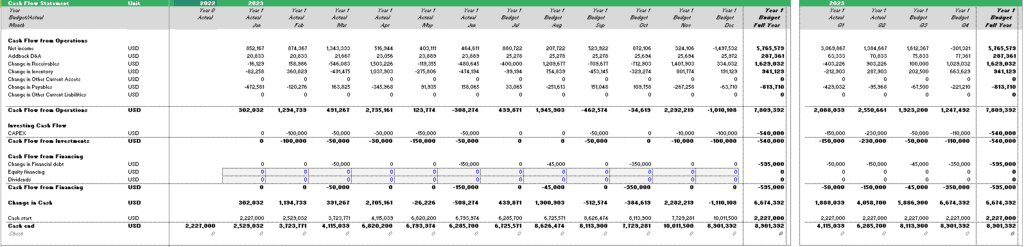
The magic happens when you bring cash flow management into your familiar budgeting template. Think of it as going beyond the basics – you’re not just planning for what money you’ll get and spend, but when it will come and go. It lets you see if you’ll have enough money at the right times, preventing unexpected financial hiccups. But that’s not all, this cash flow feature also guides your decisions. You’ll know when it’s safe to invest, when to tighten your belt, and when to jump on opportunities because you have the full visibility of your cash position.
In a nutshell, it’s about putting your budget to work for you. By blending simple budgeting exercises with cash flow management, you’re not just crunching numbers – you’re steering your business with a clear financial map. And that’s something any business can benefit from, no matter its size or industry.
Many businesses turn to Excel budgeting templates to simplify the Budgeting process. Excel’s intuitive interface makes it an ideal tool for creating and managing budgets. Here’s why:
- Flexibility: Excel offers various pre-designed budgeting templates, adaptable to diverse financial scenarios, from personal finance to intricate business budgets.
- User-Friendly Interface: Excel’s familiar layout, drag-and-drop functionality, and automated calculations make Budgeting accessible even to those with limited financial expertise.
- Real-Time Tracking: Excel budget templates allow continuous tracking of expenses and income, empowering timely financial decisions.
- Historical Context: A budget template in Excel allows businesses to input past financial data, fostering better future predictions and alignment with strategic objectives.
How to Efficiently Perform Budgeting Activity Using a Budget Template in Excel?
Well, it’s a no-brainer! Using a budget template in Excel can be a great way to get started. Here’s a step-by-step guide on how to effectively use a simple Excel budgeting template:
- Download your Template: Find a simple Excel budgeting template here
- Fill in the Template: Budgeting templates normally provide input options. Fill it out.
- Analyze and Adjust: Review your budget to see if you’re still inclined. Otherwise, identify areas where you can cut back. Make Adjustments as needed.
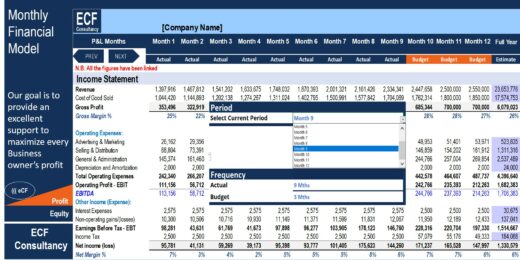
- Update the Template: As the month progresses, update your budget template with the actual amounts you spend in each category. It will help you compare your projections with your real spending.
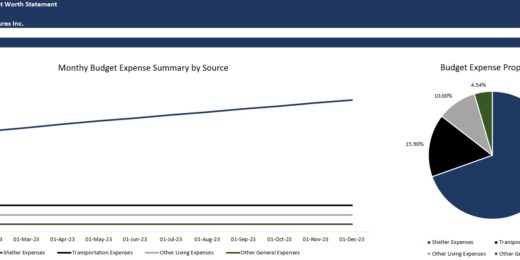
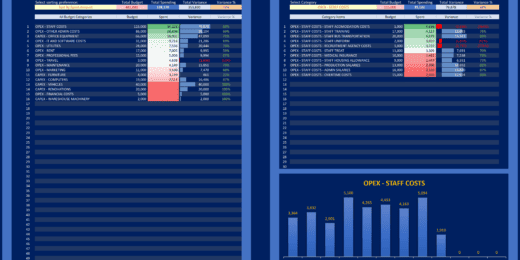
- Use Budgeting Tools: Most Budgeting Templates in Excel are equipped with tools like charts and graphs to visualize your spending patterns. Use these tools to gain insights into your financial behavior.
Conclusion: Embrace the Power of Excel Budgeting Templates
In a world where financial agility and foresight are paramount, integrating Excel budgeting templates into the budgeting process is more than a convenience; it’s a strategic advantage. By embracing this powerful tool, businesses and individuals can confidently navigate the financial landscape, making informed decisions that align with their long-term vision and goals. The future of financial planning is here, and it’s encapsulated in the seamless synergy between Budgeting and Excel, even for those seeking a budgeting template free of charge. Don’t just plan for success; equip yourself with the tools to achieve it without breaking the bank.
If you’re looking for a simple budgeting template, you might wanna give this one a try!


If you’re still searching, take a look at our selection of other valuable budgeting templates.