
0 ITEMS

When do I receive my Earnings/Commissions?
Here, we will discuss things in the following order:
- PayPal Account & Importance of Updating Vendor Profile
- Read Main Terms for Vendors
- When to Receive Commissions
- Bank Transfer Option to Receive Commission
Update Vendor Profile – Confirm and Update PayPal Account
Upon Registering as a Vendor on our platform, there is a mandatory field for a PayPal Email account. The PayPal email account that you entered is where we will send your commissions and where you will be able to withdraw all your sales from us. Therefore, it is very important for you to confirm and update your PayPal account on your Vendor Profile.
In some cases, there are typos upon registering, so it is very important to confirm if the correct PayPal Account is saved in your Vendor Profile. Otherwise, the commission sales will not be properly sent to your account.
Please also make sure that the PayPal Account is verified, working, or updated so that there will be no issues upon commission payouts.
eFinancialModels’ Main Terms for Vendors
Aside from the Registration Form, you will also see the Main Terms for Vendors upon registering. It summarizes the main terms that vendors should take note of before joining our Vendor Program.
See the screenshot below as a reference:
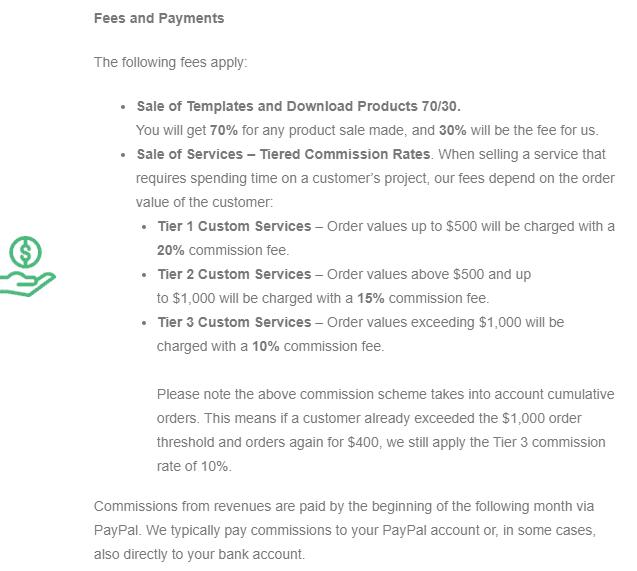
You can see the full Terms for Vendors on our Terms of Use landing page. This page includes other terms to consider upon registering as a vendor on our platform and our Vendor Guidelines. Please kindly read it carefully to be fully informed regarding our Terms for Vendors and other related terms of our platform.
When are Commissions / Earnings Paid?
Commissions are paid by the end of the month or the first week of the next month via PayPal or Transferwise. For this, you will need a PayPal account to receive your commissions or request for Transferwise/Bank Transfer instead.
For every product sold, your commission will only be recorded as Outstanding Commission. And at the end of the month, all unpaid Commissions will be paid in sum to your PayPal/Bank account.
Rest assured, all sales data will be stated and recorded in your Vendor Earnings.
Of course, you are still free to ask us to confirm by contacting us at [email protected]
Receive Commission via Bank Transfer
For Vendors that prefer direct payments to their Bank Account, we also offer an option to switch the payout commission via Bank Transfer (Transferwise).
Due to the extra fees and exchange rates of PayPal, some vendors, especially international vendors, prefer payment directly to their bank account to receive their Outstanding Commission. This means that you can benefit from reduced fees compared to the fees you have to pay PayPal to withdraw your funds.
If you would like to use this option to receive your end-of-month commission, please contact our Vendor Support at [email protected] on how to proceed.
